Whether you are a parent worried about teens or an artist protecting your work, safety is important. This guide covers DeviantArt safety from all angles: privacy, scams, content, and community.
What is DeviantArt and How Does It Work?
To understand the safety risks, you first need to understand what the platform actually is. DeviantArt is often described as a social network for artists. It is not just a gallery; it is a community.
Users create profiles to upload their artwork, which is called a "deviation." These deviations can be anything from traditional sketches and digital paintings, usually including:
-
Digital or traditional art
-
Photography
-
Poetry
-
Fan fiction
Once posted, other users can comment on it, "favorite" it, and share it.
The site fosters a lot of interaction. There are forums, chat rooms, and private messaging features. Artists can open "commissions," meaning they accept payment to draw specific things for other users.
Because it relies so heavily on user-generated content and social interaction, the safety of the platform often depends on who you are interacting with, rather than just the website's code itself. It is a massive digital city; some neighborhoods are safe and inspiring, while others can be a bit sketchy if you don't know your way around.
DeviantArt Safety Issues History & Overall Reputation
DeviantArt has been around since 2000. That is a lifetime in internet years. Over two decades, it has built a reputation that is a bit of a mixed bag.
On the positive side, it is known as a haven for niche artists and a great place to build a portfolio. However, it has also faced its share of controversies regarding safety and security. Historically, the site has had moments where spam bots ran wild, flooding comment sections with malicious links.
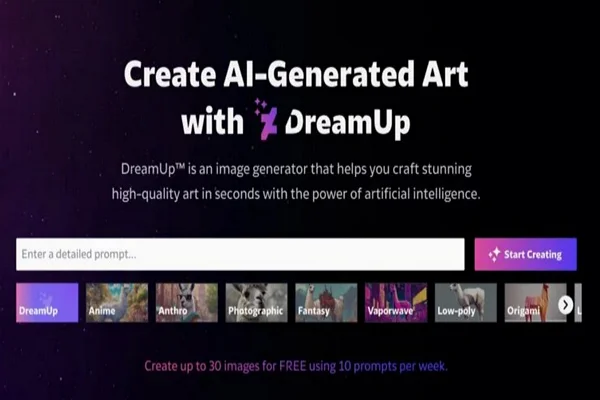
More recently, the reputation of the site took a hit regarding artist rights. With the rise of AI generation tools, many users felt DeviantArt wasn't doing enough to protect their original work from being used to train AI models without consent. It even launched its AI tool called DreamUp. While they have updated their policies since then, trust is a fragile thing. You can choose to turn off AI on DeivanArt. However, this does not completely block AI-related activity on the platform. To fully avoid AI exposure, the only solution is to leave the platform by deleting your DeviantArt account.
Furthermore, because the site allows "Mature Content" (with filters), it has developed a reputation in some circles for hosting adult themes. While this isn't inherently "unsafe" if labeled correctly, it contributes to the worry parents feel when their kids ask to join. Generally, the technical security of the site is standard for a large social media platform, but the community safety—how users treat each other—varies wildly.
Is using a VPN for Deviantart Safe?
YES, and it is necessary.
This is a common technical question. Perhaps you are traveling to a country where DeviantArt is blocked, or you are just trying to access the site from a restricted network at school or work.
Using a VPN (Virtual Private Network) to access DeviantArt is generally safe and allowed, provided you are not using it to break the site's Terms of Service. For example, if you were banned for harassment and you use a VPN to create a new account to continue harassing people, that is a violation that will get you banned again.
👉 In short, the benefits of using a VPN include:
-
Access blocked sites safely
-
Encrypt your connection on public Wi-Fi
-
Hide your IP address to protect your privacy
-
Prevent ISPs or network admins from seeing your activity
However, simply having a VPN doesn't make you invincible. To remain safe, you must follow the laws of the country you are in and the rules of the platform.
More importantly, not all connection tools are created equal. DeviantArt is an image-heavy site. It requires loading high-resolution galleries, videos, and complex interface elements. If you use a slow or unstable proxy, the site will lag, images won't load, and your upload process might time out, potentially corrupting your files.
This is where using a high-quality product like a free proxy VPN in UFO UPN makes a difference. You need a service that offers "no-log" privacy and high-speed servers. The UFO VPN focuses heavily on maintaining rapid connection speeds so that your browsing experience on art sites remains smooth. Beyond just access, this efficient tool ensures that your connection is encrypted. It adds a layer of safety that prevents network administrators or ISPs from spying on what you are viewing or uploading.
You can quickly download and install the UFO VPN with the simple steps below:


UFO VPN is an all-in-one VPN that offers unlimited access to 4K streaming like Netlfix, Disney Plus, no-ping gaming as PUBG, Roblox, CODM and social networking for YouTube, X, Facebook and more.




Unlock Pro Features
If you have upgraded to premium plan , feel free to enjoy premium servers for 4K streaming and advanced features like Kill Switch, Split Tunneling, and gaming acceleration. Your Mac is now fully optimized and protected. Inaddition to basic functions, we recommend you turn on

Verify Your IP Now
Use UFO VPN's " What is My IP " feature to see your new IP and location. This confirms your connection is secure, anonymous, and ready for safe browsing online anywhere at any time.







Is DeviantArt Safe for Personal Data and Privacy?
When we ask "Is DeviantArt safe?", we usually think about digital privacy.
Like almost every social media site, DeviantArt collects data. They track what images you look at, who you interact with, your IP address, and device information. This is used to target ads and suggest content. While this is standard industry practice, it is still a lot of information about your personal tastes and habits.
The real danger often comes from where you access the site. If you are sitting in a coffee shop or using airport Wi-Fi to check your DeviantArt messages or log into your account, you are vulnerable. Public networks are often unsecured. A hacker on the same network can potentially intercept the data traveling between your device and the website.
This is another area where our product becomes essential for your daily digital life. By routing your traffic through an encrypted tunnel, we scramble your data. Even if you are on an open Wi-Fi network, anyone trying to snoop on your activity will only see garbled code, not your login credentials or your private messages. Protecting your personal data starts with securing your connection before you even type in "DeviantArt.com".
Is DeviantArt Safe from Scams and Fake Accounts?
The internet is full of opportunists, and DeviantArt is no exception. Because money changes hands on the site (via commissions and artwork sales), it attracts scammers.
You need to be aware of a few specific tricks:
-
The "NFT" Scam: A random user messages you saying, "I love your gallery! I want to buy this image as an NFT for $3,000!" This is almost always a lie. They will send you a phishing link or ask you to pay a "gas fee" upfront.
-
The "Muse" Scam: Someone claims they want to use your art as a reference for a mural or a project and offers to pay you with a check. The check will be fake, or they will "accidentally" overpay you and ask for a refund, leaving you out of pocket when the original check bounces.
-
Phishing Links: Bots will post comments like "Check out my new art game!" with a link. These links often lead to malware or fake login pages designed to steal your password.
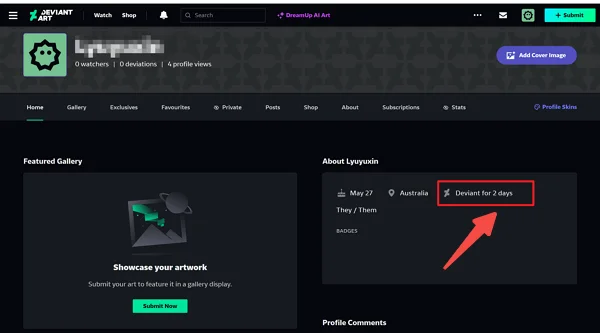
Though it looks hard, you can easily spot them from the profile by checking:
-
Is the account brand new (joined this week)?
-
Do they have zero deviations (artwork) uploaded?
-
Is their username a random string of letters and numbers?
-
Is the message generic? (e.g., "Hello artist, I like your draw.")
If you see these signs, do not click links and do not reply.
Sometimes, scams can escalate into harassment or "doxxing" (revealing your real-world location). This happens if a scammer manages to grab your IP address through a malicious link.
This is where changing your virtual location becomes a safety net. By using the UFO VPN to mask your real IP address, you become much harder to target. For example, if you are actually in the United States, you can switch your server location by choosing the UK VPN free. If a malicious actor tries to trace your connection, they hit a dead end on a different continent. It adds a layer of distance between your real life and your online persona, making it much harder for bad actors to intimidate you.
Is DeviantArt Safe for Kids and Teens?
This is the biggest question for parents. DeviantArt allows users as young as 13 to join (in compliance with COPPA laws). However, just because they can join doesn't mean it is a playground.
DeviantArt hosts "Mature Content." This includes nudity, violence, and strong language. The site has a "Strict" filter that is supposed to block this content for users under 18. The problem? It relies on artists tagging their work correctly. If an artist uploads something inappropriate but forgets to tag it as "Mature," the filter won't catch it, and it could end up in your child's feed.
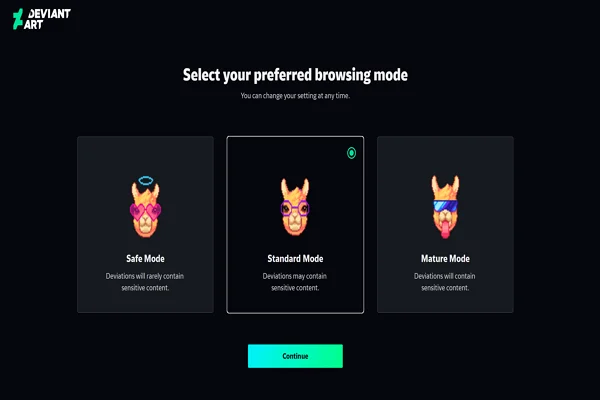
Beyond the images, the comment sections can be brutal. Cyberbullying is a risk on any social platform. Kids might receive harsh criticism on their art that crushes their confidence, or creepy messages from adults pretending to be teens. The "anonymous" nature of the internet makes people say things they never would in person.
Another risk is that it is so easy to bypass restrictions. A tech-savvy teen can easily figure out how to unblock everything on DeviantArt or simply create a new account with a fake birthday to see adult content.
DeviantArt is not safe for kids under 12 to use unsupervised. If your child wants an account, you may need to:
-
Supervise the Account Creation: Set the birthday correctly so the filters default to strict.
-
Check Content Settings: Go into the settings and ensure "Show Mature Content" is turned off.
-
Regular Check-ins: Look at their inbox and notifications occasionally.
-
Teach Them: Explain that they should never give out their real name, school, or address.
But pay attention, parents should respect a child's privacy. Before allowing them to use DeviantArt, it is important to agree on these rules in advance. If the rules are not accepted, the child should not have an account. Clear boundaries help protect children while also building trust.
How to Use DeviantArt Safely?
If you decide to use the platform, whether you are a pro or a hobbyist, you need to take proactive steps to secure your experience.
1. Protect Your Artwork ( from AI and Theft)
One of the biggest modern fears is having art stolen.
-
Opt-out of AI: Go to your account settings and check the box that says "Do not authorize for use in AI datasets." While not foolproof, it sends a legal signal.
-
Watermark Everything: DeviantArt has a built-in watermarking tool. Use it. Or, use your own visible signature right in the center of the image.
-
Low Resolution: Never upload the high-res print file. Upload a smaller, web-friendly version (like 72dpi) so it can't be printed and sold by thieves.
2. Block and Report Aggressively
Do not engage with trolls. If someone leaves a nasty comment or sends a spam message:
-
Click the three dots on their comment/profile.
-
Select Block User.
-
Select Report if they are scamming or harassing.
-
Blocking prevents them from commenting on your work or messaging you. Curate your own experience.
3. Secure Your Payments
If you are buying art or taking commissions, never use "Friends and Family" payments on PayPal for business transactions. Always use goods and services protection. If a user asks you to pay in gift cards or crypto, it is a scam. Run away.
4. General Cybersecurity
-
Two-Factor Authentication (2FA): Enable this in your settings. It requires a code from your phone to log in, making it much harder for hackers to steal your account.
-
Connection Security: As mentioned earlier, keeping your connection encrypted via a reliable service ensures that your login cookies and session data aren't snatched while you browse.
Final Thoughts
So, is DeviantArt safe? The answer is: mostly yes, but with conditions.
It is a legitimate company, not a virus site. It is safe in the sense that your computer won't blow up from visiting it. However, it is a massive public square. It has pickpockets (scammers), bullies, and areas meant only for adults.
For artists, it remains a valuable place to find community, provided you protect your files and ignore the bots. For parents, it requires active involvement. You cannot just hand a child an iPad with DeviantArt open and walk away.
By using common sense, understanding the privacy settings, and utilizing tools to secure your internet connection, you can navigate DeviantArt safely and enjoy the creativity it has to offer.
FAQs
Does DeviantArt have viruses?
Generally, no. DeviantArt itself is a secure website. However, users can post links in comments or journals. If you click a suspicious link posted by a random user, that link could lead to a virus. Never download .exe or .zip files from links in chat messages.
Can DeviantArt steal or sell my artwork?
No, DeviantArt does not claim ownership of your work. You retain the copyright. However, by uploading, you give them a license to display the work on their site. The main concern recently has been third-party AI companies scraping the site, not DeviantArt selling the art directly.
What should I do if I encounter a scam on DeviantArt?
Do not reply to the message. Take a screenshot of the interaction for your records. Go to the user's profile, click the "..." button, and select "Report." specific the type of scam. After reporting, block the user immediately.
Is DeviantArt safe to use without an account?
Yes, it is safer in terms of privacy because you aren't sharing your email or personal details. You can browse galleries freely. However, you will still see the content, and you won't be able to turn on the "Strict" safety filters as effectively as a registered user.
How do I stop spam bots on DeviantArt?
You cannot stop them from existing, but you can limit their impact. In your account settings, you can restrict who can comment on your work (e.g., only members of the community for more than a month). This filters out many brand-new bot accounts.