DNS-Cache Basics
DNS-cache is essentially a temporary database stored on your device that keeps records of domain-to-IP mappings. When you visit a website, your system normally needs to query a DNS server to translate the domain name into an IP address. With DNS-cache, these translations are stored locally, so subsequent visits to the same site are much faster.
Here’s how it works in more detail:
- DNS Query Flow – When you type a URL, your device first checks the local cache. If no entry exists, it sends a recursive query to a DNS resolver, which then queries authoritative servers to obtain the IP address.
- Time to Live (TTL) – Each cache entry has a TTL, which specifies how long it can be stored before it expires. Short TTLs ensure fresh data but reduce cache efficiency, while longer TTLs improve speed but risk serving outdated IPs.
- Impact on Networks – On mobile networks or public Wi-Fi, DNS-cache helps reduce latency and server load, providing smoother browsing experiences even on congested connections.
To enhance privacy while taking advantage of DNS-cache, using a VPN like UFO VPN ensures that DNS queries are encrypted, preventing ISPs or attackers from monitoring which sites you visit, while still benefiting from the speed improvements of caching. 🌐🔒
DNS-Cache in Action: Benefits You Notice
The advantages of DNS-cache go beyond simple speed. Users experience smoother browsing, reduced latency, and improved server efficiency. Let’s break it down:
Faster Website Access
When a domain’s IP is stored in your DNS-cache, your browser can resolve it instantly. This reduces the time to first byte (TTFB) and ensures that pages load more quickly. For example, returning to a frequently visited news site feels almost instantaneous because the lookup step is skipped.
Reduced Server Load & Network Efficiency
Caching decreases repeated queries to authoritative DNS servers. Fewer requests translate into lower server load and reduced network congestion. The table below illustrates typical benefits:
| Benefit | Impact |
|---|---|
| Faster website access | Pages load 20-50% quicker on repeat visits |
| Reduced server queries | Lowers bandwidth usage and server load |
| Improved network performance | Less latency for high-traffic networks |
For users seeking both speed and privacy, combining DNS-cache efficiency with a VPN such as UFO VPN ensures that queries are encrypted while still benefiting from cached resolutions, reducing the risk of DNS leaks.
Common DNS-Cache Problems
Despite its advantages, DNS-cache isn’t flawless. Some common issues include:
- Stale entries – IP addresses change but cached records remain, causing website access errors.
- Corrupted cache – Cache corruption can prevent site loading or redirect users to outdated pages.
- Security risks – Attackers may exploit cached DNS entries through poisoning attacks to redirect traffic.
Being aware of these pitfalls allows users to take preventive actions, like periodic cache clearing or using secure DNS services. Pairing DNS security practices with UFO VPN can mitigate risks, as VPNs encrypt DNS requests and reduce the chance of interception.
Clearing DNS-Cache: Practical Methods
Refreshing your DNS-cache is often the first step in resolving connectivity or redirect issues. The process varies across systems and browsers.
Windows, macOS, and Linux Commands
To clear outdated DNS entries and ensure your system queries the latest IP addresses, use the following commands for your operating system:
- Windows: Open Command Prompt and run:
ipconfig /flushdns - macOS: Open Terminal and run:
sudo dscacheutil -flushcache
Then execute:
sudo killall -HUP mDNSResponder - Linux: Depending on your distribution, run either:
sudo systemd-resolve --flush-caches
or
sudo /etc/init.d/nscd restart
Executing these commands refreshes the DNS-cache, helping to resolve stale entries and improve browsing reliability.
DNS-Cache Chrome — How to Refresh in Google Chrome
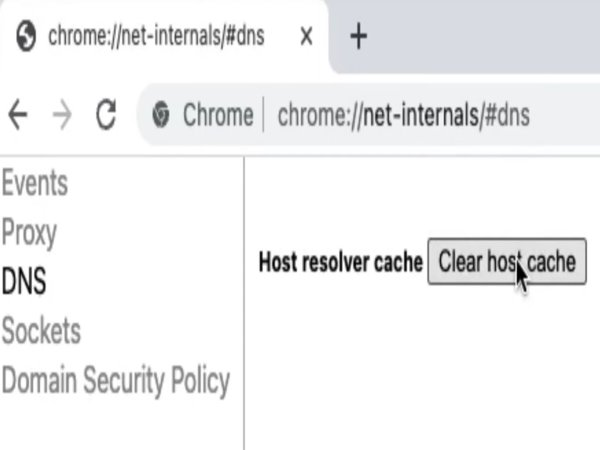
Chrome maintains its own DNS-cache separate from the OS. To refresh it:
- Open Chrome and navigate to chrome://net-internals/#dns.
- Click Clear host cache.
- Optionally, go to chrome://net-internals/#sockets and click Flush socket pools to fully reset connections.
Using a VPN like UFO VPN while performing these steps adds a privacy layer, ensuring that your DNS queries are encrypted and your IP address remains hidden from third parties. 🔒
Securing Your DNS-Cache in 2026
Securing DNS-cache is vital to prevent cyber threats such as DNS spoofing or man-in-the-middle attacks. Some best practices include:
- Use encrypted DNS protocols like DNS over HTTPS (DoH) or DNS over TLS (DoT).
- Regularly clear stale entries to avoid corrupted or outdated data.
- Leverage VPN services like UFO VPN, which automatically encrypt DNS queries and hide your IP, significantly reducing the risk of DNS-based attacks.
Incorporating these strategies ensures that your browsing remains both fast and secure.


UFO VPN is an all-in-one VPN that offers unlimited access to 4K streaming like Netlfix, Disney Plus, no-ping gaming as PUBG, Roblox, CODM and social networking for YouTube, X, Facebook and more.




Unlock Pro Features
If you have upgraded to premium plan , feel free to enjoy premium servers for 4K streaming and advanced features like Kill Switch, Split Tunneling, and gaming acceleration. Your Mac is now fully optimized and protected. Inaddition to basic functions, we recommend you turn on

Verify Your IP Now
Use UFO VPN's " What is My IP " feature to see your new IP and location. This confirms your connection is secure, anonymous, and ready for safe browsing online anywhere at any time.







Conclusion
DNS-cache is a cornerstone of fast and efficient internet browsing, improving speed, reducing server load, and enhancing user experience. However, without proper maintenance and security practices, stale or corrupted caches can cause issues and expose you to potential attacks.
In 2026, combining DNS optimizations with privacy tools like UFO VPN offers the best of both worlds—speed and security. Whether you are a casual user or a tech professional, understanding DNS-cache and protecting your queries ensures a seamless and safe online experience. 🌐💡
FAQs
How often should I clear DNS-cache?
Clear it if websites aren’t loading correctly or IP changes occur.
Can DNS-cache cause security issues?
Yes, stale or poisoned entries can redirect traffic to malicious sites.
How does UFO VPN help with DNS security?
It encrypts DNS queries, prevents leaks, and hides your IP address from trackers.
Is clearing DNS-cache different in Chrome vs. OS?
Yes, Chrome maintains a separate cache; both should be cleared for complete refresh.