Does Twitter (X) Allow Porn? X Policy Breakdown
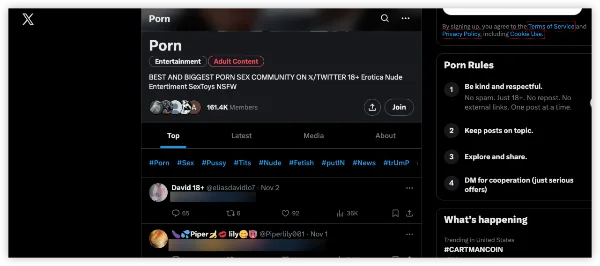
Yes—X officially permits porn and adult nudity, even for users in blocked regions via a free proxy VPN. Updated in June 2024 (still active in 2026), the platform allows "consensually produced and distributed adult nudity or sexual behavior" as long as it's properly labeled as sensitive and not in prominent spots (e.g., profile pics, banners). This covers AI-generated photos, or animations (like hentai).
Specifically, here are some key rules and limits that every user should know:
| Aspect | Allowed or Not? | Notes |
|---|---|---|
| Consensual Adult Content | Yes | Must be labeled sensitive; no promotion of exploitation, nonconsent, or harm to minors. |
| Profile/Banner Visibility | No | Can't use porn in headers or pics—blocks exposure to kids. |
| Under-18 Users | Blocked | Auto-hides NSFW; age verification ramps up in 2025. |
| Opt-In for Adults | Required | Users must enable sensitive media to view. |
Pre-Musk Twitter tolerated it unofficially (13% of posts were adult in 2022). Now, it's explicit to balance free expression with safety—fines lurk for violations (e.g., EU DSA). But enforcement? Spotty, with bots thriving.
Three Methods to Block Porn on Twitter (X)
Though adult content on Twitter (X) is not fully banned, the platform provides several built-in controls to limit what you see. Below are three practical, up-to-date methods to effectively reduce or block pornographic content.
Method 1: Block via Twitter (X) Built-in Settings
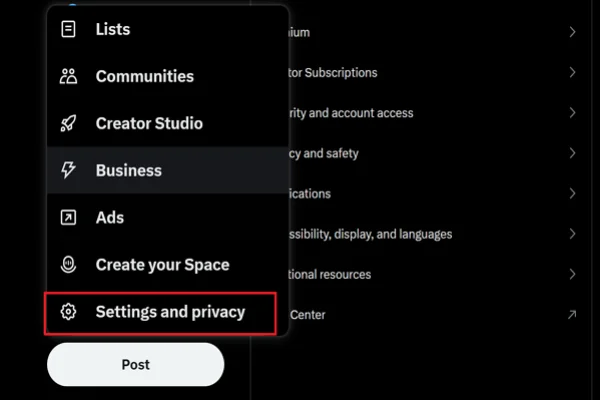
The fastest way to clean up your entire feed is by flipping one simple toggle in X’s privacy settings. This hides media that may contain sensitive content (including porn, nudity, and graphic material) across your timeline and recommendations. Here's exactly how to do it (works best on the web version at x.com):
Step 1. Log in to X and click More (three dots or lines on the left sidebar).
Step 2. Select Settings and privacy > Privacy and safety > Content you see.
Step 3. Uncheck the box next to “Display media that may contain sensitive content.”
Once unchecked, X automatically hides sensitive posts behind a warning or removes them from your view. The change syncs to the mobile app within minutes and stays active until you turn it back on. This is the No.1 recommended method by X’s own support team for users who want a porn-free experience.
Method 2: Use the Twitter (X) Search Feature
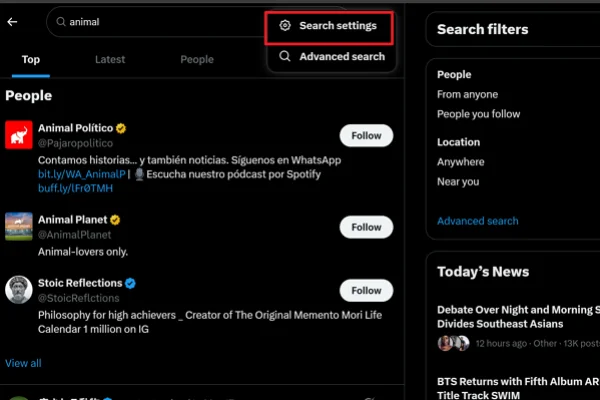
Even if your timeline is clean, searching can still surface unwanted adult content. X’s Safe Search filter solves this in seconds and applies to every search you do.
Follow these steps on the web or app:
Step 1. Type any keyword into the X search bar and hit Enter.
Step 2. On the search results page, tap the overflow icon (⋯) in the top right.
Step 3. Choose Search settings.
Step 4. Check the box next to "Hide sensitive content."
Step 5. Return to Privacy and safety → Muted words. Then add keywords like:
- porn
- nsfw
- onlyfans
- adult
Step 6. Set duration to Forever
This official Safe Search option permanently filters out porn and sensitive media from all future searches. It also hides content from blocked or muted accounts. The setting takes effect in minutes and works everywhere on X—perfect for avoiding accidental exposure while browsing trends or topics.
Method 3: Consider Marking Sensitive Content
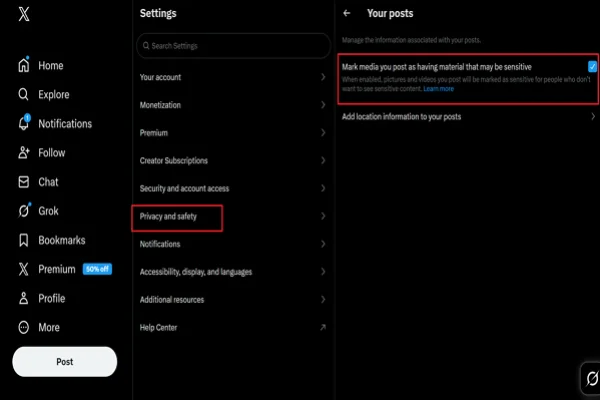
If you post any media yourself (or just want to understand how X protects others), enabling the content warning flag ensures your posts automatically trigger a sensitive-content alert. This helps the community and keeps your account compliant.
Here’s how to activate it:
Step 1. Go to Settings and privacy > Privacy and safety.
Step 2. Click or tap Your posts.
Step 3. Toggle on "Mark media you post as containing material that may be sensitive." (It turns blue when active.)
Once enabled, every photo or video you upload will show a “sensitive content” warning to viewers. They must click to see it. This matches X's latest media rules exactly and is the official way creators prevent their content from surprising followers.
Pro Suggestions to Prevent Twitter (X) Porn Content
Even with filters enabled on Twitter (X), some explicit content may still appear due to weak tagging or algorithm recommendations. The following strategies give you more direct and practical control.
✅ Install Browser Extension
A browser extension adds an extra layer of filtering beyond X’s built-in settings. Tools like XBlock can automatically detect and hide adult images, videos, and keywords—even when posts are not labeled as sensitive.
Most extensions also allow customization, such as blocking specific words or hiding certain sections like trending topics. This makes them especially useful for desktop users who want stricter, more consistent control.
✅ Regularly Mute and Block Accounts
When you see inappropriate content, act on it immediately:
- Click the three-dot menu on the post
- Select “Mute” or “Block”
Blocking removes the account entirely, while muting hides their posts without alerting them. Over time, these actions help “clean” your feed, since X uses your behavior to adjust future recommendations.
✅ Avoid Engaging with Suggestive Content
Your clicks directly shape what you see next. To reduce unwanted content:
- Don’t open or watch explicit posts
- Avoid NSFW hashtags or search terms
- Don’t follow accounts that post adult content
Even a brief interaction can signal interest. Staying consistent with these habits helps the algorithm push cleaner content to your feed.
✅ Adjust Age & Profile Signals
Your account profile also affects content visibility. On Twitter (X), stricter filtering may apply to accounts with limited or unverified age information.
To strengthen this effect:
- Keep sensitive content settings turned off
- Avoid interacting with adult topics
- Maintain a “clean” activity pattern
This works quietly in the background but supports other filtering methods.
✅ If You're a Parent: Talk to Your Kids about Porn
For younger users, settings alone are not enough. Parents should guide how their children use Twitter (X) by explaining how content is recommended, setting clear boundaries, and encouraging them to avoid or report inappropriate posts. Combining open communication with technical controls is more effective than relying on restrictions alone.

Why Can I Still See Porn on Twitter (X) After Blocking?
You followed the steps—muted keywords, hid sensitive media, blocked accounts—but NSFW still slips through? X's filters are imperfect by design, prioritizing free speech over total censorship. In 2026, with 1.5B+ monthly posts and AI moderation gaps, porn evades blocks in predictable ways. Here are the top 6 Reasons Twitter Porn Still Appears + Fixes:
| Issue | Reason | Fixes |
|---|---|---|
| Unlabeled Sensitive Content | Creators skip labeling, X only auto-hides flagged media. 40% of NSFW skips tags. | Report posts: 3 dots > "Report" > "Nudity" > "Not labeled." X enforces after 3+ reports. |
| New Accounts & Bots | Bots rotate handles daily; blocking one spawns 10 more. 2025 bot surge up 300% post-premium changes. | Use XBlock or uBlock Origin (Chrome/Firefox) with custom filters: ` |
| Ads & Promoted Posts | Paid NSFW ads bypass mute lists. X Premium+ pushes OnlyFans promos. | Upgrade to Premium+ > Settings > Monetization > Turn off personalized ads. Or use Pi-hole at the router level. |
| Hashtag Variations & Emojis | Muting "#NSFW" misses "#NSFW🔥", "p0rn", or 🍑. | Mute 100+ variations (download lists from r/parentalcontrols). Enable "Mute from anyone" in settings. |
| Algorithmic "For You" Feed | X's AI ignores blocks in "For You" - shows trending porn even if muted. | Switch to the "Following" tab only. Pin it: Long-press tab > Pin. |
| App vs. Web Glitches | Mobile app caches old settings; web updates faster. | Force sync: Log out/in, clear app cache (Android: Settings > Apps > X > Storage > Clear Cache), or use x.com in a browser. |
Pro Option: 99% Porn-Free Twitter Account
If you want a near-complete solution, you can go beyond filtering and create a fully controlled environment on Twitter (X). This method minimizes algorithm influence and keeps your feed almost entirely free from unwanted content. Here's how to set it up:
1. Create a new account (clean / burner account): Start fresh without following anyone. If registration is restricted in your region, you can use a VPN to complete the signup process.


UFO VPN is an all-in-one VPN that offers unlimited access to 4K streaming like Netlfix, Disney Plus, no-ping gaming as PUBG, Roblox, CODM and social networking for YouTube, X, Facebook and more.




Unlock Pro Features
If you have upgraded to premium plan , feel free to enjoy premium servers for 4K streaming and advanced features like Kill Switch, Split Tunneling, and gaming acceleration. Your Mac is now fully optimized and protected. Inaddition to basic functions, we recommend you turn on

Verify Your IP Now
Use UFO VPN's " What is My IP " feature to see your new IP and location. This confirms your connection is secure, anonymous, and ready for safe browsing online anywhere at any time.







2. Do not follow any accounts: Keeping your following list empty prevents the algorithm from populating your timeline with recommended or trending content. Your feed will remain clean by default.
3. Use Lists for controlled browsing: Instead of following accounts, go to Settings → Lists → Create List → Add trusted users. This allows you to view content only from selected, safe accounts without affecting your main timeline.
4. Enable privacy and security features: Turn on “Protect your posts” (limits who can interact with you) and Two-Factor Authentication (2FA) (adds account security).
Tips: Test Your Blocks before Restarting Twitter
Search #NSFW in incognito—if blurred or gone, filters work. Still visible? Layer VPN + DNS blocker (NextDNS: block onlyfans.com, pornhub.com domains).
Bottom Line: X won't fully block porn (it's allowed), but combining native settings + extensions + clean feeds gets you 95%+ clean. Persistent leaks? Switch to Bluesky or Mastodon—zero NSFW by default.
This guide is for informational use only—18+ audiences. X allows labeled adult content, but accessing/sharing may violate laws (e.g., age rules in US/UK, bans in India/UAE). Use ethically; report illegal posts. Tools like VPNs for privacy—verify providers. Data is current as of the latest available sources—check X Help for updates. For support, visit RAINN.org. Stay safe!
Final Thoughts
X's porn-friendly vibe boosts engagement but invites chaos—block porns on Twitter via settings for peace, or unfilter for access. Parents: Layer with monitoring apps.
FAQs
How do I block porn on X completely?
Hide sensitive media + mute keywords like "porn," "NSFW."
Why can't I see porns on X?
Filter enabled, age under 18, or glitches—enable in Content You See.
Is there a porn blocker app for X?
Yes—Canopy or XBlock extension for auto-filtering.