Overview of Wheon Online Gaming

If you are looking for a place to play games without any hassle, you have likely come across wheon online gaming.
But what exactly is it? At its core, Wheon is a massive online portal that hosts a variety of web-based games. Originally, the site started as a place for news and entertainment updates, but it quickly grew into a favorite spot for casual gamers. It acts as a library where you can find everything from high-speed racing games to quiet, thoughtful puzzles.
The way it works is quite simple. Unlike platforms like Steam or the Epic Games Store, where you have to install software on your hard drive, Wheon uses your web browser to run the games. This is called "cloud-hosted" or "web-based" gaming.
When you click on a game title, your browser loads the game assets from the site's servers. Because these games are optimized to be lightweight, they usually load in just a few seconds. You don’t have to worry about running out of space on your phone or laptop. As long as your browser is up to date, the games will run smoothly.
Key Features, Pros & Cons of Whenon Online Gaming
Many players are moving away from heavy downloads and choosing Wheon online gaming instead. There are several clear reasons why this platform has gained so much traction in the gaming community. It isn't just about the games themselves; it's about how easy the whole experience is for the average user.
The key features that make this online gaming stand out include:
-
No Installation Required: This is the biggest draw. You can play directly in Chrome, Safari, or Firefox without downloading a single megabyte to your device.
-
Cross-Platform Compatibility: Whether you are using an Android phone, an iPad, a Windows laptop, or a MacBook, the site works the same across all of them.
-
Regular Content Updates: The team behind the site adds new games and news articles almost every week, so the catalog never feels old.
-
Lightweight Performance: Most games are designed to run on older hardware. You don't need a high-end graphics card to enjoy the action.
-
SSL Security: The website uses SSL encryption, which means the connection between your computer and the site is private and secure from basic hackers.
After knowing the key features of Wheon, you should also know the pros and cons that make it different from other gaming platforms. And this often includes:
Easy for new players to start
Many free‑to‑play options
Games load in browser — no large downloads
Competitive and casual game choices
Community elements (chat and friends lists)
Some games include in‑game purchases
Connection lag possible in peak times
Not all games have tutorials
Limited parental control features
What Wheon Online Gaming Can Offer to Players?
When you spend time on the Wheon online gaming site, you realize it is more than just a list of links. It is a well-organized hub designed to keep players entertained for hours. Specifically, in this platform, players can get:
✅ A Diverse Game Library
The platform offers a massive range of genres. If you like fast-paced action, there are combat and shooting games. If you prefer to relax, there are "match-three" puzzles and card games. They even have sports simulators that let you play soccer or basketball against the computer or other players.
✅ Gaming News and AI Insights
One thing that sets Wheon apart is its news section. They don't just host games; they also write about the gaming industry. You can find articles about the latest AI technology in gaming, reviews of new releases, and guides on how to improve your skills. This makes it a great "all-in-one" stop for people who love the hobby.
✅ Accessibility for Everyone
Since the games are free and don't require expensive gear, Wheon online gaming is very accessible. It's perfect for students who want a quick break between classes or office workers looking to de-stress. Because the games are virus-scanned and checked for safety, parents also feel comfortable letting their children explore the site.
✅ Multiplayer Matches
Players can compete with others around the world in real time. This means you are not just playing against computer bots - you are playing against real people.
✅ Progress and Rewards
As you play, your scores and ranks update on the platform. Wheon Online Gaming offers daily tasks or rewards for logging in each day. These rewards can unlock new levels, items, or badges.
✅ Leaderboards & Tournaments
The platform tracks scores and ranks players globally or by region. Some games host tournaments where players can earn points, badges, and recognition for top performance.
How to Play Wheon Online Games?
Getting started with Wheon online gaming is super easy, but there are a few tips to make your experience much better. Depending on where you are, like at school, in a library, or traveling abroad, you might run into some small hurdles. Here is exactly how to get the most out of the platform.
Step 1: Use a Reliable VPN
Sometimes, school or office networks block gaming websites to keep people focused. Or, if you are traveling to a different country, some content might not load correctly. To fix this, you can use a free proxy VPN in UFO VPN.
A VPN hides your actual location and encrypts your data. This lets you bypass blocks and keeps your gaming activity private from your internet service provider.
Using UFO VPN ensures that your connection is fast enough for gaming, so you won't experience annoying lag or "ping" issues while trying to beat a high score. Here's the exact steps that you should follow to install one in your devices:


UFO VPN is an all-in-one VPN that offers unlimited access to 4K streaming like Netlfix, Disney Plus, no-ping gaming as PUBG, Roblox, CODM and social networking for YouTube, X, Facebook and more.




Unlock Pro Features
If you have upgraded to premium plan , feel free to enjoy premium servers for 4K streaming and advanced features like Kill Switch, Split Tunneling, and gaming acceleration. Your Mac is now fully optimized and protected. Inaddition to basic functions, we recommend you turn on

Verify Your IP Now
Use UFO VPN's " What is My IP " feature to see your new IP and location. This confirms your connection is secure, anonymous, and ready for safe browsing online anywhere at any time.







Step 2: Open Your Browser
Once your VPN is active, open your favorite web browser. Whether you prefer Google Chrome for its speed or Safari for your iPhone, any modern browser will work. Make sure your browser is updated to the latest version to ensure all game features load properly.
Step 3: Visit the Official Site
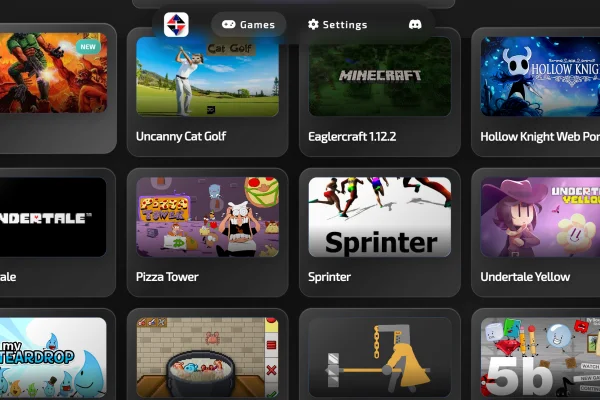
Type the URL for Wheon into your address bar. Once the homepage loads, you will see a grid of game icons. You can browse the "Latest" section to see what's new or use the search bar if you are looking for a specific title like "Grand Theft Auto" or "Puzzle Quest."
Step 4: Click and Play
Pick a game that looks interesting and click on the "Play Now" button. The game will take a few seconds to load. Most games will show a brief instruction screen telling you which keys to use (like the arrow keys or WASD). If you are on a phone, the game will usually show on-screen touch controls.
Step 5: Adjust Your Settings
Most games on the site have a "Settings" or "Gear" icon. You can use this to turn the music up or down, change the difficulty, or adjust the graphics quality. If your internet is a bit slow, lowering the graphics can help the game run much faster.
Types of Games Wheon Can Offer to Players
The sheer number of choices on the site can be a bit overwhelming at first. To help you find the best of Wheon online gaming, it helps to look at the most popular categories. Here are the types of games you will find and some specific recommendations for your first session.
-
Action games - These games focus on fast reflexes and real-time challenges. Players often need to dodge attacks, complete missions under time limits, or defeat enemies using weapons or special skills.
-
Racing games - In these games, players control vehicles on tracks or open roads, aiming to finish first. They often include obstacles, shortcuts, and power-ups to make the races more exciting.
-
Puzzle games - Players solve problems by arranging objects, matching patterns, or completing sequences. These games encourage critical thinking and sometimes require strategy to clear levels.
-
Strategy games - Players plan moves, manage resources, and make tactical decisions. These games may involve building armies, defending territories, or managing economies to achieve victory.
-
Sports games - Sports games on Wheon mimic the rules and dynamics of real-life sports. Players control teams or individual athletes to score points, compete in matches, and improve skills over time.
-
Simulation games - This type of game lets players create and manage systems, cities, or businesses. Players make decisions about resources, layouts, and development, often aiming for growth or efficiency.
Most Played Games on Wheon Online Gaming
If you are a first-comer or just feel confused about how to choose the most exciting game from various options. Here are some of the most popular and must‑try games players talk about:
-
Speed Racer X – A racing game where players drive fast cars around tracks. You try to finish in the shortest time and beat competitors.
-
Battle Arena Quest – An action game where players fight in arenas. You select weapons, move in real time, and defeat opponents to score points.
-
Puzzle Block World – A logic puzzle game with shapes that you rotate and place to clear lines. The faster you solve levels, the higher your score.
-
Empire Builder – A strategy game where you plan cities, manage resources, and defend your territory. Players can compete or trade with others.
-
Goal Kick League – A soccer game that lets you play matches in quick sessions. You control players on the field and score goals against rivals.
Each game has its own rules and play style. New players should start with easier games and move to harder ones as their skills grow.

Safety Suggestions: Protect Yourself When Playing Games Online
While Wheon online gaming is generally very safe, the internet always has risks. Whether it's data trackers or public Wi-Fi hackers, you should take a few steps to protect your personal information while you play.
1) Use a Reliable VPN
As mentioned before, a VPN is your first line of defense. Using UFO VPN masks your IP address, which is like your digital home address.
By hiding this, you prevent websites or other players from seeing where you are located. It also encrypts your traffic, making it much harder for anyone to steal your data while you are on a public Wi-Fi network at a cafe or airport.
2) Use Incognito or Private Mode
If you are playing on a computer that isn't yours (like at a school or a friend's house), always use your browser's "Incognito" or "Private" mode. This ensures that your login details, browsing history, and cookies are deleted as soon as you close the window.
3) Avoid Using Your Real Name
When you join multiplayer games or chat rooms on the site, never use your real full name as your username. Create a fun "gamer tag" instead. This prevents strangers from finding your social media accounts or other personal details.
4) Keep Your Browser and Plugins Updated
Hackers often use "holes" in old software to get into computers. By keeping your browser (Chrome, Firefox, etc.) updated, you make sure you have the latest security patches. This helps the games run better and keeps your system safe from malware.
5) Be Careful with Third-Party Ads
While the ads on the site are usually safe, you should never click on "pop-ups" that tell you your computer has a virus or that you've won a prize. These are almost always scams. Just close the ad and go back to your game.
Conclusion
The world of Wheon online gaming offers a fantastic way for anyone to enjoy high-quality entertainment without spending a penny or worrying about storage space. By bringing together news, community features, and a huge library of "no-download" games, it has become a top destination for casual players everywhere.
But just remember to use a tool like UFO VPN to keep your connection fast and secure, and always follow basic safety tips to keep your private info private. Now that you know the basics, all that's left is to find a game and start playing!
FAQs
Is Wheon online gaming free?
Yes, the vast majority of games on the platform are completely free to play. You do not need to pay a subscription fee or buy individual titles to enjoy the content.
Do I need to create an account to play?
No, you can play most games as a guest. However, creating a free account might help you save your progress in certain RPGs or long-term strategy games.
Why is the website blocked at my school?
Many schools and offices block gaming sites to prevent distractions. You can usually get around these filters by using a service like UFO VPN, which hides your traffic from the network's filters.
Can I play these games on my phone?
Absolutely. The site is fully optimized for mobile devices. You just need to open the website in your mobile browser, and the games will adjust to fit your screen.
Are the games safe from viruses?
The games on Wheon are scanned and checked for safety before they are uploaded. Since you are playing in your browser and not downloading files to your computer, the risk of getting a virus is much lower than with traditional game downloads.