logo

UFO VPN : Best Free VPN You Can Actually Trust

Strong encryption & free access to global apps & websites.

  • No credit card
  • 100% free plan
  • 2000+ servers
blog banner bg

Best VPN for TextNow in 2026 – Use TextNow Freely Anywhere

TextNow is a free texting and calling app that offers a U.S. or Canadian phone number to users, making it popular for both locals and international users who want to access free communication. But here’s the catch—TextNow doesn’t work in every country, and users often get blocked due to geo-restrictions or IP bans. This is where a TextNow VPN comes into play. In this guide, we’ll break down how a VPN can help you access TextNow anywhere, what makes a VPN ideal for TextNow usage, and recommend the best VPNs for TextNow.
Updated on 01/26/2026
5 minutes

Also available in:  Русский

Table of Contents

Where TextNow Is Available Now

TextNow is officially supported or commonly accessible in the following regions:

  • United States

  • Canada

  • United Kingdom (Can use app with Wi-Fi, but U.S./Canada numbers only)

  • Germany(App may work with VPN or Wi-Fi only)

  • India(Requires a free proxy VPN like UFO VPN for stable connection and verification)

  • Mexico(App accessible; number registration may be restricted)

  • Philippines(Messaging and calling via Wi-Fi with VPN may be needed)

  • South Africa(Accessible with VPN and Wi-Fi; not in app stores)

  • France

  • Netherlands

  • Spain

  • Italy

  • Brazil

  • Australia
Related Posts
How to
date icon 2025-07-03 11:09:43
How to See TextNow Call History on PC and Web: 2026 Guide
Google Voice
Troubleshooter
date icon 2025-07-03 11:09:00
Top 10 TextNow Alternatives for Free Talk and Text

Is It Safe to Use TextNow with a VPN
best vpn for textnow app

Yes, using a VPN like UFO VPN enhances your security while using TextNow by:

  • Hiding your IP address

  • Preventing data tracking

  • Bypassing local ISP blocks

Just be sure to avoid suspicious free VPNs that may log your data.

Feature
Device
Speed
HD Streaming
Ad blocker
0 login & credit card
Unlimited
460Mbps
Other Free VPNs
Payment first
1
100Mbps

Top 3 VPNs for TextNow

1. UFO VPN

Best Free & Secure VPN for TextNow

  • OS Supported: iOS, Android, Windows, Mac

  • Free Plan: Yes, with U.S. servers included

  • Key Features:

    • High-speed U.S. & Canada servers

    • Unblocks TextNow without lag

    • No-log policy for anonymous use

    • Simple one-tap interface

👉 Why it’s best for TextNow: UFO VPN offers dedicated U.S. IPs and stable servers that work seamlessly with TextNow. It’s perfect for beginners who want fast setup and reliable access.

Unlock, Protect and Go Free
Access any site
Lifetime free
3000+ global IPs
1-click connection

2. NordVPN

Premium Privacy for Frequent Users

  • OS Supported: All major platforms + browser extensions

  • Free Trial: 30-day money-back guarantee

  • Key Features:

    • 5,000+ servers worldwide

    • Advanced encryption protocols

    • Blocks ads & trackers

👉 Why it’s great for TextNow: With numerous U.S. and Canadian servers, NordVPN ensures secure, consistent access to TextNow—even on networks that block VoIP services.

3. ProtonVPN

Free Plan with No Data Limits

  • OS Supported: Windows, Mac, iOS, Android, Linux

  • Free Plan: Yes, unlimited data but slower speeds

  • Key Features:

    • No data caps

    • Trusted for privacy (Swiss-based)

    • Open-source applications

👉 Why choose ProtonVPN for TextNow: It’s one of the few VPNs offering a completely free and unlimited service with U.S. servers—ideal for those who don’t want to upgrade to premium.

How to Unblock TextNow via a VPN

Step 1
Grab the free Windows VPN installer right below. UFO VPN is lightweight and secure on all Windows systems. Double-click the downloaded file and complete the installation. Once installed, launch UFO VPN.
windows1
Step 2
Select a VPN Server
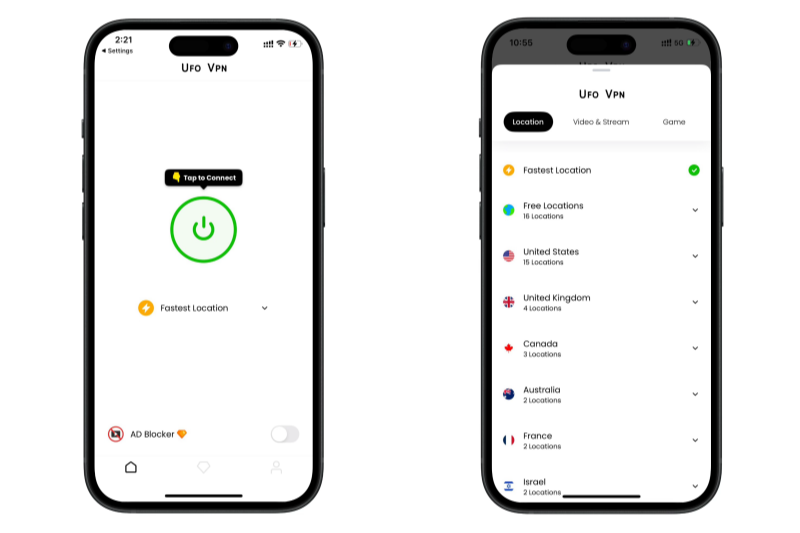
Inside the app, you can click the "Connect" button for quick connection, or browse the list of servers by Location or categroy: Video& Stream, Game, etc. Choosing the right server ensures fast speeds and smooth access.
windows2
Pro Tip

UFO VPN is an all-in-one VPN that offers unlimited access to 4D streaming like Netlfix, Disney Plus, no-ping gaming as PUBG, Roblox, CODM and social networking for YouTube, X, Facebook and more.


Step 3
Enable Advanced Features
In addition to basic functions, we recommend you turn on extra protections via Ad Blocker and features like Kill Switch, Split Tunneling and Smart Hop. Users can optimize online gaming/streaming/chatting as much as possible.
windows3
Step 4
Check Your New IP
Use UFO VPN's built-in " What is My IP" feature to see your new IP address and location. This confirms your VPN is working, hides your real IP, and ensures privacy while browsing.
windows4
Step 1 Download and install UFO VPN for macOS
Click the button below to download offcial Mac VPN free. Open the .dmg file, drag UFO VPN to your Applications folder, and launch it. You're just a few clicks away from secure browsing.
macos1
Step 2 Pick Your IP Server
Tap "Connect" button for the fastest server automatically. Or you can select a server from the global server list in 100+ countries. UFO VPN is an UFO VPN is an all-in-one VPN or gaming, video streaming, social platforms, and AI tools.
macos2
Step 3

Unlock Pro Features

If you have upgraded to premium plan , feel free to enjoy premium servers for 4K streaming and advanced features like Kill Switch, Split Tunneling, and gaming acceleration. Your Mac is now fully optimized and protected. Inaddition to basic functions, we recommend you turn on

macos3
Step 4

Verify Your IP Now

Use UFO VPN's " What is My IP " feature to see your new IP and location. This confirms your connection is secure, anonymous, and ready for safe browsing online anywhere at any time.


macos4
Step 1 Download and install UFO VPN for iPhone/iPad
Download this free iOS VPN via official link or App Store. Once installed, launch the app to get started. UFO VPN is now trusted by over 2 million users worldwide with optimzed service.
ios1
Step 2 Select a Perfect Server
Hit "Connect" button for the fastest server near you instantly. Or you can choose a favorite location/platform from the server list manually for full control. UFO VPN is an all-in-one VPN companion for gaming, streaming, social media, and AI tools.
ios2
Step 3 Lookup IP and Enable Pro Features
Now you can check your current IP via built-in IP lookup tool. Pro features in premium plan offer you premium servers, blazing speeds, Kill Switch, Split Tunneling, and Multi-device login, so you can protect your iPhone, iPad, and other Apple devices all at once.
ios3
Step 1 install UFO VPN for Android
Get free Android VPN from offcial website or Google Play Store. Follow the instructions for easy download. Then open the app and get ready to surf safely.
android1
Step 2 Choose Your Ideal Server
UFO VPN is an all-in-one powerhouse for gaming, video streaming, social apps, and AI tools. The"Connect" button links you to the fastest server instantly, or you can choose among the server list manually via Location/ Video&Stream/Games for easy access.
android2
Step 3 Power Up Pro Features
Pro users can look up current IP via built-in "What Is My IP" feature, and unlock premium features like 4K servers, turbo speeds, Kill Switch, Split Tunneling, and Multi-device login, keeping all your Android phones, tablets, and other devices safe at once.
android3

Then register or sign in to your TextNow account. Start texting and calling like you’re in North America!

Bonus: VPN Not Working with TextNow

Problem Fix
App not opening Try a different VPN server
Can’t verify phone number Use a stable U.S. IP, not a blacklisted one
Login error Clear cache and reinstall the app
Call drops Choose a faster server or upgrade to a premium plan

Conclusion: Use the Right VPN and Enjoy TextNow Anywhere

If TextNow isn’t available in your country, or you're facing app restrictions, the solution is simple: Use a trusted VPN for TextNow. Whether you go for UFO VPN’s free solution or a premium option like NordVPN, accessing TextNow safely and privately is easier than ever.

FAQs

Does TextNow work with a VPN?

Yes, most VPNs with U.S./Canada servers work well with TextNow. Use UFO VPN or NordVPN for best results.

Why is TextNow blocked in my country?

TextNow is limited to North American regions. Licensing and VoIP restrictions often cause blocks.

Is it legal to use VPN for TextNow?

Yes, VPN usage is legal in most countries. However, always check local regulations.

Will TextNow ban my account for using a VPN?

No, as long as you're not violating their terms, using a VPN won't result in a ban.

Which is the best free VPN for TextNow?

UFO VPN offers one of the best free VPN services with U.S. servers ideal for TextNow access.



Bypass blocks. Stay private.

Use UFO VPN — the best free VPN that works anywhere

Also available in:  Русский

Ethan Carter
Ethan Carter

About This Author

I’m Ethan Carter, a New York-based writer with a background in cybersecurity and digital trends. I love breaking down complex tech topics into digestible insights, helping people navigate the online world safely and smartly.