Is Facebook Down?
We have acknowledged the frustration of sudden disconnection. Now, you need to read this part to determine if the problem is on your end or a nationwide issue.
Before you start changing settings on your phone, you must first confirm the scale of the outage to save time and effort.
The first step in troubleshooting is verification. Is your Wi-Fi acting up, or has the government pulled the plug? In Pakistan, internet restrictions are often localized or ISP-specific, meaning your friend on Jazz might be offline while your neighbor on PTCL is fine.
To get a clear answer, follow these steps:
-
Check DownDetector: Visit websites like DownDetector.pk. If you see a massive spike in reports in the last hour, it's a confirmed outage.
-
Look at Twitter (X): ironically, when Facebook goes down, everyone rushes to X (formerly Twitter) to complain. Search for hashtags like #FacebookDown or #PakistanInternet to see real-time updates.
-
NetBlocks Reports: For a more technical confirmation, check NetBlocks. They monitor internet traffic globally and often confirm if a specific platform is being throttled or blocked by ISPs in Pakistan.
If the outage is widespread, standard troubleshooting won't help—you will need a free proxy VPN to bypass the Facebook outage.
Facebook Outage Today in Pakistan
Having confirmed whether the outage is local or national, you should know how to identify the specific symptoms your device is showing. Understanding the exact error, whether it's a login loop or media failure, is crucial because different symptoms require different fixes.
Not all outages look the same. In Pakistan, restrictions often manifest as "throttling" rather than a total blackout, which can be even more annoying. Here are the most common issues users are facing right now:
👉 The "Session Expired" Loop: You are repeatedly logged out and asked to sign in, but your password is rejected, or the page just reloads endlessly.
👉 Media Not Loading: You can see text posts, but images and videos remain blank grey boxes. This is a classic sign of bandwidth throttling, where ISPs slow down specific traffic types.
👉 Messenger Connection Failure: You can open the app, but messages say "Waiting for network" even though your YouTube or Google works perfectly fine.
👉 DNS Errors: Your browser tells you the site "cannot be reached" or "IP address not found," which often indicates your ISP has removed Facebook from its directory.
If you are experiencing any of these specific problems while other apps work fine, you are likely the victim of a targeted block.
How to Bypass the Facebook Outage Safely?
Now that you have identified the specific error preventing your access, you should learn the practical, step-by-step methods to restore your connection.
If the blockage is due to government censorship or ISP throttling, restarting your router won't fix it. You need a tool that can tunnel through the digital walls erected around your internet connection.
Way 1. Use a Trusted VPN to Fix Outage
When ISPs in Pakistan block Facebook, they do so by inspecting your traffic and stopping requests that go to Facebook's servers.
To fix it, you need to hide your traffic so the ISP doesn't know where you are going. This is where a Virtual Private Network (VPN) becomes essential.
A VPN encrypts your data and routes it through a server in a different country where Facebook isn't blocked. It effectively makes your digital footprint invisible to local censors.
In this area, UFO VPN can be a real expert. It helps to block Facebook in your region via:
-
Smart Protocol Selection: UFO VPN uses advanced protocols that are specifically designed to bypass deep packet inspection, which is commonly used in Pakistan to block standard VPNs.
-
Bank-Level Security: With AES-256 encryption, your data is unreadable to anyone trying to snoop—be it the government or hackers on public Wi-Fi.
-
Speed & Stability: Unlike many free proxies that slow your internet to a crawl, UFO VPN is optimized for streaming and media, meaning your Facebook videos will actually load.
-
Simplicity: You don't need to be a tech wizard. With its "One Tap Connect" feature, you can instantly switch your location to a secure region like the UK or Singapore and regain access in seconds.
To install and set up this app, the steps can be very simple.


UFO VPN is an all-in-one VPN that offers unlimited access to 4K streaming like Netlfix, Disney Plus, no-ping gaming as PUBG, Roblox, CODM and social networking for YouTube, X, Facebook and more.




Unlock Pro Features
If you have upgraded to premium plan , feel free to enjoy premium servers for 4K streaming and advanced features like Kill Switch, Split Tunneling, and gaming acceleration. Your Mac is now fully optimized and protected. Inaddition to basic functions, we recommend you turn on

Verify Your IP Now
Use UFO VPN's " What is My IP " feature to see your new IP and location. This confirms your connection is secure, anonymous, and ready for safe browsing online anywhere at any time.







Way 2. Change Your DNS Settings
Often, ISPs block Facebook by removing it from their Domain Name System (DNS) directory. This means your computer can't find the "address" for Facebook. You can bypass this by switching to a public DNS.
You may go to your network settings and manually change your DNS server to Google (8.8.8.8 and 8.8.4.4) or Cloudflare (1.1.1.1). This is a free and safe way to bypass simple blocks, though it may not work against deep packet inspection.
Way 3. Use the Tor Browser
If privacy is your main concern, the Tor Browser is a powerful tool. It routes your traffic through multiple random nodes around the world, making it nearly impossible to trace.
While excellent for anonymity, Tor is notoriously slow. Loading a simple Facebook image can take forever, and watching videos is almost impossible. It is better suited for text-based browsing than social media scrolling.
Way 4. Web Proxy Sites
Web proxies act as a middleman. You visit the proxy site, enter "facebook.com," and the proxy fetches the site for you.
Most free proxies are riddled with ads, have poor security (risking your login details), and often break the layout of modern websites like Facebook. They are a "last resort" option.
How Does Facebook's Ban Impact Pakistan?
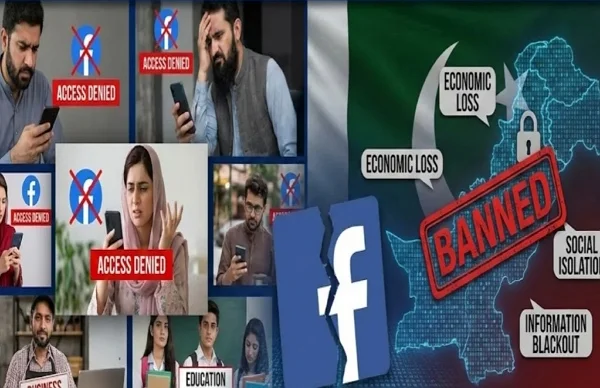
You now have the solution to get back online, but you might be wondering why these bans happen and what the consequences are.
The recurring narrative of Facebook outage in Pakistan is not just about missing memes or family updates; it is a significant economic blow.
-
Freelancers & SMEs: Thousands of Pakistani entrepreneurs run their businesses solely through Facebook Pages. When the platform goes down, their storefront closes. Orders are missed, client communication halts, and revenue is lost.
-
Educational Disruption: Many student groups and educational resources are hosted on Facebook. Outages disconnect students from peer support and vital updates.
-
Social Isolation: For many, Facebook (and WhatsApp) is the primary line of communication with family members working abroad. A ban effectively cuts the line to loved ones.
By using tools like UFO VPN, you aren't just watching videos; you are reclaiming your right to work, learn, and communicate freely.


Conclusion
Facing a Facebook outage in Pakistan is frustrating, but it doesn't have to be permanent. Whether the platform is down due to technical glitches or government censorship, you now have the knowledge to identify the issue and the tools to bypass the Facebook outage safely.
Don't let restrictions dictate your digital life. By keeping a reliable tool like UFO VPN installed on your device, you ensure that you are always just one tap away from an open, fast, and secure internet.
FAQs
Is it legal to use a VPN to access Facebook in Pakistan?
Yes, using a VPN is generally legal in Pakistan for legitimate purposes like securing your data and protecting your privacy. However, you should always use the internet responsibly and avoid engaging in illegal activities while connected.
Why is Facebook working on Wi-Fi but not on mobile data?
This often happens because different Internet Service Providers (ISPs) implement blocks at different times. Your home Wi-Fi provider might not have enforced the block yet, while your mobile carrier (like Jazz or Zong) has already restricted access, or vice versa.
Can I fix the Facebook outage without using a VPN?
You can try changing your DNS settings to Google Public DNS (8.8.8.8) or Cloudflare (1.1.1.1), which can sometimes bypass simple ISP blocks.
However, if the government is using deep packet inspection to block the site, these methods often fail, and a VPN becomes the only reliable solution.
What is the safest way to bypass the Facebook outage in Pakistan?
The safest method is using a trusted VPN that offers strong encryption, such as UFO VPN, to hide your online activity from your ISP.
Avoid using free web proxies, as they often lack security, can steal your login credentials, and are frequently blocked by Pakistani ISPs anyway.