Why Is Discord Banned in the UAE?
The United Arab Emirates (UAE) has a history of imposing strict regulations on internet usage and communication platforms. The ban on Discord is part of a broader effort to control online activities and ensure compliance with local laws. Several key factors have contributed to this decision:
-
Regulatory Compliance: The UAE government requires all communication platforms to comply with its regulatory framework. Discord's encryption and privacy features make it difficult for authorities to monitor conversations, leading to its ban.
-
VoIP Restrictions: The UAE has stringent regulations on Voice over Internet Protocol (VoIP) services. Discord's voice chat feature falls under this category, and the government prefers users to rely on state-approved services.
-
Content Control: The government aims to control the type of content accessible within the country. Discord's open nature allows for unregulated sharing of information, which can include content deemed inappropriate or illegal by UAE standards.
-
Security Concerns: Authorities are concerned about the potential misuse of Discord for activities that could threaten national security. The platform's anonymity features make it a potential tool for coordinating illicit activities.
-
Economic Interests: The ban also serves to protect the economic interests of local telecom providers. By restricting access to free communication platforms like Discord, the government ensures that users turn to paid services offered by these providers.
📖Related Reading
- Is Discord banned in China?
- Is Itch.io safe?
How to Access Discord in the UAE in 3 Steps
If you're in the UAE and wish to access Discord, follow these steps:


UFO VPN is an all-in-one VPN that offers unlimited access to 4K streaming like Netlfix, Disney Plus, no-ping gaming as PUBG, Roblox, CODM and social networking for YouTube, X, Facebook and more.




Unlock Pro Features
If you have upgraded to premium plan , feel free to enjoy premium servers for 4K streaming and advanced features like Kill Switch, Split Tunneling, and gaming acceleration. Your Mac is now fully optimized and protected. Inaddition to basic functions, we recommend you turn on

Verify Your IP Now
Use UFO VPN's " What is My IP " feature to see your new IP and location. This confirms your connection is secure, anonymous, and ready for safe browsing online anywhere at any time.







By using UFO VPN, you can bypass the UAE's restrictions and access Discord as if you were in a different country.
Tips for Accessing Discord in the UAE
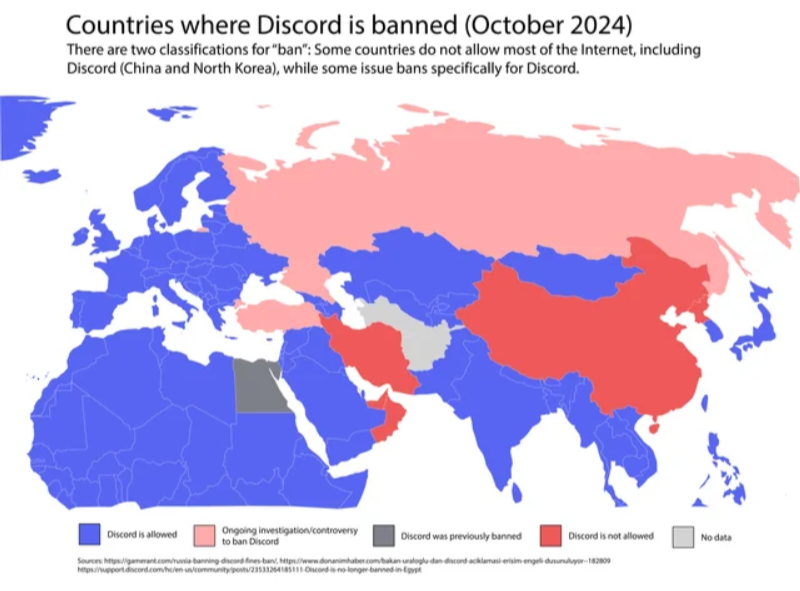
To ensure a smooth experience while accessing Discord in the UAE:
-
Use Best free VPN: Choose a reliable VPN service to mask your IP address and bypass geo-restrictions.
-
Select the Right Server Location: When using a VPN, connect to a server in a country where Discord is not blocked, such as the United States, Canada, or the United Kingdom.
-
Keep Your VPN Updated: Ensure your VPN app is always up-to-date to benefit from the latest security features and server options.
-
Check Your Internet Speed: A fast and stable internet connection is crucial for a smooth Discord experience. Test your speed and switch servers if you encounter lag or connectivity issues.
-
Use Alternative Communication Methods: If VPN access is temporarily unavailable, consider using other encrypted messaging apps to stay connected with your Discord community.
What Happens If I Use Discord in the UAE?
If you attempt to use Discord in the UAE without a VPN, you may encounter the following:
-
Access Denied: The platform may be unreachable, and you might see an error message indicating that the service is blocked.
-
Monitoring: Government authorities may monitor your internet activity, especially if you're using unapproved communication platforms.
-
Penalties: While using a VPN is not illegal in the UAE, accessing restricted services without proper authorization can lead to penalties.
To avoid these issues, it's recommended to use a reputable VPN service to access Discord securely and privately.
FAQs
Q: Is it legal to use a VPN in the UAE?
Yes, using a VPN is legal in the UAE. However, it's important to note that using a VPN to access restricted services or engage in illegal activities is prohibited. Always ensure that your use of a VPN complies with local laws and regulations.
Q: Can I access Discord without a VPN in the UAE?
Without a VPN, Discord is blocked in the UAE. Attempting to access the platform without a VPN will likely result in access being denied.
Q: Are there any risks associated with using a VPN in the UAE?
While using a VPN is legal, it's essential to use it responsibly. Engaging in illegal activities or accessing restricted services can lead to penalties. Always ensure that your online activities comply with local laws.
Q: What are some alternative communication platforms available in the UAE?
The UAE offers state-approved communication platforms like Botim and ToTok. These services comply with local regulations and are accessible within the country.
Conclusion
Discord is banned in the UAE due to regulatory, security, and economic reasons. However, by using a reputable VPN service, you can bypass these restrictions and access Discord securely. Always ensure that your use of a VPN complies with local laws and regulations to avoid potential penalties.