Can You Really Delete a Reddit Account

Yes, you can delete your Reddit account — but there are some important caveats. Reddit calls this process “deactivation,” and it’s permanent. Once you deactivate your account:
-
Your profile disappears
-
Your username becomes unavailable for reuse
-
But... your posts and comments stay visible (unless you manually delete them first)
So, while you can technically delete your Reddit account, it doesn’t erase everything unless you take extra steps.
Notes: Reddit currently only allows deactivation from a web browser. So remember to get ready for the following process with desktop devices.


Preparations before You Delete an Account
If your goal is to disappear from Reddit with maximum anonymity, consider using a free proxy VPN. A good VPN will:
-
Mask your IP address
-
Block tracking scripts
-
Hide your physical location
-
Bypass regional Reddit restrictions
Recommended VPN for Reddit Users:
| VPN Brand | Best For | Features | Free Plan |
|---|---|---|---|
| UFO VPN | Fast, anonymous Reddit access | Global servers, IP masking, kill switch | ✅ |
| NordVPN | Strong privacy | No-logs, multi-hop encryption | ✅ |
| Surfshark | Budget-friendly | Unlimited devices, Camouflage mode | ✅ |
How to Get Started with UFO VPN:


UFO VPN is an all-in-one VPN that offers unlimited access to 4D streaming like Netlfix, Disney Plus, no-ping gaming as PUBG, Roblox, CODM and social networking for YouTube, X, Facebook and more.




Unlock Pro Features
If you have upgraded to premium plan , feel free to enjoy premium servers for 4K streaming and advanced features like Kill Switch, Split Tunneling, and gaming acceleration. Your Mac is now fully optimized and protected. Inaddition to basic functions, we recommend you turn on

Verify Your IP Now
Use UFO VPN's " What is My IP " feature to see your new IP and location. This confirms your connection is secure, anonymous, and ready for safe browsing online anywhere at any time.







For secure access and complete peace of mind, we recommend UFO VPN for Windows and Mac — especially if you're deleting Reddit from a restricted region or while on public Wi-Fi.
How to Delete a Reddit Account
Before deleting your Reddit account, follow these two essential steps:
Step 1: Delete Your Reddit Posts and Comments
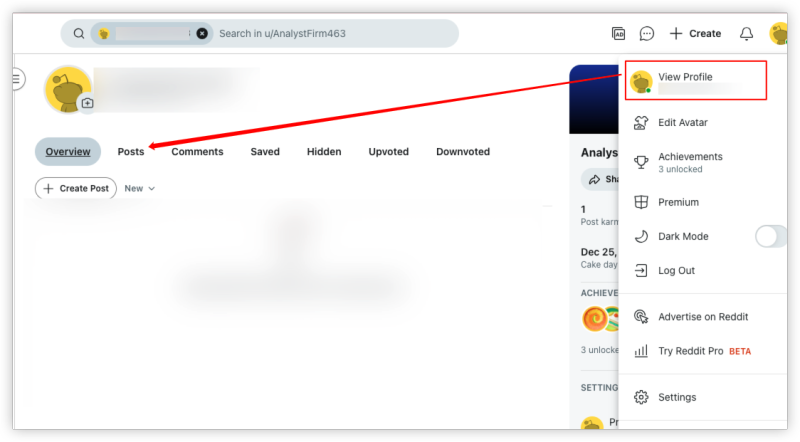
Reddit won’t do this for you, so take time to:
-
Go to your profile
-
Click on “Posts” and “Comments”
-
Delete each manually, or use browser extensions like Reddit Nuke (for advanced users)
Step 2: Deactivate Your Reddit Account
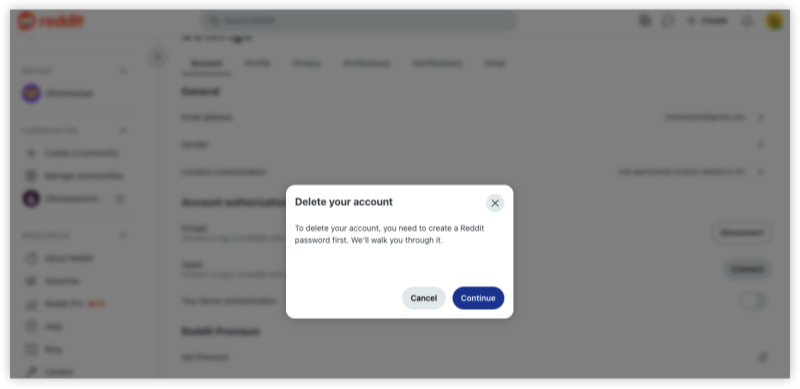
Once you’ve cleaned your account:
-
Log into Reddit on desktop (mobile app doesn’t support deactivation)
-
Go to User Settings
-
Scroll down to the "Deactivate Account" section
-
Confirm your username and password
-
(Optional) Add a reason for leaving
-
Click "Deactivate"
⚠️ Important: This action is permanent — Reddit will not recover your account later.
Why Can’t I Fully Delete My Reddit Account
The reason is baked into how Reddit works.
Unlike some social platforms, Reddit doesn’t associate usernames with individual posts after deactivation — the system simply shows “[deleted]” as the author.
That’s why even after account deletion, your content remains online unless you remove it yourself first.
Reddit doesn’t offer bulk post deletion, so users often resort to third-party tools or manually deleting posts before deactivating.
Bonus: Reddit Account Delete vs Deactivate vs Suspend
| Feature | Deactivate | Suspend | Log Out |
|---|---|---|---|
| Permanently deletes username? | ✅ | ❌ | ❌ |
| Posts and comments removed? | ❌ | ❌ | ❌ |
| Can be undone? | ❌ | ❌ | ✅ |
| Hides profile? | ✅ | ✅ | ❌ |
Final Thoughts
So, can you delete a Reddit account? Yes — but Reddit’s deactivation system comes with some privacy limitations. If you’re looking to delete a Reddit account, be sure to delete your posts and comments first, using a VPN to safeguard your IP and personal data. Then deactivate your account permanently With the right steps, you can leave Reddit behind on your terms — and stay in control of your digital footprint.
FAQs
1. Can I delete my Reddit account from the mobile app?
No. Reddit currently only allows deactivation from a web browser.
2. If I delete my Reddit account, will my posts be removed?
No. Your username will disappear, but posts and comments remain visible unless you delete them manually beforehand.
3. Can I reuse my Reddit username after deleting the account?
No. Once deleted, the username becomes permanently unavailable.
4. Why does Reddit keep my data after I delete my account?
Reddit anonymizes your identity by removing your username from posts but retains the content to preserve discussion threads.
5. Is there a way to delete all Reddit comments at once?
Not natively. You can use browser extensions or scripts like Reddit Nuke (Chrome) or Power Delete Suite.