Things to Do Before Closing Your Cash App Account
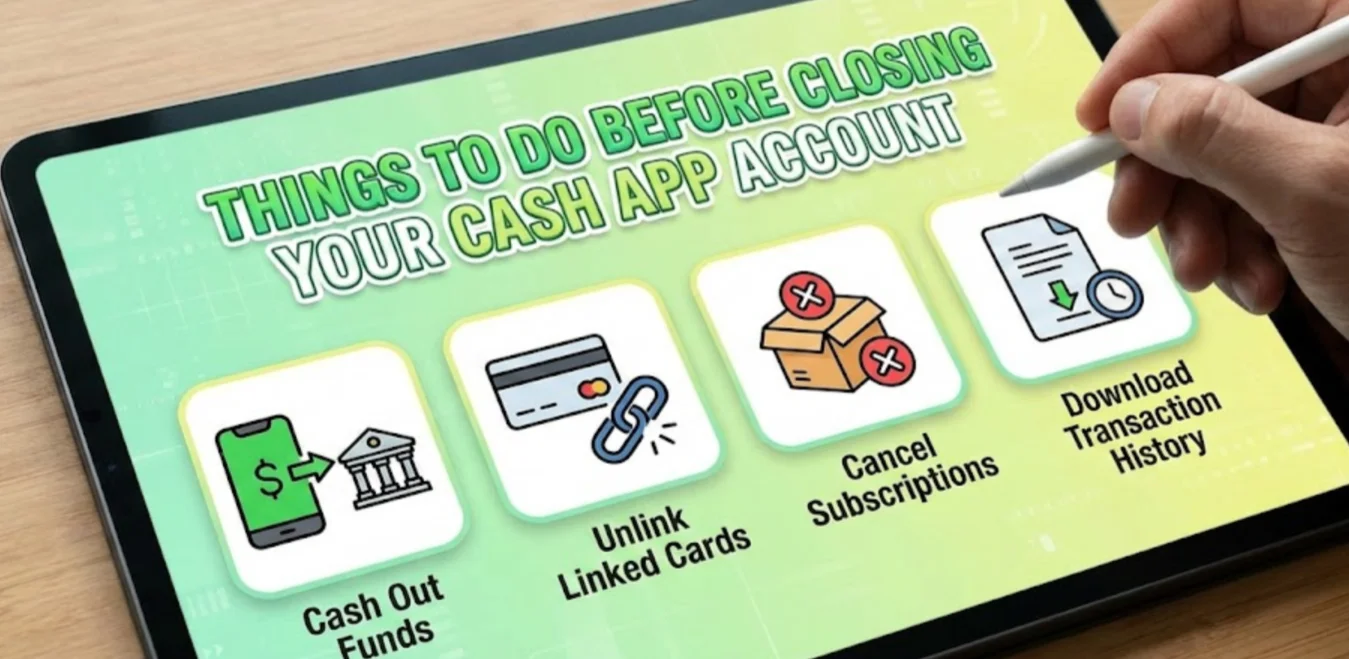
Before you permanently delete your Cash App account, there are important steps to ensure you don’t lose money or compromise your data. Many users make the mistake of closing their account without preparation, leading to missed transactions or sensitive information being left behind.
Here’s what you should do:
-
Withdraw Your Balance: Transfer any remaining funds to your linked bank account or another payment method. Cash App won’t refund your balance after the account is deleted.
-
Cancel Recurring Payments: Make sure subscriptions or recurring payments linked to Cash App are canceled to avoid failed payments.
-
Save Transaction Records: Export or screenshot important transaction history for personal records or tax purposes.
-
Unlink Your Bank Account or Card: Remove your bank accounts and debit cards to protect your financial information.
-
Update Connected Services: If you use Cash App for other apps or services, update your payment method to prevent interruptions.
Taking these steps ensures that closing your Cash App account doesn’t create complications later, and using a free proxy VPN keeps your sensitive information safe throughout the process.
How to Permanently Delete Your Cash App Account?
Now that you’ve prepared your account by withdrawing funds, canceling subscriptions, and securing your personal information, it’s time to permanently delete your Cash App account. This section will guide you step by step on how to close your account on both iPhone and Android, ensuring the process is complete and your data is protected.
iPhone
-
Open Cash App on your iPhone.
-
Tap your profile icon on the home screen.
-
Scroll down and select “Support”, then tap “Something Else”.
-
Tap “Account Settings” and choose “Close My Cash App Account”.
-
Follow the on-screen instructions to confirm your account closure.
-
You’ll receive a confirmation email once your account is successfully deleted.
Android
-
Launch the Cash App on your Android device.
-
Tap the profile icon in the top-right corner.
-
Scroll down to Support → Something Else → Account Settings.
-
Tap Close My Cash App Account and confirm your action.
-
Check your registered email for confirmation that the account has been closed permanently.
By following these instructions, you can ensure your Cash App account is permanently deleted and no longer accessible.

What Happens When You Delete Your Cash App Account?

After you’ve permanently deleted your Cash App account, it’s important to know what changes take place and what to expect. The following explains the consequences of closing your account, including what happens to your funds, transaction history, and the ability to use your email or phone number for future accounts, so you can plan accordingly and avoid surprises.
-
Funds Are Returned: Any remaining balance must be withdrawn before closing. Otherwise, the money may be lost.
-
Account Data Removed: Your profile, transaction history, and linked cards are permanently deleted.
-
Email and Phone Freed Up: You can use your email or phone number to create a new Cash App account in the future.
-
Transactions Are Not Reversible: Past payments and refunds cannot be retrieved after deletion.
Knowing these outcomes ensures you take the right steps beforehand. If you’re worried about security while deleting your account, using a VPN can protect your connection and keep your financial details safe from hackers during the process.
Safety Tips During Account Deletion
Now that you know what happens when you delete your Cash App account, the next step is to ensure your personal and financial information remains secure during the process. Hackers and cybercriminals often target users on unsecured networks, especially when sensitive financial actions like withdrawing funds or closing accounts are being performed. Following these safety tips can help you protect your personal and financial information during the account deletion process:
1. Use a Secure Network with a VPN
Avoid using public Wi-Fi or unsecured networks while deleting your Cash App account. Public networks are easy targets for hackers who can intercept your data, including login credentials and bank details. This is where UFO VPN comes in—it encrypts your internet connection, creating a private and secure tunnel for all your online activity.
With UFO VPN, you can:
-
Hide your IP address so hackers cannot track your device.
-
Encrypt all data sent over the network, including transactions and personal info.
-
Prevent potential man-in-the-middle attacks when using public Wi-Fi.
By connecting to UFO VPN before closing your account, you ensure that your sensitive financial details remain protected from prying eyes.
How to Set Up UFO VPN for Your Device?


UFO VPN is an all-in-one VPN that offers unlimited access to 4K streaming like Netlfix, Disney Plus, no-ping gaming as PUBG, Roblox, CODM and social networking for YouTube, X, Facebook and more.




Unlock Pro Features
If you have upgraded to premium plan , feel free to enjoy premium servers for 4K streaming and advanced features like Kill Switch, Split Tunneling, and gaming acceleration. Your Mac is now fully optimized and protected. Inaddition to basic functions, we recommend you turn on

Verify Your IP Now
Use UFO VPN's " What is My IP " feature to see your new IP and location. This confirms your connection is secure, anonymous, and ready for safe browsing online anywhere at any time.







2. Check for Suspicious Activity
Before deleting your account, carefully review your transaction history for any unauthorized or suspicious payments. If you notice any irregularities, report them immediately to Cash App support to resolve issues before closing your account.
3. Log Out from All Devices
Ensure your Cash App account is logged out from all devices, including smartphones, tablets, and desktop browsers. Any active session could be exploited by unauthorized users if left open.
4. Change Linked Account Passwords
After unlinking your bank account and cards, update passwords for all linked accounts, including your bank, email, and any other connected services. This step helps secure your accounts and prevents unauthorized access after your Cash App account is deleted.
By following these precautions, you can significantly reduce the risk of fraud, identity theft, or data breaches during the account deletion process. Deleting your Cash App account doesn’t have to be risky—careful preparation keeps your personal and financial information safe.
How to Remove Personal Information and Transactions During Account Deletion
Closing your Cash App account safely doesn’t automatically delete all traces of your personal data. Many people assume that deleting an account will remove transaction links or active subscriptions, but in practice, that’s not always the case. If you want to ensure your information is fully removed, follow these steps:
-
Export Important Transactions: Save any records you might need for taxes or personal reference.
-
Request Deletion of Sensitive Data: Contact Cash App support to remove personal information associated with your account.
-
Clear Linked Bank and Card Details: Ensure that no financial data remains on the platform.
-
Check Email and Backup Services: Delete any saved receipts or backups containing account information.
- Block Active or Problematic Merchants: If you had subscriptions or recurring charges before closing your account, ask a Cash App representative to block specific merchants. This prevents any future charge attempts, even after the account is closed.
(As someone that work with cashapp before) It won't link the previous transactions or subscriptions. How ever you can also request a representative to block the merchant for you, that will stop the transactions

By taking these actions, you protect your privacy and financial security after closing your Cash App account.
Conclusion
Deleting your Cash App account may seem simple, but it requires careful planning to ensure your funds and personal data are safe. From withdrawing balances and canceling subscriptions to removing sensitive information and securing your connection with a VPN, following the proper steps is essential for a smooth experience. By using this step-by-step guide, you can permanently delete your Cash App account on both iPhone and Android, while staying protected online.
FAQs
Can I reopen my Cash App account after deletion?
Yes, you can create a new account using the same email or phone number. However, your old transaction history and balance will not be restored.
Will my personal data be fully deleted after deleting my cash app account?
Deleting your account removes most personal data, but you may need to contact Cash App support to ensure sensitive information and transaction records are completely removed.
How long does it take for Cash App to delete my account?
Once you request deletion, it usually takes a few minutes to a few hours for confirmation, depending on server processing times.
What happens to pending transactions when I delete my account?
Pending transactions must be completed or canceled before deletion. Any unprocessed payments may be lost if the account is closed prematurely.