What Is Booking.com and How Does It Work?
Booking.com is a widely used travel fare aggregator that allows users to book hotels, hostels, apartments, vacation homes, and more. Founded in 1996, the site has grown to list over 28 million accommodation options in nearly every country in the world.
When you book on Booking.com, you're usually reserving directly through a hotel or third-party property owner. Booking.com acts as the middleman, handling the reservation process while the actual accommodation provider takes care of your stay.
Here’s how it works:
-
You search for a destination and set your travel dates.
-
Booking.com shows available listings, prices, and guest reviews.
-
You make a reservation. Some bookings require upfront payment, while others let you pay at the property.
-
Booking.com sends a confirmation email and handles basic customer support.
That sounds easy, but is Booking.com legit when it comes to delivering what you book? Let’s dive deeper.
💗Special Offer for Iran Users:💗
If you're in Iran or anywhere in the Middle East where access to international hotel booking sites like Booking.com may be restricted or monitored, our Iran VPN free is your ideal solution. With UFO VPN, you can bypass censorship, unlock full access to Booking.com, and even compare hotel prices across different countries.
Is Booking.com Legit for Hotels and Accommodations?
Short answer: Yes, Booking.com is a legit platform. But like all large online marketplaces, user experience may vary.
Here’s what makes Booking.com legit for hotels:
-
Verified Listings: Properties are reviewed and rated by past guests, giving you insight into their service quality.
-
Secure Payments: Booking.com uses secure encryption protocols for transactions.
-
Global Support: They offer 24/7 customer service in multiple languages.
-
Flexible Booking Options: You can often cancel or change your booking without extra fees.
-
Genuine Reviews: Reviews can only be left by users who have completed a stay, reducing fake reviews.
However, it's important to understand that Booking.com doesn’t own the hotels. So while the platform itself is legitimate, the quality and reliability of your stay depend on the property owner. That's where most of the concerns arise.
Common Complaints and Booking Scams: What to Watch For
Even though Booking.com is a legitimate service, there are still some common issues reported by travelers. Understanding these will help you book smarter:
1. Fake Listings or Overbooking
Some users have arrived at hotels only to find that their booking didn’t exist or the room was already taken. This usually happens due to mismanagement on the part of the hotel, not Booking.com itself.
2. Hidden Fees
Some listings may not include taxes, resort fees, or cleaning charges until the final step. Always read the fine print before you book.
3. Inconsistent Refund Policies
Cancellation policies vary by property. Some properties offer free cancellation, while others are strict. Always double-check this detail.
4. Scam Emails
Fake Booking.com emails asking for payment info have circulated online. These phishing attacks are not from Booking.com itself but can be very convincing.
Tip: Use free VPN Proxy by UFO VPN to add an extra layer of encryption to your browsing and avoid location-based scams or phishing attempts.
How a VPN Can Help You Book Safely on Booking.com
1. Avoid Regional Price Discrimination
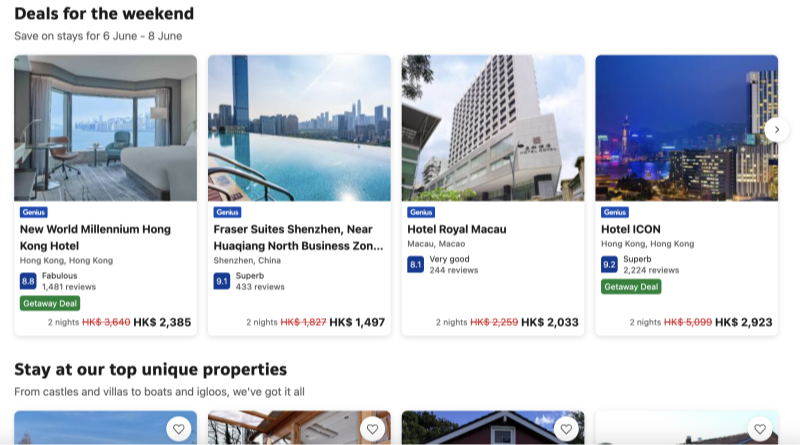
Did you know that Booking.com sometimes shows different prices based on your location? By using UFO VPN, you can switch your IP address to compare hotel prices across regions—and often save money.
2. Browse Anonymously
VPNs encrypt your internet traffic, preventing ISPs and third parties from tracking your searches or injecting ads into your browsing.
3. Secure Payments
When booking hotels from public Wi-Fi or foreign countries, using UFO VPN ensures your personal data and payment information are encrypted.
4. Access Booking.com from Restricted Regions
In some countries, access to Booking.com may be blocked or restricted. UFO VPN lets you bypass those geo-blocks by changing your server location to a region with full access.
Use the UFO VPN for safe, anonymous browsing in 4 Steps.


UFO VPN is an all-in-one VPN that offers unlimited access to 4D streaming like Netlfix, Disney Plus, no-ping gaming as PUBG, Roblox, CODM and social networking for YouTube, X, Facebook and more.




Unlock Pro Features
If you have upgraded to premium plan , feel free to enjoy premium servers for 4K streaming and advanced features like Kill Switch, Split Tunneling, and gaming acceleration. Your Mac is now fully optimized and protected. Inaddition to basic functions, we recommend you turn on

Verify Your IP Now
Use UFO VPN's " What is My IP " feature to see your new IP and location. This confirms your connection is secure, anonymous, and ready for safe browsing online anywhere at any time.







FAQs
Is Booking.com legit for hotels?
Yes, it is. Booking.com is one of the most used travel booking platforms worldwide, especially for hotels and accommodations. Still, users should read reviews carefully and confirm details directly with the property when possible.
Can Booking.com be trusted with my credit card info?
Generally, yes. Booking.com uses secure encryption. However, to stay even safer, you can book through UFO VPN to add encryption and privacy to your transaction.
Can I get better hotel prices using a VPN?
Absolutely. VPNs like UFO VPN allow you to change your virtual location and may help you find lower prices based on regional pricing strategies used by platforms.
Is Booking.com safe to use in countries with strict internet laws like China or Iran?
Booking.com may be partially blocked in some regions. With UFO VPN, you can bypass these blocks and access the site safely.
What should I do if my Booking.com hotel isn’t what I expected?
Contact Booking.com support immediately. If the issue is severe (such as no room available), the platform often helps find alternative accommodations.