Decode content://cz.mobilesoft.appblock.fileprovider/cache/blank.html Word-by-Word
When you look at a URL this long and complex, it is easy to get overwhelmed. It looks like a jumble of random tech words. But if we separate it into pieces, it makes perfect sense. This is just a standard Android file address. It tells the phone exactly where to look for a specific file inside its own memory.
Let’s break it down into small chunks to understand what your phone is doing when it processes this link.
Key Components of This URL
The full string content://cz.mobilesoft.appblock.fileprovider/cache/blank.html contains several parts, and each one has a specific meaning inside the Android system.
-
content://
This is a content URI scheme used by Android. Unlike http:// or https://, it does not point to a website on the internet. Instead, it tells the system to load data from a local content provider inside an app. -
cz.mobilesoft.appblock
This is the unique package name of the AppBlock application. Android uses package names to identify apps clearly and avoid conflicts. -
fileprovider
A FileProvider is an Android component that allows an app to share files or internal resources safely. It prevents other apps from accessing raw file paths directly. -
/cache/
This folder stores temporary files. Cached files are usually created for short-term use and can be deleted or replaced at any time by the app. -
blank.html
This is a simple HTML file. In this case, it is often an empty or neutral page used as a placeholder when access to real content is blocked.
Put together, content://cz.mobilesoft.appblock.fileprovider/cache/blank.html simply points to a local blank page created and controlled by AppBlock.
Why Does It Appear?
This address usually appears when AppBlock is actively doing its job. When you try to open a blocked website or app feature, AppBlock needs a safe way to stop the request without crashing the app or showing broken content. Instead of loading the original page, it redirects the request to a local blank page.
This approach has several advantages:
-
It avoids loading any external data.
-
It prevents error messages that could confuse users.
-
It keeps the blocking process fast and stable.
So when you see content://cz.mobilesoft.appblock.fileprovider/cache/blank.html, it means AppBlock successfully intercepted something you chose to block.
Important Info from the URL
Even though this link looks technical, it actually tells you a lot:
-
The source is local, not online.
-
The app involved is AppBlock, not a random process.
-
The file is stored in cache, not permanent storage.
-
The page is blank, not collecting or sending data.
All of this points to normal and expected behavior for a focus and productivity app.
What Is AppBlock & How Does It Work?
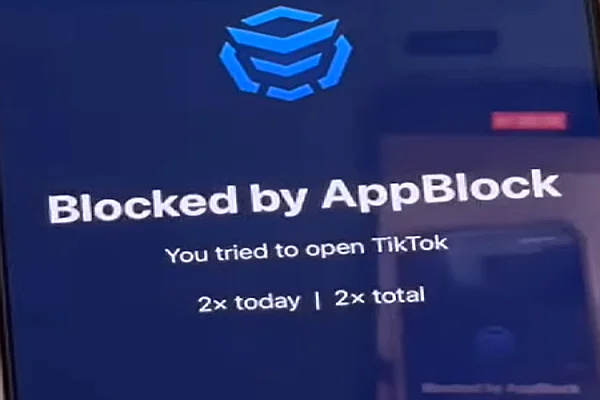
AppBlock is a productivity app designed to help users reduce distractions on their phones. It focuses on limiting access to apps and websites that waste time, especially during work or study hours. Many people use it to build better digital habits and stay focused.
At its core, AppBlock works by monitoring which apps and web addresses you try to open. When a blocked item is detected, the app steps in and replaces the original content with a controlled alternative, such as the blank page referenced by content://cz.mobilesoft.appblock.fileprovider/cache/blank.html.
Here is how AppBlock works in everyday use:
-
Block distracting apps and websites during focus time
You can choose which apps or sites you want to block and set specific schedules. -
Activate blocks based on time, location, or Wi‑Fi
For example, blocks can turn on automatically at work, at school, or when connected to a certain network. -
Show clear data about digital habits
AppBlock tracks screen time patterns so you can see where your time actually goes. -
Prevent easy bypassing of restrictions
Features like strict mode make it harder to disable blocks on impulse.
The blank.html page is one of the technical tools that makes these features work smoothly.
The Most Important Thing: Is It a Good Sign or a Warning?
This is 100% a good sign. Seeing content://cz.mobilesoft.appblock.fileprovider/cache/blank.html means the app is functioning correctly and safely. It does not indicate malware, hacking, or data leakage.
Because this page is stored locally and served through Android’s content system, it never exposes your personal information. No data is sent out, and no tracking scripts are running. From a security and privacy point of view, this is one of the safest ways an app can block access.
Red Flags: Key Signs You Really Need to Watch Out For
While content://cz.mobilesoft.appblock.fileprovider/cache/blank.html itself is safe, it is still smart to know what real warning signs look like on Android.
Here are issues that actually deserve attention:
-
A similar-looking link that opens a real website without your action.
-
Unknown app package names you do not recognize.
-
Repeated pop-ups asking for permissions that do not match the app’s purpose.
-
Heavy battery drain linked to an unfamiliar app.
-
Network activity when no internet access should be needed.
Compared to these, a local blank page from AppBlock is harmless.
Reduce Anxiety: Install a VPN on Your Device
This page is completely safe, but many users still want extra protection when browsing or using apps. A reliable VPN like UFO VPN can help by adding a layer of privacy when your device connects to the internet.
By connecting to a free proxy VPN in UFO VPN, you can:
-
Hide your IP address from websites.
-
Protect data on public Wi‑Fi networks.
-
Reduce the risk of tracking when visiting new sites.
Even though content://cz.mobilesoft.appblock.fileprovider/cache/blank.html does not require a VPN, having one active can give peace of mind when switching between different apps and networks.


UFO VPN is an all-in-one VPN that offers unlimited access to 4K streaming like Netlfix, Disney Plus, no-ping gaming as PUBG, Roblox, CODM and social networking for YouTube, X, Facebook and more.




Unlock Pro Features
If you have upgraded to premium plan , feel free to enjoy premium servers for 4K streaming and advanced features like Kill Switch, Split Tunneling, and gaming acceleration. Your Mac is now fully optimized and protected. Inaddition to basic functions, we recommend you turn on

Verify Your IP Now
Use UFO VPN's " What is My IP " feature to see your new IP and location. This confirms your connection is secure, anonymous, and ready for safe browsing online anywhere at any time.







Final Says
The url "content://cz.mobilesoft.appblock.fileprovider/cache/blank.html" may look strange, but it is simply an internal Android link used by AppBlock to block distractions safely. It does not connect to the internet, it does not collect data, and it does not signal any risk.
Understanding how this works can remove unnecessary worry and help you trust the tools you use to stay focused. When you know what to look for, technical details become helpful instead of scary.
FAQs
Is "content://cz.mobilesoft.appblock.fileprovider/cache/blank.html" a virus?
No, it is absolutely not a virus. This file path is a legitimate part of the AppBlock application on Android. It is a safe, local HTML file used to display a blank screen when you try to access a blocked website. It does not harm your device or steal your data.
Why does this long URL appear in my browser history?
It appears in your history because your browser technically "visited" this page. When AppBlock blocks a website (like Facebook or YouTube), it redirects your browser to this local blank file to stop the content from loading. Your browser records this redirection as a visited page in your history log.
How do I get rid of the blank page and access the website I want?
To stop seeing this blank page, you need to unblock the website. Open the AppBlock app on your phone and either turn off the active "Blocking Profile" or pause the "Strict Mode" if it is enabled. Once the app is disabled, you can refresh your browser, and the original website will load instead of the blank file.
Can I delete this file to save storage space?
No, you cannot delete this specific file manually, and you shouldn't try to. It is a system file managed by the AppBlock app. However, the file is incredibly small (a simple white page), so it takes up almost zero storage space on your phone. Deleting it would stop AppBlock from working correctly.
Does seeing this link mean my phone has been hacked?
No, seeing content://cz.mobilesoft.appblock.fileprovider/cache/blank.html does not mean you are hacked. It actually means your phone is doing exactly what you told it to do: blocking distractions. However, if you see this link but you never installed AppBlock, you should check your installed apps list and remove any unknown applications immediately.