How to Check If Threads Is Down
If Threads isn’t working, the first step is to determine whether the problem is global or local:
-
Official Meta Sources
Meta sometimes posts updates on outages or maintenance on their official help pages and social media channels. Checking these sources helps confirm if the issue is widespread. -
Real-Time Status Checkers
Websites like DownDetector provide user reports on Threads’ performance. You can see whether the platform is facing global downtime or geo-blocked in your region. >>>Use a free proxy VPN to regain Threads access right now. -
Community Feedback
Platforms like Reddit and Twitter often have live reports from users experiencing issues. Browsing these discussions can help identify if the problem is widespread.
Confirming the status first avoids unnecessary troubleshooting if the issue is on Meta’s side.
Where Is Threads Available?
Threads is accessible in most countries but faces restrictions in some regions. Here’s a breakdown:
✅ Countries Where Threads Is Widely Available
-
United States
-
Canada
-
United Kingdom
-
Australia
-
New Zealand
-
Most European countries (Germany, France, Italy, Spain, the Netherlands, etc.)
-
Japan, South Korea, Singapore, and other parts of Southeast Asia
🚫 Countries With Restricted or Blocked Access
-
China: Meta services, including Threads, are not accessible.
-
Iran: Social media platforms face government restrictions.
-
North Korea: Social media is heavily restricted.
-
Other countries with strict internet censorship may also block Threads.
Notes:
-
Even in available countries, temporary outages or server issues can affect access.
-
Users in restricted regions often rely on VPNs, proxies, or DNS settings to regain safe access.
How to Access Threads Quickly
If Threads is blocked or not loading, several methods can help you access it safely:
1. VPN (Virtual Private Network)
How it works: A VPN routes your connection through a server in another country, making it appear as if you’re browsing from there.
Why use it: Ideal for bypassing regional restrictions. A reliable VPN, like UFO VPN, provides fast speeds, stable connections, and secure browsing.
How to browse Threads with UFO VPN:


UFO VPN is an all-in-one VPN that offers unlimited access to 4K streaming like Netlfix, Disney Plus, no-ping gaming as PUBG, Roblox, CODM and social networking for YouTube, X, Facebook and more.




Unlock Pro Features
If you have upgraded to premium plan , feel free to enjoy premium servers for 4K streaming and advanced features like Kill Switch, Split Tunneling, and gaming acceleration. Your Mac is now fully optimized and protected. Inaddition to basic functions, we recommend you turn on

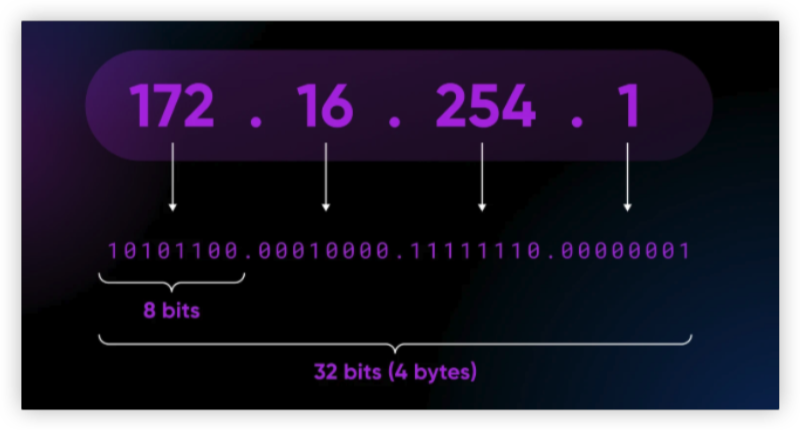
Verify Your IP Now
Use UFO VPN's " What is My IP " feature to see your new IP and location. This confirms your connection is secure, anonymous, and ready for safe browsing online anywhere at any time.







Tips: Choose a server close to your location for optimal speed and avoid free VPNs that may compromise privacy.
2. Proxy Servers
How it works: A proxy serves as an intermediary, allowing access to blocked content.
Why use it: Quick and lightweight solution for temporary access.
Caution: Free proxies usually don’t encrypt traffic, so avoid logging in with sensitive accounts while using them.
3. Custom DNS Settings
How it works: Changing your DNS server can bypass ISP-level restrictions. Popular options include Google DNS (8.8.8.8 / 8.8.4.4) or Cloudflare DNS (1.1.1.1).
Why use it: Useful if Threads is blocked at the network level but not globally restricted.
Limitations: DNS changes don’t encrypt traffic, so they offer less privacy than VPNs.
4. Switch Networks
Switching between Wi-Fi and mobile data can sometimes solve access issues without additional tools.
✅ Best Practice: For reliable and safe access, combining a trusted VPN with secure DNS settings is recommended. This ensures both speed and privacy while using Threads.
Threads Not Working? Reasons & Solutions
Here are common issues and how to fix them:
1. Threads Not Updating
Cause: Outdated app version, server-side issues, or slow network.
Solution: Update the app, clear cache, restart the device, and check server status.
2. Threads Not Posting
Cause: Connectivity problems or temporary server errors.
Solution: Switch networks, log out and back in, or reinstall the app.
3. App Crashing or Freezing
Cause: Low device memory or software bugs.
Solution: Close background apps, free up memory, and update the operating system.
4. iPhone-Specific Issues
Ensure iOS is up to date, background app refresh is enabled, and reinstall Threads if necessary.
Most problems can be resolved quickly by following these steps without waiting for a global fix.


Safety Tips for Browsing Threads
Even when troubleshooting, staying safe is essential:
-
Download Official Apps Only: Avoid third-party sources to prevent malware.
-
Use Trusted Networks: Public Wi-Fi can expose your data; use secure connections or VPNs.
-
Be Careful With Links: Phishing links can spread malware even on social apps.
-
VPN for Security: VPNs not only bypass blocks but also encrypt your traffic, keeping your data private.
Following these practices ensures smooth and secure usage.
FAQs
Is Threads down right now?
Check platforms like DownDetector or Meta’s official updates for real-time status.
Is Threads shutting down?
No official announcements suggest Threads is shutting down. Most issues are temporary glitches or connectivity problems.
Threads not working on iPhone – what to do?
Update iOS and the app, enable background app refresh, clear cache, and restart your device.
Threads not posting or updating – how to fix?
Switch networks, log out and back in, reinstall the app, or check server status.
How can I unblock Threads in restricted regions?
A reliable VPN like UFO VPN can help you safely access Threads without compromising privacy.
Conclusion
Threads may experience occasional downtime, posting failures, or regional restrictions, but most problems can be resolved with simple troubleshooting. Checking server status, updating the app, and using access methods like VPN, proxy, or DNS ensures uninterrupted use. In restricted regions, a trustworthy VPN provides secure and fast access, allowing you to enjoy Threads while keeping your data private.