What Are LOCKED Codes?
Understanding LOCKED codes is the first step to improving your Roblox experience. Many players waste time trying to redeem expired codes or fall for unsafe sources. In this section, we will list new LOCKED codes and expired LOCKED codes updated so far.
New LOCKED Codes
Check out the latest active LOCKED Codes below—just copy, paste, and claim your awesome rewards instantly!
BRANDNEWCODE: Redeem for 500K Yen
SEASON5WINNER: Redeem for 100,000 Yen
75KLIKES: Redeem for 150,000 Yen
125MILVISITS: Redeem for 85,000 Yen
120KFAVOURITE: Redeem for 85,000 Yen
Expired LOCKED Codes
Expired codes no longer provide rewards but knowing them helps you avoid wasting time.
- BALANCE1
- THANKYOUFOR7KLIKES30KMEMBERS
- SHUTDOWN5
- LOCKEDMAS
- THANKYOU2MILVISITS
- DOUBLEMFBUG
- FIELDMAP
- HAPPYNEWYEARSAND20KMEMBERS
- LIKES5K
- WAVE3
- TRAILER
- RELEASE
- REVOLVER
- MOREBALANCING
- HEIGHTSTAMINA
- 30MILVISITS
- SWORDSCREW
- FACEREVAMP
- QUALITYOFLIFEUPDATE.1
- WATCHTOWER
- 10KGROUPMEMBERS
- 50KFAVOURITES
- 10V10TOURNAMENTBUG

How to Redeem LOCKED Codes Step by Step in Roblox?
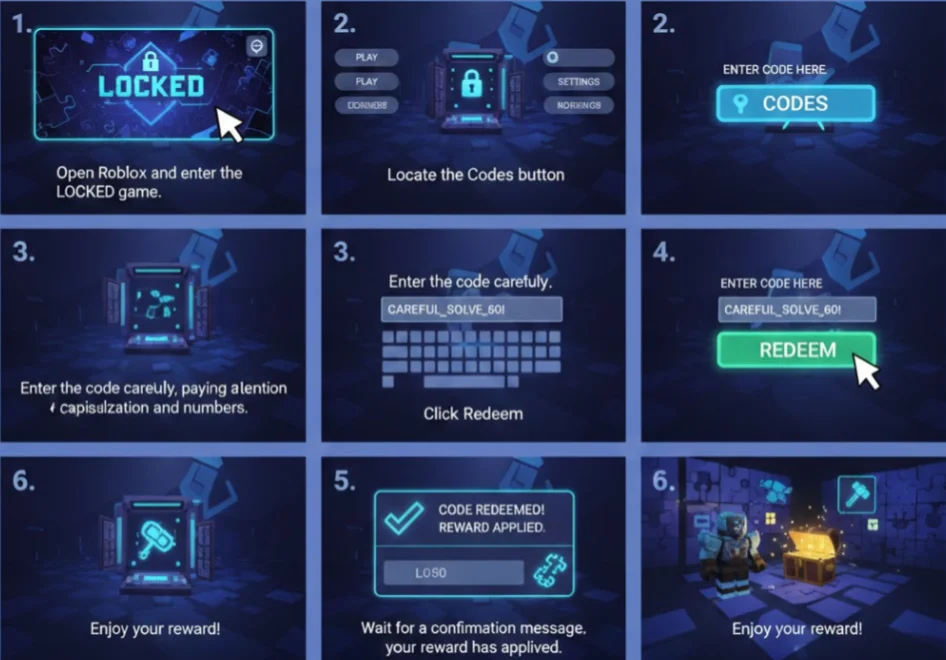
Redeeming LOCKED codes may seem straightforward, but you may run into issues such as entering codes incorrectly, using expired codes, or not receiving their rewards. This part will guide you through the correct redemption process step by step, helping you avoid common mistakes.
Step-by-Step Guide to Redeem LOCKED Codes:
-
Open Roblox and enter the LOCKED game.
-
Locate the Codes button – usually found on the main menu or settings panel.
-
Enter the code carefully, paying attention to capitalization and numbers.
-
Click Redeem.
-
Wait for a confirmation message that your reward has been applied.
Troubleshooting Tips:
-
Ensure your internet connection is stable.
-
If the code doesn’t work, check if it’s expired.
-
Try clearing your cache or restarting Roblox.
By following this guide, you can redeem codes efficiently and enjoy the exclusive content without errors, and if you want to add security while playing, a free proxy VPN is a good choice.
How to Unblock the Complete Roblox LOCKED Game Safely?
If you’ve successfully redeemed your LOCKED codes but still can’t access the full game due to network restrictions, the following will show you safe ways to unblock Roblox LOCKED so you can enjoy all features without compromising your security.
Use a VPN
UFO VPN helps remove access restrictions while also protecting your connection, so you can enjoy the full Roblox experience without interruptions or unnecessary risks.
It can help you:
-
Unblock the full game: Access LOCKED even on restricted networks such as school or workplace Wi-Fi.
-
Protect your privacy: Encrypt your connection to prevent tracking by ISPs or hackers.
-
Improve stability: Reduce lag and connection drops for smoother gameplay.
How to Use UFO VPN for Roblox LOCKED:


UFO VPN is an all-in-one VPN that offers unlimited access to 4K streaming like Netlfix, Disney Plus, no-ping gaming as PUBG, Roblox, CODM and social networking for YouTube, X, Facebook and more.




Unlock Pro Features
If you have upgraded to premium plan , feel free to enjoy premium servers for 4K streaming and advanced features like Kill Switch, Split Tunneling, and gaming acceleration. Your Mac is now fully optimized and protected. Inaddition to basic functions, we recommend you turn on

Verify Your IP Now
Use UFO VPN's " What is My IP " feature to see your new IP and location. This confirms your connection is secure, anonymous, and ready for safe browsing online anywhere at any time.







How to Get More LOCKED Codes?
Even after redeeming existing codes, it’s easy to miss new LOCKED codes released through updates or events. Let's show you reliable ways to find and claim the latest codes so you never miss out on free items and exclusive rewards.
Ways to Get More LOCKED Codes:
-
Follow Official Roblox Social Media: Developers often release codes via Twitter, Discord, or Instagram.
-
Join Roblox Community Groups: Many groups and forums share verified codes.
-
Subscribe to Newsletters: Some games send exclusive codes to subscribers.
-
Attend In-Game Events: Special events often give limited-time codes.
-
Use Code Aggregator Websites: Make sure to use reputable sites to avoid scams.
Avoid unknown third-party sites claiming “free codes,” as they may be scams. Always prioritize verified sources.
Are LOCKED Codes Safe and Legal to Use?
While searching for more LOCKED codes, it’s easy to encounter unsafe or unofficial sources that could put your account or device at risk. This part explains which codes are safe and legal to use, so you can claim rewards without jeopardizing your Roblox experience.
Safety Tips:
-
Only redeem codes from official sources or trusted community channels.
-
Avoid downloading external software claiming to give free codes.
-
Use a VPN like UFO VPN to protect your identity and data while accessing codes or blocked content.
Legal Considerations:
-
Roblox codes provided by developers are completely legal.
-
Avoid codes that require illegal actions, as these could get your account banned.
Following these tips ensures you can enjoy LOCKED codes without putting your account or personal data at risk.

Conclusion
LOCKED codes in Roblox are an excellent way to enhance gameplay, unlock special items, and enjoy the full game experience. By knowing how to redeem codes correctly, safely unblock the game with tools, and stay updated on new codes, you can maximize your Roblox LOCKED experience in 2026.
FAQs
How often are new LOCKED codes released?
New LOCKED codes are usually released during game updates, special events, or seasonal promotions. To avoid missing rewards, it’s best to follow official Roblox channels and the LOCKED game’s developer announcements regularly.
Can I redeem expired LOCKED codes in Roblox?
No, expired LOCKED codes can no longer be redeemed once they are disabled by the developers. Trying to use outdated codes often results in error messages, so always focus on currently active LOCKED codes.
Is it safe to use LOCKED codes with a VPN enabled?
Yes, using LOCKED codes while connected to a trusted VPN like UFO VPN is generally safe. A VPN can also help protect your privacy and maintain access if the LOCKED game is restricted on certain networks.
Can LOCKED codes give free in-game items without spending Robux?
Yes, many LOCKED codes offer free rewards such as items, skins, boosts, or in-game currency. These codes are designed by developers to reward players without requiring real money or Robux purchases.