What Is a Remote Access VPN?
A remote access VPN (Virtual Private Network) allows individual users to connect securely to a private network — such as a company’s internal systems or a home network — from a remote location. Unlike site-to-site VPNs, which link entire networks, VPNs for remote connection connect a single device (like a laptop or smartphone) to a central network.
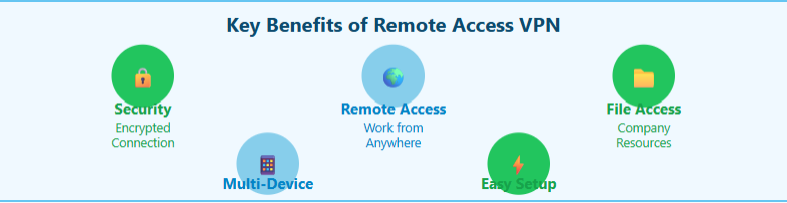
This technology creates a secure "tunnel" between your device and the target network, keeping data safe from prying eyes. It’s widely used by employees working remotely, freelancers accessing company files, or anyone needing to manage smart devices at home while away.
If you are just looking for geo-restricted content, UFO VPN provides 2000+ remote servers for your safe browsing and streaming, such as servers in Russia VPN, India VPN, US VPN, UK VPN, etc. Download free VPN for Mac right now!
How Does a Remote Access VPN Work?
Here’s a simplified process:
-
You install a VPN server at home or in your office (on a router, NAS, or dedicated device).
-
You configure port forwarding and possibly set up Dynamic DNS (if you have a dynamic IP).
-
While away, you connect to that VPN server using a VPN client app.
-
Once connected, you’re virtually on your home/office network—able to access internal devices as if you were there physically.
This setup ensures end-to-end encryption and shields your activity from public Wi-Fi or ISP monitoring.
What's the Difference Between VPN and Remote Access VPN?
Is a VPN a remote access tool? Yes, you can use a VPN to access content from a remote location. However, there's a slight difference between a general "VPN" and a "VPN for Remote Access." Not all VPNs are designed for remote access.
| Feature | General VPN | Remote Access VPN |
|---|---|---|
| Primary Purpose | General online privacy & anonymity | Secure connection to a private network |
| Usage | Browsing, streaming, bypassing geo-blocks | Access to internal files and systems |
| Devices | One or more | Typically individual remote users |
| Example Scenario | Unblocking websites abroad | Accessing company resources from home |
If you're looking for a VPN that offers both online privacy and remote network access, consider a dual-purpose service like UFO VPN, which supports both secure browsing and business-level access tools.
Challenges of Setting Up a Remote Access VPN
While powerful, traditional remote access VPNs require a certain level of technical expertise that many everyday users may find difficult to manage.
-
Port forwarding on your home router
You’ll need to manually open specific ports to allow VPN traffic, which can be confusing for non-technical users. -
Configuring firewall rules
Home firewalls often block incoming connections by default, so adjustments are required to let your VPN traffic through safely. -
Ensuring a stable public IP address (or using DDNS)
If your home internet uses dynamic IPs, you’ll need to set up Dynamic DNS so you can consistently reach your home network. -
Maintaining uptime for your VPN server
Your home VPN server must remain online and connected at all times — any power or network interruption breaks access.
For many users, this setup process is more complex and time-consuming than expected.
A Simpler Alternative: UFO VPN
If your main goals are privacy, data security, and access to restricted content while abroad, there’s an easier solution: UFO VPN.
Instead of setting up your own VPN server, you can simply connect to one of our secure, global servers with a single tap.
✅ Why Choose UFO VPN Over Traditional Remote Access VPN?
| Feature | Traditional Remote VPN |
UFO VPN |
|---|---|---|
| Requires tech setup | ✅ Yes | ❌ No |
| Server maintenance | ✅ You do it | ❌ We handle it |
| Global server access | ❌ No (home/office only) | ✅ 120+ countries |
| Military-grade encryption | ✅ Yes | ✅ Yes |
| Fast streaming & browsing | ❌ Depends | ✅ Optimized servers |
Use UFO VPN When You're Away from Home
Here’s what UFO VPN makes easy:
-
Browse safely on public Wi-Fi in airports and hotels
-
Stream geo-blocked content like Netflix, Hulu, or BBC iPlayer
-
Access region-restricted apps like WhatsApp, Telegram, or banking platforms
-
Protect your personal data while shopping or banking online
Whether you’re working remotely or traveling internationally, UFO VPN gives you secure access to the open internet — without the hassle of setting up anything at home.


UFO VPN is an all-in-one VPN that offers unlimited access to 4D streaming like Netlfix, Disney Plus, no-ping gaming as PUBG, Roblox, CODM and social networking for YouTube, X, Facebook and more.




Unlock Pro Features
If you have upgraded to premium plan , feel free to enjoy premium servers for 4K streaming and advanced features like Kill Switch, Split Tunneling, and gaming acceleration. Your Mac is now fully optimized and protected. Inaddition to basic functions, we recommend you turn on

Verify Your IP Now
Use UFO VPN's " What is My IP " feature to see your new IP and location. This confirms your connection is secure, anonymous, and ready for safe browsing online anywhere at any time.







Conclusion
Remote Access VPNs are a powerful way to connect to your private home or office network, but they require time, configuration, and ongoing management.
If you want a faster, easier, and more secure way to stay connected from anywhere in the world, UFO VPN is the smarter choice.
FAQs
1. Can I use a VPN to access my home network from work or while traveling?
Yes, with a remote access VPN, you can securely control smart devices, access files, or monitor security systems from anywhere.
2. Is remote access VPN free?
Some providers offer limited free plans, but for full access and strong encryption, you can download free VPN for Windows by UFO VPN. It not only gives you a free trial, but also provides full access and strong encryption for your work!
3. Is UFO VPN safe for remote access?
Yes, UFO VPN is safe for remote access in the sense that it provides a secure, encrypted connection when you're using public Wi-Fi, working remotely, or traveling. It protects your data from hackers, trackers, and other online threats.
However, if you're looking to access specific devices on your home or office network (like a printer or NAS), you would need to set up your own remote access VPN server. UFO VPN does not offer direct access to private local networks.