What DeviantArt AI Can Do on the Platform?
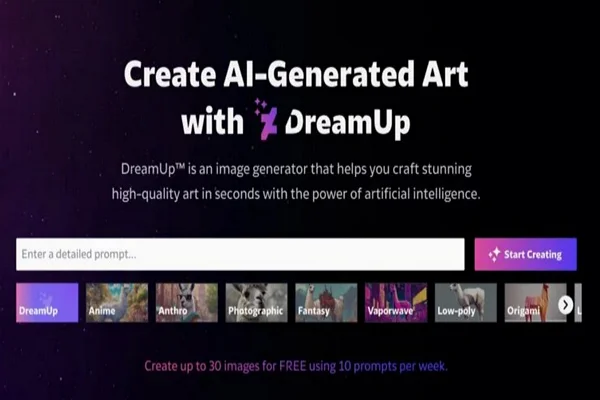
Before we start pressing buttons and changing settings, it's important to understand what is actually happening behind the scenes. DeviantArt introduced its own AI generator, known as DreamUp. This tool allows users to type in a few words—a prompt—and get a fully rendered image in return.
To make this work, AI models need to "learn." They do this by analyzing millions of existing images to understand things like lighting, anatomy, brushstrokes, and composition. The controversy arises because, initially, many of these models were trained on datasets that included artwork from DeviantArt users without their explicit permission.
So, when we talk about AI on the platform, we are talking about two distinct things:
-
Generation: The ability for users to create AI art using tools like DreamUp.
-
Training: The possibility of your personal artwork being used as "food" for these AI models to learn from.
Both of these are major concerns for artists who value originality. Fortunately, you do have options to control how you interact with this technology.
Why You Might Need to Turn Off AI on DeviantArt?
Why go through the trouble of changing your settings? For most users, it isn't just about being "anti-tech." It is about consent and experience. Here are the main reasons why you should consider tightening your account security regarding AI.
Protect Your Original Artwork from AI Training
This is the number one fear for most artists. You have spent years, maybe decades, refining your craft. You have developed a style that is uniquely yours. The idea that a software program could analyze your gallery and learn to replicate your style in seconds is so unfair.
By adjusting your settings, you are putting up a digital fence. It's like telling the data scrapers and the platform itself that your work is not free for the taking. It is a crucial step in preserving the value of your hard work.
Maintain Creative Control and Artistic Integrity
Art is personal. When you draw a character or paint a landscape, you are making thousands of small decisions based on your emotions and experiences. AI art operates differently; it relies on patterns and algorithms.
Many artists feel that having their work mixed into a dataset dilutes their artistic integrity. By turning off AI permissions, you are taking a stand. You are ensuring that your profile remains a sanctuary for human-made creations, maintaining the "soul" of your portfolio.
Privacy and Data Usage Considerations
Beyond the artistic arguments, there is a simple issue of data privacy. When you upload a photo or a drawing, you expect it to be viewed, not processed. Many users feel that having their data scraped for machine learning violates the unwritten contract of social media.
Opting out is a way to reclaim ownership of your digital footprint. It asserts your right to decide how your data is used, ensuring that you are not just a passive resource for a tech company's experiment.
Avoid Unwanted AI-Generated Content in Your Feed
For those who use DeviantArt primarily to browse and collect art, the influx of AI images can be overwhelming. It can be frustrating to search for "fantasy landscape" and find page after page of generic, AI-generated mountains.
Turning off AI features isn't just about protecting your own art; it's also about curating your experience. By filtering out these images, you can ensure your feed remains filled with the genuine, human creativity that brought you to the site in the first place.
What to Prepare Before Turning off AI on DeviantArt?
You might be tempted to rush straight to the settings menu, but take a moment to prepare. A few preliminary steps can save you a lot of headaches and ensure the changes actually stick.
Check the Internet
This sounds simple, but it is the most common reason settings fail to save. When you are applying bulk changes to your gallery or updating account-wide privacy settings, your browser sends a request to the DeviantArt servers. If your connection flickers or times out during this process, the "save" might not register, leaving your art vulnerable without you realizing it.
When surfing DeviantArt, the network must be stable. If you are in a region where connection to international servers is spotty, or if you are using a VPN to secure your traffic, make sure you are connected to a low-latency node. It is best to use products like a free proxy VPN in UFO VPN to avoid a series of subsequent problems that could affect your operations and experience on DeviantArt. A solid connection ensures that when you click "Save," it stays saved.
In order to successfully close AI content and make relevant settings on that platform, make sure you have a stable connection with the following steps:


UFO VPN is an all-in-one VPN that offers unlimited access to 4K streaming like Netlfix, Disney Plus, no-ping gaming as PUBG, Roblox, CODM and social networking for YouTube, X, Facebook and more.




Unlock Pro Features
If you have upgraded to premium plan , feel free to enjoy premium servers for 4K streaming and advanced features like Kill Switch, Split Tunneling, and gaming acceleration. Your Mac is now fully optimized and protected. Inaddition to basic functions, we recommend you turn on

Verify Your IP Now
Use UFO VPN's " What is My IP " feature to see your new IP and location. This confirms your connection is secure, anonymous, and ready for safe browsing online anywhere at any time.







Review Artwork and Upload Settings
Take a look at your current gallery. Do you have hundreds of old deviations? DeviantArt has implemented features to apply settings to future uploads, but you need to be careful about your past work. We will cover how to bulk-edit later, but for now, get an idea of how much content you have. This will help you decide if you need to do a manual review or a bulk update.
Audit Your Authorized Applications
Over the years, you may have linked your DeviantArt account to various third-party apps, quiz sites, or portfolio builders. Go to your Authorized Applications in settings.
Some of these old apps might have permissions that are no longer secure. If an app has access to your gallery, it might theoretically be used as a backdoor for data scraping. Revoke access for any app you do not recognize or no longer use.
Accept the Time Limitation
Be patient. When you apply a "NoAI" tag to your entire gallery, it tells the system to mark your images. However, search engines and external datasets do not update instantly. It may take days or even weeks for your images to be dropped from external indexing. Understanding this helps manage your expectations—you are fixing the future, even if the past takes a moment to catch up.
How to Turn Off AI on DeviantArt?
Now, let's get to the core of the problem. Here are the specific steps on how to turn off AI DeviantArt settings to protect your account and limit AI content.
Activate the "NoAI" Settings
This controls how your artwork is used.
How to do it:
-
Go to Account Settings → AI Settings
-
Enable "NoAI" for your account or selected deviations
What it does:
-
Prevents your artwork from being used in third-party AI training
-
Protects your images from external AI datasets
⚠️ Note: This does not hide AI art in your feed.
Review and Adjust Your Account Privacy
This helps limit AI interactions on your account.
How to do it:
-
Go to Account Settings → Privacy & Security
-
Review options such as who can comment, favorite, or share your artwork
-
Adjust settings to restrict unknown or automated accounts
What it does:
-
Reduces unwanted AI-generated prompts or automated interactions
-
Gives you more control over who can access your artwork
⚠️ Note: This does not block AI art from appearing on the platform, but it improves account-level protection.
Manually Filter AI Content Using Tags
This gives you more precise control when searching.
How to do it:
When using DeviantArt search, exclude tags such as:
ai-
aiart -
dreamup
What it does:
-
Prevents AI-tagged content from appearing in search results
-
Helps focus on human-made artworks
Block or Mute AI-Focused Accounts
This reduces repeated exposure from the same sources.
How to do it:
-
Open an AI artist's profile
-
Click Block or Mute
What it does:
-
Removes their artwork from your feed and recommendations
-
Keeps your timeline focused on non-AI content
How to Control the Amount of AI Content on DeviantArt
Maybe you aren't an artist, or maybe you don't mind AI existing, but you just don't want it taking over your entire screen. You want to see human art first, with perhaps a sprinkle of AI inspiration. In this case, you can actually control the volume of AI content you see.
DeviantArt realized that users were unhappy with the flood of generated images, so they introduced a "suppression" feature.
-
Go to Account Settings and click on Browsing.
-
Look for the AI Content section.
-
You will see options to "Suppress AI Content."
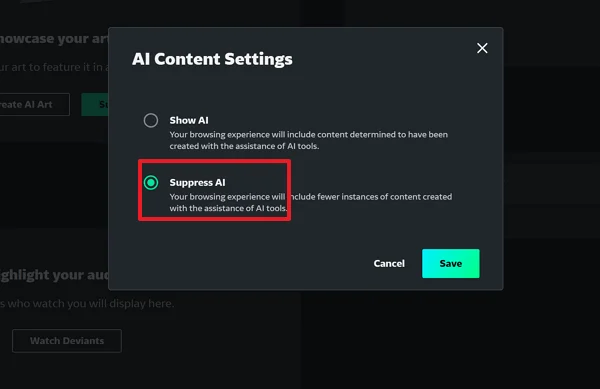
By activating this, the algorithm attempts to hide images that are tagged as AI-created. It isn't perfect—sometimes users lie and don't tag their AI art—but it significantly reduces the noise.
However, if you want a more nuanced approach—perhaps you want to see some AI art but not all of it—you have to rely on the algorithm learning your preferences. If you click on AI images and "favorite" them, the site will show you more. If you click "Show fewer like this" on AI images, the site will slowly learn to clean up your feed.
Can You Fully Disable AI on DeviantArt?
The short answer is: NO. You cannot fully disable all AI-related features on DeviantArt. You can opt out of some AI uses and limit seeing AI-generated art, but there's no way to completely turn off AI everywhere on the platform.
But if you feel that the platform no longer aligns with your values, or if you want to ensure 100% safety, you might be looking for the "nuclear option." Here is how to fully disable your interaction with the AI ecosystem.
Consider Account Deactivation
This is the only way to be absolutely certain your future activity isn't monitored by the platform.
-
Go to Settings > General.
-
Click Deactivate Account.
⚠️ Note: This deletes your public presence. However, images that have already been scraped by external AI bots years ago cannot be "un-scraped" by doing this. But it stops any future bleeding.
Try Free Alternatives of DeviantArt
If you leave, where do you go? Many artists are migrating to platforms that have taken a hard Anti-AI stance.
-
Cara: A new portfolio site specifically built to filter out AI art and protect human artists.
-
InkBlot: A community-focused platform similar to the "old" DeviantArt.
-
ArtStation: While they allow AI, they have strict filters and professional standards. Moving to these platforms can give you peace of mind that the administrators are prioritizing human creators.
Adjust Content Visibility Settings
If you don't want to leave but want to "go dark," you can change who sees your art.
-
Storage Only: Move your deviations to Storage. They are saved on your account but invisible to the public (and bots).
-
Watchers Only: You can set galleries to be visible only to people who follow you. This limits the exposure to random web crawlers that scan public pages.
Stay Updated on DeviantArt's AI Policy
The rules change fast. Last year, the settings were different than they are today. If you choose to stay, make it a habit to check the DeviantArt Team profile once a month. They post updates regarding legal changes, new protection tools, and changes to the Terms of Service. Staying informed is your best defense.
Even after adjusting all settings, the AI page may not disappear immediately. So remember to use UFO VPN for a stable connection. Try to log out and log back in, or refresh the page after you turn off DeviantArt AI.
How to Fix: Can't Turn off AI on DeviantArt
Are you clicking the "Suppress AI" button, but it keeps toggling back on? or maybe the "Save" button is greyed out? This is a common frustration. Here is how to fix it:
-
Clear Browser Cache: Old cookies can sometimes mess up the settings menu. Clear your cache and cookies, then log in again.
-
Disable Ad-Blockers Temporarily: Sometimes, aggressive ad-blockers identify the settings script as an "ad" and block it from running. Pause your ad-blocker, change the setting, and then turn it back on.
-
Update Your Browser: Ensure you are using the latest version of Chrome, Firefox, or Edge.
-
Check Your Connection: As mentioned earlier, a weak connection causes save errors. If the site is loading slowly, try switching to a different network or using a secure tool to stabilize your route to the website.
Conclusion
Navigating the world of digital art has become complicated. The rise of AI has brought convenient tools, but it has also brought genuine anxiety for creators who want to protect their intellectual property. Knowing how to turn off AI on DeviantArt is no longer just a preference—it is a necessary skill for maintaining your digital privacy.
By enabling "NoAI" tags, using tools like Glaze, and curating your browsing settings, you can take back control. You can ensure that your gallery remains a reflection of your hard work and that your feed inspires you rather than annoying you. Remember, technology serves the user, not the other way around. Take these steps today to secure your art for tomorrow.
FAQs
Will disabling AI affect my account visibility or engagement?
No. Flagging your art as "NoAI" does not hide it from human search results or the "Daily Deviations" page. It simply adds a metadata tag for bots. Your visibility to human viewers remains the same.
After turning off Deviantart AI, will my artwork still be visible to the public?
Yes. Turning off AI permissions only stops machines from using your art for training. It does not make your art private. Humans can still see, like, and comment on your post as usual.
If I turn off AI settings now, is my old art removed from AI datasets?
This is the tricky part. If your art was already scraped into a dataset (like LAION) two years ago, changing the setting on DeviantArt today cannot retroactively delete it from that external database. However, it prevents future versions of DeviantArt's DreamUp from using it.
Are DeviantArt's AI settings the same in all regions?
Not exactly. Laws regarding AI and data privacy differ by country. Furthermore, some regions and countries cannot directly use or access DeviantArt due to internet censorship. If you need to perform a series of operations like turning off AI on the platform, it is best to first connect to UFO VPN to access the app. This ensures you can load the full settings menu and save your preferences regardless of your physical location.