What is Tutanota?
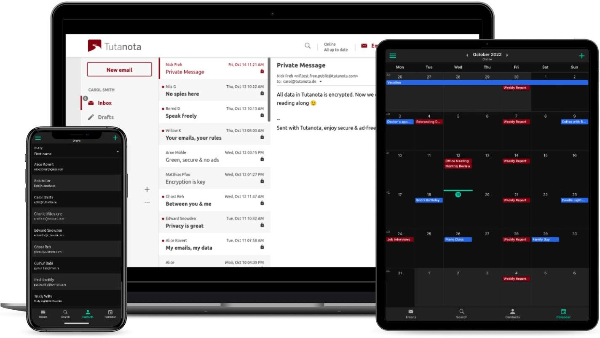
Tutanota is a free, secure email service based in Germany. It stands out for its focus on privacy and security, offering encrypted email storage and communications. Tutanota uses a zero-knowledge architecture, meaning not even Tutanota can access the contents of your emails. It’s particularly well-regarded for its commitment to data privacy and its easy-to-use platform.
What is ProtonMail?
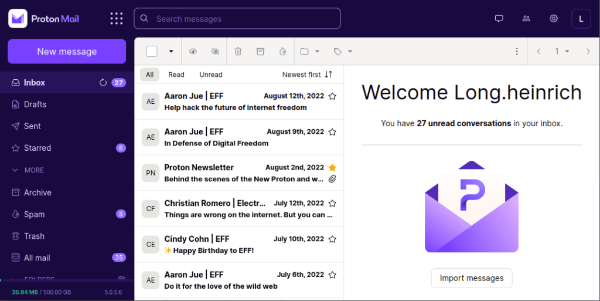
ProtonMail, based in Switzerland, is another popular choice for secure email services. It offers end-to-end encryption, ensuring that only the sender and recipient can read the contents of the email. ProtonMail operates under Swiss privacy laws, which are some of the strongest in the world. This makes ProtonMail a popular choice for users looking for a high level of security and confidentiality.
Key Features: Tutanota vs. ProtonMail
Let’s compare the key features of Tutanota and ProtonMail to help you choose the best service for your needs.
1. Privacy and Security
-
Tutanota: Based in Germany, Tutanota benefits from strong privacy laws, including the GDPR, which provides high levels of protection for personal data. Tutanota’s encryption is built into the service, and even their employees cannot decrypt user data.
-
ProtonMail: ProtonMail is based in Switzerland, a country known for its strong privacy laws, including protections against data requests from governments. ProtonMail encrypts all emails, ensuring that only the sender and recipient can read them.
Both services use open-source cryptography and ensure that no third party can access the emails. However, the legal jurisdiction of each service differs: Tutanota is subject to German laws, while ProtonMail benefits from Switzerland’s neutral stance.
2. Encryption
-
Tutanota: Tutanota offers end-to-end encryption, meaning emails are encrypted both in transit and at rest. They also encrypt subject lines and attachments, offering an extra layer of security.
-
ProtonMail: ProtonMail also offers end-to-end encryption, but unlike Tutanota, ProtonMail allows users to send encrypted messages to non-ProtonMail users using a password. However, ProtonMail’s encryption does not cover the subject line by default.
3. User Interface and Experience
-
Tutanota: Tutanota’s interface is clean and easy to use, with a minimalist design that’s accessible even to less tech-savvy users. It’s available on web, mobile, and desktop versions.
-
ProtonMail: ProtonMail offers a similar user experience but with a slightly more sophisticated interface, designed for users who are familiar with email encryption concepts. It’s also available on multiple platforms, including web, iOS, and Android.
4. Storage and Pricing
-
Tutanota: Tutanota offers a free plan with 1 GB of storage and paid plans for more storage. It’s very affordable compared to ProtonMail, making it an attractive option for users on a budget.
-
ProtonMail: ProtonMail’s free plan includes 500 MB of storage, and its paid plans offer up to 20 GB of storage. While it’s a bit more expensive than Tutanota, it offers more features, such as additional email aliases and a higher email sending limit.
5. Additional Features
-
Tutanota: Tutanota includes built-in calendar encryption, which is rare in secure email services. Tutanota’s premium plans also offer additional aliases and custom domains.
-
ProtonMail: ProtonMail offers features like self-destructing messages and encrypted attachments. ProtonMail’s premium plans include more advanced options, such as the ability to use a custom domain.

How UFO VPN Enhances Email Security
While Tutanota and ProtonMail offer excellent encryption and privacy features, a free proxy VPN in UFO VPN can provide an additional layer of security for your online activities. Here’s how using UFO VPN can help:
-
Encrypt Your Internet Traffic: UFO VPN encrypts all your internet traffic, making it much harder for hackers or government agencies to intercept your emails, even if you are using a public Wi-Fi network.
-
Hide Your IP Address: UFO VPN masks your IP address, preventing websites and online services from tracking your location or activities. This adds a further layer of privacy when using your email service.
-
Bypass Geo-Restrictions: If you’re traveling in a country with restricted access to services like ProtonMail or Tutanota, UFO VPN can help you bypass these restrictions and access your secure email account safely.
4 Steps Free Start with UFO VPN:


UFO VPN is an all-in-one VPN that offers unlimited access to 4K streaming like Netlfix, Disney Plus, no-ping gaming as PUBG, Roblox, CODM and social networking for YouTube, X, Facebook and more.




Unlock Pro Features
If you have upgraded to premium plan , feel free to enjoy premium servers for 4K streaming and advanced features like Kill Switch, Split Tunneling, and gaming acceleration. Your Mac is now fully optimized and protected. Inaddition to basic functions, we recommend you turn on

Verify Your IP Now
Use UFO VPN's " What is My IP " feature to see your new IP and location. This confirms your connection is secure, anonymous, and ready for safe browsing online anywhere at any time.







Which Email Service is Better: Tutanota or ProtonMail?
Both Tutanota and ProtonMail are excellent choices for those seeking secure email services, but the best choice depends on your specific needs:
-
Tutanota is great for users who prioritize simplicity and cost-efficiency, as well as those who need encrypted calendars and contacts.
-
ProtonMail is ideal for users who require a more feature-rich service and are willing to pay a little more for extra storage, email aliases, and advanced features like encrypted email passwords.
FAQs
Is ProtonMail more secure than Tutanota?
Both ProtonMail and Tutanota offer robust encryption and privacy protections, but ProtonMail benefits from Swiss privacy laws, which are some of the strictest in the world. However, Tutanota offers additional features, such as calendar encryption.
Can I use Tutanota or ProtonMail on my mobile phone?
Yes, both Tutanota and ProtonMail offer apps for iOS and Android, so you can securely access your emails from your mobile devices.
How does UFO VPN help secure my email account?
UFO VPN secures your internet connection by encrypting your traffic and hiding your IP address, making it more difficult for hackers to intercept your emails or track your online activity.
Can I use ProtonMail or Tutanota for sending encrypted emails to non-users?
Yes, both services offer options for sending encrypted messages to non-users. ProtonMail allows encrypted emails with a password, and Tutanota uses end-to-end encryption for all its emails.