What Is a VPN Protocol?
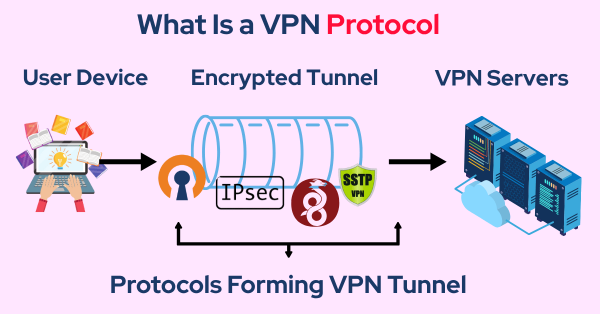
A VPN protocol is a set of rules that determine how data is transmitted between your device and a VPN server. The protocol governs key elements of VPN operation, including encryption standards, authentication, and data integrity. By controlling how data is sent and received, the protocol ensures that your internet traffic is protected from surveillance and hackers.
There are several VPN protocols, each with different characteristics, such as speed, security, and compatibility. Some are better suited for specific use cases, such as streaming or online banking, while others prioritize privacy or speed.
The Most Popular VPN Protocols
Let’s take a look at some of the most popular VPN protocols in use today and compare their features, advantages, and disadvantages.
1. OpenVPN

OpenVPN is one of the most widely used and secure VPN protocols available. It is open-source, meaning its code is publicly accessible, which ensures transparency and trustworthiness.
-
Features:
-
Highly secure with robust encryption.
-
Supports both TCP (Transmission Control Protocol) and UDP (User Datagram Protocol), offering flexibility between security and speed.
-
Can bypass most firewalls, making it suitable for restrictive networks.
-
-
Advantages:
-
Open-source and highly customizable.
-
Strong security and encryption protocols.
-
Versatile and supports various encryption ciphers.
-
-
Disadvantages:
-
Can be complex to set up manually.
-
Slower than some other protocols when using TCP for more reliable data delivery.
-
When to Use OpenVPN: OpenVPN is ideal for users who prioritize security and need a reliable connection, such as when browsing on public Wi-Fi or accessing sensitive information.
2. IKEv2/IPsec
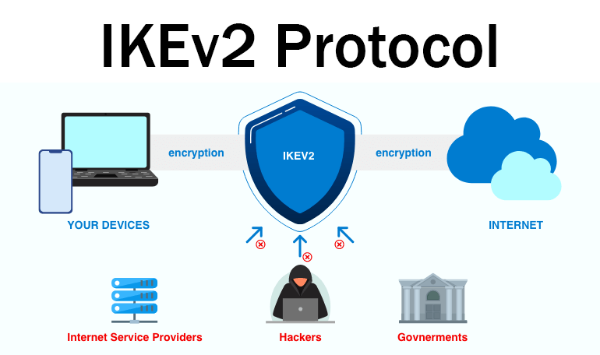
IKEv2 (Internet Key Exchange version 2) paired with IPsec is a popular protocol for mobile devices. It’s known for its fast speeds and stability, especially during network switches (e.g., from Wi-Fi to cellular).
-
Features:
-
Fast and reliable, especially on mobile devices.
-
Strong encryption with IPsec.
-
Automatically reconnects when network connections drop or change.
-
-
Advantages:
-
Excellent performance for mobile devices.
-
Fast connection speeds and quick reconnections.
-
Strong security with encryption protocols.
-
-
Disadvantages:
-
Limited support on some platforms compared to OpenVPN.
-
Less flexibility than OpenVPN.
-
When to Use IKEv2/IPsec: IKEv2 is ideal for mobile users who need a fast, stable connection with high-security standards.
3. WireGuard
WireGuard is a newer VPN protocol that has gained significant attention for its speed and simplicity. It uses state-of-the-art cryptography and aims to provide better performance with lower overhead than older protocols.
-
Features:
-
Light and simple with minimal code for faster speeds.
-
High security with modern cryptography.
-
Supports mobile and desktop devices.
-
-
Advantages:
-
Fast and efficient with low latency.
-
Easy to configure and lightweight.
-
Strong encryption with a focus on performance.
-
-
Disadvantages:
-
Still relatively new, meaning it hasn’t been as widely tested as OpenVPN.
-
Limited support on some legacy systems.
-
When to Use WireGuard: WireGuard is a great option for users who need speed and efficiency while still maintaining strong security. It’s a solid choice for casual browsing, gaming, or streaming.
How VPN Ensures Your Security
The free proxy VPN in UFO VPN offers strong encryption and support for multiple VPN protocols to enhance your online privacy. Whether you need a reliable connection for streaming, secure banking, or simply protecting your data while browsing, UFO VPN provides the flexibility and security you need:
-
Advanced Encryption: UFO VPN uses military-grade encryption to keep your data safe from hackers and third-party surveillance.
-
Multiple Protocols: With UFO VPN, you can choose between OpenVPN, IKEv2/IPsec, and WireGuard to ensure the best balance of speed and security for your needs.
-
No-Logs Policy: UFO VPN does not track or store your browsing activity, so your online presence remains anonymous.
Using UFO VPN in conjunction with the right VPN protocol ensures that your internet connection is always secure, whether you're accessing public networks or streaming content from abroad.
💚Ensure Your Security in 4 Steps:


UFO VPN is an all-in-one VPN that offers unlimited access to 4K streaming like Netlfix, Disney Plus, no-ping gaming as PUBG, Roblox, CODM and social networking for YouTube, X, Facebook and more.




Unlock Pro Features
If you have upgraded to premium plan , feel free to enjoy premium servers for 4K streaming and advanced features like Kill Switch, Split Tunneling, and gaming acceleration. Your Mac is now fully optimized and protected. Inaddition to basic functions, we recommend you turn on

Verify Your IP Now
Use UFO VPN's " What is My IP " feature to see your new IP and location. This confirms your connection is secure, anonymous, and ready for safe browsing online anywhere at any time.







How to Choose the Right VPN Protocol for Your Needs
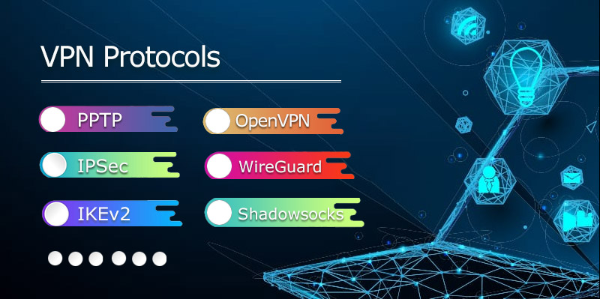
When choosing the right VPN protocol, consider your specific use case and the balance you need between security and speed. Here's a quick overview of which protocol is best for different needs:
-
For Maximum Security: OpenVPN is your best choice for top-notch encryption and robust security features. It’s perfect for privacy-conscious users who want to stay secure on public networks.
-
For Mobile Users: IKEv2/IPsec offers fast, stable connections and is well-suited for users who need a reliable connection while on the go.
-
For Speed and Efficiency: WireGuard is ideal for users who want a fast, low-latency connection without sacrificing too much security. It’s perfect for gaming or streaming content.
Using UFO VPN allows you to choose the protocol that best fits your needs, giving you control over your privacy and online experience.
FAQs
Which VPN protocol is the fastest?
WireGuard is known for its speed and efficiency, offering lower latency and faster speeds compared to older protocols like OpenVPN and IKEv2.
Can I switch between VPN protocols with UFO VPN?
Yes, UFO VPN allows users to switch between different VPN protocols, such as OpenVPN, IKEv2, and WireGuard, depending on your needs for security or speed.
Is IKEv2 more secure than OpenVPN?
Both IKEv2 and OpenVPN are highly secure, but OpenVPN is often considered more flexible and configurable. IKEv2 offers better stability, particularly for mobile users.
How does UFO VPN improve my security with VPN protocols?
UFO VPN enhances security by providing strong encryption and supporting multiple VPN protocols, allowing users to select the best option for their needs while maintaining privacy.