Full YouTube TV Channels List
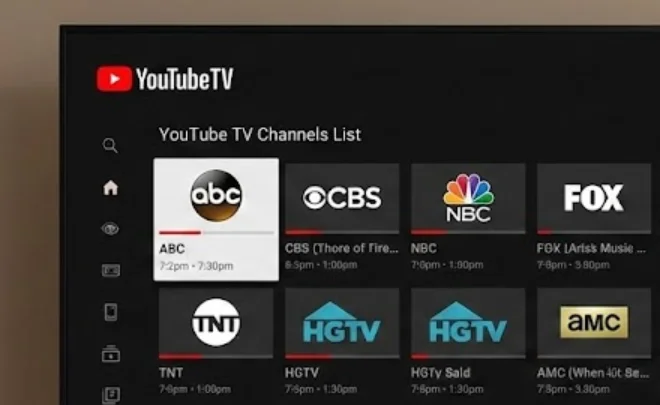
The most critical factor in choosing a live TV streaming service is verifying that it actually carries the networks you watch daily. There is nothing worse than cutting the cord only to realize you have lost access to your local news or favorite sports team. In this part, we provide a comprehensive breakdown of the 2026 YouTube TV channel lineup, detailing precisely what is included in the Base Plan so you can confirm it meets your entertainment needs before you spend a dime.
1. Local Broadcast Networks
- ABC
- CBS
- FOX
- NBC
- PBS
- The CW (VOD only in some areas)
- Telemundo
- Univision
2. Sports
- ESPN
- ESPN2
- FS1
- FS2
- CBS Sports Network
- Big Ten Network
- SEC Network
- ACC Network
- Golf Channel
- NBA TV
- NFL Network
- T2
- Tennis Channel
3. News
- CNN
- MSNBC
- Fox News
- BBC World News
- CNBC
- HLN
- Fox Business
- ABC News Live
- NBC News Now
- Weather Channel
4. Entertainment & Lifestyle
- AMC
- TNT
- TBS
- USA Network
- FX
- FXX
- Bravo
- E!
- HGTV
- Food Network
- TLC
- Comedy Central
- MTV
- VH1
- BET
- Paramount Network
- Hallmark Channel
- Syfy
- TruTV
5. Family & Kids
- Disney Channel
- Disney Junior
- Disney XD
- Nickelodeon
- Nick Jr.
- Cartoon Network
- Universal Kids
- PBS Kids
6. Movies
- Turner Classic Movies (TCM)
- FXM
- Hallmark Movies & Mysteries
- IFC
- SundanceTV
How to Subscribe to YouTube TV Channels Anywhere Safely?

Now that you have reviewed the impressive channel lineup in the previous section, you might be eager to sign up and start watching immediately. However, if you travel frequently or live outside the United States, you will face a major roadblock: geo-restrictions. The following explains how to bypass those error messages and maintain access to the subscription you paid for, no matter where you are in the world.
YouTube TV is strictly available only within the United States. If you try to log in from Europe, Asia, or anywhere else, you will be blocked from viewing your content. To access your account safely and securely from anywhere, you need a reliable tool to change your virtual location.
A free proxy VPN in UFO VPN allows you to mask your real IP address and connect to a secure server in the United States. By doing this, YouTube TV sees you as a user browsing from within the US, granting you full access to your live channels, DVR recordings, and add-ons.
Why You Need a VPN for YouTube TV Channels Subscription?
-
Mask Your Real Location: A VPN hides your actual IP address and routes your internet connection through a secure server in a different location.
-
Bypass Geo-Blocks: By connecting to a server in the US, you effectively trick YouTube TV into believing you are browsing from home, eliminating those frustrating "content unavailable" error messages.
-
Restore Full Access: This instantly grants you access to your complete live channel lineup, personal DVR library, and premium add-ons, ensuring you get the full value of your subscription regardless of where you travel
Recommended Safe Tool for Subscribing to YouTube TV Channels
To bypass these geo-restrictions reliably and securely, UFO VPN - free VPN Proxy is a secure, no-log VPN perfect for adult content access. It offers:
-
Ad blocker and IP lookup tool for free
-
Fast servers in over 100 countries
-
No activity logs with advanced encryption
-
Easy setup on mobile & desktop
The following steps help you set up UFO VPN:


UFO VPN is an all-in-one VPN that offers unlimited access to 4K streaming like Netlfix, Disney Plus, no-ping gaming as PUBG, Roblox, CODM and social networking for YouTube, X, Facebook and more.




Unlock Pro Features
If you have upgraded to premium plan , feel free to enjoy premium servers for 4K streaming and advanced features like Kill Switch, Split Tunneling, and gaming acceleration. Your Mac is now fully optimized and protected. Inaddition to basic functions, we recommend you turn on

Verify Your IP Now
Use UFO VPN's " What is My IP " feature to see your new IP and location. This confirms your connection is secure, anonymous, and ready for safe browsing online anywhere at any time.







How Much Does YouTube TV Cost Per Month?

With your connection secured via a safe tool, the only thing standing between you and your favorite shows is the subscription itself. We will now break down exactly what you can expect to pay for this premium service in 2026, including the standard rates and the aggressive promotional deals currently available, so you can plan your budget without any surprises.
For 2026, the standard pricing structure for the YouTube TV Base Plan is $82.99 per month. This single tier includes all the 100+ channels listed earlier, unlimited cloud DVR space, and up to 6 accounts per household.
However, new subscribers can often take advantage of limited-time promotions:
-
New Subscriber Deal: Currently, many new users are being offered a rate of $59.99/month for the first two months or $72.99/month for the first three months.
-
Free Trial: A standard free trial (usually 5 to 21 days) is available to test the service before you commit.
Unlike traditional cable, there are no hidden broadcast fees, equipment rentals, or cancellation fees. You pay the monthly rate plus tax, and you can cancel at any time.


YouTube TV Packages & Add-Ons Explained
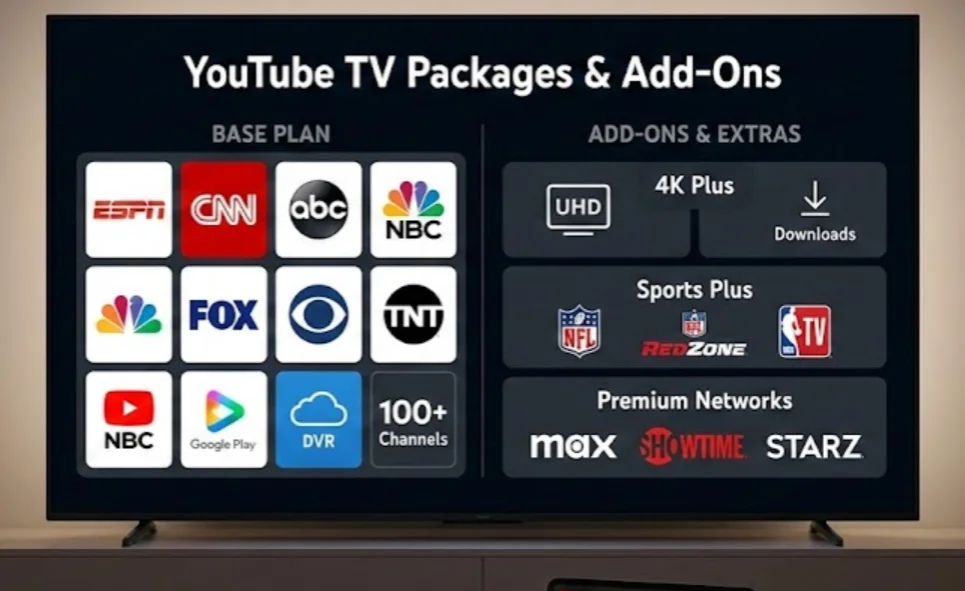
Understanding the base cost is important, but as we discussed in the pricing section, $82.99 is just the starting point if you want premium content. This final section details the optional add-on packages available, helping you determine if the extra features—like 4K streaming or NFL RedZone—are worth the additional investment for your specific viewing habits.
You can customize your viewing experience with several "à la carte" add-ons. These are charged on top of your base subscription fee.
4K Plus: For the Power User
This is the most popular upgrade for large households and tech enthusiasts. For an additional $9.99/month (often discounted for the first year), this package solves three major pain points:
-
4K Ultra High Definition: This can offer a better experience in watching the World Cup, Super Bowl, Olympics, and any other sporting events.
-
Unlimited Streams at Home: The standard plan limits you to 3 simultaneous screens. This add-on grants you unlimited streams while connected to your home Wi-Fi—perfect for big families where everyone watches something different.
-
Offline Viewing: Download recordings to your mobile device to watch offline, a lifesaver for flights or commutes.
Sports Plus: The Ultimate Fan Experience
If the standard ESPN and FS1 channels aren't enough, the Sports Plus add-on ($10.99/month) is a must-have, specifically for one reason: NFL RedZone.
-
NFL RedZone: Catch every touchdown from every game on Sunday afternoons commercial-free.
-
Global Sports: Includes Fox Soccer Plus and beIN SPORTS for international soccer leagues.
-
Niche Interests: features channels like Billiard TV, PokerGO, MAVTV (motorsports), and Fight Network.
Entertainment Plus & Premium Networks
You can bundle premium networks or buy them individually. The Entertainment Plus Bundle ($29.99/mo) is the best value, combining Max (formerly HBO Max), STARZ, and Showtime.
If you prefer to pick and choose, you can add these standalone networks:
-
Max: Access to all HBO series, Warner Bros. movies, and Max originals.
-
MGM+: formerly Epix, great for movies and original series.
-
Cinemax & Starz: For extensive movie libraries.
-
NBA League Pass: Watch out-of-market NBA games (pricing varies by season).
Niche & International Add-Ons
YouTube TV offers dozens of smaller, specialized add-ons that cater to specific hobbies or demographics:
-
Spanish Plus ($14.99/mo): Adds 28+ channels like ESPN Deportes, CNN Español, and Cine Latino to your Base Plan. (Note: There is also a standalone Spanish Plan for users who only want Spanish content without the English Base Plan).
-
Hallmark Movies Now: Commercial-free feel-good movies.
-
Acorn TV & BritBox: The best of British television and mysteries.
-
Shudder: A dedicated streaming service for horror, thriller, and supernatural fans.
-
CuriosityStream: High-quality documentaries for science and history buffs.
Conclusion
YouTube TV continues to dominate the live TV streaming market in 2026 with its extensive channel lineup, unlimited DVR, and flexible add-on options. Whether you stick with the robust Base Plan or upgrade with the 4K Plus and Sports Plus packages, the service offers a premium cable-free experience. Remember, while the service is exclusive to the US, tools like UFO VPN can help you maintain secure access to your subscription while traveling. By evaluating the costs and the new plan options, you can build the perfect entertainment setup for your home.
FAQs
Can I share my YouTube TV membership with my family?
Yes, your YouTube TV membership allows you to create a family group with up to five other people in your household at no extra cost.
Is there a contract or cancellation fee with YouTube TV?
No, YouTube TV operates on a strict month-to-month basis with no long-term contracts or commitments. You are free to cancel your membership at any time through your account settings.
Does YouTube TV offer local channels in every zip code?
YouTube TV provides local affiliate channels for ABC, CBS, FOX, and NBC in over 98% of television markets across the United States.
What internet speed do I need to stream YouTube TV reliably?
To stream content effectively, YouTube TV recommends a download speed of at least 3 Mbps for standard definition video.