What Is DeviantArt?
Before we dive into the settings, let's briefly look at the platform itself. DeviantArt (often abbreviated as DA) is the world's largest online social community for artists and art enthusiasts.
Launched back in 2000, it is a place for talents to share sketches, digital paintings, literature, and photography while connecting with fellow creators.
Think of it as a mix between a social network (like Facebook) and a digital gallery. Users can "watch" or follow other artists, join groups, submit work, and comment on others' creations.
Because it is an open social platform, it attracts millions of distinct personalities. While most interactions are positive, like constructive criticism, fan art, and commissions, the open nature of the site means you might occasionally encounter spam, harassment, or content that violates your personal comfort zone. When running into such problems, it's better to block some DA accounts.
Can You Block DeviantArt Accounts?
The short answer is: Yes, absolutely.
DeviantArt provides robust tools allowing users to control who interacts with them. When you block a user, it's just like building a digital wall between your profile and theirs.
The platform understands that for creativity to flourish, artists need to feel safe. If you cannot control who comments on your work or sends you private notes, you might stop posting altogether. Therefore, learning how to block DeviantArt accounts isn't just a technical skill; it's more like a way to protect your creative energy.
Note: If DeviantArt is restricted in your area, you might need to use the free proxy VPN in UFO VPN. This reliable tool ensures a stable connection to the app and lets you successfully block anyone you no longer wish to interact with.
Why You Should Block Someone on DeviantArt?
You might be hesitant to block someone. Maybe you feel it's too harsh, or you are worried about drama. But in fact, blocking is a healthy boundary. Here are a few common scenarios where hitting that block button is the right call:
1. Harassment and Cyberbullying
This is the most obvious reason. If a user is leaving mean comments, sending aggressive private notes, or engaging in hate speech on your profile, you should block them immediately. You do not owe anyone your time or mental energy.
2. Art Theft
When we catch someone who is stealing our creations, ideally, we want to report art thieves to the admins. But what comes more emergent is that while you wait for the moderation team to take action, you should block the thief right away. This prevents them from seeing your future uploads and plagiarizing more of your work.
3. Spam and Bots
Like all major platforms, DeviantArt has its fair share of bots. These accounts might comment on generic links to scam sites or unwanted cryptocurrency promotions on your artwork. Blocking them clears up your notification feed so you can focus on genuine feedback.
4. Unwanted Commissions or Requests
Some users can be very pushy about requesting free art or commissions you have already declined. If someone refuses to take "no" for an answer, blocking them is a valid way to end the conversation.
How to Block DeviantArt Accounts on Desktop?
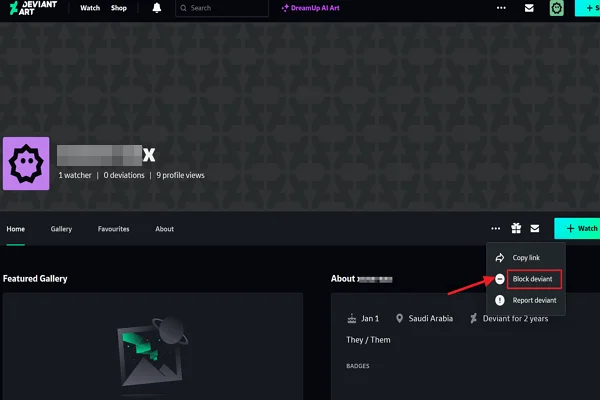
If you are using a desktop, there are generally two ways to block DeviantArt accounts - you can directly block someone from the profile or manage the block list in settings.
Method 1: Blocking Directly from the User's Profile
This is the fastest method if you are currently looking at the offender's page.
Step 1. Click on the username of the person you want to block to go to their main page.
Step 2. Look for the three little dots (the ellipsis icon). They are usually located near the top right of their profile banner, often next to the "Watch" or "Chat" buttons.
Step 3. A dropdown menu will appear. Then click on Block User.
Step 4. A pop-up window may appear asking you to confirm. Once you click confirm, the connection is severed.
Method 2: Using the Settings Menu
If you know the username but don't want to visit their profile (perhaps to avoid seeing their content), you can use the settings menu.
Step 1. Hover over your avatar in the top right corner and select Account Settings.
Step 2. Look for the section labeled General.
Step 3. Locate the section dedicated to blocked users.
Step 4. You will see a text box where you can type in the username of the person you wish to block.
Step 5. Click save or add, and the user will be added to your block list.
How to Block DeviantArt Accounts on Mobile?
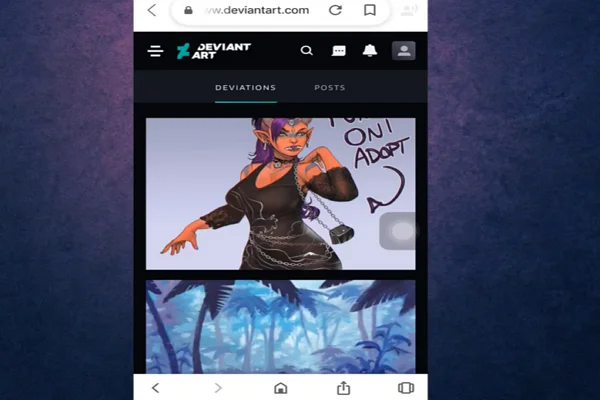
Many people also use DeviantArt via the mobile app or a mobile browser. And if you are one of them, never worry about this. The interface is slightly different, but the process is super easy.
Method 1. Block from the DeviantArt App ( iOS and Android)
Step 1. Open the app and log in to your account.
Step 2. Tap on the user's avatar or name to visit their profile page.
Step 3. Look for the three dots in the top right corner of the screen (sometimes it is a gear icon depending on the version of the app).
Step 4. Select the Block option from the menu.
Step 5. The app will ask if you are sure. Tap yes to confirm.
Method 2. Block from Your Mobile Browser (Chrome, Safari, etc.)
If you are not using the app, the mobile browser version looks very similar to the desktop version, just condensed.
Step 1. Navigate to the user's profile URL.
Step 2. Tap the three dots near the cover image.
Step 3. Select Block User from the dropdown list.
By grasping how to block DeviantArt accounts on mobile, you ensure that you can manage your safety even when you are away from your desk.
Is A VPN Necessary When Using DeviantArt?

A VPN isn't strictly required for most users, but it can be helpful in certain situations. For example, when DeviantArt loads slowly, fails to open, or won't let you log in at all, the issue may be related to network restrictions, unstable public Wi-Fi, or regional connection limits rather than your account itself.
In certain countries or regions, access to creative communities like DeviantArt is restricted or completely banned due to censorship laws. Moreover, if you are using public Wi-Fi (like at a coffee shop or school), the network administrator might have blocked the site.
In these cases, a VPN (Virtual Private Network) is not just a luxury; it is necessary.
A reliable VPN masks your IP address, making it look like you are browsing from a different location, thus helping bypass geo-blocks. UFO VPN ensures a more stable and secure network condition due to its:
- Cross-Platform Compatibility: It doesn't matter what device you use to browse art. UFO VPN is compatible with macOS, Windows, iOS, and Android. You can secure your phone and your computer with a single service.
- Fast Speed: Loading high-resolution art images requires a fast connection. UFO VPN offers stable speeds so your gallery loads quickly.
- Privacy: It adds an extra layer of encryption, keeping your browsing habits private from your ISP.
You can switch to different server locations to make sure you can log in without errors and manage your account settings without any interruption. It also adds an extra layer of protection, especially when you're browsing or logging in on public networks, helping keep your activity private and secure.
It is also pretty easy to install and use. To get a quick service, you'll just need to follow a few steps, including:


UFO VPN is an all-in-one VPN that offers unlimited access to 4K streaming like Netlfix, Disney Plus, no-ping gaming as PUBG, Roblox, CODM and social networking for YouTube, X, Facebook and more.




Unlock Pro Features
If you have upgraded to premium plan , feel free to enjoy premium servers for 4K streaming and advanced features like Kill Switch, Split Tunneling, and gaming acceleration. Your Mac is now fully optimized and protected. Inaddition to basic functions, we recommend you turn on

Verify Your IP Now
Use UFO VPN's " What is My IP " feature to see your new IP and location. This confirms your connection is secure, anonymous, and ready for safe browsing online anywhere at any time.







Final Thoughts
The internet is a big place, and DeviantArt is a massive community. While the majority of interactions on the platform are creative and inspiring, there will always be a few bad apples.
You should never feel guilty about prioritizing your mental health and digital safety. Learning how to block DeviantArt accounts is a basic skill every user should have in their toolkit. Whether it is a spam bot or a toxic user, removing them from your digital view allows you to focus on what really matters: creating and enjoying art.
Take a few minutes today to review your privacy settings. A curated feed is a happy feed!
FAQs
1. Can DeviantArt accounts be deactivated?
If you're experiencing connectivity issues or are unable to access Call of Duty, it might be due to server maintenance or regional outages. You can check Activision’s official server status page or the social media for updates on ongoing maintenance or disruptions.
2. Does blocking stop people from watching DeviantArt?
Yes. Blocking removes them from your Watchers list, stops notifications, and prevents them from watching you again while blocked.
3. Can I block someone who doesn't log in?
No. Guests can't be blocked because they don't have accounts. However, you can limit who sees your art by adjusting gallery visibility settings.
4. How many accounts can I block on DeviantArt?
In the past, DeviantArt had a strict limit on the number of users you could block (around 500). However, the platform updates frequently. No worries, the technical limit is very high today. Most users will never reach it. If needed, you can unblock inactive accounts.
5. What happens when you block someone on DeviantArt?
Blocking stops messages, comments, favorites, and most profile access. And the block is mutual, meaning neither of you can interact with each other until it's removed.