What is the Deep Web?
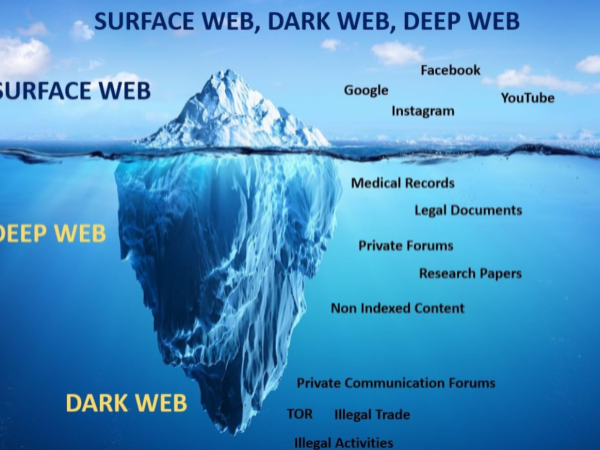
The deep web refers to all parts of the internet that are not indexed by search engines. This includes private accounts, databases, and subscription-based services that require a login to access. Most people use the deep web daily without even realizing it, such as checking email, accessing online banking, or using cloud storage services.
Examples of Deep Web Content:
-
Private Databases: Information within company intranets, academic resources, or government databases not available to the public.
-
Subscription Services: Content behind paywalls, such as streaming services and paid news websites.
-
Personal Information: Your private emails, health records, online banking accounts, and social media settings.
What is the Dark Web?
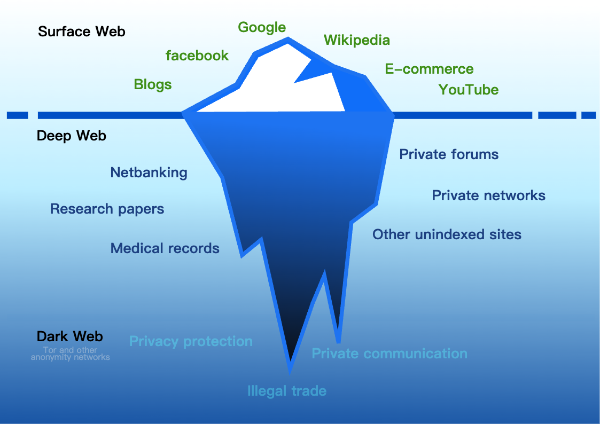
The dark web, on the other hand, is a small portion of the deep web that requires special software (such as Tor) to access. While it’s true that the dark web is notorious for illegal activities, it is also a hub for users seeking anonymity, such as journalists, whistleblowers, and activists.
Dark Web Content:
-
Illegal Marketplaces: Platforms where illicit goods like drugs, weapons, and stolen identities are traded.
-
Cryptocurrency Transactions: The dark web is often used for anonymous financial transactions, mainly via cryptocurrencies like Bitcoin.
-
Hacking Forums: Spaces where cybercriminals exchange tools and techniques for illegal activities.
Key Differences Between the Deep Web and the Dark Web
| Deep Web | Dark Web |
|---|---|
| Not indexed by search engines | Requires specific software (e.g., Tor) |
| Includes private data, email, and subscription content | Hosts anonymous, often illegal, activities |
| Accessed by regular users for daily activities | Accessed by users seeking anonymity, often with a focus on privacy or illicit trade |

Risks of the Dark Web
While the dark web can provide privacy and anonymity, it’s also a breeding ground for illegal activities and cybercrimes. Users who explore the dark web without the proper precautions may find themselves exposed to malware, hacking attempts, and even illegal content.
Major Risks:
-
Exposure to Cybercrime: The dark web is home to illegal markets and forums that may involve hacking tools, malware, and fraudulent schemes.
-
Identity Theft: Personal information bought and sold on the dark web can lead to identity theft, fraud, or cyberstalking.
-
Data Breaches: Some users’ personal data may be found in dark web databases, exposing them to further risks of attacks.
How VPN Can Protect Your Online Privacy
While navigating the deep web is relatively safe for everyday users, browsing the dark web requires special attention to security.A free proxy VPN in UFO VPN can protect your privacy and keep your data safe while exploring these hidden web layers.
UFO VPN Features:
-
AES-256 Encryption: UFO VPN secures your internet traffic with industry-standard encryption, ensuring your personal data stays protected.
-
IP Address Masking: Your real IP address is hidden, preventing third parties from tracking your activities on both the deep and dark web.
-
Safe Browsing on Public Networks: Whether you're accessing the deep web or using public Wi-Fi, UFO VPN ensures that your data is safe from hackers and malicious sites.
-
No-Logs Policy: UFO VPN doesn’t track your online activities, so even your browsing on the deep web stays private.
🩵Safeguard Your Online Privacy in 4 Steps:


UFO VPN is an all-in-one VPN that offers unlimited access to 4K streaming like Netlfix, Disney Plus, no-ping gaming as PUBG, Roblox, CODM and social networking for YouTube, X, Facebook and more.




Unlock Pro Features
If you have upgraded to premium plan , feel free to enjoy premium servers for 4K streaming and advanced features like Kill Switch, Split Tunneling, and gaming acceleration. Your Mac is now fully optimized and protected. Inaddition to basic functions, we recommend you turn on

Verify Your IP Now
Use UFO VPN's " What is My IP " feature to see your new IP and location. This confirms your connection is secure, anonymous, and ready for safe browsing online anywhere at any time.







Benefits of Accessing the Deep and Dark Web
Despite the risks, both the deep and dark web offer distinct advantages for certain users:
-
Deep Web: Provides access to essential services, such as online banking, personal data storage, and academic research that is not available through search engines.
-
Dark Web: Offers anonymity for users who require it, such as journalists in oppressive regimes, activists, or people who need to bypass censorship.
FAQs
Is it illegal to access the deep web?
No, accessing the deep web is completely legal. It includes everyday activities such as using your email, banking, or accessing private academic papers.
Is the dark web illegal?
Accessing the dark web itself is not illegal; however, many activities on the dark web, such as buying illegal goods, are unlawful.
How do I access the dark web safely?
To safely access the dark web, use the Tor browser and ensure you’re using a VPN like UFO VPN to protect your privacy and security.
Can UFO VPN protect me on the dark web?
Yes, UFO VPN can protect your data while using Tor, ensuring that your identity and online activities remain anonymous.