What Is Basketball Stars Unblocked?
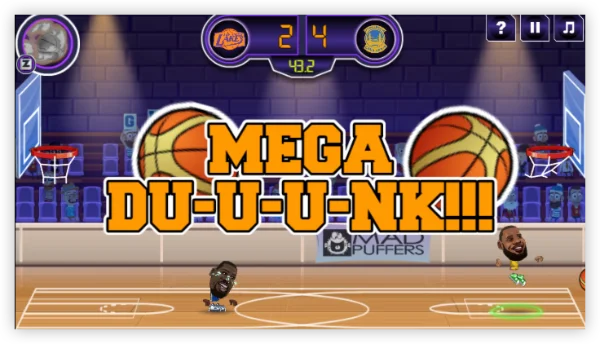
Basketball Stars is one of the most popular online basketball games, originally developed by MadPuffers. It features:
-
1v1 and 2v2 Matches – Play against AI or real players.
-
Quick Controls – Simple arrow keys and space bar for shooting, blocking, and dribbling.
-
Customization – Choose characters, outfits, and basketball courts.
-
Unblocked Version – Mirror sites and portals make the game accessible even on school or office networks where gaming is usually restricted.
These games are trending in:
-
United States – Especially in schools with Chromebook programs.
-
India & Southeast Asia – Due to lightweight browser compatibility.
-
Europe – Students and office workers enjoy casual breaks.
-
Middle East – UFO VPN is often used for access due to stricter restrictions.
How to Play Basketball Stars Unblocked
On PC/Chrome
-
Open your browser (Chrome works best for unblocked sites).
-
Search for “Basketball Stars Unblocked” or directly visit trusted portals like Unblocked Games WTF.
-
Click Play – No download is required; the game loads directly in your browser.
-
Choose a Mode – 1 Player, 2 Player, or Quick Match.
-
Enjoy & Compete – Show off your dunking and shooting skills!
On Mobile (iOS/Android)
-
Install the app – Download Basketball Stars from Google Play or the App Store.
-
Launch & set up – Allow network/audio permissions; log in if you want to save progress.
-
Controls – Use the on-screen joystick to move and tap buttons to shoot, block, or pass. Long press for dunks or power shots.
-
Multiplayer – Play quick matches online or invite friends.
-
Optional: Pair a Bluetooth controller for more precise controls.
Basketball Stars Unblocked Is Not Working: 5+ Solutions
Sometimes, you might find that Basketball Stars Unblocked isn’t loading or running properly. This can happen for several reasons, and here are practical solutions:
-
Check Internet Connection
-
Slow or unstable Wi-Fi often causes the game to freeze or fail to load.
-
Restart your router or switch to a stable network if possible.
-
-
Clear Browser Cache & Cookies
-
Cached files may prevent unblocked game sites from loading.
-
Go to your browser settings → Clear browsing data → Select cache & cookies → Refresh the page.
-
-
Disable Extensions or Ad Blockers
-
Some extensions (like ad blockers) interfere with the scripts that run unblocked games.
-
Try disabling them and reload the game.
-
-
Try a Different Browser
-
If the game doesn’t run on Chrome, switch to Firefox, Edge, or Brave.
-
-
Check School or Workplace Restrictions
-
Some networks block unblocked game sites completely.
-
Use a VPN (e.g., UFO VPN) to bypass restrictions and access the game safely.
Step 1Download UFO VPN for WindowsGrab the free Windows VPN installer right below. UFO VPN is lightweight and secure on all Windows systems. Double-click the downloaded file and complete the installation. Once installed, launch UFO VPN. Step 2Select a VPN ServerInside the app, you can click the "Connect" button for quick connection, or browse the list of servers by Location or categroy: Video& Stream, Game, etc. Choosing the right server ensures fast speeds and smooth access.
UFO VPN is an all-in-one VPN that offers unlimited access to 4K streaming like Netlfix, Disney Plus, no-ping gaming as PUBG, Roblox, CODM and social networking for YouTube, X, Facebook and more.
Step 3Enable Advanced FeaturesIn addition to basic functions, we recommend you turn on extra protections via Ad Blocker and features like Kill Switch, Split Tunneling and Smart Hop. Users can optimize online gaming/streaming/chatting as much as possible. Step 4Check Your New IPUse UFO VPN's built-in " What is My IP" feature to see your new IP address and location. This confirms your VPN is working, hides your real IP, and ensures privacy while browsing.
 Step 1 Download and install UFO VPN for macOSClick the button below to download offcial Mac VPN free. Open the .dmg file, drag UFO VPN to your Applications folder, and launch it. You're just a few clicks away from secure browsing.
 Step 2 Pick Your IP ServerTap "Connect" button for the fastest server automatically. Or you can select a server from the global server list in 100+ countries. UFO VPN is an UFO VPN is an all-in-one VPN or gaming, video streaming, social platforms, and AI tools.
 Step 3
Unlock Pro Features
If you have upgraded to premium plan , feel free to enjoy premium servers for 4K streaming and advanced features like Kill Switch, Split Tunneling, and gaming acceleration. Your Mac is now fully optimized and protected. Inaddition to basic functions, we recommend you turn on
 Step 4
Verify Your IP Now
Use UFO VPN's " What is My IP " feature to see your new IP and location. This confirms your connection is secure, anonymous, and ready for safe browsing online anywhere at any time.
 Step 1 Download and install UFO VPN for iPhone/iPadDownload this free iOS VPN via official link or App Store. Once installed, launch the app to get started. UFO VPN is now trusted by over 2 million users worldwide with optimzed service.
 Step 2 Select a Perfect ServerHit "Connect" button for the fastest server near you instantly. Or you can choose a favorite location/platform from the server list manually for full control. UFO VPN is an all-in-one VPN companion for gaming, streaming, social media, and AI tools.
 Step 3 Lookup IP and Enable Pro FeaturesNow you can check your current IP via built-in IP lookup tool. Pro features in premium plan offer you premium servers, blazing speeds, Kill Switch, Split Tunneling, and Multi-device login, so you can protect your iPhone, iPad, and other Apple devices all at once.
 Step 1 install UFO VPN for AndroidGet free Android VPN from offcial website or Google Play Store. Follow the instructions for easy download. Then open the app and get ready to surf safely.
 Step 2 Choose Your Ideal ServerUFO VPN is an all-in-one powerhouse for gaming, video streaming, social apps, and AI tools. The"Connect" button links you to the fastest server instantly, or you can choose among the server list manually via Location/ Video&Stream/Games for easy access.
 Step 3 Power Up Pro FeaturesPro users can look up current IP via built-in "What Is My IP" feature, and unlock premium features like 4K servers, turbo speeds, Kill Switch, Split Tunneling, and Multi-device login, keeping all your Android phones, tablets, and other devices safe at once.
-
-
Update Your Browser or Device
-
Older browser versions may not support certain HTML5 or Unity-based games.
-
Keep your device and browser up to date for smoother gameplay.
-
👉 If none of these work, try an alternative unblocked game portal. Sometimes the site itself might be down or overloaded.
Where Is Basketball Stars Unblocked Games Available?
Unblocked game portals are typically designed to bypass network restrictions, so availability depends on where schools or workplaces restrict gaming websites. Here’s a list of regions where players commonly access Basketball Stars Unblocked:
Country List about Basketball Stars Availability
-
United States – Popular among students on school Chromebooks.
-
Canada – Many free unblocked portals are accessible.
-
United Kingdom – Frequently accessed via proxy-based sites.
-
Australia – Common among students seeking quick browser games.
-
India – Availability depends on local school/work filters.
-
Philippines – Widely played through mobile-friendly unblocked sites.
-
European countries (Germany, France, Spain, Italy) – Often accessible unless blocked by school firewalls.
-
Middle East & Southeast Asia – Some restrictions may apply, but VPNs or alternate portals make it accessible.
👉 Tip: If your country blocks certain unblocked portals, using a VPN like UFO VPN can help you bypass restrictions and access the game safely.
Top Portals for Unblocked Sports Games Basketball
Here are the top portals where you can access unblocked sports games basketball versions:
-
Unblocked Games WTF – Known for hosting the latest sports and action games.
-
CoolMath Games – Features strategy and puzzle-oriented versions of basketball games.
-
CrazyGames – Offers both Basketball Stars and alternative basketball sports titles.
-
FreezeNova Unblocked – Perfect for action-driven basketball games with smooth performance.
-
Google Sites Mirrors – Many student-made versions of Basketball Stars are hosted here.
💡 Pro Tip: Bookmark multiple portals, as URLs often change when blocked by school firewalls.
Is Basketball Stars Unblocked Free to Play?
Yes — Basketball Stars Unblocked is completely free to play. Unlike official versions of the game that might be hosted on app stores or premium gaming platforms, the unblocked version is usually accessible directly through browser-based portals. These sites allow you to play without creating an account, downloading files, or paying fees.
However, keep in mind:
-
Free access comes with ads — many unblocked sites rely on advertising.
-
Not all versions are equal — some portals may offer updated graphics or multiplayer support, while others may run older versions.
-
Hidden risks — always check that the unblocked site is safe and free from malware before playing.
Alternatives: More Unblocked Basketball Sports Games
If Basketball Stars is unavailable, try these:
-
Basketball Legends – A similar 2D basketball game with iconic characters.
-
Dunk Shot – A simple yet addictive hoop-shooting game.
-
Street Hoops 3D – Offers a street-style basketball experience.
-
Basket Random – Hilarious physics-based basketball fun.
-
NBA Jam (Browser Version) – Retro arcade basketball action.
Bonus: Master in Basketball Stars Unblocked Games
Basketball Stars Unblocked is more than just a casual shooting game — it’s a test of quick reflexes and smart strategy. Here are the key skills you can develop while playing:
-
Dribbling Control
-
Keep the ball moving to avoid losing possession.
-
Learn to time crossovers and feints to trick opponents.
-
-
Timing Your Shots
-
Perfect timing is crucial — release the ball at the right moment for accurate baskets.
-
Practice long-range shots and dunks to maximize scoring opportunities.
-
-
Defense and Blocking
-
Stay alert and anticipate your opponent’s moves.
-
Use quick reactions to block shots or steal the ball.
-
-
Boost Management
-
Some versions have special boosts (speed, higher jumps, etc.).
-
Use them strategically instead of wasting them early.
-
-
Multiplayer Strategy
-
In 2-player mode, learn to predict your friend’s moves.
-
Balance between aggressive offense and strong defense for the win.
-
👉 Pro Tip: Playing regularly sharpens hand-eye coordination, reaction speed, and decision-making, making Basketball Stars Unblocked both fun and skill-building.
Conclusion
Basketball Stars Unblocked and other unblocked sports games basketball titles make it easy for fans to enjoy hoops action anywhere—school, work, or home. With simple controls, fun physics, and multiplayer options, it’s one of the best unblocked sports games available today.
FAQs
Can I play Basketball Stars with friends?
Yes—2-player mode allows local multiplayer on the same keyboard.
Why isn’t Basketball Stars loading?
Clear cache, try Incognito mode, or switch to another mirror portal.
Is it legal to play Basketball Stars on unblocked sites?
As long as you stick with related laws and regulations, it’s legal. Avoid shady links.
Can I play Basketball Stars on a phone?
Yes, most versions are mobile-friendly and run on Chrome or Safari.