What the Five Eyes alliance is

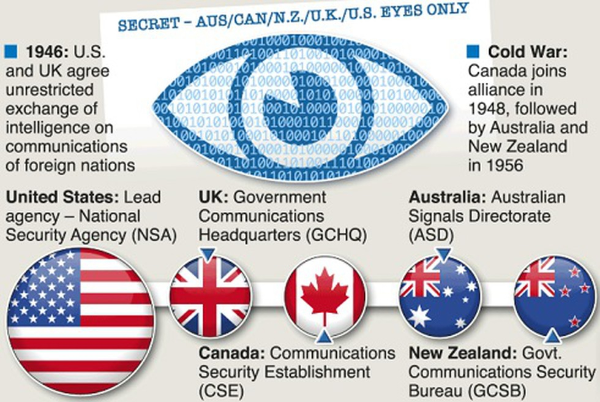
The Five Eyes alliance is a long-standing intelligence partnership built to share signals intelligence (SIGINT)—the collection and analysis of electronic communications and metadata. Born from the UKUSA Agreement in 1946, it formalized collaboration that began during World War II code-breaking. The principle is simple: each member collects intelligence in ways shaped by its geography, capabilities, and laws, then shares relevant insights with the others.
Why it endures:
-
Global coverage. No single country sees everything. The Five Eyes alliance spreads collection, analysis, and technical expertise across five regions.
-
Standardization. Decades of joint standards and tooling make sharing faster and more useful.
-
Threat evolution. From Cold War radio intercepts to today’s internet backbone, the Five Eyes alliance adapts as communications technologies change.
each country has its own legal limits and oversight mechanisms. Yet, cross-border sharing can complicate those boundaries, which is why privacy advocates still pay close attention to the Five Eyes alliance today.
Members and how intelligence sharing works in practice

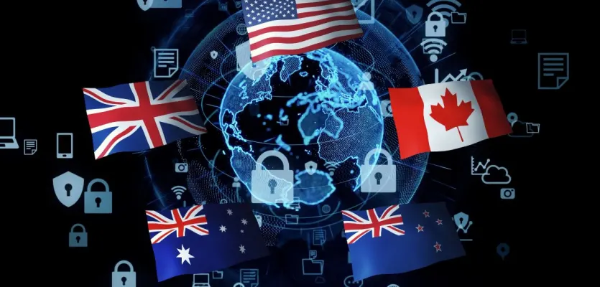
The Five Eyes alliance members are the United States, United Kingdom, Canada, Australia, and New Zealand. While structures differ, the working model is consistent:
-
Tasking & collection. Agencies prioritize targets (terrorism, cybercrime, foreign intel, hostile influence). Collection can include lawful intercepts, metadata analysis, and foreign-focused monitoring.
-
Processing & analysis. Bulk signals become structured data; analysts correlate with open-source, diplomatic, and law-enforcement information.
-
Sharing & safeguards. Partners disseminate what’s relevant, usually with handling caveats (classification, origin rules, minimization of domestic data, etc.).
Why you should care: even if one country restricts domestic collection, shared insights from partners may still reveal patterns about domestic users. That’s the tension—capabilities are powerful; oversight and minimization must keep up. Understanding the Five Eyes alliance helps you choose privacy tools and habits aligned with your risk tolerance.
Nine Eyes and Fourteen Eyes explained
You’ll often see two larger groupings alongside the Five Eyes alliance:
-
Nine Eyes. The original five plus Denmark, France, the Netherlands, and Norway. Cooperation is looser than within the core five.
-
Fourteen Eyes. The nine plus Germany, Belgium, Italy, Spain, and Sweden. This is commonly linked with the SIGINT Seniors Europe framework.
Why this matters for users: conversations about jurisdiction, data-retention laws, and cross-border requests often reference whether a service or provider is in a Nine Eyes or Fourteen Eyes country. While membership doesn’t automatically mean your personal data is being collected, it does inform risk models, legal processes, and how easily intelligence can be shared.
How the Five Eyes alliance affects your privacy
The Five Eyes alliance doesn’t monitor everyone all the time. But modern communications create large amounts of metadata, and legal thresholds for collection, retention, and sharing vary by country. Here’s how that intersects with your daily life:
-
Metadata matters. Even without reading message content, who you contacted, when, from where, and how often can reveal sensitive patterns. The Five Eyes alliance emphasizes signals analysis where metadata is highly valuable.
-
Cross-border requests. A request blocked in one jurisdiction may be accessible via a partner’s legal pathway. That’s the “work-around” critics worry about.
-
Cloud & app sprawl. Your data sits with many vendors (email, messaging, backups). Each has its own logs, jurisdictions, and disclosure processes.
-
ISP visibility. Your internet provider sees destination IPs, timing, and often DNS lookups—useful signals for analysis.
-
Public Wi-Fi risk. Airports, hotels, and cafés are noisy, high-risk environments for on-path snooping and captive-portal tricks—issues orthogonal to the Five Eyes alliance, but relevant to your overall exposure.
Bottom line: the Five Eyes alliance is a reminder to reduce unnecessary exposure, encrypt more of what you can, and be intentional about the services you use.
A practical privacy plan with VPN
You don’t need to vanish to improve privacy; you need repeatable habits. Use this layered plan to lower risk in a world where the Five Eyes alliance and its partners operate at scale.
1) Minimize data at the source
-
Turn on end-to-end encryption where available (messengers, password managers, cloud notes).
-
Prune third-party “connect” permissions you no longer use (social sign-ins, calendar access, extensions).
-
Choose providers with transparent governance and public audits when possible.
2) Lock down devices
-
Keep OS and apps up to date; enable automatic updates.
-
Use a password manager + strong, unique passwords + multi-factor authentication.
-
Encrypt your drives (FileVault on macOS, BitLocker on Windows, full-disk on Android/iOS by default).
3) Make your browsing quieter
-
Use modern browsers with anti-tracking protections; consider isolating high-risk activity in a separate profile.
-
Switch your DNS to a trusted resolver with DNS-over-HTTPS/ TLS if your router supports it.
4) Use a free proxy VPN in UFO VPN where it helps most
A VPN won’t change the legal domicile of a company or negate a lawful order, but it does encrypt your traffic in transit, hide your IP from local networks, and reduce ISP-level visibility. That’s material for everyday privacy.
-
On public Wi-Fi or untrusted networks, open UFO VPN before logging in, banking, or handling sensitive work.
-
Choose the nearest UFO VPN location for best speed and lower latency.
-
If you stream or need specific regions, switch UFO VPN servers accordingly—just remember that server location ≠ corporate jurisdiction. Jurisdiction depends on where a provider is based and operates, while a server location affects routing and performance.
-
Look for essentials such as a kill switch, auto-connect on untrusted Wi-Fi, and clear, public no-logs commitments. (Review the provider’s documentation so your expectations match the product.)
🩵How to Get Linked to Worldwide Servers


UFO VPN is an all-in-one VPN that offers unlimited access to 4K streaming like Netlfix, Disney Plus, no-ping gaming as PUBG, Roblox, CODM and social networking for YouTube, X, Facebook and more.




Unlock Pro Features
If you have upgraded to premium plan , feel free to enjoy premium servers for 4K streaming and advanced features like Kill Switch, Split Tunneling, and gaming acceleration. Your Mac is now fully optimized and protected. Inaddition to basic functions, we recommend you turn on

Verify Your IP Now
Use UFO VPN's " What is My IP " feature to see your new IP and location. This confirms your connection is secure, anonymous, and ready for safe browsing online anywhere at any time.







5) Separate networks at home
-
Put laptops/phones on your main SSID; isolate IoT on a guest or IoT-only network.
-
Update your router regularly; disable WPS; use WPA3 if your gear supports it.
6) Be skeptical of links and attachments
-
Phishing remains the easiest path to compromise. Verify out-of-band before opening anything sensitive.
These steps don’t “beat” the Five Eyes alliance; they reduce low-hanging exposure so your data footprint is smaller, encrypted more often, and less casually observable in transit.
FAQs
What is the Five Eyes alliance, in one sentence?
An intelligence-sharing pact between the US, UK, Canada, Australia, and New Zealand created by the UKUSA Agreement to coordinate signals intelligence.
How are Nine Eyes and Fourteen Eyes different?
They’re broader cooperation groups—Nine Eyes adds Denmark, France, the Netherlands, and Norway; Fourteen Eyes adds Germany, Belgium, Italy, Spain, and Sweden—with looser integration than the core five.
Does the Five Eyes alliance mean my personal data is collected?
Not automatically. Collection is governed by each member’s laws and oversight. Still, the alliance’s reach is a good reason to reduce unnecessary exposure and encrypt more.
Do VPNs bypass the Five Eyes alliance?
No VPN changes a provider’s legal obligations. However, a VPN like UFO VPN encrypts your traffic in transit, masks your IP from local networks, and reduces ISP-level logging—meaningful protections on public and home networks.
Is server location outside the Five/Nine/Fourteen Eyes enough?
Server location alone isn’t determinative. The provider’s corporate jurisdiction, policies, and audits matter most. Use server locations for latency and content needs; evaluate providers on governance.