LCK Cup Summer 2026 Schedule
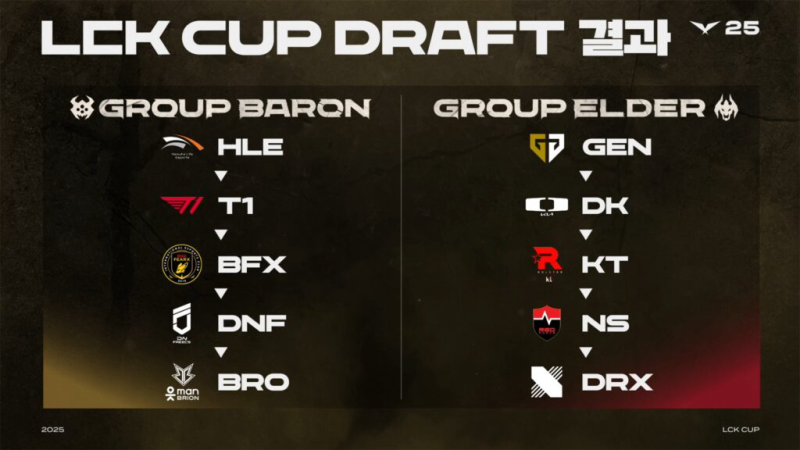
After the LCK Cup 2025 group stage and playoffs in January–February, teams prepare for the Summer segment. Below is the LCK 2025 Summer Schedule outline:
-
LCK Cup 2025 Recap:
-
Ran January 15 – February 23, 2025, featuring group stage, play-ins, playoffs, and the Grand Final.
-
Winner secured momentum into the Summer Split.
-
-
Road to Summer: Mid-Season Invitational (MSI) 2025:
-
MSI runs June 27 – July 12, 2025. LCK representatives from early-season performances compete internationally.
-
After MSI, the LCK transitions into the Summer phase.
-
-
LCK Summer 2025 Schedule (Rounds 3–5):
-
Start Date: July 23, 2025
-
End Date: August 31, 2025
-
Format:
-
Ten teams split into Legend Group (top 5 from Rounds 1–2) and Rise Group (bottom 5), with records carried over.
-
Triple round-robin within each group (best-of-three).
-
Top teams proceed to playoffs in early September.
-
-
Key Dates to Mark:
-
July 23, 2025: Summer segment begins
-
Late August 2025: End of group matches; playoff seeding determined
-
Early September 2025: Playoffs (typically best-of-five series)
-
Mid-September 2025: Summer champion crowned; qualifies for Worlds 2025.
-
-
❤️ If you encounter geo-blocks on official streams, see the next section on how to watch LCK 2025 by bypassing restrictions with free proxy VPN - UFO VPN.
Where to Watch LCK 2026 Live
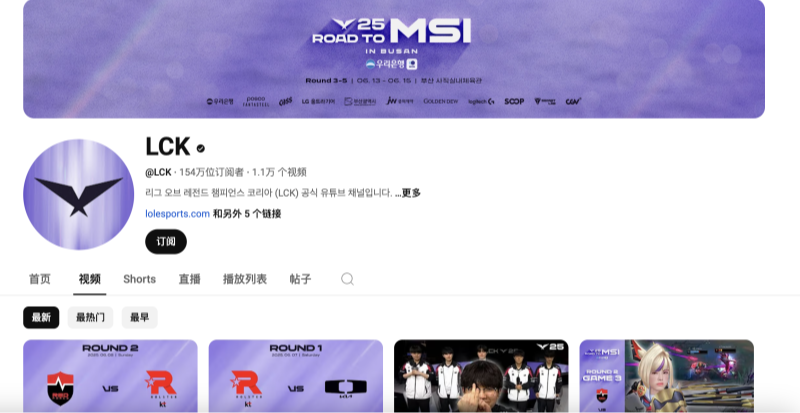
To watch LCK 2025 matches—both for LCK Cup 2025 recaps and the Summer segment—use the following platforms:
| Platform Type | Service / Site | Region / Notes |
|---|---|---|
| Global Official Streams | Twitch, YouTube (Riot LCK) | Free worldwide for live LCK Cup 2025 replays , Occasional geo-blocks on certain VOD features. |
| Korea Official Platforms | AfreecaTV, Naver | Korean-language streams; often free but may require Korean IP. |
| Regional Esports Platforms | Local partners (varies) | Some regions offer bonus content via subscription—check local esports portals for details. |
| Mobile & Desktop Apps | Twitch/YouTube apps | Subscribe to notifications per lck schedule so you don’t miss match start. |
| Community & Fan Sites | Discord, Reddit LCK threads | Provide schedule reminders, highlight clips. Official streams remain source, but community embeds useful tips. |
🤩LIMITED TIME DISCOUNT:
If you're in the heavily internet-regulated region of India, we've got you covered with a free and secure India VPN that's compatible with both your Apple and Android devices. Just download free VPN for Android - UFO VPN (with VPN APK) and free iPhone VPN - UFO VPN for iOS.

Unable to Watch LCK 2026 Locally? Use VPN

When official streams restrict access in your region during high-profile matches, follow these steps to watch LCK 2025 seamlessly. UFO VPN enables free, smooth streaming of LCK Cup 2025 replays and Summer matches.
-
Why Use a VPN for LCK 2025?
-
Bypass Geo-Restrictions: Some matches or on-demand video content may be region-locked due to broadcast partnerships.
-
Stable Connection: UFO VPN’s servers are optimized to minimize lag and buffering when you watch LCK 2025 matches live.
-
Privacy & Security: Encrypts data on public networks while streaming.
-
-
H3: Download UFO VPN & Connect (Step-by-Step)
-
Step 1Download UFO VPN for WindowsGrab the free Windows VPN installer right below. UFO VPN is lightweight and secure on all Windows systems. Double-click the downloaded file and complete the installation. Once installed, launch UFO VPN.
 Step 2Select a VPN ServerInside the app, you can click the "Connect" button for quick connection, or browse the list of servers by Location or categroy: Video& Stream, Game, etc. Choosing the right server ensures fast speeds and smooth access.
UFO VPN is an all-in-one VPN that offers unlimited access to 4D streaming like Netlfix, Disney Plus, no-ping gaming as PUBG, Roblox, CODM and social networking for YouTube, X, Facebook and more.
Step 3Enable Advanced FeaturesIn addition to basic functions, we recommend you turn on extra protections via Ad Blocker and features like Kill Switch, Split Tunneling and Smart Hop. Users can optimize online gaming/streaming/chatting as much as possible. Step 4Check Your New IPUse UFO VPN's built-in " What is My IP" feature to see your new IP address and location. This confirms your VPN is working, hides your real IP, and ensures privacy while browsing.
 Step 1 Download and install UFO VPN for macOSClick the button below to download offcial Mac VPN free. Open the .dmg file, drag UFO VPN to your Applications folder, and launch it. You're just a few clicks away from secure browsing.
 Step 2 Pick Your IP ServerTap "Connect" button for the fastest server automatically. Or you can select a server from the global server list in 100+ countries. UFO VPN is an UFO VPN is an all-in-one VPN or gaming, video streaming, social platforms, and AI tools.
 Step 3
Unlock Pro Features
If you have upgraded to premium plan , feel free to enjoy premium servers for 4K streaming and advanced features like Kill Switch, Split Tunneling, and gaming acceleration. Your Mac is now fully optimized and protected. Inaddition to basic functions, we recommend you turn on
 Step 4
Verify Your IP Now
Use UFO VPN's " What is My IP " feature to see your new IP and location. This confirms your connection is secure, anonymous, and ready for safe browsing online anywhere at any time.
 Step 1 Download and install UFO VPN for iPhone/iPadDownload this free iOS VPN via official link or App Store. Once installed, launch the app to get started. UFO VPN is now trusted by over 2 million users worldwide with optimzed service.
 Step 2 Select a Perfect ServerHit "Connect" button for the fastest server near you instantly. Or you can choose a favorite location/platform from the server list manually for full control. UFO VPN is an all-in-one VPN companion for gaming, streaming, social media, and AI tools.
 Step 3 Lookup IP and Enable Pro FeaturesNow you can check your current IP via built-in IP lookup tool. Pro features in premium plan offer you premium servers, blazing speeds, Kill Switch, Split Tunneling, and Multi-device login, so you can protect your iPhone, iPad, and other Apple devices all at once.
 Step 1 install UFO VPN for AndroidGet free Android VPN from offcial website or Google Play Store. Follow the instructions for easy download. Then open the app and get ready to surf safely.
 Step 2 Choose Your Ideal ServerUFO VPN is an all-in-one powerhouse for gaming, video streaming, social apps, and AI tools. The"Connect" button links you to the fastest server instantly, or you can choose among the server list manually via Location/ Video&Stream/Games for easy access.
 Step 3 Power Up Pro FeaturesPro users can look up current IP via built-in "What Is My IP" feature, and unlock premium features like 4K servers, turbo speeds, Kill Switch, Split Tunneling, and Multi-device login, keeping all your Android phones, tablets, and other devices safe at once.
-
Launch the Stream: Open Twitch or YouTube, navigate to the LCK channel, and start watching. With UFO VPN active, you bypass any geo-blocks.
-
-
Optimize During Streaming:
-
Use a stable internet line (Ethernet or strong Wi-Fi).
-
If buffering, switch between nearby UFO VPN servers.
-
Enable “fastest server” features if available.
-
🌟 Quick Checklist:
-
Install UFO VPN before match day
-
Connect to the recommended server per event region
-
Open the official stream exactly at match start per lck schedule
LCK 2026 Insights & Fan Interests

Beyond knowing when and where to watch, fans care about teams, meta shifts, and viewing enhancements for LCK 2025 content.
-
Team Form from LCK Cup 2025:
-
Champions and strong performers in LCK Cup 2025 often carry momentum into Summer. Referring back to LCK Cup 2025 results helps predict Summer contenders.
-
-
Meta & Patch Considerations:
-
Summer Split (Rounds 3–5 starting July 23) follows patches deployed around MSI. Keep an eye on champion pools favored in LCK 2025 meta.
-
-
Key Rivalries & Storylines:
-
Established titans (e.g., T1, Gen.G, Hanwha Life Esports) vs. emerging squads. Fans tracking LCK Cup 2025 upsets will watch Summer rematches closely.
-
-
Viewing Experience Tips:
-
Multi-Angle Streams & Stats Overlays: Use platforms offering in-stream stats or third-party overlay apps. With UFO VPN, you can access region-specific tools that might otherwise be blocked.
-
Schedule Alerts: Subscribe to notifications on Twitch/YouTube to know when to tune in, matching the official lck schedule.
-
Community Engagement: Join Discord or regional forums to discuss LCK Cup 2025 outcomes and upcoming Summer matches.
-
-
Event Attendance & Viewing Parties:
-
If in Korea, consider attending live studio audiences (when allowed). Otherwise, organize local watch parties using UFO VPN to sync streams for international friends.
-
🫵🏻 Tip:
If you want to pursue a more big-screen viewing experience, I suggest you to use your computer to watch the game, we also provide you with MAC side and Windows system installation package, click UFO VPN for PC - best free VPN and free VPN for Mac - UFO VPN to get it.
FAQs
Q1: Are official LCK streams free?
-
Riot’s Twitch and YouTube streams are generally free worldwide. Occasionally, specific VOD or on-demand features may be region-locked; VPN solves this.
Q2: Where to find the full lck schedule for Summer 2025?
-
Check Liquipedia or the official LCK website for the detailed lck schedule. Key dates: July 23 – August 31, 2025 for group matches, early September playoffs.
Q3: Why mention LCK Cup 2025 when discussing Summer?
-
LCK Cup 2025 results set early-season form and storylines that carry into Summer Split performance.
Q4: What advantages does UFO VPN offer for esports streaming?
-
Low-latency Korean servers, unlimited trial bandwidth, streaming-optimized network, strong encryption, multi-platform support, and easy setup.