Why You Need to Change the Roblox Account Location
There are several practical reasons why a player might need to update their region. Roblox is a global platform, but it does not treat every country exactly the same.
Here are the most common reasons:
💡 Accessing Region-Locked Games: Some game developers only release their experiences in specific countries. This is often due to local laws about gaming or simply because they are testing the game in one market first.
For example, Egypt officially blocked access to Roblox nationwide recently, citing concerns about child safety and harmful online content, so players in Egypt suddenly could not load or play Roblox without special workarounds, such as a Roblox VPN free.
💡 Fixing Robux Currency Issues: If your account location is set to the UK but you are living in the US, you will see prices in Pounds instead of Dollars. This makes it hard to use local gift cards or credit cards. The payment system usually requires your account region to match your payment method’s origin.
💡 Reducing Game Lag: Your location determines which servers Roblox puts you on. If the system thinks you are in Asia while you are actually in New York, it will connect you to distant servers. This causes "ping" issues, where your character moves slowly or the game freezes.
💡 Correcting Automatic Errors: Sometimes, Roblox simply gets it wrong. Your internet provider might route your traffic through a different city or country, making Roblox think you are somewhere you are not.
Step-by-Step Guide to Change Your Roblox Account Location
Changing your Roblox account location is not always as simple as clicking a country dropdown. Roblox does not provide a clear “change location” button, so the process depends on account settings, IP address, and support verification.
Step 1: Log in to Your Roblox Account
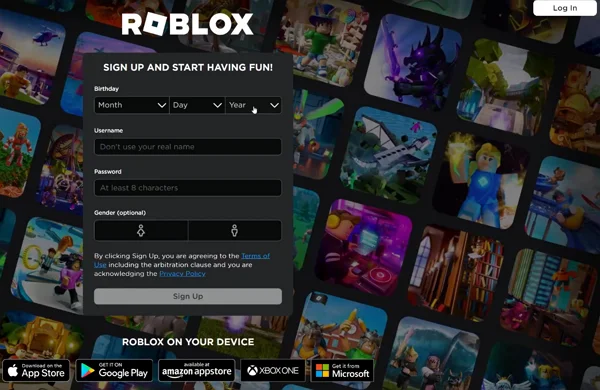
Start by logging in on the official Roblox website using a secure browser. Avoid public computers or shared networks. Make sure you can access your account settings without any login issues before moving forward.
Step 2: Check Your Current Account Location
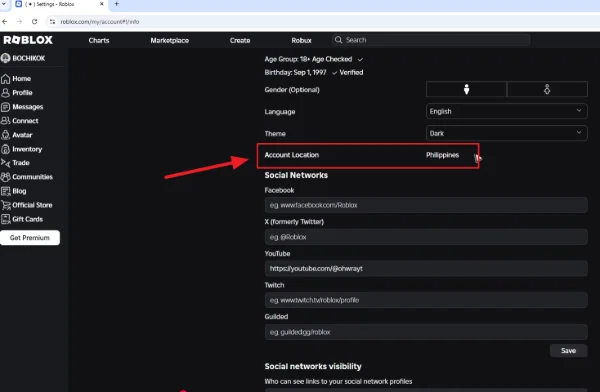
Go to Settings and review details related to country, language, and billing. Roblox may not show your country directly, but your payment currency and regional options give a strong hint about your current account location.
This step helps you confirm whether a location change is actually needed.
Step 3: Connect to a Network Matching the New Location
Roblox detects location mainly through IP address. To change your Roblox account location, you must appear to be accessing Roblox from the new country.
This is where most users run into problems if they rely only on normal internet connections.
Step 4: Update Account Details or Trigger Location Refresh
Once connected through the correct regional network, revisit your account settings. In many cases, Roblox updates its location automatically when you access the platform from a new region for a period of time.
If you plan to make a purchase, the payment page often forces Roblox to re-check your location and apply the new region.
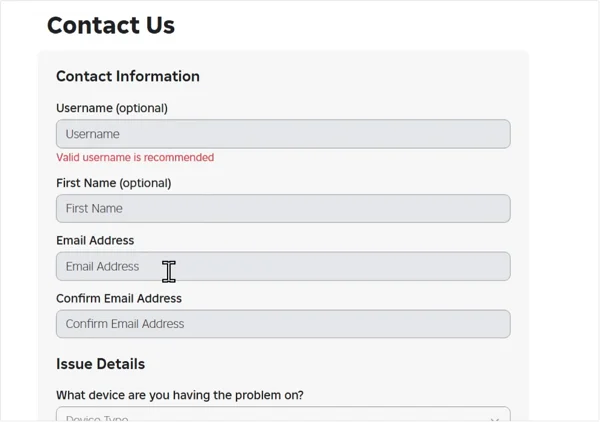
Step 5: Contact Roblox Support if Needed
If your location does not update after repeated logins and activity, submit a request through Roblox Support. Choose the account or billing category and clearly explain that your account location does not match your current country.
Provide correct details, but avoid sending unnecessary personal information.
Is a VPN Necessary to Change the Roblox Account Location?
Yes, in most cases, a VPN is necessary to change the Roblox account location.
Roblox relies heavily on IP-based detection. If your real network does not match the target country, Roblox will keep your old location. A VPN allows you to connect through servers in the country you want your account to reflect.
VPNs are very common in gaming, not just for privacy, but for improving access and stability. When used correctly, a VPN can support several useful functions:
- Unblock Roblox at school
- Reduce lag and connection drops
- Access region-limited games and events
- Protect your IP and network data
- Help verify age on Roblox and similar games
The problem is that choosing a good VPN can be difficult. Many VPNs are slow, unstable, or blocked by gaming platforms. That is why many players choose a free proxy VPN in UFO VPN, which is designed to work with games and common platforms like Roblox. And it's very to install as long as you follow the simple steps below:


UFO VPN is an all-in-one VPN that offers unlimited access to 4K streaming like Netlfix, Disney Plus, no-ping gaming as PUBG, Roblox, CODM and social networking for YouTube, X, Facebook and more.




Unlock Pro Features
If you have upgraded to premium plan , feel free to enjoy premium servers for 4K streaming and advanced features like Kill Switch, Split Tunneling, and gaming acceleration. Your Mac is now fully optimized and protected. Inaddition to basic functions, we recommend you turn on

Verify Your IP Now
Use UFO VPN's " What is My IP " feature to see your new IP and location. This confirms your connection is secure, anonymous, and ready for safe browsing online anywhere at any time.







Common Roblox Location Change Errors & How to Fix
Even when following the correct steps, users may face issues. Below is a table outlining common problems and practical fixes.
| ⚠️ Problem | 🛠️ How to Fix |
|---|---|
| Location does not update | Use a VPN from the target country and log in for several sessions |
| Payment method rejected | Match VPN location with payment country |
| Roblox is blocked on the network | Use UFO VPN and switch networks |
| Account verification failed | Ensure consistent IP and account details |
| High ping after location change | Switch server within the same country |
These issues are usually temporary and related to inconsistent location signals rather than account penalties.
Tips to Keep Your Roblox Account Secure After a Location Change
When you change your Roblox account location, the system might think someone else is trying to get into your account. Security is the most important part of this process.
- Turn on 2-Step Verification: Use an app like Google Authenticator or your email. This ensures that even if someone sees you logged in from a new country, they cannot get into your account without that second code.
- Avoid "Free Robux" sites: Many sites claim they can change your location and give you free money. These are always scams designed to steal your password. Only use trusted tools or the official Roblox support page.
- Link a valid email and phone number: If Roblox locks your account because of a location jump, you will need your email to prove you are the real owner. Make sure you can access that email before you start.
- Log out of other devices: Before you change your region, log out of Roblox on your tablet, phone, and PC. Then, only log in on the device where you changed the location settings. This prevents the system from seeing you in two countries at the same time.
Conclusion
Changing your location on Roblox is about more than just seeing a different flag in your settings. It is about getting the best speed, playing with friends in different time zones, and making sure your Robux purchases work without a hitch.
By using a reliable connection tool and clearing your device data, you can move your digital home to anywhere in the world. Just remember to keep your security settings tight so your hard-earned items and progress stay safe.
FAQs
Is It Safe to Change Roblox Location?
Yes, it is safe if you use a stable network, avoid rapid location switching, and keep your account details consistent.
Will Changing Location Get Your Roblox Account Banned?
No, changing location alone does not cause bans. Problems usually come from suspicious login patterns or policy violations.
How Long Does Roblox Take to Update Account Location?
In most cases, updates happen within a few logins. Some accounts may take several days.
Can I Change Roblox Location on Mobile?
Yes, but mobile networks change IPs often. You can use UFO VPN to provide better consistency.
Does Roblox Support Manual Location Changes?
Roblox Support can help in special cases, especially for billing or permanent relocation issues.