What is OfferUp?
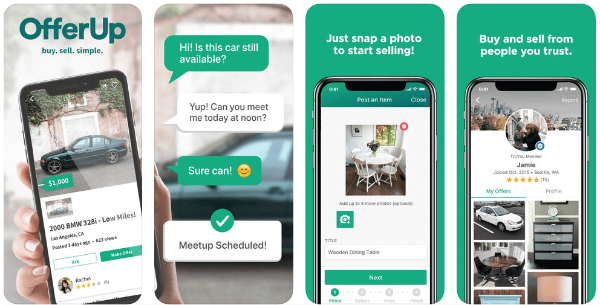
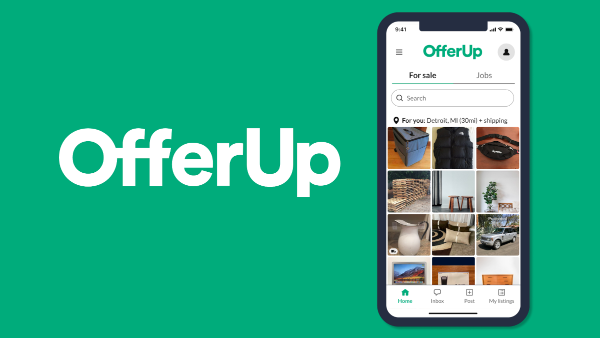
OfferUp is an online marketplace where individuals can buy and sell used items, ranging from electronics to furniture. Launched in 2011, it’s one of the most popular platforms in the United States, offering both a website and an app. While it provides a built-in messaging system for communication, it also has features that help protect buyers and sellers during transactions. However, like any online platform, it is not immune to scams.
How Safe is OfferUp?

While OfferUp can be a safe platform if used correctly, it’s also a target for scammers looking to exploit users. Similar to other online marketplaces like Facebook Marketplace, Airbnb, or eBay, OfferUp users should be vigilant and understand the risks involved. By following certain precautions, you can protect yourself and reduce the chances of falling victim to fraud.

Common OfferUp Scams and How to Spot Them
To avoid falling victim to scams, it's important to know the warning signs. Here are some of the most common scams on OfferUp:
1. Payment Scams from Buyers
-
Requesting Payment via Unsecure Apps: If a buyer insists on paying via apps like Venmo, Zelle, or Cash App, it’s a red flag. These apps don’t provide the same protection as OfferUp’s payment system.
-
Unusually Impatient Buyers: A buyer who rushes you to sell the item quickly may have ulterior motives.
-
Overpayment Offers: If a buyer offers to pay more than your asking price and asks for a refund of the difference, it’s usually a scam.
-
Shipping Requests: A buyer asking you to ship the item (especially through unofficial channels) can indicate a scam, as OfferUp generally encourages local in-person transactions.
2. Scams from Sellers
-
Links to Fake Websites: Sellers may send links to websites that appear to be OfferUp but are actually fake. These sites can be used to steal personal information or infect your device with malware.
-
Fake Listings: Some scammers will post fake listings to trick you into paying for an item that doesn’t exist or that doesn’t match the description.
-
Overpriced or Misleading Offers: Sellers may lure buyers with "too good to be true" deals. Always verify the item’s authenticity and compare prices to ensure you’re not being overcharged.
How VPN Enhances Your Security on OfferUp
While most scams on OfferUp are based on communication and payment issues, using a free proxy VPN in UFO VPN can help protect you in a few important ways:
-
Encrypt Your Internet Traffic: UFO VPN secures your online transactions by encrypting your connection, making it difficult for hackers or scammers to intercept your personal information.
-
Bypass Potential Geo-Restrictions: If you are trying to access OfferUp from a location where it’s restricted, UFO VPN can help you access the platform securely by masking your IP address.
-
Protect Your Privacy: Using UFO VPN ensures that your location and identity remain anonymous, which can be critical when engaging in transactions with strangers.
🩵Get Ready with UFO VPN in 4 Steps🩵


UFO VPN is an all-in-one VPN that offers unlimited access to 4K streaming like Netlfix, Disney Plus, no-ping gaming as PUBG, Roblox, CODM and social networking for YouTube, X, Facebook and more.




Unlock Pro Features
If you have upgraded to premium plan , feel free to enjoy premium servers for 4K streaming and advanced features like Kill Switch, Split Tunneling, and gaming acceleration. Your Mac is now fully optimized and protected. Inaddition to basic functions, we recommend you turn on

Verify Your IP Now
Use UFO VPN's " What is My IP " feature to see your new IP and location. This confirms your connection is secure, anonymous, and ready for safe browsing online anywhere at any time.







Best Practices to Protect Yourself from Scams on OfferUp
Besides using UFO VPN, here are some additional steps to take when buying or selling on OfferUp to ensure your safety:
-
Use OfferUp’s Payment System: Whenever possible, use OfferUp’s built-in payment system rather than third-party apps, as it offers better protection.
-
Meet in Safe Locations: Always arrange to meet in public places, such as shopping malls or coffee shops, and avoid inviting strangers to your home.
-
Check Seller Reviews: Before buying, review the seller’s feedback and ratings to ensure they are reputable.
-
Don’t Share Personal Information: Avoid sharing sensitive personal information like your social security number, full address, or banking details.
-
Use Two-Factor Authentication: Enable two-factor authentication (2FA) on your OfferUp account to add an extra layer of security.
FAQs
How do I know if a seller is legitimate on OfferUp?
Always check the seller’s profile and reviews. If they have a history of positive transactions and feedback, they are likely legitimate. Also, ask for additional pictures of the item and proof of condition.
How can I protect my payment information on OfferUp?
To protect your payment information, always use OfferUp’s payment system. Avoid sending money through apps like Venmo, Cash App, or Zelle, as these offer less protection for buyers.
How does UFO VPN help me stay safe on OfferUp?
UFO VPN encrypts your internet traffic, protecting your personal data during transactions. It also allows you to securely browse OfferUp, even from restricted locations, while keeping your privacy intact.
What should I do if I suspect I’ve been scammed on OfferUp?
If you think you’ve been scammed, report the incident to OfferUp immediately. You should also contact your bank if any financial transactions were involved and consider changing your passwords.