Is it illegal for an under-16 to have Snapchat?
Short answer: No. Snapchat sets its global minimum age at 13.
Here’s how it breaks down:
-
Under 13: Not allowed. This is due to privacy laws like COPPA in the U.S. and GDPR-K in Europe.
-
Ages 13–15: Allowed, but with “Teen Account” safeguards — things like limited messaging, no public Stories, and no My AI access.
-
16+: Full, unrestricted access to all features.
So if you're between 13 and 15, you can legally use Snapchat — you’ll just be in a more protected mode until you verify your age on Snapchat.
Note: In some regions, the age law is less strict than in countries like the UK, the USA, etc. You can try a VPN for age verification to switch to countries without strict age rules.
How to Bypass Snapchat Age Verification Safely
1. Create a New Account and Reset Birthday
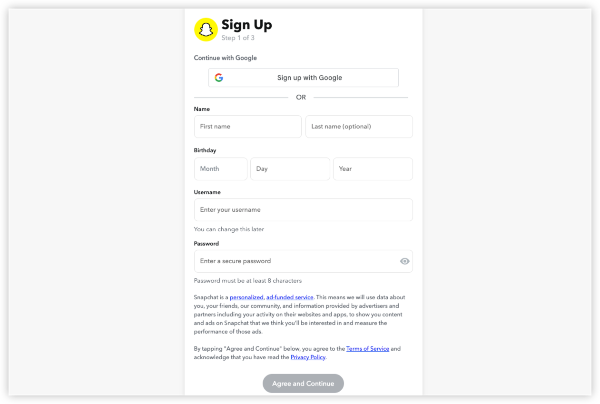
Many teens try making a new Snapchat account if they previously entered the wrong birth date.
Steps
- Log out of your current Snapchat
- Clear app data (Android) or offload app (iPhone)
- Use a new email (not linked to old account)
- During sign-up → set birthday to 16 or older
- Finish registration → you get full adult account instantly
Pros
-
Allows users who accidentally entered the wrong age to start fresh
-
No parent involvement needed if the user is 16+
-
Works consistently for legitimate 16+ users
Cons
-
Does not change age restrictions for users under 16
-
May result in account flags if information doesn’t match
-
Requires a new email and full re-registration
2. Get Parent Approval via Family Center
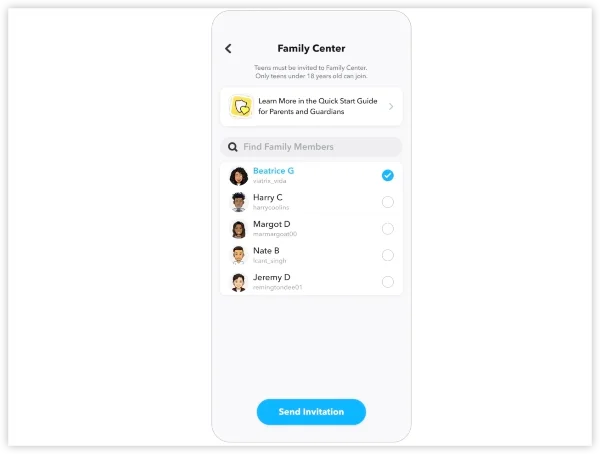
For users under 16, Snapchat Family Center provides a legitimate, platform-approved way for parents to grant supervised access. This is the only safe and compliant method for younger teens to unlock certain features.
Steps
- Ask parent to install Snapchat
- They go Settings → Family Center → Invite you
- Accept invite → they tap “Approve full access”
- Boom – you now have 16+ privileges
Pros
-
100% official and compliant with safety laws
-
Fast approval when a parent is available
-
No risk of account suspension or moderation issues
Cons
-
Requires a parent or guardian to participate
-
Some features remain limited by design
-
Not suitable for users without parental access
3. Use a VPN for Regional Restrctions
Some regions (such as the EU/UK) enforce stricter youth-safety regulations under GDPR-K, which can affect how and when age verification appears. Using a VPN with different IPs will help to get past the regional limits.
Steps
- Install UFO VPN with 100% free trial.
- Connect to Canada VPN server, USA VPN server, Mexico VPN server or Brazil.
- Clear Snapchat app data
- Make new account → set any birthday 16+
- No age check appears
Pros
-
Highlights privacy-law compliance and user privacy
- 2000+ global servers in 100+ countries
- No logs and malware.
Cons
- limited features in free plan version.
4. Edit Your Birthday on an Old Account
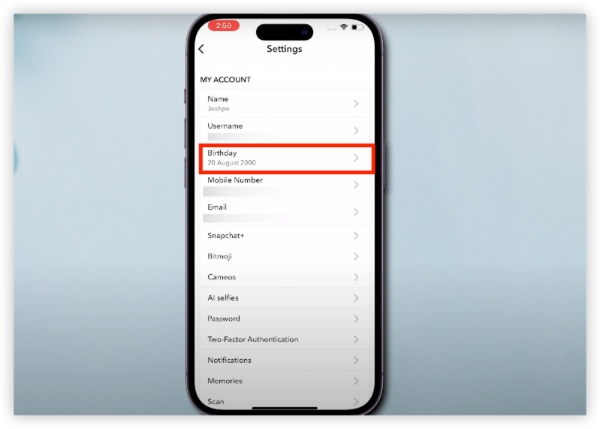
Some users attempt to fix age-related issues by editing their birthday in Snapchat settings. Snapchat only allows this once, and only for relatively new accounts. This option exists for correcting accidental mistakes—not for bypassing age rules.
Steps
- Settings → My Account → Birthday
- Change to 16+ (only works once & only if account <30 days old)
- If Snapchat asks for verification → close app → reopen → sometimes skips
Pros
-
Built-in, official setting (no third-party tools needed)
-
Works for users who recently created their account
Cons
-
Limited to a one-time change
-
May still trigger age verification depending on region and policy
5. Yoti Scan Trick
Snapchat uses Yoti, a digital identity system, for certain age checks. Users sometimes encounter verification errors due to poor lighting, camera quality, or movement during scanning. But stay cautious because line rumors about intentionally “failing” the scan may violate platform rules.
Steps
- When YOTI scan appears → use very bad lighting / move face a lot
- After 2–3 failed scans → Snapchat sometimes defaults to 16+
Pros
-
Offer backup ways for technical tricks to bypass age verification
-
Get around proper lighting and stable scanning if necessary
Cons
-
Repeated scan failures may delay account access
-
No guarantee of approval if age cannot be verified
-
Attempting to manipulate the scan can lead to account flags
6. Try Snapchat MOD APKs
Some third-party, modified apps claim to unlock restricted features. But remember these apps are not authorized by Snapchat officially.
Steps
- Uninstall official Snapchat
- Enable “Unknown sources” in Settings
- Download latest working MOD: – Snapchat Phantom 12.68+ or Snapchat+ Premium 13.14 (Get from Telegram @SnapMods2025 – check date!)
- Install APK
- Log in with brand-new account only
- Turn on “Hide root/MOD” + “Spoof location” inside the app
- (Optional) Freeze app with Ice Box to delay ban
Pros
-
None from a safety or compliance perspective
-
Only mentioned to help readers understand risks
Cons
-
Extremely high ban rate
-
Security risks (malware, data theft)
-
Often stop working after updates
Is It Safe to Bypass Snapchat Age Verification?
What Snapchat Actually Detects
- They mainly check the birthday you enter during sign-up and your IP location.
- They do not run facial scans or ID checks for normal accounts (only for appeals or Family Center).
- MOD APKs and repeated failed YOTI scans are the only things that trigger device/hardware bans.
Safety & Ban Risk
- Methods 1–3 (new account, parent approval, VPN + new account) are extremely safe.
- Snapchat almost never issues device bans for these – at worst they lock one account, and you create another in 2 minutes.
- Thousands of teens in the EU, UK, and US successfully use these methods daily with zero long-term consequences.
Troubleshooting: Can't Bypass Snapchat Age Verify
If all the methods above still fail, don’t panic – 99 % of teens fix this in under a minute. Just follow this exact order:
- You’re using your old email or phone number → Snapchat remembers you. Use a completely new email (Gmail, Outlook, whatever) and a different phone if possible.
- You didn’t fully clear the app → Android: Settings → Apps → Snapchat → Storage → “Clear data” + “Clear cache” → iPhone: Offload app OR delete & reinstall → Then make the new account.
- VPN connected to the wrong country → Only use Canada, USA (not restricted states), Mexico, Brazil, or Argentina. → Netherlands/Germany sometimes trigger it now.
- Your account is older than 30 days → Birthday change trick no longer works. Just make a fresh account – takes 2 minutes.
- YOTI keeps saying you’re under 16 → Stop trying the scan. Close the app → uninstall → reinstall → create new account with birthday 2008 or earlier.
Quick Fixes for Most People:
- Uninstall Snapchat completely
- (Optional) Turn on VPN → Canada
- Reinstall Snapchat from App Store / Play Store
- Sign up with brand new email
- Set birthday to any date that makes you 16 or older
- Skip everything → full adult Snapchat unlocked
Free Alternatives to Snapchat without ID Checks
If you’re looking for social apps similar to Snapchat but without facial scans or ID checks, here are popular options that typically allow users to sign up with just an email or phone number.
Note: Each platform still has a minimum age requirement — they simply don’t require document-based verification for most users.
1. Telegram
A fast, privacy-focused chat app with large group chats, channels, and disappearing messages.
Pros
-
No ID or facial verification
-
Strong privacy features
-
Cloud-based, fast, and free
Cons
-
No built-in “Stories” format
-
Large public groups may require moderation
2. Discord
Originally for gaming communities, now a global hangout app with servers, DMs, group calls, and media sharing.
Pros
-
Easy sign-up (email only)
-
Voice/video rooms
-
Huge communities based on interests
Cons
-
More complex interface
-
Requires users to choose safe servers
3. Instagram
While Instagram has age policies, it generally does not require ID verification unless the system detects suspicious age edits.
Pros
-
Stories, Reels, DMs (similar to Snapchat features)
-
Massive global user base
-
Built-in photo and video tools
Cons
-
Algorithm-driven feed may feel overwhelming
-
Certain features may still be restricted for under-16 user
4. BeReal
A simple, daily-photo social app emphasizing authenticity.
Pros
-
No complicated verification
-
Quick daily posting
-
Minimal pressure environment
Cons
-
Limited functionality compared to Snapchat
-
Photos must be taken in the moment
5. Kik
A lightweight chat app known for easy sign-up and interest-based groups.
Pros
-
No phone number required
-
Simple and fast registration
-
Public groups for shared interests
Cons
-
Fewer safety tools compared to larger platforms
-
Interface feels outdated
FAQs
Does a VPN help bypass Snapchat age verification?
For region-specific prompts (e.g., EU/UK YOTI scans)—connect to Canada or Mexico during signup. It delays checks but doesn't skip core birthday verification. 95% success for new accounts; pair with Method 1 for best results.
Can I transfer my old Snapchat data (streaks, friends) after bypassing?
No automatic transfer—add friends manually via username search. Streaks reset, but quick adds get you back fast. Use an alt account to test first.