What‘s New In Snapchat Age Verification?
Snapchat age verification is the internal system used by Snapchat to confirm a user’s real age so it can apply safety rules, enable age-appropriate features, and comply with new global online-safety regulations. But the system has changed dramatically.
The Old Snapchat Age Verification System
Features:
-
You typed your birthdate when creating your account
-
You could edit your birthday later in Settings
-
Snapchat applied age-based rules (e.g., under 13 → limited experience)
-
No ID, no selfie, no parental approval
-
No country-level compliance checks
Potential Risks:
-
Kids under 13 could lie about their age
-
Teens could access adult content or features
-
Governments criticized Snapchat for weak protection
-
Did not meet new laws in the U.S., UK, EU, and Australia
Key Differences: Old vs Updated Snapchat Age Verify
| Features | Old System | Updated System |
|---|---|---|
| Self-reported birthday | ✔ Yes | ✔ Still required |
| Ability to lie about age | ✔ Easy | ✘ Much harder |
| Selfie / face-age check | ✘ No | ✔ In regulated regions |
| Parental verification | ✘ Rare | ✔ Mandatory for some |
| Government compliance | ✘ Weak | ✔ Meets strict laws |
| Third-party age services | ✘ None | ✔ Added in 2025 |
| Account locking for unverifed age | ✘ No | ✔ Yes (under-16) |
-
The old system relied mostly on trust and allowed easy age manipulation.
-
The updated system uses advanced checks, parental oversight, and regional legal compliance (try a VPN for age verification to switch to regions without strict age laws)—making it much stronger and far more regulated for users under 16. This also explains why many teens are seeking ways to bypass Snapchat age verify right now.
Types of Snapchat Age Verification: Deeper Dive
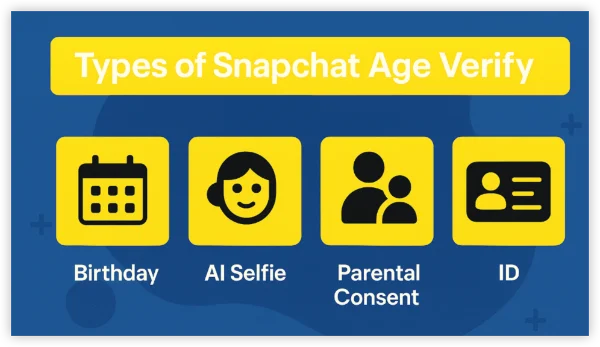
Since 2026, Snapchat introduced a full multi-layer age verification framework driven by global regulations. The verification now uses a combination of:
1. Birthday Confirmation
You must confirm your birthday inside Settings → Birthday, but this is no longer enough in regulated regions.
2. AI Selfie Age Estimation (New)
Snapchat may request a selfie to estimate age if:
-
You appear younger than 16
-
Your birthday seems incorrect
-
Law requires secondary verification
3. Parental Consent Verification
Parents may be required to:
-
Approve the child’s age
-
Manage controls
-
Confirm via app links or third-party systems
4. Third-Party Age Verification Providers
Snapchat partners with certified age-verification services (no ID stored by Snapchat) in:
-
Australia
-
Some EU countries
-
Certain U.S. states
5. Feature Locking Until Verified
Unverified under-16 users may lose access to:
-
Stories
-
Friend recommendations
-
Snap Map
-
My AI
-
Chatting features
-
Discover content
How to Verify Your Age on Snapchat Easily
1. Open Snapchat Settings
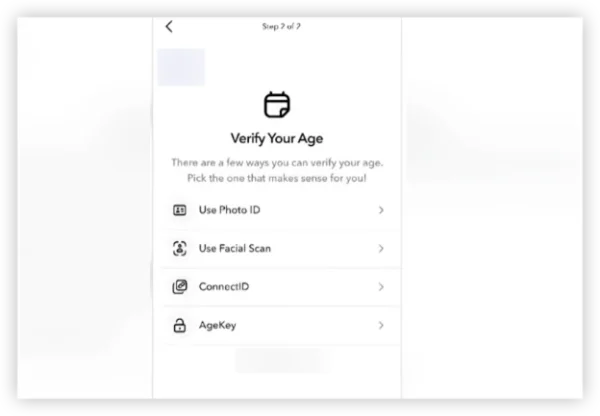
-
Open Snapchat
-
Tap your profile icon
-
Tap the ⚙️ Settings button in the top-right corner
This opens your full account settings.
2. Go to “Birthday”
-
Scroll to My Account
-
Select Birthday
This is the official age-verification page.
3. Confirm or Update Your Birthday
If Snapchat asks you to verify your age, you’ll see a pop-up.
You can:
-
Confirm your saved birthday
-
Correct it if it was entered incorrectly
⚠️ For safety reasons, Snapchat limits how often you can change your birthday.
4. Complete Extra Checks
Depending on region, you may need to take the following steps to go on:
-
Take a selfie scan
-
Enter parent/guardian details
-
Complete a third-party verification
5. Wait for Approval
Most verifications complete within:
-
Instant (AI scan)
-
5–15 minutes (parent confirmation)
-
Up to 24 hours (third-party verification)
Once verified, all eligible features are restored according to your age.
Bonus: Best VPN for Snapchat Age Verify Protection
Here are some of the best VPNs widely recommended for Snapchat. Each has its own strengths depending on what you need (privacy, speed, device coverage, etc.).
| VPN Provider | Age-Verify Use | Feature |
|---|---|---|
| UFO VPN | Easy to set up, large server list, reliable performance for social apps | 100% Free Trial. Good for beginners wanting simple, straightforward protection for Snapchat. |
| ExpressVPN | Very fast speeds; strong encryption and reliability; excellent global server coverage | Great for users who want a stable, fast, and secure connection everywhere. |
| NordVPN | Excellent privacy features, large server network, strong no-logs policy, versatile apps | Solid balance of security + usability — works well across devices for Snapchat and other apps. |
| Surfshark | Budget-friendly; unlimited simultaneous connections; good unblocking & privacy features | Ideal for households or multiple devices, especially if you want maximum value for money. |
| Private Internet Access (PIA) | Strong security focus, open-source apps, many server options, unlimited connections | Great for users who prioritise privacy over convenience or streaming performance. |
How to Set Up a VPN for Snapchat:


UFO VPN is an all-in-one VPN that offers unlimited access to 4K streaming like Netlfix, Disney Plus, no-ping gaming as PUBG, Roblox, CODM and social networking for YouTube, X, Facebook and more.




Unlock Pro Features
If you have upgraded to premium plan , feel free to enjoy premium servers for 4K streaming and advanced features like Kill Switch, Split Tunneling, and gaming acceleration. Your Mac is now fully optimized and protected. Inaddition to basic functions, we recommend you turn on

Verify Your IP Now
Use UFO VPN's " What is My IP " feature to see your new IP and location. This confirms your connection is secure, anonymous, and ready for safe browsing online anywhere at any time.







Launch Snapchat. Log in and use it normally — your traffic is now encrypted and your IP hidden. If you need age-verify prompts: complete them while on VPN for added privacy (or if location-based restrictions apply).
Is Snapchat Age Verification Mandatory for Every Country?
Age verification is becoming mandatory in more countries each year. Below is the current list of where Snapchat requires stronger verification for users under 16.
Countries where age verification is mandatory:
-
Australia (new national law — minimum age enforcement)
-
United Kingdom (Online Safety Act)
-
France (ARCOM digital age rules)
-
Germany (strict youth-protection requirements)
-
Ireland, Netherlands, Belgium (EU rules planned for broader rollout)
-
Spain & Italy (national child-safety laws rolling out)
U.S. States with mandatory verification:
-
Louisiana
-
Texas
-
Utah
-
Arkansas
-
Mississippi
-
Virginia
-
Montana
Regions with optional or “recommended” age verification:
-
Canada
-
New Zealand
-
Scandinavian countries
-
Singapore
-
South Korea
Countries with only basic birthday confirmation:
-
Most of Latin America
-
Middle East
-
Africa
-
Southeast Asia
Snapchat is expected to expand mandatory verification to more countries.
Conclusion
Snapchat’s updated age-verification system is no longer a simple birthday field — it now includes selfie scans, parental verification, and third-party checks in regions where the law requires proof of age. For anyone under 16, the process is stricter than ever, and skipping verification is no longer an option if you want to keep using the app normally.
FAQs
Can I fake my age on Snapchat?
Snapchat now flags suspicious birthdays, so false ages often trigger a lock instead of unlocking features.
What happens if I don’t verify age on Snapchat at all?
In regulated countries:your account will be restricted or disabled after a grace period.
Is UFO VPN really helpful for Snapchat age verification?
Yes, especially when you are facing IP bans or regional restrictions to access Snapchat, using a free VPN for Snapchat like UFO VPN helps you reach the app and switch to any country you prefer. But always take responsibilities for any individual activities on Snapchat.