What Does "ChatGPT is currently unavailable." Mean?
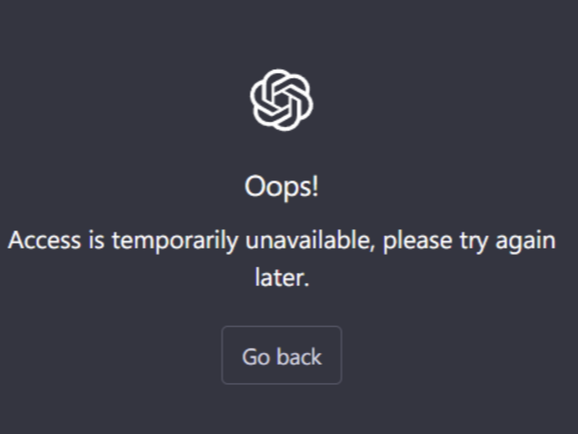
This message typically appears when the ChatGPT service is overloaded, undergoing maintenance, or temporarily blocking new sign-ups due to high demand. In some cases, it may even be related to where you're connecting from.
Here are the most common causes:
1. Server Overload or Scheduled Maintenance
When too many users try to access ChatGPT at once, OpenAI may temporarily throttle access to reduce server strain. During these moments, you may see errors like:
-
“ChatGPT is currently unavailable.”
-
“Signup is temporarily unavailable. Please try again later.”
-
“503 Service Temporarily Unavailable”
These indicate that the system is too busy or under maintenance and can’t fulfill your request at that moment.
2. Geo-Restrictions or Access Blocks
Some users encounter these messages not because ChatGPT is down globally, but because the platform is blocked or restricted in their region.
Countries where access may be blocked or unstable include:
In these cases, even if ChatGPT is available elsewhere, your connection may be silently rejected or routed to an unavailable server.
If you suspect regional restrictions, using a secure VPN with stable global servers can help bypass these limitations. UFO VPN, for example, provides access to ChatGPT-friendly servers without exposing your identity or slowing down performance.
3. Signup Rate Limiting (Too Many New Users)
If you're seeing the message while trying to create a new account, it's likely that OpenAI is temporarily limiting registrations.
This often happens:
-
During product launches (e.g., GPT-4 or new tools)
-
When traffic spikes in specific countries or time zones
-
To prevent bot abuse or server saturation
4. Browser or Device-Related Problems
Sometimes the issue isn’t on OpenAI’s side—it’s on yours.
Corrupt cache, outdated browser extensions, or conflicting apps may prevent ChatGPT from loading properly, causing:
-
Blank screens
-
Unresponsive buttons
-
Inability to submit prompts or forms
These are typically local issues and can be fixed in just a few steps.
5. ISP or Network-Level Blocking
If you're on a public network (e.g., at school, office, airport), access to AI services might be intentionally blocked by the network administrator or your internet provider.
This can lead to:
-
Timeouts
-
"This site can’t be reached" errors
-
403 or 503 status codes
If you can access ChatGPT from mobile data but not from Wi-Fi, this is a strong indicator. You can use a reliable VPN to bypass these limitations.
How to Fix "ChatGPT Signup Is Currently Unavailable" (Step-by-Step)
Let’s go through the most effective solutions, from quick fixes to advanced troubleshooting:
1. Wait and Try Again Later
Sometimes, patience is all you need.
-
Wait for 10–20 minutes
-
Refresh the page (use
Ctrl + F5to force reload) -
Try signing up again
This is especially effective when the issue is server-related or caused by temporary rate limits.
2. Use a VPN (for Regional Restrictions)
If you're accessing ChatGPT from a country or network where it's blocked, a VPN is often the most effective fix.
What to do:
- Download a trustworthy VPN service
- Connect to a country where ChatGPT is available (e.g., US, Canada, UK)
- Try signing up or logging in again
UFO VPN, for example, offers high-speed servers optimized for streaming and AI tools, making it a solid choice for bypassing regional blocks safely.


UFO VPN is an all-in-one VPN that offers unlimited access to 4D streaming like Netlfix, Disney Plus, no-ping gaming as PUBG, Roblox, CODM and social networking for YouTube, X, Facebook and more.




Unlock Pro Features
If you have upgraded to premium plan , feel free to enjoy premium servers for 4K streaming and advanced features like Kill Switch, Split Tunneling, and gaming acceleration. Your Mac is now fully optimized and protected. Inaddition to basic functions, we recommend you turn on

Verify Your IP Now
Use UFO VPN's " What is My IP " feature to see your new IP and location. This confirms your connection is secure, anonymous, and ready for safe browsing online anywhere at any time.







Note: Avoid using free or untrusted VPNs—they may be blocked by OpenAI or compromise your security.
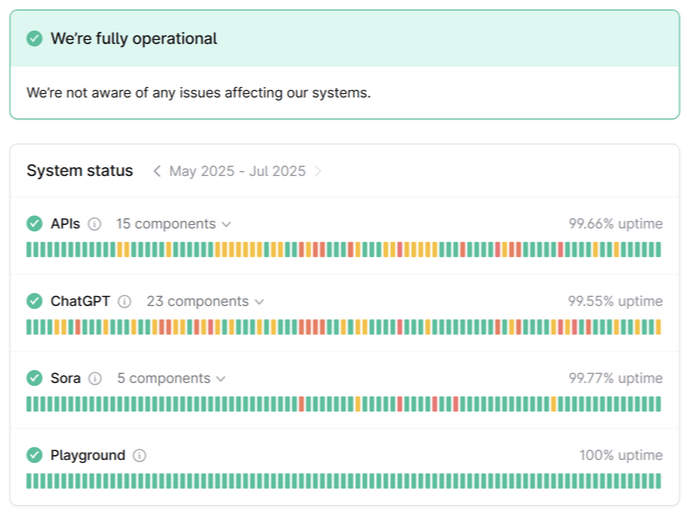
3. Check ChatGPT’s Status Page
Before diving into complex fixes, check if the problem is widespread.
Visit: https://status.openai.com
Look for:
-
Partial outages
-
Login issues
-
High traffic alerts
If there’s an ongoing incident, your best option is to wait.
4. Clear Browser Cache or Use Incognito Mode
Browser-related glitches are surprisingly common.
To fix:
-
Open your browser settings
-
Clear cache + cookies
-
Restart the browser
-
Alternatively, use Incognito Mode or Private Window to bypass cache-related issues
This helps resolve conflicts with outdated data or extensions.
5. Switch Browsers or Devices
If clearing the cache doesn’t help, try:
-
Using a different browser (e.g., switch from Chrome to Firefox)
-
Testing on your smartphone or another computer
Different environments can yield different results, especially if an extension or device configuration is causing the problem.
6. Sign Up via the OpenAI Platform Instead
Sometimes the ChatGPT-specific portal is temporarily down, but the main OpenAI platform remains functional.
Try this alternative path:
-
Visit: https://platform.openai.com/signup
-
Complete the registration
-
Use your login to access ChatGPT afterwards
This method bypasses UI bugs or partial outages on the ChatGPT frontend.
7. Switch Networks (If on Public Wi-Fi or School Internet)
If you’re using a school, workplace, or public Wi-Fi, your connection may be filtered.
To check:
-
Try switching to mobile data
-
Use a personal hotspot
-
Ask the administrator if AI or chat tools are blocked
If ChatGPT works fine on mobile but not Wi-Fi, you’ve found the culprit.
FAQs
Q1: Is ChatGPT down right now?
Check OpenAI’s status page or DownDetector for real-time updates.
Q2: What does “503 Service Temporarily Unavailable” mean?
It’s a server error that usually means the system is overloaded or under maintenance. It’s not caused by you.
Q3: Why can’t I sign up for ChatGPT right now?
You might be rate-limited due to too many signups or connecting from a restricted region. Try again later or use a VPN.
Q4: Will using a VPN really help fix this?
Yes, if you're in a blocked country or region, a VPN can help you access ChatGPT through a different location. Just be sure to choose a reputable service.
Conclusion
Seeing “ChatGPT is currently unavailable” doesn’t mean you’ve done anything wrong—it’s a temporary issue that can be caused by server overload, signup restrictions, local browser settings, or even your geographic location. If you’re in a location where access is blocked, remember: tools like VPNs aren’t just for privacy—they’re essential for freedom of access. Used wisely, they can help you sign up and stay connected when ChatGPT is unavailable.