Quick Answer to What Is the First Computer Virus in the Philippines
The short and direct answer to what is the first computer virus in philippines is the ILOVEYOU virus, also known as the "Love Bug" or the "Love Letter" virus. It wasn't the very first time someone in the country wrote code, but it was the first one to go global and cause billions of dollars in damage.
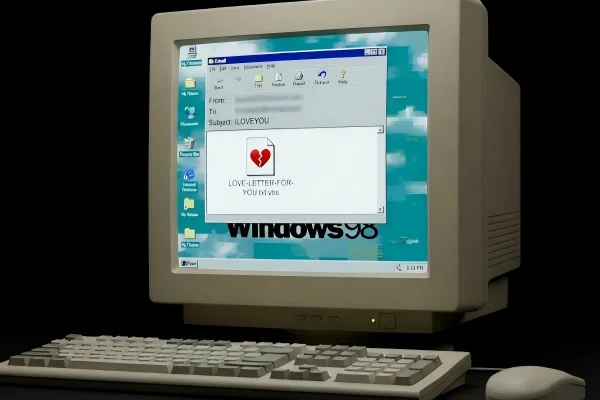
The first computer virus in the Philippines is actually a VBScript program. On May 4, 2000, it started spreading like wildfire. It arrived in people's inboxes with the subject line "ILOVEYOU" and an attachment named "LOVE-LETTER-FOR-YOU.txt.vbs."
Because people were curious and the subject line seemed sweet, they clicked on it. Within hours, it had moved across the globe, crashing email servers and deleting personal files on millions of PCs.
Why This Virus Became Widely Known?
The reason why people still talk about the first computer virus in the Philippines is because of how "successful" it was at being destructive. It didn't just stay in one office or one city. It traveled faster than any virus before it.
-
Human Curiosity: The creator used a "social engineering" trick. By using the words "I love you," he played on the fact that humans are naturally curious. Everyone wants to know who loves them.
-
The Address Book Trick: Unlike older viruses that needed a person to share a floppy disk, this one used your own computer against you. Once it got inside, it looked at your Windows Address Book and sent a copy of itself to every single person you knew.
-
Media Coverage: Because it hit big names like the British Parliament and the CIA, it was on the news every night. It put the Philippines on the map for the wrong reasons, showing that a single person with a cheap computer could cause global chaos.
Key Facts About the ILOVEYOU Virus: How Did It Spread So Quickly?
To really understand the first computer virus in the Philippines, we have to look at the timeline and the tech behind it. It wasn't just a lucky break for the hacker; it was a perfect storm of bad timing and weak security in the software we used at the time.
When and How the Virus First Appeared?
The virus first showed up on the morning of May 4, 2000. It came from a neighborhood in Manila. The creator was a young student named Onel de Guzman, who attended AMA Computer College. He had actually written a thesis proposal for a program that could steal passwords, but his teachers rejected it because it was illegal.
He didn't listen. He took that idea and turned it into the Love Bug. He used a computer with a dial-up modem - which was very slow back then - to upload the code. From that one small connection, the virus jumped to Hong Kong, then to Europe, and finally to the United States as people woke up and opened their morning emails.
How did the ILOVEYOU Virus Spread and Work?
The virus worked because of a trick in how Windows showed file names. The attachment was named LOVE-LETTER-FOR-YOU.txt.vbs. On most computers, Windows would hide the .vbs part. Users only saw LOVE-LETTER-FOR-YOU.txt. They thought it was just a harmless text note.
Once a user double-clicked that file, the script ran. It did three main things:
-
Self-Replication: It opened Microsoft Outlook and sent the same email to everyone in the user's contact list. This made the recipient trust the email because it came from a friend.
-
File Destruction: It searched the hard drive for files ending in
.jpg,.jpeg,.mp3, and.vbs. It would then overwrite these files with a copy of itself, effectively deleting the user's photos and music. -
Password Stealing: It tried to download a file that would steal the user's internet passwords and send them back to the creator's email address in the Philippines.
Damage and Losses Caused by the ILOVEYOU Virus
The damage was huge. Experts say it hit about 45 million computers in just one day. In terms of money, the total loss was estimated at around $10 billion.
Most of that cost wasn't from stolen money, but from the time and work it took to clean the computers and the lost productivity while email systems were shut down.
Large companies had to turn off their entire mail servers to stop the spread. The US Pentagon and the UK Parliament had to stop using email for a while.
In the Philippines, local businesses that were just starting to use the web found their computers wiped clean. It was a wake-up call that the internet was a dangerous place if you didn't have your guard up.
How the Virus Was Identified and Removed?
When the world started screaming about a virus from Manila, the local police had a hard time. They detected the virus by tracing the email accounts used to spread the initial code. They tracked it back to a phone line in an apartment in Manila.
However, back in 2000, the Philippines didn't have laws against "cybercrime." When the police raided the apartment and found Onel de Guzman, they couldn't actually charge him with a crime for making the virus. They tried to charge him with "theft" of passwords, but the case eventually fell apart.
To remove the virus, computer experts had to write "patches." Antivirus companies like Norton and McAfee had to work 24/7 to update their software so it could recognize the .vbs script and block it.
Users had to manually go into their folders and delete the corrupted files, though many lost their precious photos forever because they didn't have backups.
What Can We Learn From the ILOVEYOU Virus?
Even though this happened over twenty years ago, the lessons are still very important for anyone using a phone or computer today.
-
Don't Trust Every Link: Just because an email comes from your mom or your boss doesn't mean it's safe. Hackers can hijack accounts. If a link looks weird or unexpected, don't click it.
-
Check File Extensions: Always look at the end of a file name. If you think you are opening a picture, but the file ends in
.exeor.vbs, it is a trap. -
Backup Your Data: The Love Bug deleted people's memories - their photos. If they had used an external drive or a cloud service, they wouldn't have lost anything. Always keep a second copy of your important files.
-
Laws Need to Keep Up: The fact that the creator walked free showed that governments need to make strong laws to punish people who hurt others online.
-
Security Software is a Must: You wouldn't leave your front door wide open in a busy city. You shouldn't leave your computer without a firewall and antivirus software.
Practical Tips: How to Stay Safe When Surfing the Internet in the Philippines?
The internet in the Philippines is much faster now, but the risks are higher. From "Smishing" (fake texts) to identity theft, hackers are always looking for a way in. But there are many ways you can protect yourself when you are using the Internet.
🎯 Use a Reliable VPN: One of the best things you can do is use free proxy VPN in UFO VPN. It helps because it hides your real location and encrypts your data. This is very important when you are using public Wi-Fi in malls or coffee shops in Manila or Cebu.
UFO VPN is great because it has fast servers that don't lag while you are gaming or streaming, and it keeps your private info away from hackers who might be "listening" on the same network.
Here are some simple steps to install this trusted tool on your devices:


UFO VPN is an all-in-one VPN that offers unlimited access to 4K streaming like Netlfix, Disney Plus, no-ping gaming as PUBG, Roblox, CODM and social networking for YouTube, X, Facebook and more.




Unlock Pro Features
If you have upgraded to premium plan , feel free to enjoy premium servers for 4K streaming and advanced features like Kill Switch, Split Tunneling, and gaming acceleration. Your Mac is now fully optimized and protected. Inaddition to basic functions, we recommend you turn on

Verify Your IP Now
Use UFO VPN's " What is My IP " feature to see your new IP and location. This confirms your connection is secure, anonymous, and ready for safe browsing online anywhere at any time.







🎯 Use Two-Factor Authentication (2FA): Even if someone steals your password (like the Love Bug tried to do), they can't get into your account without a code from your phone. Turn this on for Facebook, Gmail, and your bank.
🎯 Avoid Sketchy Sites: If a website offers free movies that are still in theaters or "free" money, it's probably full of malware. Stay on official sites.
🎯 Update Your Phone and PC: When you see a notification for a "System Update," don't ignore it. These updates often fix "holes" that hackers use to get into your system.
🎯 Be Careful with Public Wi-Fi: Never log into your bank account while using the free Wi-Fi at the airport or a park. If you must do it, make sure your VPN is turned on first.
🎯 Look for the "Padlock": Make sure the website address starts with "https" and has a little lock icon. This means the connection between you and the site is private.
🎯 Trust Your Gut: If a message feels too good to be true, or if a "friend" asks you for money suddenly on Messenger, call them on the phone to check. It’s usually a scam.
Attention: Top 10 High-Risk Computer Viruses Worldwide
Since the Love Bug hit, many other viruses have caused trouble. Some want to steal your money, while others just want to break everything. Understanding the history of these threats helps us stay prepared for the next one.
The world of malware has changed a lot. In the early days, viruses were often made by bored students. Today, they are made by professional criminals who want to hold your data for ransom. Here is a list of the most dangerous ones that have hit the world since the internet began.
- ILOVEYOU
- WannaCry
- Mydoom
- Conficker
- Stuxnet
- Zeus
- Melissa
- Code Red
- CryptoLocker
- Slammer
These viruses are known for fast spread, data loss, or financial damage. Learning about them helps users recognize warning signs and take prevention seriously.
Conclusion
Looking back at what is the first computer virus in the Philippines teaches us a lot about our digital world. The ILOVEYOU virus wasn't just a glitch; it was a global event that showed how connected we all are. One person in a small room in Manila could touch the lives of people in London, New York, and Tokyo in just a few seconds.
Today, we have better tools and better laws, but the hackers are also getting smarter. We don't see many "Love Letters" anymore, but we see fake bank emails and tricky links on social media every day.
The best defense isn't just a piece of software - it's your own common sense. Stay curious, but stay careful. By using tools like a VPN and keeping your software updated, you can enjoy the internet without becoming part of the next big virus story.
FAQs
Is the ILOVEYOU virus still around today?
No, the original virus is not a threat to modern computers. Today's antivirus software recognizes its code instantly, and Microsoft Outlook has long since blocked the "vbs" scripts that allowed it to spread.
Who exactly created the first virus in the Philippines?
The main person identified was Onel de Guzman. He was a 24-year-old student at the time. His brother-in-law, Reonel Ramones, was also arrested but later released.
Did anyone go to jail for the Love Bug?
No. Because the Philippines did not have a specific law against computer hacking in May 2000, prosecutors could not find a crime to charge de Guzman with. This led to the creation of the E-Commerce Act (Republic Act No. 8792) shortly after.
Can my Mac get the ILOVEYOU virus?
The original Love Bug was designed specifically for Windows computers using Microsoft Outlook. While Macs can get viruses, the ILOVEYOU script would not have worked on a Mac operating system back then.
How can I tell if an email attachment is a virus?
Look at the file extension. If it ends in .exe, .vbs, .js, or .bat, it is likely a program, not a document or a photo. If you weren't expecting a program from someone, do not open it.