logo

UFO VPN : Best Free VPN You Can Actually Trust

Strong encryption & free access to global apps & websites.

  • No credit card
  • 100% free plan
  • 2000+ servers
blog banner bg

Janitor AI Banned in the UK? Here’s Why & How to Fix It

If you're in the UK and suddenly find that Janitor AI is no longer accessible, you're not alone. Thousands of users have recently reported being unable to load the website, triggering confusion, concern, and frustration, especially for those who use Janitor AI for roleplay, creativity, or entertainment. The reason? A sudden geo-block that has taken many by surprise. In this guide, we’ll explain why Janitor AI is blocked in the UK, which countries still allow access, and—most importantly—how to regain access quickly and safely using a VPN like UFO VPN.
Updated on 01/23/2026
5 minutes

Also available in:  Français , Русский

Table of Contents

Why Is Janitor AI Unavailable in the UK?
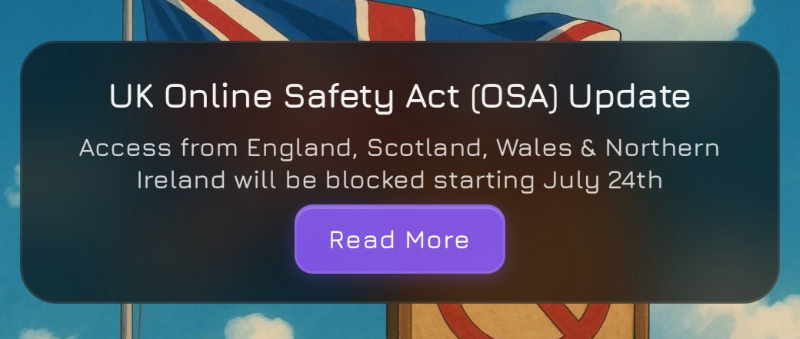
Janitor AI unavailable in the UK

On July 24, 2025, Janitor AI officially confirmed that access to their platform has been blocked for users in the United Kingdom. In a blog post, the team explained that this action was taken in response to the UK’s Online Safety Act, a law requiring online services to comply with strict content monitoring and data compliance.

"As a small indie team, we don’t have the resources to comply with these extensive UK regulations," the Janitor AI team stated.
Janitor AI Blog, July 2025

What does this mean for UK users?

  • The site won’t load in most UK ISPs

  • Access may work temporarily via mobile data or secondary links, but gets cut again

  • Even API-based tools using Janitor AI may fail to connect

How to Unblock Janitor AI in the UK with a VPN Safely?

The easiest and most effective way to access Janitor AI from the UK is by using a reliable VPN. A Virtual Private Network allows you to change your virtual location to a country where Janitor AI is still accessible, like the US, Canada, or Germany.

Step-by-Step: Access Janitor AI Using UFO VPN

1. Download UFO VPN

Step 1
Grab the free Windows VPN installer right below. UFO VPN is lightweight and secure on all Windows systems. Double-click the downloaded file and complete the installation. Once installed, launch UFO VPN.
windows1
Step 2
Select a VPN Server
Inside the app, you can click the "Connect" button for quick connection, or browse the list of servers by Location or categroy: Video& Stream, Game, etc. Choosing the right server ensures fast speeds and smooth access.
windows2
Pro Tip

UFO VPN is an all-in-one VPN that offers unlimited access to 4D streaming like Netlfix, Disney Plus, no-ping gaming as PUBG, Roblox, CODM and social networking for YouTube, X, Facebook and more.


Step 3
Enable Advanced Features
In addition to basic functions, we recommend you turn on extra protections via Ad Blocker and features like Kill Switch, Split Tunneling and Smart Hop. Users can optimize online gaming/streaming/chatting as much as possible.
windows3
Step 4
Check Your New IP
Use UFO VPN's built-in " What is My IP" feature to see your new IP address and location. This confirms your VPN is working, hides your real IP, and ensures privacy while browsing.
windows4
Step 1 Download and install UFO VPN for macOS
Click the button below to download offcial Mac VPN free. Open the .dmg file, drag UFO VPN to your Applications folder, and launch it. You're just a few clicks away from secure browsing.
macos1
Step 2 Pick Your IP Server
Tap "Connect" button for the fastest server automatically. Or you can select a server from the global server list in 100+ countries. UFO VPN is an UFO VPN is an all-in-one VPN or gaming, video streaming, social platforms, and AI tools.
macos2
Step 3

Unlock Pro Features

If you have upgraded to premium plan , feel free to enjoy premium servers for 4K streaming and advanced features like Kill Switch, Split Tunneling, and gaming acceleration. Your Mac is now fully optimized and protected. Inaddition to basic functions, we recommend you turn on

macos3
Step 4

Verify Your IP Now

Use UFO VPN's " What is My IP " feature to see your new IP and location. This confirms your connection is secure, anonymous, and ready for safe browsing online anywhere at any time.


macos4
Step 1 Download and install UFO VPN for iPhone/iPad
Download this free iOS VPN via official link or App Store. Once installed, launch the app to get started. UFO VPN is now trusted by over 2 million users worldwide with optimzed service.
ios1
Step 2 Select a Perfect Server
Hit "Connect" button for the fastest server near you instantly. Or you can choose a favorite location/platform from the server list manually for full control. UFO VPN is an all-in-one VPN companion for gaming, streaming, social media, and AI tools.
ios2
Step 3 Lookup IP and Enable Pro Features
Now you can check your current IP via built-in IP lookup tool. Pro features in premium plan offer you premium servers, blazing speeds, Kill Switch, Split Tunneling, and Multi-device login, so you can protect your iPhone, iPad, and other Apple devices all at once.
ios3
Step 1 install UFO VPN for Android
Get free Android VPN from offcial website or Google Play Store. Follow the instructions for easy download. Then open the app and get ready to surf safely.
android1
Step 2 Choose Your Ideal Server
UFO VPN is an all-in-one powerhouse for gaming, video streaming, social apps, and AI tools. The"Connect" button links you to the fastest server instantly, or you can choose among the server list manually via Location/ Video&Stream/Games for easy access.
android2
Step 3 Power Up Pro Features
Pro users can look up current IP via built-in "What Is My IP" feature, and unlock premium features like 4K servers, turbo speeds, Kill Switch, Split Tunneling, and Multi-device login, keeping all your Android phones, tablets, and other devices safe at once.
android3

2. Clear your browser cache & cookies
This avoids location leaks or redirect issues.

3. Visit janitorai.com
You should now have full access again.

Where Is Janitor AI Still Available in 2026?

Janitor AI continues to operate normally in many countries. Here's a snapshot:

🌍 Country Access Status Notes
🇺🇸 United States ✅ Available Fully functional
🇩🇪 Germany ✅ Available No known restrictions
🇸🇬 Singapore ⚠️ Intermittent Some users report desktop issues
🇷🇺 Russia ❌ Blocked Access may fail, even with VPN
🇹🇷 Turkey ❌ Blocked VPN required to access
🇬🇧 United Kingdom ❌ Banned Officially geo-blocked as of July
Pro Tip

VPN effectiveness may vary by region. UFO VPN has high success rates for UK users. Download UFO VPN iOS - free VPN for iPhone/iPad.

FAQs

Why can’t I access Janitor AI in the UK?

Because the service has been geo-blocked due to compliance issues with the UK Online Safety Act.

Is it legal to use a VPN to access Janitor AI?

Yes, using a VPN is legal in the UK. However, how you use the VPN (e.g., for NSFW content) should comply with local laws.

What is the UK Online Safety Act?

It’s a government regulation aiming to enforce content moderation, age restrictions, and platform accountability for online services.

Will Janitor AI return to the UK?

There is currently no official plan to resume UK access. The team has stated that it's not feasible unless regulations change.

Conclusion

Janitor AI's sudden disappearance in the UK is frustrating—but not final. By using a reliable VPN like UFO VPN, you can easily bypass the geo-block and continue chatting with your favorite characters, safely and privately.

As global internet laws continue to evolve, tools like VPNs are more crucial than ever in protecting digital freedom. Stay informed, stay connected—and enjoy your AI experience without borders.

Bypass blocks. Stay private.

Use UFO VPN — the best free VPN that works anywhere

Also available in:  Français , Русский

Marco
Marco

About This Author

Hi, I’m Marco, a tech enthusiast and writer specializing in trending topics around AI and IT. With a passion for innovation and a knack for simplifying complex concepts, I create engaging content that keeps readers informed about the latest advancements in technology.