How to Verify If Character AI Is Down
Before jumping into solutions, first confirm whether the problem lies with the platform itself or something on your end. Here are three simple methods to check if Character AI is down:
1. Visit the Official Website
Go to https://status.character.ai/. If the page fails to load or shows a 500/502 error, there’s a good chance the server is having issues. However, if the homepage loads but chat functionality fails, it may be a partial outage.
2. Use Status Checking Sites
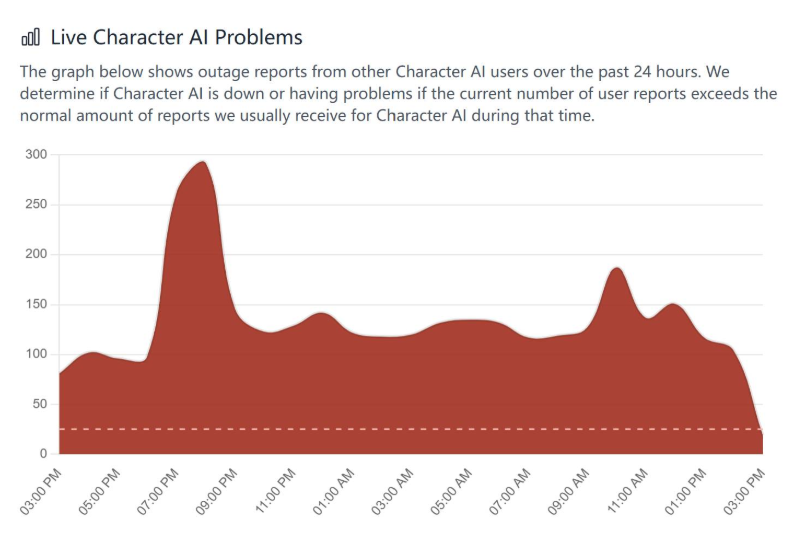
Websites like DownDetector or IsItDownRightNow can help confirm widespread outages. These services track real-time reports from other users and may show location-based failures, too.
3. Check X (Twitter) or Reddit
Search for updates on social platforms like X (formerly Twitter). Look for hashtags such as #characterAIdown or check the platform’s official account for any maintenance announcements. Reddit threads, particularly on r/CharacterAI, can also reveal if others are experiencing the same issue.
Possible Reasons for Character AI Downtime
Even when Character AI is accessible in most places, there are several reasons it might not work for you. Let’s break down the most common causes:
1. Regional Access Restrictions
In some regions, access to Character AI may be restricted due to government censorship, ISP-level blocks, or firewall policies. If the site works on mobile data but not on your Wi-Fi, this might be the case.
Quick solution: Use a secure VPN like UFO VPN to bypass geo-restrictions
2. Server-Side Issues
Character AI occasionally experiences server overloads, especially during peak usage hours. These can result in chat messages failing to send, extended loading times, or full site downtime.
3. Scheduled Maintenance or Updates
Like most online platforms, Character AI periodically rolls out updates or fixes bugs through scheduled maintenance. Unfortunately, these aren’t always well-communicated in advance.
4. Browser or Device Conflicts
Sometimes the issue isn’t with Character AI itself, but with your local setup. Cached data, outdated browsers, or misconfigured DNS settings can all lead to login or functionality failures.
5. Account-Specific Glitches
Some users report issues like chat loading endlessly or profiles not saving correctly. In such cases, your account may be experiencing sync or backend problems that require a logout or reset.
Bonus: How to Access Character AI Quickly (Even If Blocked)
If Character AI seems unreachable in your country or network, it might be due to regional blocks or restrictions. This is where a VPN (Virtual Private Network) becomes incredibly useful.
A VPN allows you to change your virtual location, so you can access Character AI as if you're browsing from a country where it's fully available. It also protects your online traffic, making your connection more secure and private.
Pro Tip: Using a VPN like UFO VPN can help you bypass local network blocks or filters, and even reduce lag by connecting to faster international servers. If Character AI is blocked or slow in your area, try switching to a VPN server in a more neutral or stable region like Germany or Switzerland.
Remember, always use a trusted VPN service and avoid free options that may log your data or inject ads. Download UFO VPN iOS - free VPN for iPhone and iPad right now!


UFO VPN is an all-in-one VPN that offers unlimited access to 4D streaming like Netlfix, Disney Plus, no-ping gaming as PUBG, Roblox, CODM and social networking for YouTube, X, Facebook and more.




Unlock Pro Features
If you have upgraded to premium plan , feel free to enjoy premium servers for 4K streaming and advanced features like Kill Switch, Split Tunneling, and gaming acceleration. Your Mac is now fully optimized and protected. Inaddition to basic functions, we recommend you turn on

Verify Your IP Now
Use UFO VPN's " What is My IP " feature to see your new IP and location. This confirms your connection is secure, anonymous, and ready for safe browsing online anywhere at any time.







Quick Fixes for Character AI Not Working
If the website isn't down globally, and you're still facing issues, try these troubleshooting steps:
1. Refresh the Page or Reboot the App
It sounds basic, but sometimes simply refreshing your browser or restarting the app clears up temporary glitches.
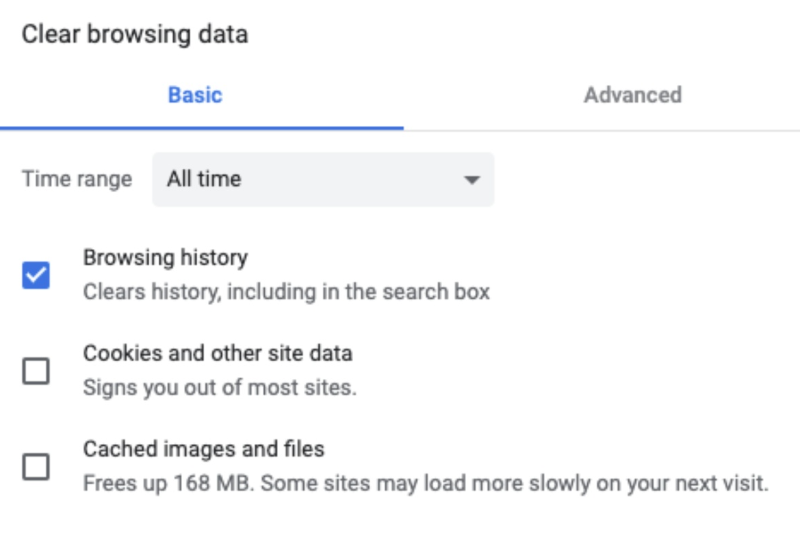
2. Clear Your Cache and Cookies
Your browser stores cached data that may cause loading conflicts. Clear cache and cookies, then reload the site to see if things improve.
3. Try a Different Browser or Device
If you’re using Safari or an older version of Chrome, switch to a newer browser like Firefox or Edge. Also, test on mobile if desktop access fails.
4. Flush DNS or Restart Your Router
DNS errors can sometimes prevent access to certain websites. Run a DNS flush on your computer or restart your router to renew your IP settings.
5. Disable Extensions and Ad Blockers
Browser add-ons, especially ad blockers or privacy extensions, may interfere with how Character AI loads. Try opening the site in incognito/private mode to rule this out.
6. Connect via VPN
As mentioned, if your access is being blocked by your ISP or regional filters, using a VPN is often the most effective fix.
FAQs
Q1: Is Character AI down right now?
Check real-time platforms like DownDetector or the official Character AI X account for status updates.
Q2: Why is Character AI loading forever?
This can be caused by server lag, browser cache issues, or account-specific problems. Try clearing the cache, changing browsers, or using a VPN.
Q3: Is Character AI blocked in my country?
Some countries or institutions restrict access to AI platforms. If you're unable to access the site without explanation, try switching networks or using a VPN.
Q4: Why does Character AI work on mobile but not on my Wi-Fi?
This could indicate a local network block. Your mobile carrier may not restrict it, while your ISP or router firewall might.
Q5: Can I access Character AI while traveling abroad?
Yes. If it’s blocked in the country you're visiting, use a VPN to regain access as if you were in your home region.
Conclusion
Is Character AI down? Whether it’s a global server issue or a local network conflict, the steps outlined in this guide can help you get back to chatting with your favorite AI characters quickly and securely. When Character AI is down or inaccessible due to regional blocks, using a secure VPN solution like UFO VPN can be a reliable fix. It ensures consistent access, faster speeds, and enhanced privacy, no matter where you are.