What is Opera GX
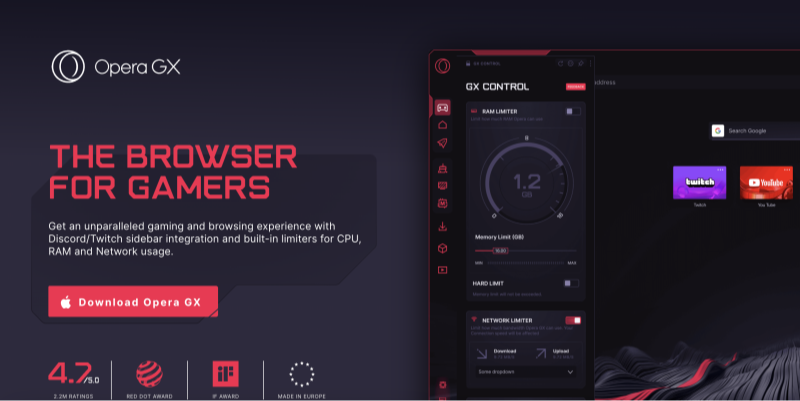
Opera GX is a gaming‑focused browser, a spin‑off of the standard Opera browser, designed to appeal to PC and console gamers with features like RAM/CPU limiters, Twitch integration, and a custom GX Corner news feed. Yet at its core, Opera GX retains the fundamental architecture of Opera—including the Opera GX VPN, ad blocker, and Chromium‑based engine. While the design may be eye‑catching, gamers need to ask: is Opera GX safe enough to handle personal data, passwords, and financial transactions?
📖Related Reading
Core Security Features of Opera GX
Built‑In VPN: Hype or Help?
Opera GX’s headline security feature is its free built‑in VPN. Positioned in the sidebar, this VPN promises to mask your IP address and encrypt traffic. However:
-
Proxy vs True VPN
Opera’s “VPN” is actually an encrypted proxy server, not a full VPN offering system‑wide encryption. Only browser traffic is routed through Opera’s servers—other applications and services on your PC remain unprotected. -
Server Locations & Logging
With only a handful of virtual server regions (Americas, Europe, Asia), Opera GX VPN lacks the global reach of premium solutions. And while Opera claims a no‑logs policy for VPN traffic, its parent company’s broader data collection practices cast doubt on true anonymity. -
Performance
Free VPNs often throttle bandwidth. Gamers may notice slower downloads or lag spikes—ironically compromising the very performance Opera GX advertises.
Verdict:
Opera GX VPN can obscure your IP for casual browsing, but it’s no substitute for a dedicated VPN when you need full‑stack encryption and privacy.
GX Control: Resource Limiting & Security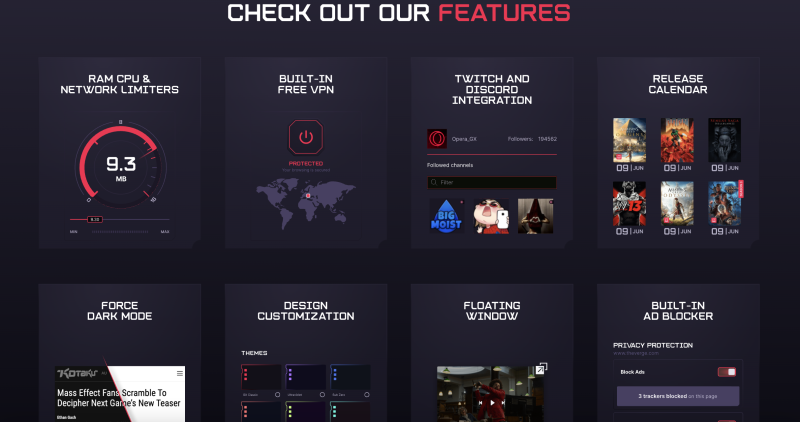
Opera GX’s signature GX Control lets you cap CPU, RAM, and network usage. While great for maintaining game performance, these controls have some security implications:
-
Reduced Isolation
By throttling processes, you may inadvertently lower sandbox protections that rely on CPU/RAM allocation. Proper sandboxing helps isolate browser tabs to prevent malware from spreading. -
Network Limiter
While the limit can prevent background tabs from hogging bandwidth, it may also interfere with real‑time security updates or antivirus cloud scans if set too low.
Balance resource limits—set GX Control so it favors gaming performance without crippling essential security processes.
Incognito Mode in Opera GX: Real Privacy?
How to Go Incognito on Opera GX
-
Click the Opera GX menu (GX icon) in the upper left.
-
Select “New Private Window” (or press Ctrl+Shift+N).
-
Browse in incognito mode—history and cookies are cleared when you close the window.
Incognito Flaws & Limitations
-
Local Privacy Only
Incognito prevents storing history and cookies on your device but does nothing to hide your IP from websites, ISPs, or network administrators. -
No Protection Against Fingerprinting
Websites can still track you through browser fingerprinting, which incognito doesn’t address. -
Extensions May Leak Data
Unless disabled, extensions installed in normal mode can remain active in incognito, potentially exposing data.
Takeaway:
How to go incognito on Opera GX is straightforward but offers limited real‑world privacy. For true anonymity, combine incognito with Best free VPN.
2026 Security Risks & Vulnerabilities
Past Exploits and Patches
-
2021 WebView Exploit
A Chromium vulnerability allowed remote code execution via malicious web pages. Opera quickly patched, highlighting the need for auto‑updates. -
Extension API Flaws
Some GX‑compatible extensions had excessive permissions, risking data leaks.
Privacy Policy Concerns
Opera’s privacy policy states that certain usage analytics and crash reports may be collected. While anonymized, aggregated data could still reveal browsing patterns. Always review the policy under Settings → Privacy & Security → Data Collection.
Third‑Party Extensions & Risks
Installing unvetted browser extensions can undermine Opera GX’s security. Only use extensions from trusted sources and regularly audit permissions.
Opera GX vs Other Gaming Browsers
| Feature | Opera GX | Brave GX | Edge(with game mode) |
|---|---|---|---|
| VPN | Encrypted proxy (browser only) | No built‑in VPN | No built‑in VPN |
| Resource Control | CPU/RAM/Network limiters | RAM limiter only | Game Mode prioritizes GPU/CPU |
| Privacy | Ad/tracker blocker, data collection | Built‑in ad/tracker blocker | Limited tracking prevention |
| Customization | Color themes, sound effects | Theming, limited custom scripts | Minimal theming |
Opera GX leads in resource control and built‑in VPN, but Brave GX offers stronger privacy by default.
Best Practices for Safe Gaming Browsing


UFO VPN is an all-in-one VPN that offers unlimited access to 4D streaming like Netlfix, Disney Plus, no-ping gaming as PUBG, Roblox, CODM and social networking for YouTube, X, Facebook and more.




Unlock Pro Features
If you have upgraded to premium plan , feel free to enjoy premium servers for 4K streaming and advanced features like Kill Switch, Split Tunneling, and gaming acceleration. Your Mac is now fully optimized and protected. Inaddition to basic functions, we recommend you turn on

Verify Your IP Now
Use UFO VPN's " What is My IP " feature to see your new IP and location. This confirms your connection is secure, anonymous, and ready for safe browsing online anywhere at any time.







FAQs
Is Opera GX safe for everyday browsing?
Opera GX is generally safe, but its built‑in VPN only covers browser traffic. For full‑stack security, pair Opera GX with a dedicated VPN like UFO VPN.
Does Opera GX VPN encrypt all my data?
No—Opera GX VPN is an encrypted proxy that only protects browser traffic. Other apps (games, chat clients) remain unencrypted.
How to go incognito on Opera GX?
Click the GX menu → New Private Window or press Ctrl+Shift+N. Remember, incognito hides local history but doesn’t mask your IP.
What makes Opera GX different from normal Opera?
Opera GX adds resource limiters (CPU, RAM, network), gaming‑focused themes, and sidebar integrations for Twitch, Discord, and GX Corner.
Should I trust Opera GX with my data?
Opera GX is as secure as Chromium—but review data collection settings and consider a VPN for added anonymity.
Conclusion
So, is Opera GX safe? It offers compelling gaming‑centric features—ad blocker, resource limiters, and a built‑in Opera GX VPN—but real privacy and security require more than a free proxy. For 2026, supplement Opera GX with a dedicated VPN like UFO VPN, regularly audit extensions, and combine incognito mode with encryption to truly protect your data. With these best practices, you can enjoy a smooth, secure gaming and browsing experience without compromising your privacy.