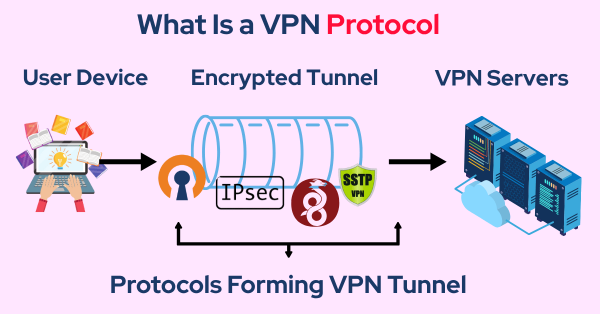
What is PPTP?
PPTP (Point-to-Point Tunneling Protocol) is one of the oldest VPN protocols, originally designed by Microsoft in the 1990s. It creates a secure tunnel between your device and the VPN server, helping protect your data during transmission. While PPTP was widely adopted for its ease of use and speed, it has significant security weaknesses that make it unsuitable for modern VPN needs.
PPTP handles basic functionalities like data encryption and authentication, but modern threats have exposed its vulnerabilities. This makes it less secure than newer protocols such as OpenVPN or WireGuard.
How PPTP Works
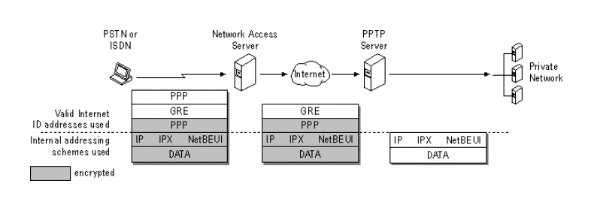
PPTP operates by establishing a “tunnel” between two points—typically, your device and the VPN server. Once the connection is established, data packets are encapsulated within an IP envelope and sent to another router or machine that decrypts the data, making it accessible to the receiving party.
This tunneling process allows for two types of data flow:
-
Data Packets: These contain the actual information being transmitted.
-
Control Messages: These manage the start and end of the encrypted connection.
Despite its simplicity, PPTP does not offer the encryption standards of newer VPN protocols, leading to vulnerabilities.
Advantages and Disadvantages of PPTP
While PPTP was revolutionary in its time, its flaws have become apparent. Here’s a breakdown of its pros and cons:
Advantages of PPTP
-
Fast and Easy Setup: PPTP is one of the simplest VPN protocols to set up, making it accessible to users with minimal technical knowledge.
-
Wide Compatibility: As one of the oldest VPN protocols, PPTP is supported by a variety of operating systems, including Windows, macOS, and Linux.
-
Speed: PPTP’s lack of complex encryption algorithms means faster connection speeds and lower overhead, which is beneficial for users prioritizing performance over security.
Disadvantages of PPTP
-
Weak Security: PPTP uses outdated encryption methods that are vulnerable to modern hacking techniques. Attackers can exploit these weaknesses, compromising your data and privacy.
-
No Integrity Check: Unlike newer VPN protocols, PPTP does not provide proper protection against data integrity attacks, making it more susceptible to interception.
-
Insecure for Sensitive Data: Due to its vulnerabilities, PPTP is not recommended for transactions involving sensitive information, such as banking or password management.


PPTP vs. Modern VPN Protocols
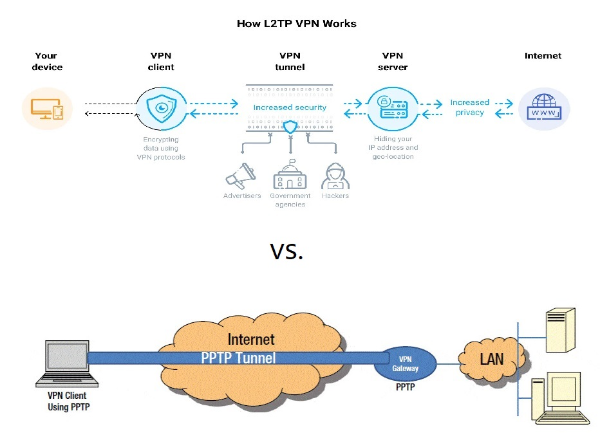
While PPTP might still be used for non-critical applications, more secure alternatives have replaced it. Protocols like OpenVPN and WireGuard offer stronger encryption, better data integrity checks, and resistance to modern cyberattacks.
-
OpenVPN: Known for its robust security features, OpenVPN offers encryption via SSL/TLS and is highly configurable. It is widely regarded as one of the most secure VPN protocols.
-
WireGuard: A newer VPN protocol that offers simplicity, faster speeds, and superior security compared to PPTP. WireGuard’s minimal codebase makes it easier to audit and more efficient than older protocols.
While PPTP may still be supported by some VPN services, it is not the best option for users looking to secure their online activities.
How VPN Enhances Your Security
Using free proxy VPN in UFO VPN is a far more secure and reliable option than PPTP. Here’s how UFO VPN ensures your online safety:
-
Strong Encryption: UFO VPN uses AES-256 encryption to secure your internet traffic, ensuring your data remains private and safe from cybercriminals.
-
No Data Logging: UFO VPN follows a strict no-logs policy, meaning your browsing history, data, and online activities are not stored or monitored.
-
Faster Speeds with Security: Unlike PPTP, UFO VPN balances strong encryption with fast speeds, giving you the best of both worlds.
-
Access to Global Content: UFO VPN allows you to bypass geo-restrictions and access content from different countries, making it a versatile tool for secure browsing and streaming.
⬇️4 Steps Switching to UFO VPN⬇️


UFO VPN is an all-in-one VPN that offers unlimited access to 4K streaming like Netlfix, Disney Plus, no-ping gaming as PUBG, Roblox, CODM and social networking for YouTube, X, Facebook and more.




Unlock Pro Features
If you have upgraded to premium plan , feel free to enjoy premium servers for 4K streaming and advanced features like Kill Switch, Split Tunneling, and gaming acceleration. Your Mac is now fully optimized and protected. Inaddition to basic functions, we recommend you turn on

Verify Your IP Now
Use UFO VPN's " What is My IP " feature to see your new IP and location. This confirms your connection is secure, anonymous, and ready for safe browsing online anywhere at any time.







FAQs
Is PPTP secure enough for everyday use?
While PPTP is fast and easy to set up, its security vulnerabilities make it unsuitable for protecting sensitive information. It's best to use more secure protocols like OpenVPN or WireGuard for online privacy and security.
How does UFO VPN compare to PPTP?
Unlike PPTP, UFO VPN uses advanced encryption methods like AES-256, ensuring your data is far more secure. Additionally, UFO VPN offers faster speeds, better privacy, and no data logging.
Should I use PPTP for banking or shopping?
No, PPTP is not secure enough for sensitive activities like banking or online shopping. For these tasks, always use a VPN that employs strong encryption protocols, such as UFO VPN.
Can I still use PPTP with UFO VPN?
UFO VPN does not use PPTP due to its weak security. Instead, it supports modern, more secure protocols, ensuring that your online activities remain safe.