Hinge Age Requirement: Policy Explained
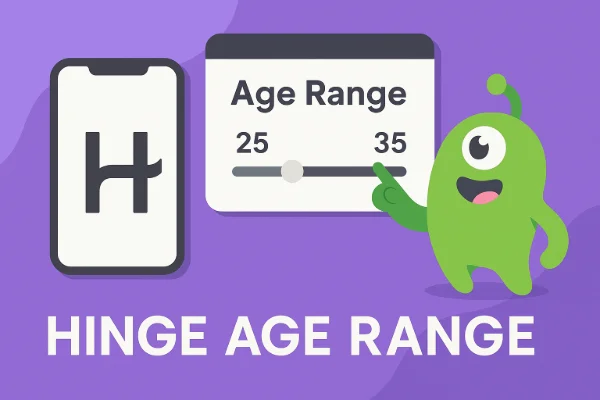
Hinge is designed for adults, and the official age requirement is 18 years and older. The app enforces age verification to ensure a safe dating environment and minimize exposure to underage users.
-
Hinge Age Range: Users can filter potential matches based on a preferred age range. Typically, profiles can be set to view users within a certain span, e.g., 20–35 years.
-
Age Checks: Hinge sometimes uses automated checks to confirm that a user’s listed age aligns with uploaded IDs or linked accounts.
-
Why It Matters: Understanding the age requirement helps you avoid account restrictions or verification failures. Misrepresenting your age could result in temporary or permanent bans.
Many users also search for “Hinge age range hack” or “how to set age range” because they want more control over matching filters. However, attempting to bypass these filters can lead to verification problems or account suspension.
Note: Hinge age rules usually follow the local laws. If you don't want to upload your sensitive information online, you can try a VPN for age verification to change your IP location to regions without strict age laws.
Can You Change Your Age on Hinge?
Changing your age on Hinge is more restricted than other dating apps. Unlike apps that allow free edits, Hinge locks your age after initial setup, often syncing it with Facebook, Apple ID, or Google account information.
-
Edit Age: Some users ask, “Can I edit my age on Hinge?” The answer is usually no unless there is a legitimate error. You can contact Hinge support for corrections if your birth date was entered incorrectly.
-
Hide Your Age: Hinge currently does not allow users to hide their age completely. This policy ensures transparency and reduces catfishing.
-
Why Users Want Changes: Users may want to tweak age to expand match options or match specific preferences. While the platform’s restrictions can be frustrating, they are essential for safe interactions.
How to Verify Age on Hinge? (Step-by-Step Guide)
Hinge offers age verification through ID upload or selfie verification, depending on your region. Here’s a step-by-step process:
Step 1: Open Your Hinge Profile
Tap your profile icon and navigate to “Account Settings” or “Profile Settings.”
Step 2: Select Verification
Look for the “Verify Your Age” or “Verify Identity” option.
Step 3: Choose Method: ID/Selfile
Method 1. Government ID Upload
Upload a valid photo ID, such as a passport or driver’s license. Ensure all details are clear and legible.
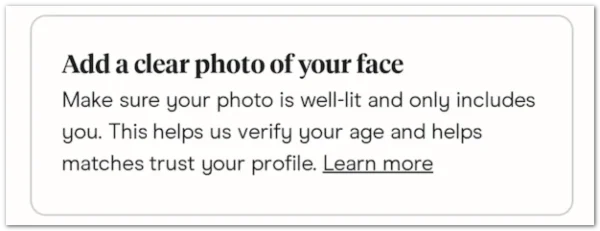
Method 2. Selfie Verification
Some regions allow a live selfie to match your profile photo for verification. Follow the on-screen instructions carefully.
Step 4: Submit & Wait
Hinge will review your submission. Processing time may vary, but it usually takes a few hours.
Step 5: Confirmation
Once verified, a small badge appears on your profile indicating successful verification.
Tips: Ensure your photo is clear, well-lit, and matches your profile. Avoid blurry images, as this is a common cause of verification rejection.
How to Use Hinge Without Age Restriction?
While Hinge enforces an 18+ age requirement, some users want more flexibility in exploring profiles outside their age range. Here’s what you can do safely:
1. Use a VPN for Privacy and Location Flexibility
A free proxy VPN like UFO VPN lets you mask your real location, which can help when the app’s age filters are applied differently in other regions.
How to access Hinge with UFO VPN:


UFO VPN is an all-in-one VPN that offers unlimited access to 4K streaming like Netlfix, Disney Plus, no-ping gaming as PUBG, Roblox, CODM and social networking for YouTube, X, Facebook and more.




Unlock Pro Features
If you have upgraded to premium plan , feel free to enjoy premium servers for 4K streaming and advanced features like Kill Switch, Split Tunneling, and gaming acceleration. Your Mac is now fully optimized and protected. Inaddition to basic functions, we recommend you turn on

Verify Your IP Now
Use UFO VPN's " What is My IP " feature to see your new IP and location. This confirms your connection is secure, anonymous, and ready for safe browsing online anywhere at any time.







VPNs do not bypass age verification, but they improve privacy and access to the app in regions with stricter restrictions.
2. Adjust Age Filters in Settings
Even if you can’t change your own age, you can set broader age preferences for matches, e.g., 18–45.
This gives the experience of exploring profiles outside your default range without violating rules.
3. Select Regions with Flexible Profile Options
Some countries or regions may have slightly different verification requirements, like selfie-only verification instead of ID upload.
Using a VPN to connect to these regions can allow smoother verification, but your true age must still meet Hinge’s minimum requirement.
Important Reminder:
Attempting to falsify your age to bypass restrictions is against Hinge’s terms and can lead to account suspension. Always stay within legal and safety guidelines.
Is It Safe to Upload Your ID/Photo on Hinge?
Safety concerns are valid when sharing sensitive information online. Hinge claims that uploaded IDs and selfies are encrypted and used strictly for verification purposes.
-
Security Practices: Data is stored securely, and Hinge does not publicly display personal details.
-
Privacy Consideration: Avoid sharing images outside the app. Always verify you’re on the official app or website before uploading sensitive documents.
-
VPN Use: For extra privacy, using a reliable VPN like UFO VPN can help mask your location when uploading information or browsing the app, reducing potential risks from regional data breaches.
Hinge Age/ID Verification Not Working? Quick Fixes
Sometimes, users face issues where Hinge does not accept their verification:
-
Blurry or Low-Quality Photos: Make sure your ID or selfie is clear, well-lit, and shows all necessary details.
-
Incorrect Document Type: Only accepted IDs are valid; check Hinge’s list.
-
Account Mismatch: Ensure your profile name matches your ID exactly.
-
App Glitches: Update your Hinge app to the latest version or reinstall it.
-
Contact Support: If problems persist, Hinge support can manually review your submission.
These solutions address common frustrations like “Why is Hinge not letting me verify?” or “Hinge verification blurry.”
Safety Tips for Hinge Age Verifying
While verification helps establish trust, it’s still important to remain vigilant:
-
Check Verification Status: Look for the verification badge on profiles to identify genuine users.
-
Beware of Fake Verification: Some may attempt to fake verification; always rely on official Hinge badges.
-
Spot Catfish & Bots: Look for inconsistencies in photos, grammar, or profile details. Reports suggest Hinge has fewer bots than some free dating apps, but vigilance is key.
-
Protect Your Data: Never share IDs outside Hinge, and consider using a VPN when accessing the app in regions with data privacy concerns.
FAQs
Does Hinge verify age?
Yes, Hinge uses ID upload or selfie verification to confirm age and identity.
Can you fake Hinge verification?
Faking verification is difficult due to automated checks and manual reviews. Attempting to cheat may result in account suspension.
How accurate is Hinge verification?
Verification is generally reliable but can fail if photos are blurry or details mismatch.
Can I hide my age on Hinge?
No, Hinge requires age transparency to reduce catfishing and maintain safety.
Are there a lot of bots on Hinge?
Hinge reports relatively few bots compared to other dating platforms, but users should remain cautious.
How do I see if someone is verified?
Verified profiles display a small badge next to the user’s name or photo.
Conclusion
Age verification on Hinge is crucial for safety, trust, and compliance with the app’s policies. While editing age is limited, following the correct verification steps ensures a smooth process. By staying cautious, spotting potential catfish, and using tools like UFO VPN for privacy, you can enjoy a safer and more effective dating experience. Understanding Hinge’s age rules and verification system helps you connect confidently with genuine users.