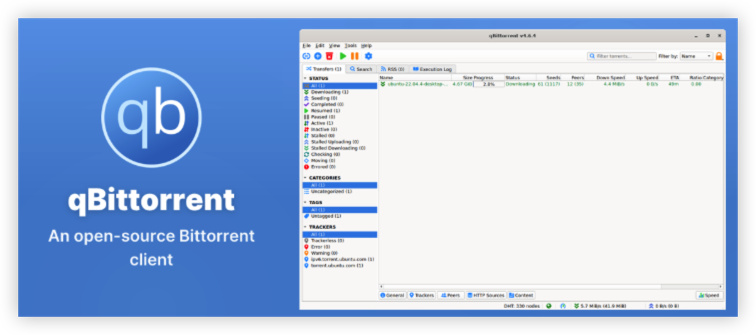
What is qBittorrent?
How does qBittorrent work?
A BitTorrent client is software that allows your device to participate in a peer-to-peer (P2P) file-sharing network. Instead of downloading an entire file from one central server, BitTorrent breaks the file into smaller pieces and allows users to download different pieces from multiple peers.
A simplified process looks like this:
Torrent file / magnet link → qBittorrent → BitTorrent peers → File pieces → Completed file
qBittorrent handles the connections between your device and other peers, manages downloads and uploads, and reassembles the pieces into the final file. The official project describes qBittorrent as an open-source alternative to µTorrent. Its current feature set includes no ads, integrated search, RSS support, encrypted connections, DHT, Peer Exchange, IP filtering, and Web UI remote control.
What Is qBittorrent Used For?
qBittorrent can be used for many legitimate P2P downloads.
For example:
- Open-source operating systems
- Linux distributions
- Large public datasets
- Open-source software
- Public-domain files
- Developer resources
- Other content distributed through authorized torrents
A common example is downloading a Linux ISO. Instead of every user downloading the entire ISO from one central server, BitTorrent allows participating users to exchange pieces with one another. This can reduce the load on a single distribution server and make large files easier to distribute.
Is qBittorrent a torrent website?
A torrent client is an application that communicates with the BitTorrent network. And popular torrent clients include:
- qBittorrent
- µTorrent
- Transmission
- Deluge
The torrent client does not necessarily host the file itself. Instead, it manages connections with other participants and coordinates the transfer of file pieces. This means qBittorrent is not a torrent website and not a VPN. It is the software that manages your BitTorrent connections.
What you download matters. Using qBittorrent is legal software use, but downloading or sharing copyrighted content without authorization may violate copyright laws.
Is qBittorrent Legal or Not?
Yes. qBittorrent itself is legal software. It is an open-source BitTorrent client designed to help users download and share files through the BitTorrent protocol.
However, what you use qBittorrent to download or share can determine whether your activity is legal.
For example, downloading an authorized Linux distribution, open-source software, or public-domain content through qBittorrent is generally legal. Downloading or distributing copyrighted movies, games, software, or other content without permission may violate copyright laws, depending on your location.
| Activity | Legality | Why |
|---|---|---|
| Downloading qBittorrent | ✅ Yes | qBittorrent is legitimate open-source software |
| Downloading Linux distributions | ✅ Yes | Many are intentionally distributed through torrents |
| Sharing your own files | ✅ Yes | You own or have permission to distribute them |
| Downloading public-domain content | ✅ Yes | The content is not protected by applicable copyright |
| Downloading authorized open-source software | ✅ Yes | Distributed with permission |
| Downloading copyrighted content without permission | ⚠️ May be illegal | Depends on copyright law and authorization |
| Sharing copyrighted content without permission | ⚠️ May be illegal | P2P sharing can involve both downloading and uploading |
📝Does Using qBittorrent Make Torrenting Illegal?
Using a BitTorrent client is not inherently illegal. BitTorrent is simply a peer-to-peer technology, and qBittorrent is software that implements that technology.
The same technology can be used for completely legitimate purposes.
The important distinction is that qBittorrent is legal. The legality of a torrent depends on the content and whether you have the right to download or share it.
A VPN also doesn't change this. Using UFO VPN can improve network privacy by routing your connection through a VPN server, but it does not make unauthorized downloads legal or protect you from copyright obligations.
Is qBittorrent Safe to Use?
Is the qBittorrent Software Safe?
The official qBittorrent client is legitimate, open-source software and is not malware. The project publishes its source code and provides official releases with verification information such as checksums and PGP signatures.
The bigger risk is downloading a fake, modified, or outdated copy from an unofficial website. Third-party installers may contain unwanted software or may have been modified without the qBittorrent project's authorization.
To download qBittorrent more safely:
- Download it from the official qBittorrent website.
- Avoid cracked, modified, or "premium" versions.
- Check that you're downloading a current stable release.
- Don't install versions from suspicious software-download websites.
- Keep qBittorrent and your operating system updated.
It's also important to separate qBittorrent safety from torrent safety. A legitimate qBittorrent installation does not guarantee that every torrent or downloaded file is safe. Torrents can contain malicious installers, executable files, or other unwanted content, so only download files from sources you trust and scan suspicious files before opening them.
Is qBittorrent Safe Without a VPN?
You can use qBittorrent without a VPN, but you have less network privacy. A VPN is not required for qBittorrent to work. Without one, qBittorrent connects to the BitTorrent network through your regular internet connection.
Because BitTorrent is a peer-to-peer protocol, your public IP address may be visible to other peers participating in the same torrent swarm. This doesn't mean qBittorrent is unsafe software. Instead, it means that using qBittorrent without a VPN can expose more information about your network connection.
| Safety Concern | qBittorrent Without VPN | qBittorrent With VPN |
|---|---|---|
| qBittorrent software security | ✅Generally safe | ✅Generally safe |
| Public IP exposure to peers | Your normal IP may be visible | ✅VPN server IP is normally visible instead |
| Traffic between your device and VPN server | N/A | ✅Encrypted through the VPN tunnel |
| Additional network privacy | Limited | ✅ |
| Protection if VPN disconnects | N/A | ✅Possible with Kill Switch |
| qBittorrent-specific traffic control | ❌ | ✅Possible with VPN binding |
For example, UFO VPN - a reliable and free proxy VPN can be used alongside qBittorrent to add a VPN layer to your P2P connection. UFO VPN includes features such as AES-256 encryption and a Kill Switch, which can be useful if you:
- Don't want your normal public IP directly exposed to P2P peers.
- Frequently use qBittorrent for large or long-running downloads.
- Leave qBittorrent running while you're away from your computer.
- Use public or unfamiliar networks.
- Want an additional layer of network privacy.
For even more control, this torrent client supports VPN binding to qBittorrent, which restricts the client to a selected network interface. This is different from simply connecting to a VPN and can help prevent qBittorrent from using another available interface.
[Bonus] How to Use qBittorrent More Safely
1. Download qBittorrent From the Official Source
Use the official qBittorrent website rather than an unofficial repackaged installer.
The current official release is qBittorrent 5.2.3, and the project publishes verification information for its downloads.
2. Keep qBittorrent Updated
Use a current stable version to benefit from bug fixes and dependency updates.
3. Use Trusted Sources
A safe torrent client does not guarantee safe content.
Be cautious with:
- Unknown software installers
- Suspicious executable files
- Modified applications
- Unexpected archives
- Untrusted torrent sources
4. Scan Downloaded Files
Especially for software, executable files, scripts, and archives, use your operating system's security tools or trusted antivirus software before opening them.
5. Consider a VPN for Network Privacy
If you're concerned about P2P IP exposure, a VPN can add another layer of privacy.
UFO VPN provides features including AES-256 encryption, Kill Switch, Split Tunneling, SmartHop, and IP/DNS leak protection, which can be useful when building a privacy-focused qBittorrent setup.


UFO VPN is an all-in-one VPN that offers unlimited access to 4K streaming like Netlfix, Disney Plus, no-ping gaming as PUBG, Roblox, CODM and social networking for YouTube, X, Facebook and more.




Unlock Pro Features
If you have upgraded to premium plan , feel free to enjoy premium servers for 4K streaming and advanced features like Kill Switch, Split Tunneling, and gaming acceleration. Your Mac is now fully optimized and protected. Inaddition to basic functions, we recommend you turn on

Verify Your IP Now
Use UFO VPN's " What is My IP " feature to see your new IP and location. This confirms your connection is secure, anonymous, and ready for safe browsing online anywhere at any time.







qBittorrent vs. uTorrent: Which is Safer & Better?
This is one of the most common reasons users compare the two clients. qBittorrent was specifically designed as an open-source alternative to µTorrent, so they share many familiar BitTorrent features. However, their product models are different.
qBittorrent vs uTorrent: Key Differences
qBittorrent's official feature list includes no ads, open-source development, encrypted connections, RSS, integrated search, Web UI, DHT, PEX, and IP filtering. While uTorrent currently offers Basic, Ad-Free, Pro, and Pro+VPN products. Its Pro tier includes malware and virus protection, while Pro+VPN bundles a VPN service.
| Feature | qBittorrent | uTorrent |
|---|---|---|
| Open source | ✅ | ❌ |
| Free version | ✅ | ✅ |
| Ads | ❌ | Yes, depending on tier |
| Paid ad-free version | ❌ | ✅ |
| Torrent downloads | ✅ | ✅ |
| RSS | ✅ | ✅ |
| DHT / PEX | ✅ | ✅ |
| Encrypted connections | ✅ | ✅ |
| Web/remote control | ✅ | ✅ |
| VPN support | ✅ | ✅ |
| VPN interface binding | ✅ | More limited |
| Anonymous Mode | ✅ | Different privacy controls |
| Windows | ✅ | ✅ |
| macOS | ✅ | ✅ |
| Linux | ✅ | No comparable official desktop client |
| Android | No official qBittorrent app | ✅ |
| Premium malware protection | ❌ | Yes, Pro |
| Bundled VPN | ❌ | Yes, Pro+VPN |
Is qBittorrent Better than uTorrent?
There isn't a universal answer. If your definition of safety is open-source transparency and an ad-free client, qBittorrent has clear advantages. But if you're looking for built-in premium malware protection, uTorrent Pro offers a feature qBittorrent does not provide as part of the client itself.
Choose qBittorrent If You Want:
- Open-source software
- No ads
- More detailed configuration
- VPN interface binding
- A desktop-focused torrent client
- Linux support
Consider uTorrent If You Want:
- Android support
- uTorrent Web
- Premium malware scanning
- A bundled VPN option
- The established µTorrent ecosystem
For most users looking for a free, open-source, ad-free desktop BitTorrent client, qBittorrent is a strong choice.

qBittorrent Alternatives for a Better Experience
qBittorrent is a strong choice for many desktop users, but it isn't necessarily the best torrent client for everyone. Your preferred alternative may depend on whether you care most about simplicity, lightweight performance, remote access, platform support, or advanced customization.
1. Transmission
Best for: Users who want a clean and easy-to-use torrent client.
- Simple, uncluttered interface
- Lightweight and easy to run in the background
- Open-source
- Available for Windows, macOS, and Linux
- Good choice for basic torrent downloading and seeding
Choose Transmission if: qBittorrent feels more feature-heavy than you need.
2. Deluge
Best for: Users who want more control over how their torrent client works.
- Open-source
- Lightweight core with a plugin-based architecture
- Supports advanced configuration
- Available for Windows, macOS, and Linux
- Suitable for users who want to add features as needed
Choose Deluge if: You want a customizable torrent client without being locked into a fixed feature set.
3. BiglyBT
Best for: Experienced users who want extensive torrent and network controls.
- Open-source
- Supports advanced download management
- Offers detailed configuration options
- Designed for users who manage large numbers of torrents
- Available across major desktop platforms
Choose BiglyBT if: You want more advanced controls and don't mind a steeper learning curve.
4. uTorrent
Best for: Users who are already familiar with the uTorrent ecosystem.
- Available on Windows, macOS, Android, and through uTorrent Web
- Familiar interface for long-time BitTorrent users
- Offers free and paid tiers
- Pro plans add features such as malware and virus protection
- Pro+VPN combines the torrent client with a VPN service
Choose uTorrent if: You prefer its established ecosystem or want premium features that aren't part of qBittorrent.
5. Tixati
Best for: Users who want a lightweight torrent client with detailed bandwidth and connection controls.
- Lightweight and designed for low resource usage
- Detailed bandwidth and traffic management
- Supports DHT, PEX, magnet links, and RSS
- Provides detailed peer and transfer statistics
- Available for Windows and Linux
- No advertising in the client
Choose Tixati if: You want a lightweight alternative with more detailed connection and bandwidth controls than a basic torrent client.
Key Takeaways
- qBittorrent is a free, open-source BitTorrent client used to download and share files through P2P networks.
- qBittorrent is generally safe when downloaded from its official source and kept updated.
- qBittorrent does not require a VPN to download or manage torrents.
- Using qBittorrent without a VPN provides less network privacy, because your normal public IP may be visible to peers.
- uTorrent offers additional premium features, including malware and virus protection in its Pro tier.
- Neither qBittorrent nor a VPN makes every torrent or downloaded file safe.
FAQs
Does qBittorrent hide your IP?
No. qBittorrent does not hide your public IP by itself. A VPN can replace your normal public IP with the VPN server's IP for traffic routed through the VPN.
Is qBittorrent faster than uTorrent?
Not necessarily. Download speed depends on peers, seeders, network conditions, configuration, and other factors. A VPN can also affect performance.
Can I use qBittorrent with UFO VPN?
Yes. UFO VPN can be used alongside qBittorrent to provide an additional network privacy layer. You can also use features such as Kill Switch and, where appropriate, qBittorrent VPN binding for more controlled traffic routing.