HoYoverse Age Verification: What It Is & Trigger Conditions
HoYoverse age verification is a system implemented to ensure compliance with global regulations that protect minors online. The process typically asks users to confirm their birthdate or provide additional verification if the system detects account inconsistencies.
Common triggers include:
-
New account creation: Users under a certain age threshold (varies by region) are flagged automatically.
-
Payment or in-game purchase attempts: HoYoverse may require verification before processing transactions.
-
Suspicious login activity: Logging in from a new country or device can trigger age verification checks.
-
Regional regulations: Certain countries, such as the US, South Korea, Japan, or those under EU GDPR, enforce stricter minor protection laws.
Understanding these triggers helps users anticipate when verification may appear and why it is necessary.
Working Game Tip: If you encounter an age verification pop-up, you can use a free proxy VPN in UFO VPN to switch your real IP address to countries without strict age-verification laws. UFO VPN offers optimized VPN servers like the USA VPN free, South Korea VPN free, Japan VPN free, the UK VPN free, etc.
Is the HoYoverse Age Verification Email Real or a Scam?
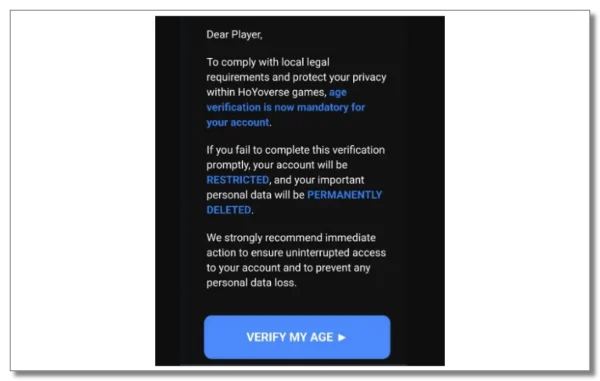
One of the most common concerns among players is whether the age verification email they receive is legitimate. Scammers sometimes mimic HoYoverse emails to steal account credentials.
Signs a real HoYoverse email typically includes:
-
Sent from official domains like
@hoyoverse.comor@hoyolab.com. -
Personalized information such as your registered username or linked email.
-
Clear instructions pointing to official HoYoverse or HoYoLAB websites.
Red flags indicating potential scams:
-
Unusual sender addresses (e.g.,
@gmail.comor unrelated domains). -
Requests for passwords, payment info, or download of suspicious files.
-
Poor grammar, typos, or urgent threats to lock your account.
If you suspect an email is fake, do not click any links and log in directly to your HoYoverse or HoYoLAB account to verify any prompts.
Safe Link Check: How to Confirm Age Verification Email Is from HoYoverse
To ensure the email you received is safe:
-
Check the sender domain: Only emails from
@hoyoverse.comor@hoyolab.comshould be trusted. -
Hover over links: Make sure URLs lead to official HoYoverse websites. Avoid clicking links with unusual domains or redirect chains.
-
Verify in your account settings: Log in to HoYoLAB or the game directly to see if a verification notice is present.
-
Check Reddit and community forums: Other players often report recent phishing attempts. Searching “HoYoverse age verification email Reddit” can confirm trends.
By following these steps, you can reduce the risk of phishing attacks or accidental credential leaks.
How to Verify Age on HoYoverse/HoYoLAB/HoYoverse Website
Completing age verification is generally straightforward:
Step 1: Access the official verification page
-
Either follow the official link in the verified email or log in directly to HoYoLAB or your game account.
Step 2: Provide required information
-
Enter your birthdate accurately.
-
Some regions may require further verification, such as uploading ID documents.
Step 3: Confirm your email
-
HoYoverse often sends a confirmation email to ensure your email address is valid.
Step 4: Submit and wait for approval
-
Processing time can range from a few minutes to 24 hours depending on server load and region.
Troubleshooting Tip
-
If the verification page doesn’t load due to regional restrictions, connecting through a stable VPN, like UFO VPN, can help access the page safely. This ensures the site loads correctly without altering your account location permanently.
HoYoverse Age Verification Not Working? Reasons & Fixes
Sometimes players experience problems completing verification. Common issues include:
1. Page loading or server errors
-
Servers may be busy or undergoing maintenance. Refresh the page or try again later.
2. Regional restrictions
-
Certain countries block access to verification services. Using a VPN with servers in supported regions can help.
3. Incorrect or inconsistent information
-
Ensure your birthdate matches the original account info. Mismatched data can cause verification to fail.
4. Email issues
-
Check spam/junk folders if confirmation emails don’t arrive. Resend the verification email from the official site if needed.
5. Browser or device problems
-
Clear your browser cache or switch devices if the verification page fails to load.
Following these steps usually resolves the majority of verification issues.
What Happens If You Don’t Verify Your Age on HoYoverse?
Skipping or failing age verification can lead to account limitations rather than deletion:
-
Access restrictions: You may be unable to access certain features, like Genshin Impact’s in-game purchases or live events.
-
Minor mode activation: Accounts may default to limited minor-friendly settings, such as reduced playtime and spending caps.
-
Account suspension: Rarely, repeated failures combined with suspicious activity could temporarily lock your account.
Important: Your game progress and items typically remain intact. Accounts are not automatically deleted solely for failing age verification.


Safety Tips for Verifying Age on HoYoverse
To keep your account safe during the verification process:
-
Always use official links and domains.
-
Avoid sharing passwords or sensitive information outside the official verification form.
-
Check your email settings: Ensure you can receive verification emails without delay.
-
Use a secure network connection: Public Wi-Fi may expose credentials; consider using a trusted VPN for safer access in restricted regions.
-
Stay updated: Follow official HoYoverse and HoYoLAB announcements to be aware of recent changes in verification procedures.
FAQs
Does HoYoverse require ID for all users?
Only certain regions, like the U.S., may request official ID for verification. In most international accounts, birthdate confirmation is sufficient.
Can I bypass HoYoverse age verification?
No official method allows bypassing age verification. Attempting to bypass can risk account suspension. Always use legitimate verification procedures.
Why isn’t my age verification page loading?
This could be due to server issues or regional restrictions. Clearing cache, switching devices, or using a VPN in a supported region usually resolves the issue.
How long does HoYoverse age verification take?
Typically a few minutes, but some regions may take up to 24 hours depending on verification type and server load.
Will my Genshin account get deleted if I don’t verify my age?
No, accounts are generally not deleted. Unverified accounts may experience feature limitations or minor-mode restrictions.
Conclusion
HoYoverse age verification in 2026 ensures compliance with global minor protection regulations and keeps accounts secure. By following the correct verification steps, confirming emails safely, and troubleshooting common issues, you can maintain full access to Genshin Impact, HoYoLAB, and other HoYoverse services. Always use official links and stay informed to safeguard your account, ensuring a smooth gaming experience without interruptions.