Can You Play Brawl Stars Without a VPN?
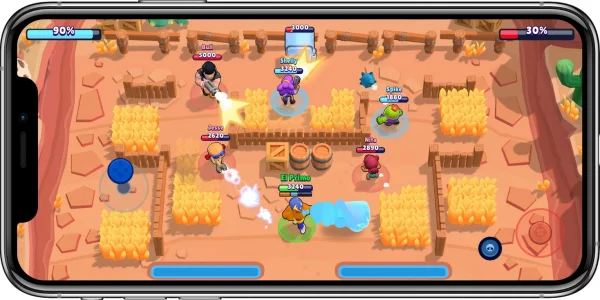
The short answer is: Yes, absolutely.
For the vast majority of players, a VPN is not a requirement. Supercell, the developer behind Brawl Stars, has launched the game globally. This means if you live in a country where the game is officially supported—which includes most of North America, Europe, and Asia—you do not need to mask your IP address to play.
Here are the scenarios where you can play directly without any third-party tools:
- Local App Stores – If Brawl Stars is available in your country’s app store, you can download and play it without any VPN. This is true for most countries where Supercell officially distributes the game.
- Home Wi-Fi Networks – At home or in private networks with no restrictions, Brawl Stars works without any need for a VPN.
- Unrestricted Mobile Networks – If your mobile carrier doesn’t block gaming apps or ports required by Brawl Stars, the game will run without extra tools.
- Game Updates – Many players find they can update Brawl Stars directly from the app store, again without needing a VPN, as long as the game is officially supported in that region.
However, players often confuse "region locking" with "connection issues." If the game is not showing up in your store, it usually means your digital store account is set to a region where the game hasn't launched yet, or it is temporarily restricted. We can bypass this by changing device settings rather than routing your connection through a VPN service.
Steps to Play Brawl Stars on Android & iOS Devices (No VPN Needed)
If you have checked your app store and cannot find the game, do not worry. You can still install and enjoy the game. The method differs slightly depending on whether you are team Android or team iPhone.
These methods involve changing your location settings or sourcing the game file directly. This allows you to play Brawl Stars without a VPN active in the background, saving your battery life and data.
For Android Users
Android allows users more freedom to install apps from sources other than the Google Play Store. This process is called "sideloading." It sounds technical, but it is just downloading a file.
Step 1: Enable "Install from Unknown Apps"
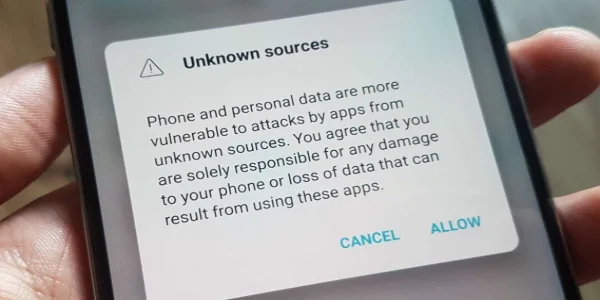
Before you download anything, you need to tell your phone it is okay to install apps from your browser.
- Go to your phone's Settings.
- Search for Security or Privacy.
- Find the option that says Install Unknown Apps (or "Unknown Sources" on older devices).
- Select your web browser (like Chrome) and toggle the switch to Allow.
Step 2: Download the APK File
You need the game installer file, known as an APK.
- Open your browser and visit a reputable APK site. Sites like APKPure, Uptodown, or QooApp are safe choices that verify their files.
- Search for "Brawl Stars APK."
- Download the latest version. Make sure the version number matches the current one to avoid "Update Required" errors later.
Step 3: Install and Play
- Once the download finishes, tap the file in your notification bar or "Downloads" folder.
- Confirm the installation.
- Open the game. It will connect to the nearest server automatically.
For iOS Users
Apple is stricter. You cannot simply download a file from a website. Instead, you need to change the region of your Apple ID to a country where the game is available (like Canada or the US).
Step 1: Cancel Subscriptions
You cannot change your store region if you have active Apple Music or TV subscriptions. You must cancel these or wait for them to expire first. Also, spend any remaining balance on your Apple ID.
Step 2: Change Country/Region
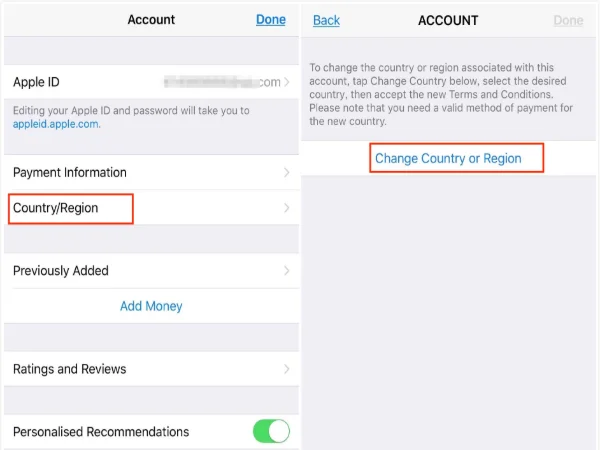
- Open the App Store.
- Tap your profile icon in the top right corner.
- Tap your name/email at the top of the menu.
- Select Country/Region and then Change Country or Region.
- Scroll down and select a supported country (e.g., Canada or the United States).
Step 3: Fill in Details
- Agree to the Terms and Conditions.
- For the payment method, select None. If you don't see "None," you may need to create a fresh Apple ID.
- Enter a billing address. This must be a real format. You can use a random generator or look up a hotel address in that country on Google Maps. You need a valid Street, City, and Zip/Postal Code.
- Tap Next.
Step 4: Download
Your App Store will refresh. Search for Brawl Stars. It should now appear. Download it, launch it, and play. You can switch your Apple ID back later, though updates might require you to switch again.
Why Can't I Play Brawl Stars at School and Other Public Areas?
You have the game installed, your phone is working, but the moment you step onto your school campus or connect to office Wi-Fi, the game refuses to load. The loading bar gets stuck at 20% or connects and immediately drops.
This is not a problem with your phone. It is the network.
Common Reasons for this situation include:
-
Firewall Restrictions: Schools and workplaces use firewalls to block specific traffic. They often block the "ports" (digital doors) that games use to communicate with servers.
-
Bandwidth Preservation: Games can eat up data. Network administrators block gaming domains to keep the internet fast for work and study.
-
Productivity Policies: Simply put, they don't want you playing games when you should be working or studying.
Quick fixes:
While we want to play Brawl Stars without VPN to save battery, this is the one specific scenario where a VPN is the only fix. You need a tool to "tunnel" through the firewall.
When you use a VPN, your traffic looks like regular gibberish to the school's network filter. It doesn't know you are gaming, so it lets the data pass through.
For this purpose, you can choose a free proxy VPN in UFO VPN. It is lightweight and designed to bypass these exact types of blocks.


UFO VPN is an all-in-one VPN that offers unlimited access to 4K streaming like Netlfix, Disney Plus, no-ping gaming as PUBG, Roblox, CODM and social networking for YouTube, X, Facebook and more.




Unlock Pro Features
If you have upgraded to premium plan , feel free to enjoy premium servers for 4K streaming and advanced features like Kill Switch, Split Tunneling, and gaming acceleration. Your Mac is now fully optimized and protected. Inaddition to basic functions, we recommend you turn on

Verify Your IP Now
Use UFO VPN's " What is My IP " feature to see your new IP and location. This confirms your connection is secure, anonymous, and ready for safe browsing online anywhere at any time.







The protocol used by UFO VPN is specifically optimized to unblock Brawl Stars at school without alerting the network admin. It encrypts your request, meaning the school Wi-Fi sees you connecting to a secure server, not to the Supercell game server.
If you’re on t-mobile like me, download a free v-p-n from the App Store and run that before playing. I don’t have any lag doing that for whatever reason

How to Play Brawl Stars From Any Country
There are times when the "No VPN" method hits a wall. Perhaps you are traveling to a country where Brawl Stars is banned or not yet released. Or, maybe you are a competitive player who wants to practice on servers in a different region (like playing on Korean servers to test your skills against different playstyles).
In these cases, your physical location (IP address) tells the game server, "You are not allowed here."
This is where a tool like UFO VPN becomes essential again. It can help:
-
Bypass Geo-Bans: Some countries block VoIP and gaming ports at a national level. A VPN changes your digital location. If you are in a restricted region, you can set your location to the US or Germany, and the game will let you in.
-
Access Soft Launches: Sometimes, Supercell tests updates in specific countries (like Finland or Canada) before the rest of the world. By switching your VPN location to these countries, you get early access to new content.
Many VPNs are slow. They route your data through crowded servers, causing "lag"—the delay between you tapping the shoot button and your character actually shooting. But UFO VPN has dedicated gaming servers. These lines are kept clear to ensure your ping remains low, even when you are spoofing a location halfway across the world.
Bonus Tips to Avoid Lag and Enjoy Smooth Gameplay
Even if you successfully play Brawl Stars without VPN, you might still face lag. Nothing causes a loss faster than your screen freezing in a Showdown match. Here are some tricks to keep your gameplay smooth.
💡 Use 5GHz Wi-Fi: Most routers have two frequencies, 2.4GHz and 5GHz. The 2.4GHz band travels through walls better but is slower and more crowded (microwaves and Bluetooth use it). Switch to the 5GHz band for a faster, cleaner connection.
💡 Close Background Apps: Social media apps refresh constantly in the background. Close Instagram, TikTok, and Snapchat before you launch the game to free up RAM and bandwidth.
💡 Clear Cache: If the game feels sluggish, go to your phone settings, find Brawl Stars, and clear the "Cache" (do not clear "Data" unless you have your Supercell ID saved, or you will lose progress).
If your ISP (Internet Service Provider) throttles gaming traffic during peak hours (like 8 PM), you might experience lag even with fast internet.
A safe Brawl trick is to toggle your VPN on just for the connection phase. Use a premium server on UFO VPN to bypass the ISP throttling, then once the game is stable, you can sometimes disconnect the VPN to rely on the direct line, or keep it on if the route is optimized. This ensures you get the brawler skins, finish your daily tasks, and rank up without the dreaded red Wi-Fi symbol.
Final Thoughts
You do not need to be a tech wizard to enjoy your favorite game. In most cases, you can play Brawl Stars without VPN simply by downloading the right APK file on Android or taking a few minutes to switch your store region on iOS. These methods are permanent, battery-friendly, and simple.
However, when you face artificial barriers—like a school firewall or a region lock while traveling—a reliable tool like UFO VPN is your best backup plan. It bridges the gap, ensuring that no matter where you are, the arena is always open.
Ready to brawl? Check your settings, grab the download, and start collecting those trophies.
FAQs
1. Can I get banned if I use a VPN for Brawl Stars?
Generally, no. Supercell does not ban players just for using a VPN to improve their connection or play at school. Instead, cheating may get punished. So remember to choose those reliable tools and safe tricks for Brawl Stars, as they won't flag your account.
2. Does Supercell allow VPNs for Brawl Stars?
Yes, they allow them, but they don't "support" them. This means if you have lag while using a VPN, Supercell's customer service will tell you to turn it off before they can help you with technical issues.
3. Why is my game lagging even without a VPN?
Lag is often caused by a weak Wi-Fi signal or too many people using the same network. Try switching to mobile data or standing closer to your router.
4. Is it safe to download Brawl Stars APKs?
It is safe as long as you use trusted websites like APKPure. Never download "Modded" versions that promise free gems, as these are usually scams or malware.
5. Can I play Brawl Stars on PC without a VPN?
Yes! You can use an emulator like BlueStacks or LDPlayer. Since these run on your computer's home internet, you can play directly without a VPN unless your local network has restrictions.