What Is Peacock?
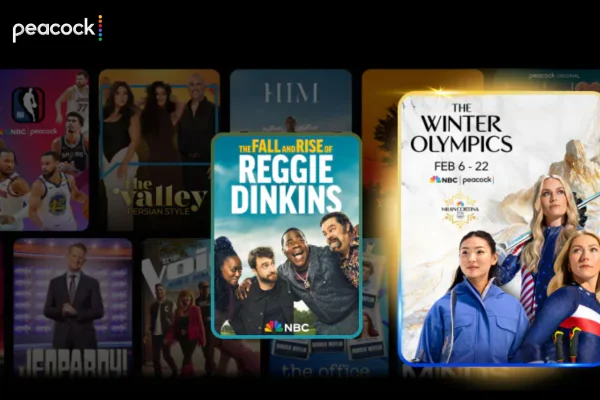
Peacock is a streaming service owned by NBCUniversal. It was launched in the United States to bring together content from NBC, Universal Pictures, and other partner networks. Unlike many platforms that focus only on on-demand shows, Peacock combines TV series, movies, live channels, and sports in one place.
One notable feature of Peacock is its connection to traditional television. Many NBC shows are available shortly after airing on TV. This makes it appealing to viewers who want to keep up with US network programs without a cable subscription.
Key features of Peacock include:
- On-demand TV shows and movies
- Live sports, including Premier League matches and WWE events
- News and live TV-style channels
- Original Peacock series not available elsewhere
- Multiple plans, including ad-supported options in the US
Peacock offers a wide range of content. Users can watch popular TV shows like The Office, Parks and Recreation, and Saturday Night Live. The movie library includes Universal releases, older classics, and rotating titles.
Sports fans often choose Peacock for live events. Premier League soccer is one of its strongest draws. In addition, Peacock carries WWE programming, which is a major reason many viewers sign up.
Peacock Originals are another attraction. These shows are produced only for the platform and are not legally available on other streaming services.
Why Peacock Is Inaccessible in Canada?
The short answer to Is Peacock Available in Canada? is no, at least not officially. Peacock is geo-restricted, meaning it is licensed to operate only in certain regions, mainly the United States.
The main reason is content licensing. Streaming rights are sold country by country. In Canada, many shows and movies on Peacock are already licensed to local broadcasters or platforms. Because of these existing agreements, NBCUniversal cannot legally stream the same content directly to Canadian users.
Another factor is market strategy. Peacock was launched with a strong focus on the US audience. Expanding into other countries requires new licensing deals, customer support, billing systems, and regulatory approvals. Until those steps are completed, access remains blocked outside the US.
When a Canadian user tries to visit Peacock, the platform detects the IP address and identifies the location as Canada. As a result, access is denied or redirected to an informational page.


How to Unblock Peacock in Canada and Anywhere
Even though Peacock is not officially available in Canada, many users look for ways to access it while traveling or living abroad. Several methods exist, but they differ in reliability and safety.
Method 1. Use a Reliable VPN
The most common method is using a reliable VPN. A VPN works by changing your apparent online location. For example, when connected to a US VPN free, your internet traffic appears to come from the United States instead of Canada. This allows platforms like Peacock to treat you as a US user.
A VPN also encrypts your connection. This helps protect your data when using public Wi-Fi or accessing streaming sites. Slow or overcrowded servers often lead to buffering or login errors.
UFO VPN can be an expert in this area because it focuses on stable connections and supports streaming use.
You can start by using a free proxy VPN in UFO VPN for light browsing or testing access before committing. Once installed, you can switch to various servers and open Peacock in the browser or app.
Most importantly, no complicated setup is required if you choose UFO VPN, you'll just need to:


UFO VPN is an all-in-one VPN that offers unlimited access to 4K streaming like Netlfix, Disney Plus, no-ping gaming as PUBG, Roblox, CODM and social networking for YouTube, X, Facebook and more.




Unlock Pro Features
If you have upgraded to premium plan , feel free to enjoy premium servers for 4K streaming and advanced features like Kill Switch, Split Tunneling, and gaming acceleration. Your Mac is now fully optimized and protected. Inaddition to basic functions, we recommend you turn on

Verify Your IP Now
Use UFO VPN's " What is My IP " feature to see your new IP and location. This confirms your connection is secure, anonymous, and ready for safe browsing online anywhere at any time.







Method 2. Use Smart DNS Services
Smart DNS services reroute only specific traffic related to location checks. They do not encrypt data like a VPN. This can result in faster speeds, but less privacy protection.
Smart DNS works well on devices that do not support VPN apps, such as smart TVs or game consoles. However, it requires manual configuration and may stop working if Peacock updates its detection methods.
Method 3. Use US-Based Streaming Devices
Some users access Peacock through US-registered streaming devices or accounts created while in the US. This method relies on maintaining a US IP address and payment method.
This approach is less flexible and can stop working if the device updates its location settings.
Method 4. Access Through US Internet Connections
If you travel frequently to the US, you may be able to access Peacock while connected to US networks. This includes hotels or mobile data.
However, once you return to Canada, access usually stops again. So this method is situational and not practical for long-term use.
Method 5. Browser Proxy Extensions
Some browser extensions act as simple proxies. They can change your IP location for basic browsing. However, many are slow, unreliable, or blocked by streaming platforms.
Free proxies often log user data or inject ads. For streaming, they are usually the least stable option.
Safe and Free Alternatives to Peacock
If you try to unblock Peacock and still cannot access it, there are many platforms that offer similar content legally in Canada. These services provide TV shows, movies, and live content without location issues.
Below are ten Peacock alternatives commonly used by Canadian viewers:
-
Crave: The closest thing to a "one-stop shop" in Canada. It carries HBO, Showtime, and many Peacock originals like Hacks.
-
CBC Gem: A fantastic free service that offers live TV and a huge library of Canadian and international shows.
-
Tubi: A completely free, ad-supported service with thousands of movies and classic TV series.
-
Pluto TV: Offers a "live" channel experience for free, including channels dedicated to 24/7 sitcoms and news.
-
Paramount+: Available directly in Canada and features a lot of the same "big network" energy as Peacock.
-
Netflix Canada: Still the king of variety, though it lacks the live sports and news that Peacock offers.
-
Disney+: Great for fans of Star Wars, Marvel, and family-friendly content that you might otherwise find on NBC.
-
Amazon Prime Video: Included with a Prime membership, it has a massive library and allows you to add "channels" for more content.
-
CityTV+: A budget-friendly option for watching local Canadian broadcasts and popular US shows on demand.
-
Global TV App: If you have a cable provider login, you can watch many shows for free here, or use their limited free tier.
If you're still unsure about which one to use, here's a clear table for you to make a better choice:
| Platform | Free / Paid | Ads | Live TV | Originals | Availability in Canada |
|---|---|---|---|---|---|
| Crave | Paid | No | Limited | Yes | Yes |
| CBC Gem | Free / Paid | Yes (free) | Yes | Some | Yes |
| Tubi | Free | Yes | No | No | Yes |
| Pluto TV | Free | Yes | Yes | No | Yes |
| Paramount+ | Paid | Some plans | Yes | Yes | Yes |
| Netflix Canada | Paid | Some plans | No | Yes | Yes |
| Disney+ | Paid | No | No | Yes | Yes |
| Amazon Prime Video | Paid | No | Limited | Yes | Yes |
| Citytv+ | Paid | No | Yes | Some | Yes |
| Global TV App | Free / Paid | Yes (free tier) | Yes | No | Yes |
🚨 Red Flags: Dangerous Signs of Using Peacock & How to Avoid
When trying to access Peacock or its alternatives, users may encounter unsafe sites or services. Recognizing warning signs can help avoid problems.
Below are some common dangers and how you can avoid:
| Dangerous Sign | What It Means | How to Avoid |
|---|---|---|
| Requests for credit card on “free” sites | Possible scam | Use official platforms only |
| Excessive pop-up ads | Unsafe site | Close the page immediately |
| Forced software downloads | Malware risk | Do not install unknown files |
| Poor video quality with redirects | Fake streaming site | Use verified services |
| No privacy policy | Data misuse risk | Check site legitimacy |
⭐ Warm note: Using trusted VPNs, official apps, and well-known platforms reduces these risks. Avoid sites that promise full access with no clear explanation.
Conclusion
So, Is Peacock Available in Canada? Not officially - but that does not mean Canadian viewers lack options. For those who still want access, choosing the right tool like UFO VPN can help. And there are many legal alternatives that are able to offer similar entertainment. The key is choosing safe, stable methods and platforms that fit your viewing habits without unnecessary stress.
FAQs
Is Peacock coming to Canada officially in 2026?
There have been no official announcements regarding a standalone launch of Peacock in Canada for 2026. Most of their content remains licensed to Canadian companies like Corus.
Can I use a Canadian credit card to pay for Peacock?
Usually, no. Peacock requires a payment method with a US billing address. Many users get around this by using virtual US gift cards or prepaid cards.
Is it legal to watch Peacock in Canada with a VPN?
Using a VPN is legal in Canada. However, using one to access geo-blocked content may go against Peacock's Terms of Service, which could lead to your account being restricted if detected.
Do I need a fast internet connection for Peacock?
Yes, for a smooth experience without buffering, you should have at least 5 Mbps for standard quality and 25 Mbps for 4K or live sports.
Does the free version of Peacock still exist?
As of recently, Peacock has largely moved away from its completely free tier for new users, focusing instead on its "Premium" and "Premium Plus" paid plans.