Is It Safe to Play Dinosaur Game on Unblocked Sites?
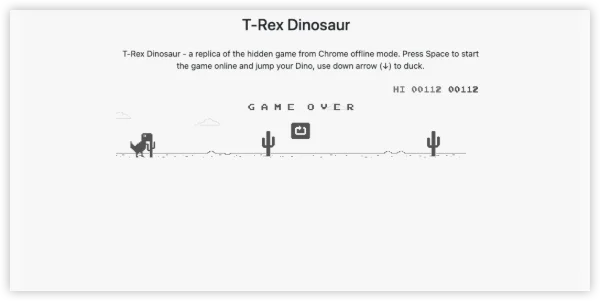
Yes, but with precautions:
-
Stick to reliable websites (like elgoog.im).
-
Avoid shady portals that ask for personal info.
-
Use UFO VPN or browser sandbox if unsure.
-
On school/work devices, play only during breaks to avoid policy violations.
Why Is Dino Game Blocked in Some Places?
Many schools and workplaces block access to certain websites and games to:
-
Prevent distractions – They want students or employees focused.
-
Control bandwidth – Even small games can spike traffic when many play simultaneously.
-
Maintain productivity – Gaming sites may fall under general “entertainment” restrictions.
But the beauty of Dino Game is that it’s lightweight, safe, and educational in its own quirky way — testing reflexes and focus. That’s why players look for unblocked versions.
Where Can You Play Dino Game Unblocked Now?
The Dino Game is globally popular. Here’s a breakdown of where it tends to be unblocked and where access is limited:
-
Freely Accessible: USA (home devices), Canada, UK, Australia, much of Europe.
-
Partially Restricted: Schools in India, South Korea, Singapore, UAE (depending on network policies).
-
Frequently Blocked: Workplaces in the US, corporate offices in Japan, and public institutions in Middle Eastern countries.
💡 Tip: Restrictions are almost always local network rules — not countrywide bans. With the right method, you can still play.
Accessible Portals & Archives for Dino Game Unblocked
Here are reliable portals to try:
-
elgoog.im/t-rex – Mirror of the original.
-
chromedino.com – Free online play.
-
dinogame.net – Extra themes and modes.
-
GitHub repositories – Open-source Dino Game versions.
How to Play Dinosaur Game Unblocked Online & Offline
Here are several safe and working methods, arranged with online and offline perspectives.
Method 1 – Play Directly Online (No VPN Needed)
Several websites host free versions of the Chrome Dino Game:
-
Open your browser.
-
Search for “Dino Game Unblocked site” (examples: chromedino.com, elgoog.im/t-rex/).
-
Start playing instantly — no login or download required.
Pros: Quick, no setup.
Cons: May be blocked on strict school/work networks.
Method 2 – Play Offline in Chrome
-
Open Google Chrome.
-
Disconnect from Wi-Fi or disable your network.
-
Try visiting any page — the “No Internet” screen appears.
-
Press the spacebar and you’re in!
Pros: 100% safe, official.
Cons: Requires you to cut the internet temporarily.
Method 3 – Use a VPN
If your network blocks gaming sites, UFO VPN is the right choice to go:


UFO VPN is an all-in-one VPN that offers unlimited access to 4K streaming like Netlfix, Disney Plus, no-ping gaming as PUBG, Roblox, CODM and social networking for YouTube, X, Facebook and more.




Unlock Pro Features
If you have upgraded to premium plan , feel free to enjoy premium servers for 4K streaming and advanced features like Kill Switch, Split Tunneling, and gaming acceleration. Your Mac is now fully optimized and protected. Inaddition to basic functions, we recommend you turn on

Verify Your IP Now
Use UFO VPN's " What is My IP " feature to see your new IP and location. This confirms your connection is secure, anonymous, and ready for safe browsing online anywhere at any time.







Open your browser and visit a Dino Game unblocked portal. Play without restrictions.
Pros: Works on restricted networks, keeps your traffic private.
Cons: Requires installing an app.
Method 4 – Browser Extensions
-
Visit Chrome Web Store or Edge Add-ons.
-
Search for “Dino Game extension.”
-
Add it to your browser.
-
Play anytime by clicking the icon — even if sites are blocked.
Method 5 – Mobile Play (iOS & Android)
-
On Android: Open Chrome > Turn Airplane Mode On > Try loading a page.
-
On iOS: Use Safari alternatives like “Dino Game Apps” (free from App Store).
Dino Game Cheats (Legal Fun Only)
Want a twist? Use these fun cheats to explore new levels:
-
Speed Control: Open Chrome, right-click > Inspect > Console, then type
Runner.instance_.setSpeed(100)(replace 100 with desired speed). -
God Mode: Type
Runner.instance_.gameOver = function(){}in console. -
Jump Hack: Modify gravity values to make the dino fly higher.
⚠️ Use cheats responsibly — they’re for fun, not competition.
Bonus: Games like Dino Game Unblocked
If you’ve mastered the T-Rex, try similar lightweight unblocked games:
-
Flappy Bird Unblocked – Another reflex-based classic.
-
Slope Unblocked – High-speed ball rolling challenge.
-
Pac-Man Online – Retro maze runner fun.
-
Snake Game – Minimalist but addictive.
Final Thoughts
The Dino Game Unblocked proves that simplicity beats complexity. From a hidden offline Easter egg, it’s now a global unblocked classic. Whether you play it on Chrome, on mobile, or through VPNs like UFO VPN, you’ll always find joy in dodging cacti and chasing high scores.
So the next time someone asks why you’re staring at a pixel dinosaur during lunch break, just say: “It’s unblocked, it’s safe, and it keeps me sharp.”
FAQs
Why does my Dino Game Unblocked site not load?
It may be network restrictions. Try clearing cache, using HTTPS, or connecting via VPN.
Is Dino Game educational?
Indirectly yes — it sharpens focus, reaction speed, and stress management.
Is Dino Game Unblocked free to play?
Yes, it’s always free. Beware of sites trying to charge.