What Are Tyrone Unblocked Games: Meaning & Features
Gaming Types in Tyrone Unblocked Games
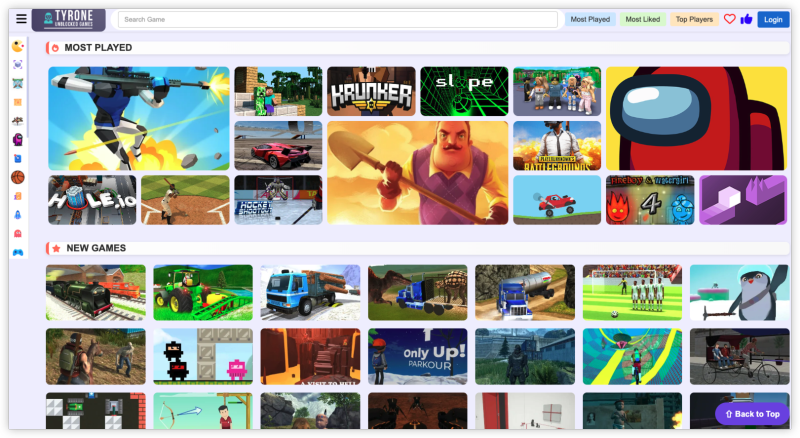
Tyrone Unblocked Games is a curated online site hosting hundreds of free-to-play games that bypass traditional firewalls or network restrictions. It includes categories like:
-
Puzzle
-
Arcade
-
Action
-
Shooting
-
Multiplayer
-
Retro/Classic (like Tetris, Snake, or Pac-Man)
Core Features of Tyrone Unblocked Game
| Feature | Descriptions |
|---|---|
| Free to Play | No sign-up or cost required |
| No Installation | Fully browser-based |
| Firewall Bypass | Designed to evade school/work filters |
| Low Hardware Requirement | Great even on old or low-spec machines |
| Fast Loading | Lightweight HTML5-based games |
| Regular Updates | New games added frequently |
Supported OS and Devices
Tyrone Unblocked Games are web-based, meaning you don’t need to install any software. Here's a breakdown of where they work best:
| Device/OS | Access | Notes |
|---|---|---|
| Chromebook | ✅ | Perfect for students |
| Windows PC | ✅ | Ideal on Chrome or Firefox |
| Mac | ✅ | Safari, Chrome, or Edge |
| Android Tablets | ✅ | Best with landscape screen |
| iOS (iPhone/iPad) | ❌ Limited | Games often blocked on iOS browsers due to network restrictions |
Where Can I Play Tyrone Unblocked Games?
The site is accessible worldwide via browser, but network restrictions may vary depending on the reigional ISP bans and device/browser compatibility. However, you can access Tyrone Unblocked Games in the following country/with the country IP in a free proxy VPN:
-
United States
-
Accessible on personal/home networks
-
Often blocked on school and office Wi-Fi
-
a free USA VPN recommended for unrestricted access
-
-
Canada
-
Similar to the U.S.: home access is fine, schools may block
-
VPN helps bypass institutional restrictions
-
-
United Kingdom
-
Public institutions (schools, libraries) often block gaming portals
-
Home access is usually unrestricted
-
-
Australia
-
Germany
-
Philippines
-
Brazil
- Indonesia
-
India
-
South Africa

- China
- Russia
- United Arab Emirates (UAE)
- Saudi Arabia
- Iran
- North Korea
- Vietnam
Even in countries where Tyrone Unblocked Games is not restricted nationally, local networks (like schools, libraries, and offices) often block access. To bypass these network-level firewalls securely and privately, using a reliable VPN like UFO VPN is highly recommended.
3 Steps to Play Tyrone Unblocked Games
Step 1: Install a VPN (especially on Chromebook)
If the site is blocked, download a free VPN like UFO VPN will help you bypass the blocks easily.


UFO VPN is an all-in-one VPN that offers unlimited access to 4D streaming like Netlfix, Disney Plus, no-ping gaming as PUBG, Roblox, CODM and social networking for YouTube, X, Facebook and more.




Unlock Pro Features
If you have upgraded to premium plan , feel free to enjoy premium servers for 4K streaming and advanced features like Kill Switch, Split Tunneling, and gaming acceleration. Your Mac is now fully optimized and protected. Inaddition to basic functions, we recommend you turn on

Verify Your IP Now
Use UFO VPN's " What is My IP " feature to see your new IP and location. This confirms your connection is secure, anonymous, and ready for safe browsing online anywhere at any time.







Step 2: Go to the Website
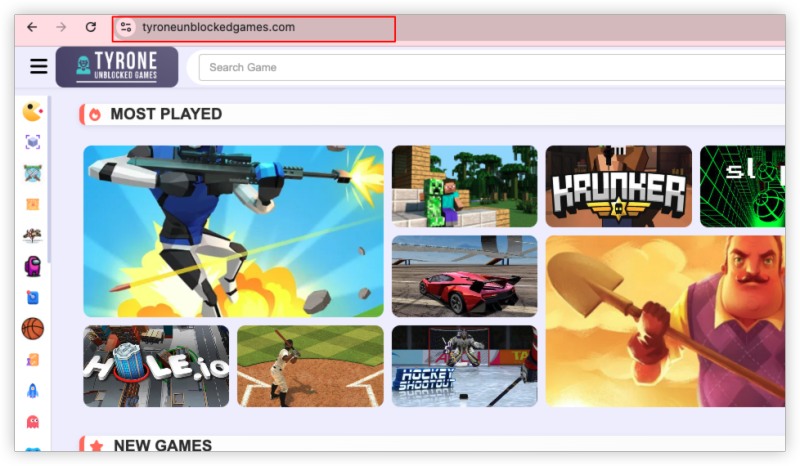
Open your browser and go to Tyrone Unblocked Games official website.
If the domain is offline, try searching “Tyrone Unblocked Games mirror site” or use UFO VPN to access global mirror versions.
Step 3: Pick a Game & Start Playing
-
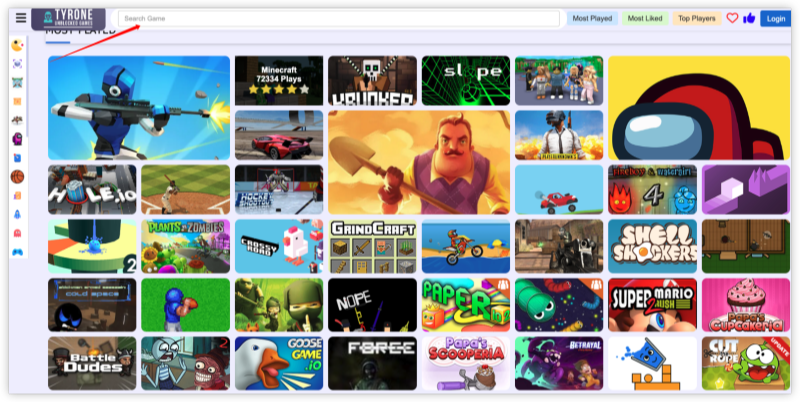
Navigate by genre or use the search bar.
-
Most games load in 5–10 seconds.
-
Controls are usually arrow keys, WASD, or mouse-based.
-
Turn sound on/off depending on your environment.
-
Use fullscreen mode for better experience.
Bookmark the site and the game URL to return easily later!
Is It Legal and Safe to Play Tyrone Unblocked Games?
Yes, it’s generally legal to play as these are flash or HTML5 games not protected by strict IP laws.
But:
-
Avoid submitting any personal data.
-
Don’t disable school policies or device controls if you’re not allowed.
-
Use a VPN responsibly and legally based on your country or institution’s rules.
Bonus: Tyrone vs Other Unblocked Game Sites
Tyrone Unblocked Games wins on clean layout, fewer ads, faster load speeds, and better Chromebook optimization.
| Feature | Tyrone Unblocked | Unblocked Games 66 | Unblocked Games WTF |
|---|---|---|---|
| Game Quality | ⭐⭐⭐⭐ | ⭐⭐⭐ | ⭐⭐⭐ |
| Ads & Popups | Low | Medium | High |
| VPN Needed? | Not always | Sometimes | Often |
| Multiplayer Options | Available | Limited | Limited |
| Game Loading Speed | Fast | Medium | Medium |
| Mobile Compatibility | Good | Poor | Poor |
Conclusion
Tyrone Unblocked Games offers a reliable and fun gaming alternative when traditional access is limited—be it in a school, workplace, or regionally restricted setup. With fast performance, low ads, solid device support, and wide game variety, it beats most other unblocked sites. And if you can’t access it directly? A safe VPN like UFO VPN can help you unlock Tyrone Unblocked Game instantly—especially on school-issued Chromebooks.
So next time you're bored during lunch break or need a quick mental recharge, Tyrone's got you covered.
FAQs
1. Are Tyrone Unblocked Games safe to play?
Yes, they are generally safe. However, always avoid clicking suspicious links or popups and use a VPN to protect your IP and privacy.
2. Do I need to download anything to play Tyrone Unblocked Games?
No, all games are browser-based. Just go to the site and play directly.
3. Can I play these games on my phone?
Some games work well on Android browsers, but iOS may have more restrictions.
4. Why is the Tyrone Unblocked Game site blocked at my school?
School firewalls often block entertainment sites. A VPN like UFO VPN helps you bypass these restrictions.
5. Is it legal to use VPN for gaming at Unblocked Games?
Yes, in most countries VPN use is legal. Just make sure your school or organization doesn’t prohibit it.