What Is eFootball & Where to Download?
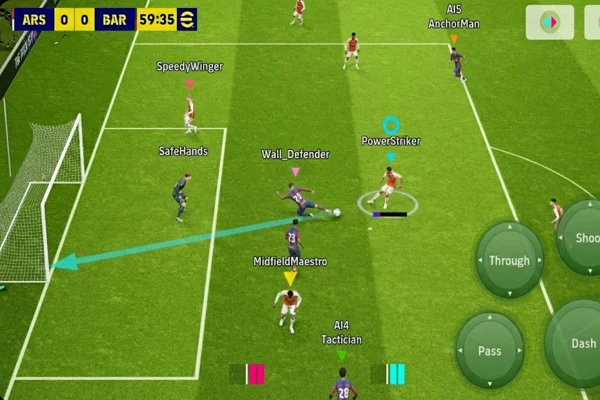
eFootball is a free-to-play football simulation game developed by Konami. It focuses on online matches and regular live updates. Players can build teams, sign real-world football stars, and compete in online leagues. The game uses real club licenses and updates player data based on real matches.
Unlike traditional yearly football games, eFootball runs as a live service. New content is added through updates instead of releasing a new title every year. This means online play is the core of the experience.
You can find eFootball from platforms like:
-
PlayStation 4 and PlayStation 5
-
Xbox One and Xbox Series X/S
-
Windows PC (via Steam)
-
Android devices (Google Play Store)
-
iPhone and iPad (App Store)
Key Benefits of Using VPN When Playing eFootball
When you play online matches, your device connects to a game server. The data travels through your internet provider before reaching the server. Sometimes this route is long or unstable. A VPN can change that route. Here are the main benefits:
1. Unlock Global Servers
Some regions have limited matchmaking pools. If your local server has fewer active players, matchmaking can take longer. A VPN lets you connect through another country. This can give you access to different server regions and larger player pools.
For example, players in Southeast Asia may switch to Japan or US servers during peak hours to find matches faster.
2. Reduce Lag and Improve Ping
High ping causes delayed passes and slow player reactions. Sometimes the issue is not your internet speed but poor routing from your ISP. A VPN can provide a shorter or more stable route to the game server.
If you test your ping before and after connecting to a VPN server near the game's data center, you may see lower latency in some cases.
3. Avoid ISP Throttling
Some internet providers slow down traffic during peak hours. This can affect gaming performance. A VPN encrypts your traffic, so your ISP cannot easily identify gaming data. This may prevent speed reduction during busy periods.
4. Protect Your IP Address
In competitive online matches, some players worry about DDoS attacks. While this is rare in casual gaming, it can happen in high-level matches or tournaments. A VPN hides your real IP address, which adds a layer of protection.
5. Access Game Events in Other Regions
Sometimes certain in-game events or campaigns appear earlier in specific regions. By switching your virtual location, you may access region-based content or test different server environments.
How Can UFO VPN Escalate the eFootball Gameplay?
Not all VPNs work well with online games. Some free services have slow speeds or unstable connections. UFO VPN is often mentioned when players look for a free VPN option that can support gaming.
Here is how it can support your eFootball matches:
✅ Large Server Network
UFO VPN offers access to more than 2,000 servers in many regions. If one region has high ping, you can switch to another nearby country.
For example, players in Singapore can try servers in Japan or South Korea to test latency. And switching servers takes only a few seconds inside the app.
✅ One-Click Connection
The app includes a simple connect button. You open it, tap once, and it selects a recommended server automatically. This helps users who do not want to adjust manual settings or test many locations.
For beginners who just want to try the best free VPN for eFootball without technical setup, this feature saves time.
✅ Strong Encryption
UFO VPN uses modern encryption protocols. Your internet traffic is protected from third parties. This keeps your IP hidden while you play ranked matches or download updates.
Encrypted traffic also reduces the chance of ISP-based restrictions during peak hours.
✅ Stable Performance
Online football games require stable data transfer. Sudden disconnections can cause match losses. UFO VPN focuses on connection consistency, which is important for long matches and tournaments.
✅ Works on Many Devices
You can install UFO VPN on:
-
Android
-
iOS
-
Windows
-
macOS
If you play eFootball on both PC and mobile, you can use the same account across devices. Here's how you can quickly install and use this efficient tool:


UFO VPN is an all-in-one VPN that offers unlimited access to 4K streaming like Netlfix, Disney Plus, no-ping gaming as PUBG, Roblox, CODM and social networking for YouTube, X, Facebook and more.




Unlock Pro Features
If you have upgraded to premium plan , feel free to enjoy premium servers for 4K streaming and advanced features like Kill Switch, Split Tunneling, and gaming acceleration. Your Mac is now fully optimized and protected. Inaddition to basic functions, we recommend you turn on

Verify Your IP Now
Use UFO VPN's " What is My IP " feature to see your new IP and location. This confirms your connection is secure, anonymous, and ready for safe browsing online anywhere at any time.







✅ Real Free Plan
UFO VPN provides a free plan with limited bandwidth. This is suitable for light gaming sessions or testing server performance. If you need higher speed or unlimited data, you can switch to a premium plan.
There is also a trial period and a 30-day money-back guarantee for paid users. This allows you to test advanced features without long-term commitment.

Common Issues of eFootball Playing & Quick Fixes
Even with the best free vpn tool, you might run into occasional hiccups. Here are the most common problems players face and how to fix them quickly.
🚨 "Unable to Connect to Server" Error: This often happens if the game detects a sudden change in your IP.
💡 Fix: Close the eFootball app completely, turn on your VPN, and then restart the game. This ensures the game sees the VPN IP from the very start.
🚨 High Ping Spikes: If your game is stuttering, your current VPN server might be crowded.
💡 Fix: Open your VPN app and switch to a different server in the same country, or choose a neighboring country.
🚨 Slow Update Downloads: Sometimes the VPN might be slower for large downloads than your actual internet.
💡 Fix: If you are just downloading a game update (and not playing a match), you can temporarily turn off the VPN to get your full ISP speed, then turn it back on to play.
🚨 Matchmaking Taking Too Long: This happens if you are connected to a server in a time zone where everyone is asleep.
💡 Fix: Switch your VPN to a region where it is currently evening or afternoon. There will be more players online, and matchmaking will be much faster.
🚨 App Crashing on Mobile: Sometimes the VPN and the game fight for memory on older phones.
💡 Fix: Clear your phone's cache and close all background apps (like social media or browsers) before starting the VPN and the game.
Final Say
Online football games require fast reactions and stable network conditions. If your local routing causes delay or limited server access, using the best free VPN for eFootball can change your experience. The key is to test different servers, monitor ping results, and choose a provider that supports stable connections. With the right setup, online games can feel smoother and more responsive.
FAQs
Will using a VPN get me banned from eFootball?
Generally, no. Most players use VPNs to improve their connection or access events. As long as you are not using the VPN to cheat, manipulate matches, or bypass payment systems, Konami usually does not take action against VPN users.
Does a free VPN work as well as a paid one for gaming?
A free VPN is great for basic needs and bypassing blocks. However, paid VPNs usually offer more servers and unlimited data. If you play eFootball for several hours every day, you might eventually want to upgrade for the best possible speeds.
Can I use a VPN on my PS5 or Xbox for eFootball?
Yes, but consoles don't support VPN apps directly. You can either install the VPN on your home router or share your PC's internet connection (with the VPN active) with your console via an Ethernet cable.
Why is my ping higher when I turn the VPN on?
This happens if you connect to a server that is very far away. For example, if you are in the UK and you connect to a server in Australia, your data has to travel around the world. Always try to connect to a server that is geographically between you and the game server.
Does eFootball use a lot of mobile data?
A standard match uses about 10MB to 30MB of data. While the matches themselves are efficient, the initial downloads and weekly updates can be several gigabytes. Always try to do your updates on Wi-Fi!