Is SpankBang Down or Blocked?
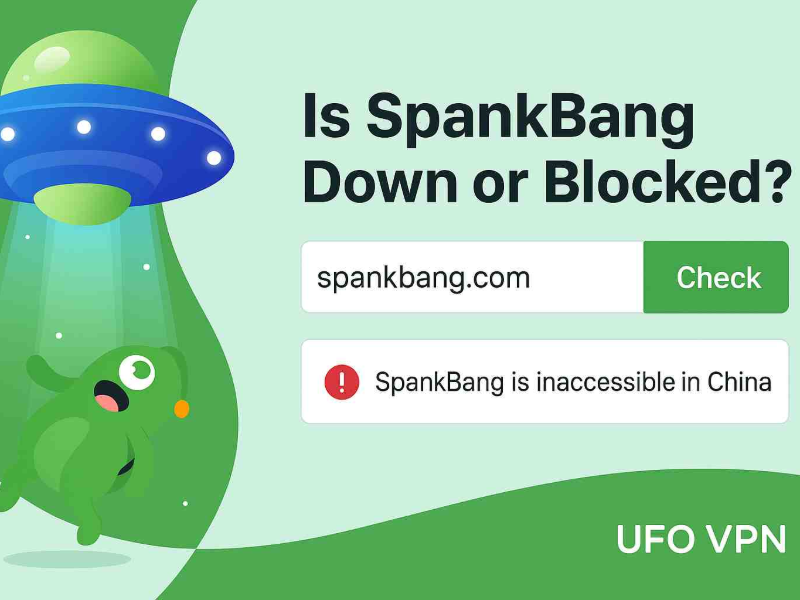
Before jumping into fixes, let’s answer the key question: Is SpankBang actually down? In most cases, SpankBang.com is still online and operational globally. The site hasn’t been shut down or removed - it’s just becoming harder to access from certain regions due to local laws or network restrictions.
Here’s how to check quickly:
-
Visit DownForEveryoneOrJustMe to confirm if the site is down globally.
-
Try opening SpankBang from a different device or network (e.g., mobile data vs. home Wi-Fi).
-
Use a reliable VPN like UFO VPN to test access from another country—if it works, the issue is regional.
Most of the time, it’s not that the website is down—it’s you getting blocked.
One click to unblock Netflix, Hulu, Disney+ etc, and enjoy buffer-free streaming.
Why Is SpankBang Not Working?
There are several reasons why SpankBang might not load on your device. Below are the most common causes:
1. Regional Blocks Due to Age Verification Laws
In several U.S. states (such as Texas, Utah, and Mississippi), lawmakers have introduced strict age-verification laws for adult content. Instead of complying, many adult websites - including SpankBang - have chosen to block access to users in those states entirely.
So if you’re seeing a blank screen or access denied message, it might be due to where you live.

2. ISP or Network-Level Restrictions
Some Internet Service Providers (ISPs), workplaces, universities, and even public Wi-Fi networks block access to adult websites by default. These blocks are often enforced by:
-
Parental control filters
-
DNS-level censorship
-
Firewall rules
If you’re connected to one of these restricted networks, SpankBang might appear unreachable, even though it’s working fine elsewhere.
3. DNS or Browser Issues
Sometimes the issue lies in your device or browser setup. Corrupted browser cache, misconfigured DNS, or expired cookies can prevent websites from loading correctly. Signs this might be the issue include:
-
Long loading times
-
“Server not found” errors
-
Page fails to fully load
4. Temporary Site Maintenance
While rare, SpankBang may occasionally go down for maintenance. During such times, users may see a server error or maintenance message. These outages are typically brief and resolved within a few hours.
Bonus: Get SpankBang Unblocked Quickly
If you’ve confirmed that SpankBang isn’t down globally, but you still can’t access it, there’s a simple workaround: use a VPN. A VPN (Virtual Private Network) allows you to change your virtual location and bypass regional restrictions. This is especially useful if:
-
You live in a state where SpankBang is geo-blocked
-
Your network or ISP filters adult content
-
You want added privacy while browsing
Pro Tip: Connect to a server like the Netherlands or Switzerland, where adult content is unrestricted and internet freedom is protected.
UFO VPN offers optimized servers for streaming adult content privately and securely. It hides your IP address and helps you bypass geo-blocks in just one click, without compromising speed or privacy.


Pro Tip
UFO VPN is an all-in-one VPN that offers unlimited access to 4K streaming like Netlfix, Disney Plus, no-ping gaming as PUBG, Roblox, CODM and social networking for YouTube, X, Facebook and more.




Unlock Pro Features
If you have upgraded to premium plan , feel free to enjoy premium servers for 4K streaming and advanced features like Kill Switch, Split Tunneling, and gaming acceleration. Your Mac is now fully optimized and protected. Inaddition to basic functions, we recommend you turn on

Verify Your IP Now
Use UFO VPN's " What is My IP " feature to see your new IP and location. This confirms your connection is secure, anonymous, and ready for safe browsing online anywhere at any time.







How to Fix SpankBang Not Working
If you find SpankBang issues remain with a VPN, there are other problems you should check. Here’s a step-by-step guide to troubleshoot and fix access issues with SpankBang:
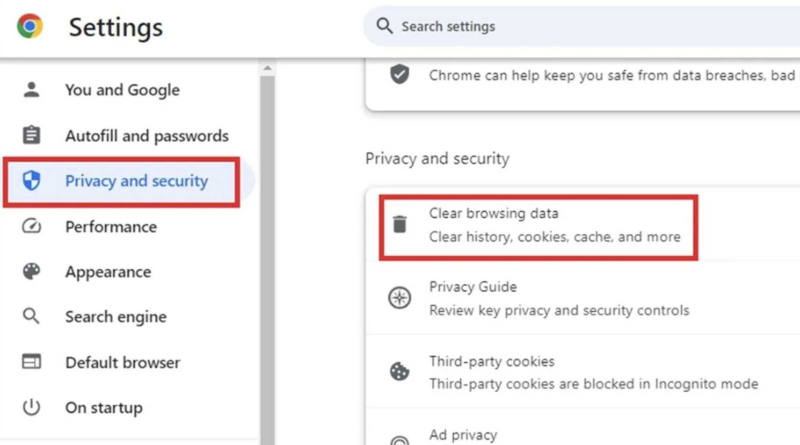
1. Clear Your Browser Cache & Cookies
An outdated cache or corrupt cookies can interfere with website loading.
-
Chrome: Go to Settings > Privacy and security> Clear Browsing Data
-
Safari: Preferences > Privacy > Manage Website Data
-
Restart the browser and try again.
2. Change DNS Settings
Switch to a more reliable DNS provider (like Google or Cloudflare):
-
Google DNS:
8.8.8.8and8.8.4.4 -
Cloudflare DNS:
1.1.1.1
Changing DNS can help bypass ISP-level content blocks.
3. Try a Different Device or Network
Access SpankBang using mobile data or a different Wi-Fi network. This helps identify whether your home or work network is filtering content.
4. Check Firewall or Antivirus Settings
Some security programs block adult content by default. Review your firewall or antivirus settings and whitelist SpankBang if necessary.
FAQs
Is SpankBang permanently taken down?
SpankBang is still operational. If you can’t access it, it’s likely due to regional restrictions or network filters.
Why is SpankBang blocked in my state?
Some states have implemented laws requiring adult sites to verify users’ age through a government-issued ID. Rather than comply, many sites block those regions altogether.
Can I unblock SpankBang on my phone?
Yes. Install a VPN app, connect to a VPN server outside your blocked region, and open SpankBang in a private browser window.
Is it legal to access SpankBang with a VPN?
Using a VPN is legal in most countries, including the U.S. However, accessing adult content may still be restricted based on local laws—always check your local regulations.
📖Related Reading
Conclusion
If you’re wondering, “Is SpankBang down?” - the answer is most likely no. Instead, what you’re facing is probably a regional restriction, ISP block, or a local network filter. Fortunately, there are simple fixes - from clearing browser cache to using a trusted VPN. Recently, more adult websites have become inaccessible from certain locations, but that doesn’t mean you have to lose access. With the right tools and a bit of know-how, you can enjoy safe, private, and unrestricted browsing—no matter where you are.