SnapTik Meaning: What Is SnapTik?
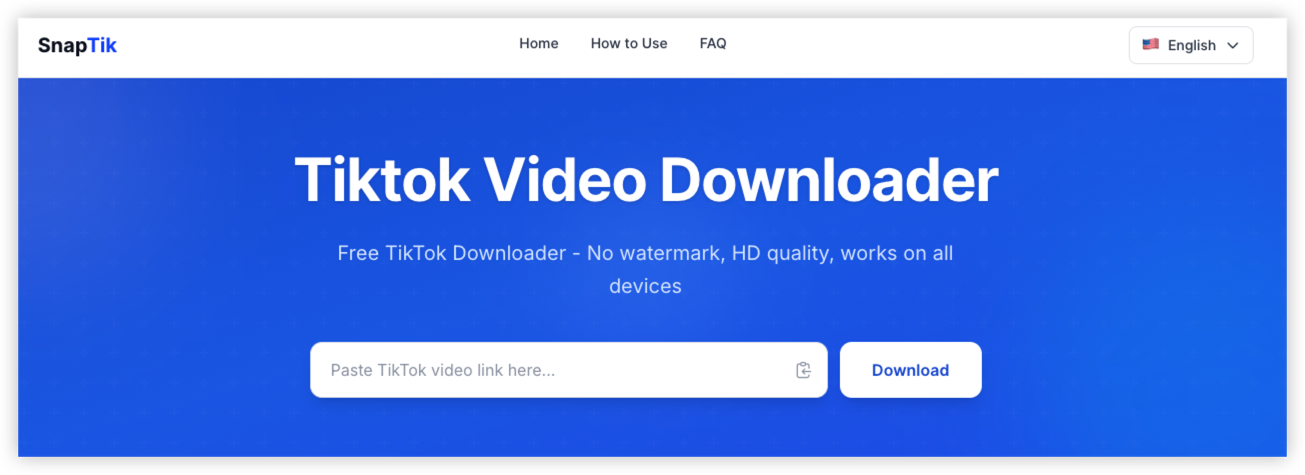
SnapTik is a name used by third-party tools designed to download TikTok videos from supported links. Depending on the particular service, available functions may include saving videos, extracting audio, or downloading other publicly accessible media.
A typical browser-based workflow is straightforward: copy a supported TikTok video URL, paste it into the downloader, select an available download option, and save the resulting file.
However, not every website using the SnapTik name necessarily provides the same service or follows the same data practices.
🧐SnapTik Website vs. SnapTik App vs. APK
“SnapTik” can refer to different websites, mobile applications, or downloadable Android packages. These should not be treated as interchangeable.
| SnapTik Version | Main Safety Concerns | What to Check |
|---|---|---|
| Browser-based SnapTik website | Data collection, advertisements, redirects, and submitted URLs | Exact domain, privacy policy, browser behavior |
| Android app from an app store | App permissions, developer identity, and data practices | Publisher, permissions, reviews, and Data safety disclosures |
| APK downloaded from a website | App authenticity, installation source, and potential malware | Developer authenticity, package integrity, and security scan results |
| Lookalike SnapTik website | Impersonation, credential theft, or misleading downloads | Domain spelling, unexpected login prompts, and unrelated redirects |
An app-store listing or privacy policy can provide useful information, but neither is a complete security audit. Similarly, a website's own claims about privacy should be treated as statements from its operator, not independent verification.
SnapTik Safety Check: Main Risks of Using SnapTik
To understand whether SnapTik is safe, it helps to separate five issues: website trust, personal data, downloaded files, network privacy, and content rights.
1. IP Addresses, URLs, and Browser Data
When you connect to a website, the destination server generally needs to process your connection information, including your public IP address. Depending on the service, other information may be recorded in server logs or processed by third-party providers.
The video URL you submit can also reveal which post you are trying to retrieve. That may be harmless for an ordinary public clip, but it deserves more consideration if the link relates to a sensitive subject or contains private access information.
A VPN like UFO VPN can help reduce the exposure of your original IP address to the destination website. It does not make the submitted URL anonymous in every respect, prevent all browser tracking, or stop you from voluntarily providing personal information.
2. Fake SnapTik Websites and Unofficial Apps
Search results, advertisements, and social media posts may lead to websites that resemble a familiar downloader. A similar logo or page layout is not proof that two services share an operator.
Check the following before using a site:
-
Domain: Read the complete domain rather than relying on the page title or logo.
-
HTTPS: Confirm that the connection is encrypted, while remembering that HTTPS does not certify the website's honesty.
-
Privacy policy: Look for clear explanations of submitted links, IP addresses, cookies, retention, and third-party providers.
-
Download behavior: Make sure the resulting file matches what you requested.
-
Permissions: Avoid granting access to contacts, messages, or other unrelated device data for a basic video download.
If the website's identity or behavior remains unclear, using TikTok's built-in download feature when available is a more straightforward option.
3. Malicious/ Unexpected Download Files
A file extension can help you recognize what you downloaded, but extensions alone are not conclusive proof of file type.
| Expected Content | Common File Types | ⚠️Warning Sign |
|---|---|---|
| Video | MP4 or another supported video format | An executable or installer appears instead |
| Audio | MP3 or another supported audio format | A file requests installation before playback |
| Android application | APK | The file was not expected or the publisher is unverified |
| Windows application | EXE or MSI | The downloader claims an installer is required to save a video |
| macOS application or package | APP, DMG, or PKG | The file is presented unexpectedly as a video download |
Do not open unexpected installers or packages. If you only want to save a video, an unrelated executable is a reason to stop and investigate.
4. Copyright, Creator Permission, and Content Privacy
A video being publicly viewable does not automatically mean that anyone can reuse it however they want.
TikTok's official video download guidance explains that creators can manage their download settings. Availability through a third-party service does not establish permission to redistribute or monetize the content.
Before saving or using a video, consider whether you own it, have the creator's permission, or have another valid basis for the intended use. Pay particular attention to music, third-party footage, private information, and commercial reuse.
Is SnapTik Safe to Use?
SnapTik should not be classified as universally safe or unsafe based on its name alone. A more useful assessment considers the specific website, the information it requests, its advertising behavior, and the file it returns.
1. Is SnapTik Safe Without Logging in?
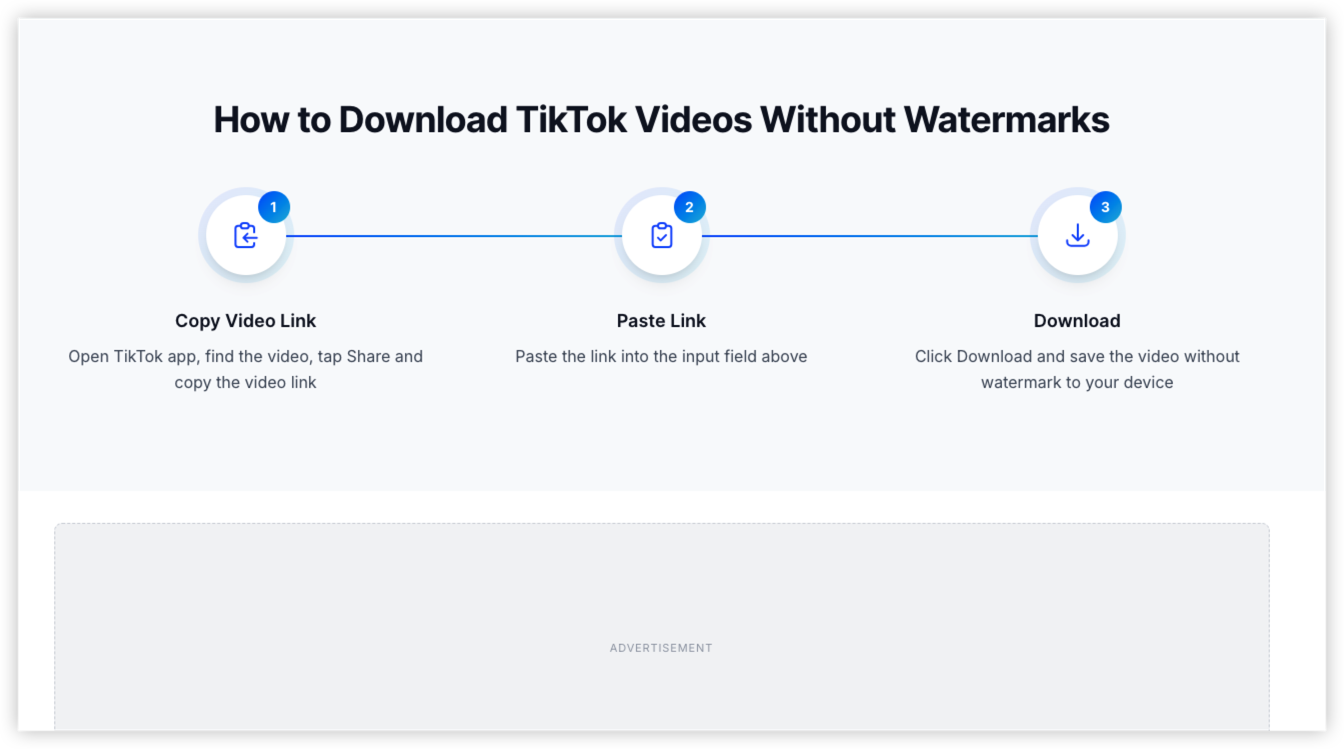
A typical browser-based downloader should not need your TikTok password to process a public video link.
Be cautious if a downloader asks you to:
-
Enter your TikTok password or verification code.
-
Upload a browser session cookie or authentication token.
-
Log in through an unfamiliar page that imitates TikTok.
-
Install an extension or unrelated application before downloading.
-
Grant permissions that do not match the task.
These requests are unnecessary warning signs for a basic public-link download workflow. Close the page rather than providing credentials.
If you have already entered your password on a suspicious page, change it through TikTok's official app or website and review your account's security settings.
2. Are SnapTik Ads, Pop-Ups, and Redirects Dangerous?
Not every pop-up is malicious, but unexpected advertising behavior deserves attention. Some websites use advertising to support free services. The risk increases when a page imitates a download button, opens unrelated tabs, repeatedly redirects you, or pressures you to install software.
Stop if you encounter any of these warning signs:
-
A download button opens an unrelated website.
-
The page claims your device is infected and urges you to install a cleaner.
-
You are asked to disable antivirus or browser protections.
-
An unexpected extension or APK is presented as a requirement.
-
Repeated notifications or redirects appear after you grant permissions.
If a page behaves this way, close it and reassess the domain instead of continuing to click through the prompts.
Is SnapTik Legal or Not?
The legality of using SnapTik depends on the content, your location, the intended use, and the relevant platform terms and laws.
1. Is Downloading Your Own TikTok Videos Legal?
Saving your own videos is generally a lower-risk situation, but you should still consider whether the video contains music, footage, or other material owned by someone else.
If you created the video but used licensed music or third-party clips, your rights to download, edit, or redistribute the complete video may be limited by the applicable licenses.
2. Is It Legal to Repost or Monetize SnapTik Downloads?
Removing a watermark does not transfer ownership of a video. Reposting, editing, or monetizing someone else's content may require permission, depending on the material and intended use.
If you plan to use a video in an advertisement, commercial social post, or branded campaign, confirm the rights to both the footage and any music before publishing it.
3. Can You Download Other People's TikTok Videos?
A publicly accessible video is not automatically free to copy or reuse. TikTok's download settings can affect whether its built-in download feature is available, but platform availability alone does not settle every copyright question.
Where permission is required, obtain it from the relevant rights holder before downloading for further use.
Notes: Can a VPN Make SnapTik Safer?
A VPN can improve the privacy of your network connection, but it addresses a different set of risks from those associated with the downloader itself.
Suppose you are at a hotel or airport and want to save a public video for offline reference. You may prefer to encrypt your connection rather than send traffic directly over the local network. A VPN can help with that network-level protection.
Encrypt your connection to the VPN server: This helps protect traffic from being read by others on the same local network.
Mask your original public IP from destination websites: Websites generally see the VPN server's public IP instead of your device's original public IP.
Help on untrusted public Wi-Fi: Encryption can reduce the risk of local network observers reading traffic that would otherwise be exposed.
Provide an alternative network route: This may help when a website fails because of a network-specific routing issue or restriction.
A fake SnapTik domain: A VPN does not verify website identity
Malware inside a downloaded file: A VPN is not a substitute for file scanning
Credential theft caused by a phishing page: A VPN cannot stop you from entering credentials into a fake form
UFO VPN offers connection privacy features that may be useful when browsing or downloading media on different networks.It offers AES-256 encryption, servers in 100+ countries, and features designed to help prevent DNS leaks. It also offers DNS/IP leak protection, a Kill Switch, and split tunneling, subject to plan and app availability.


UFO VPN is an all-in-one VPN that offers unlimited access to 4K streaming like Netlfix, Disney Plus, no-ping gaming as PUBG, Roblox, CODM and social networking for YouTube, X, Facebook and more.




Unlock Pro Features
If you have upgraded to premium plan , feel free to enjoy premium servers for 4K streaming and advanced features like Kill Switch, Split Tunneling, and gaming acceleration. Your Mac is now fully optimized and protected. Inaddition to basic functions, we recommend you turn on

Verify Your IP Now
Use UFO VPN's " What is My IP " feature to see your new IP and location. This confirms your connection is secure, anonymous, and ready for safe browsing online anywhere at any time.







(Solved) SnapTik is Not Working Properly?
If SnapTik fails to load or a download does not complete, the issue may involve the website, the submitted link, your browser, or your network.
1. SnapTik Is Blocked or Does Not Load
First, check your connection and try another browser. If the website works on mobile data but not on your usual Wi-Fi, a network-specific restriction, DNS issue, or routing problem may be involved.
A VPN such as UFO VPN may provide an alternative network route when the problem is network-specific. It cannot restore a service that is offline or repair a broken downloader backend.
2. SnapTik Keeps Redirecting or Showing Pop-Ups
Close suspicious tabs and avoid clicking additional download buttons. Check the exact domain and do not install extensions, applications, or browser certificates just to complete a routine video download.
If the behavior continues, stop using that page and consider another method, such as TikTok's built-in download feature when available.
3. SnapTik Downloads Fail or Produce Low-Quality Videos
A download may fail because the link is invalid, the content is private or deleted, TikTok has changed its platform behavior, or the downloader is experiencing a temporary technical problem.
Try copying the link again from the original post and checking whether the video remains publicly accessible. Avoid downloading additional software simply because a page claims it is required to repair the download.
SnapTik Alternatives: Apps like SnapTik
If SnapTik still fails to work for you, shows too many pop-ups, or raises privacy concerns, there are several alternatives of video downloading from your wanted website. The right choice depends on whether you prefer an official download option, a browser-based tool, or a dedicated mobile app.
1. TikTok's Built-In Download Feature
TikTok's built-in download feature is the first alternative to consider. When a creator allows downloads, you can save a video directly through TikTok without submitting its link to an external downloader.
Best for: Users who want a straightforward, platform-supported way to save videos.
Pros:
-
No separate downloader website is required.
-
You do not need to submit the video link to another service.
-
Availability and download options are managed through TikTok.
Cons:
-
The download option may be unavailable for some videos.
-
Creators can control their download settings.
-
Saving a video does not automatically grant permission to repost or monetize it.
2. SSSTikTok
SSSTikTok is a browser-based TikTok downloader that users may consider when looking for an alternative to SnapTik. Its available features and download behavior can vary, so verify the exact domain before submitting a video link.
Best for: Users who prefer a web-based downloader without installing a dedicated application.
Pros:
-
Can be accessed through a browser.
-
May offer different download options depending on the supported video.
-
Does not necessarily require a dedicated app installation.
Cons:
-
Third-party website privacy practices need to be reviewed.
-
Advertisements and redirects may affect the experience.
-
Availability and functionality can change.
3. SaveTT
SaveTT is another name associated with online TikTok video downloading tools. As with other third-party services, check that you are visiting the intended website rather than a lookalike domain.
Best for: Users looking for another browser-based option when SnapTik is unavailable.
Pros:
-
Browser-based access may avoid installing another app.
-
Can be convenient for occasional downloads.
-
May support different download options depending on the service.
Cons:
-
Features and reliability may change over time.
-
Privacy and data-retention practices depend on the specific operator.
-
Fake download buttons and unrelated redirects should be treated cautiously.
4. TikMate
TikMate is another third-party service name that appears in searches for TikTok downloaders. Before using it, verify the website's identity and review its current functionality and privacy disclosures.
Best for: Users who want to compare multiple web-based downloaders.
Pros:
-
Can provide an alternative when another downloader fails.
-
May support a simple copy-and-paste workflow.
-
May not require a separate application.
Cons:
-
Support for particular links and formats is not guaranteed.
-
Website availability may vary.
-
Its security depends on the exact service and download process.
5. Screen Recording
Screen recording is a built-in alternative available on many phones, tablets, and computers. Instead of submitting a TikTok link to an external downloader, you record content displayed on your own screen.
Best for: Capturing content you own or have permission to record when direct downloading is unavailable.
Pros:
-
Does not require a third-party video-downloader website.
-
Uses tools already available on many devices.
-
Can work when a direct download option is unavailable.
Cons:
-
Recording quality depends on playback quality and device settings.
-
Interface elements, notifications, or playback controls may appear in the recording.
-
Copyright, privacy, and content-use restrictions still apply.
Key Takeaways
-
SnapTik is a third-party service: It is not an official TikTok downloader, and similarly named websites or apps may have different operators and privacy practices.
-
A video link is different from account credentials: A typical browser-based downloader should not need your TikTok password, authentication code, or session cookie.
-
Website safety and file safety are different: A downloader may load successfully while an advertisement, redirect, or downloaded file still presents a risk.
-
A VPN can improve network privacy: UFO VPN offers features such as AES-256 encryption, DNS/IP leak protection, and Kill Switch, depending on the plan and app version.
-
A VPN cannot guarantee a safe download: It does not certify a website, scan every file, or remove copyright restrictions.
-
Downloading is not the same as having permission to reuse content: Check creator permissions and applicable rules before reposting or using a video commercially.
Final Verdict: Should You Use SnapTik?
SnapTik can be convenient for saving supported TikTok videos, but its safety depends on the specific website or app you choose and how you use it. Do not assume that every service with the same name has identical privacy practices or security controls. For a safer experience, verify the domain, avoid submitting account credentials, watch for suspicious redirects, inspect downloaded files, and respect creator permissions. When TikTok's built-in download feature is available, consider using it before relying on a third-party service.
FAQs
Is the SnapTik APK Safe to Install?
Do not assume an APK is safe simply because it uses the SnapTik name. Verify the publisher and source, review requested permissions, and use trusted security tools where available. If you only need to save a video, avoid installing an application unless there is a clear reason to do so.
Why Does SnapTik Keep Opening New Tabs?
Unexpected tabs may be caused by advertising, redirects, browser extensions, or the website's own behavior. Close the tabs, avoid granting notification permissions, and verify the domain. If the behavior continues, stop using that service rather than clicking through repeated prompts.