Key Takeaways
💡A VPN client is the software or device that starts and manages a VPN connection.
💡A VPN is a broader concept that may refer to the technology, connection, or complete VPN service.
💡For most consumers, the VPN app installed on a phone or computer is the VPN client.
💡You don't normally choose between a VPN client and a VPN — the client is one part of how you connect to and use a VPN.
What Is a VPN Client?
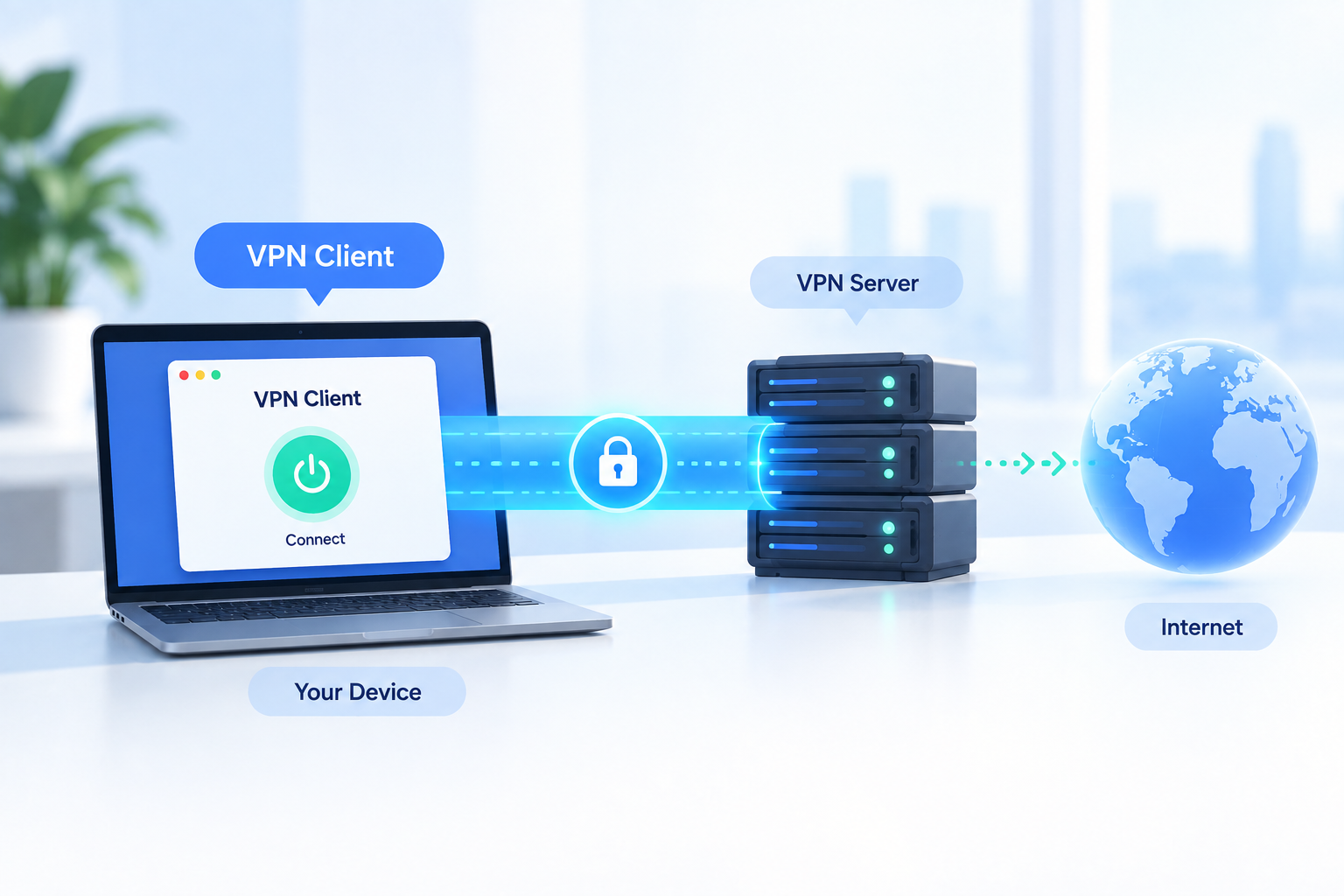
A VPN client is software or a device that establishes and manages a connection between your device and a VPN server. When you open a VPN app and press Connect, the client communicates with a remote VPN server and helps establish the secure connection between them.
A VPN client commonly handles tasks such as:
- Connecting to and disconnecting from VPN servers
- Authenticating your account or credentials
- Selecting a server location
- Using a supported VPN protocol
- Establishing and maintaining the VPN tunnel
- Managing features such as auto-connect or a kill switch
Microsoft describes a typical VPN setup in a similar way: the VPN client initiates a connection to a remote server, while the remote server authenticates the connection and transfers data between the client and the destination network.
In other words, the VPN client is the tool your device uses to access the VPN network.
Is a VPN Client the Same as a VPN App?
For most consumer VPN users, yes — the VPN app you install is also the VPN client. For example, if you install UFO VPN on Windows, Android, iPhone, or Mac, that application performs the role of the VPN client. You use it to choose a server and establish or end your VPN connection.
However, "VPN client" and "VPN app" describe slightly different things.
- VPN client describes the software's technical role in the VPN connection.
- VPN app describes the application and interface the user interacts with.
Not every VPN client is a typical consumer VPN app. Operating systems can include built-in VPN clients, businesses can deploy enterprise VPN clients, and routers can sometimes act as VPN clients as well.
What Does "VPN" Actually Mean?
One reason VPN client vs VPN can be confusing is that "VPN" itself does not always mean exactly the same thing. Depending on the context, VPN can refer to the underlying technology, a commercial VPN service, an active VPN connection, or even the VPN app installed on your device.
VPN as a Technology
At its most technical level, VPN stands for Virtual Private Network. VPN technology allows devices or networks to communicate through a protected connection over another network, such as the public internet.
In a typical consumer VPN setup, your device connects to a remote VPN server through a VPN tunnel, with the VPN client helping establish and manage that connection. Cloudflare describes the basic structure as a VPN client communicating with a VPN server over an encrypted VPN tunnel.
VPN as a Service
When someone says, "I use a VPN," they are often referring to a VPN service provided by a company. A VPN service is the complete product or infrastructure that brings together VPN apps or clients, VPN servers, supported protocols, account and authentication systems, network infrastructure, and additional connection features.
For example, a consumer VPN provider may offer apps for Windows, Android, iOS, and macOS together with servers in multiple countries. The app is the client, while the entire combination of software, servers, and infrastructure is the VPN service.
In this sense, the VPN client is only one part of the larger VPN service.
VPN as an App in Everyday Language
In everyday conversation, people may also say, "I installed a VPN on my phone." Technically, what they installed was a VPN app or VPN client. However, calling the app simply "a VPN" is completely normal in casual use.
This is why VPN and VPN client can sound interchangeable even though they aren't technically the same thing.
VPN Client vs VPN: What's the Actual Difference?
The most important distinction is scope. A VPN client is one component used to establish a VPN connection, while VPN is the broader term for the technology, network connection, or service that the client connects to.
| VPN Client | VPN | |
|---|---|---|
| Meaning | Software or device used to establish a VPN connection | Broader networking technology, connection, or service |
| Main role | Starts and manages the connection | Describes the overall VPN system or connection |
| Where it exists | Usually on your device or router | May include clients, servers, protocols, and infrastructure |
| Example | A VPN app installed on your phone | The VPN service you're using |
| Works alone? | Usually requires a compatible VPN server/service | Depends on multiple components |
The easiest way to remember the difference is: A VPN client is part of a VPN system, not an alternative to a VPN.
How Does a VPN Client Work?
A VPN client works together with a VPN server and VPN protocol to establish the connection.
The basic data flow looks like this:
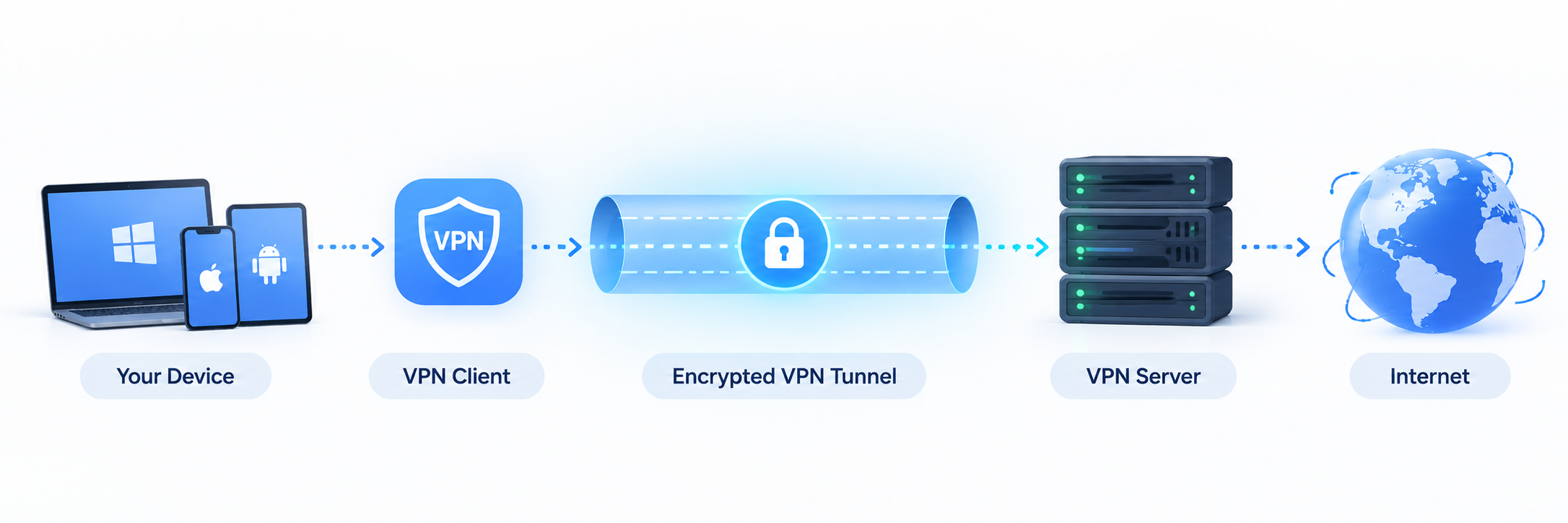
Here's what happens after you press Connect.
1. You Open the VPN Client
First, you launch the VPN client on your device. With a consumer VPN app, you may choose a location such as the US, UK, Japan, or another available server region.
2. The Client Connects to a VPN Server
The VPN client sends a connection request to the selected VPN server and completes any required authentication. Depending on the VPN setup, authentication may involve an account login, certificate, security key, or other credentials.
3. The VPN Connection Is Established
The client and server use a supported VPN protocol like WireGuard, OpenVPN, and IKEv2 to determine how the connection is established and how data travels through the tunnel. You don't usually have to configure these settings manually when using a consumer VPN app because the client handles much of the process automatically.
4. The VPN Server Forwards Your Traffic
Once connected, internet traffic covered by the VPN connection travels between your device and the VPN server through the VPN tunnel. The VPN server then communicates with the destination website or online service on your behalf. As a result, websites generally see the VPN server's public IP address instead of the original public IP address used by your internet connection.
VPN Client vs VPN Server vs VPN Service
VPN terminology becomes much easier to understand when you separate four concepts: client, server, service, and protocol.
| Term | What It Is | Main Job |
|---|---|---|
| VPN Client | Software or device on the user's side | Starts and manages the VPN connection |
| VPN Server | Remote server receiving VPN connections | Receives and routes VPN traffic |
| VPN Service | Complete infrastructure provided to users | Provides clients, servers, and supporting infrastructure |
| VPN Protocol | Rules used by the client and server | Determines how the VPN connection is established |
For example, imagine opening a VPN app and connecting to a US server. The app on your phone is the VPN client. The remote machine it connects to is the VPN server. WireGuard or another protocol may be used to establish the connection. The provider operating the apps and server network offers the VPN service. None of these terms describes exactly the same thing, although people commonly use "VPN" as shorthand for several of them.
Do You Need a VPN Client to Use a VPN?
Usually, yes. A VPN connection needs something on your side to communicate with the VPN server, establish the tunnel, and manage the connection. That role is handled by a VPN client.
However, this does not mean you always need to download a separate VPN app. The client can take different forms depending on how the VPN is configured. It may be a dedicated VPN app, a built-in feature in your operating system, enterprise software provided by your workplace, or even a compatible router.
For most everyday users, the easiest option is a dedicated VPN app. For example, UFO VPN acts as the VPN client while also giving you access to its server network and connection settings in one interface.
Common Types of VPN Clients
VPN clients can appear in several forms depending on where and how the VPN is being used.
Dedicated Consumer VPN Apps
These are the applications most people associate with VPNs. They are typically available for platforms such as Windows, macOS, Android, and iOS. The app combines the VPN client with a user-friendly interface for choosing servers, connecting or disconnecting, and changing connection settings.
Built-In OS VPN Clients
Operating systems such as Windows provide native VPN configuration and connection capabilities. These are useful when you already have VPN server information from a company, school, network administrator, or VPN provider and simply need a tool to establish the connection.
Enterprise VPN Clients
Companies often provide employees with VPN software specifically configured for accessing private business networks remotely. These clients may include company-specific authentication methods, access policies, certificates, or network settings that differ from consumer VPN apps.
Router or Hardware VPN Clients
Some routers and other network devices can act as VPN clients themselves. This allows the VPN connection to operate at the network level rather than requiring every connected device to establish an individual VPN connection.
You'll sometimes also see browser VPN extensions described as VPN clients. However, be careful with the terminology: some browser extensions function more like proxies and only route browser traffic, rather than creating a device-wide VPN connection.
Built-In VPN Client vs Dedicated VPN App
If your operating system already includes VPN settings, you might wonder why you would need a separate VPN app at all.
The main difference is that a built-in VPN client provides the connection mechanism, while a dedicated consumer VPN app normally combines that client functionality with a VPN provider's server network, account system, and additional features.
| Built-In VPN Client | Dedicated VPN App | |
|---|---|---|
| Setup | Often requires manual settings | Usually quick and guided |
| Server selection | Server information may need to be entered | Server list normally included |
| Configuration | May require protocol and credentials | Mostly handled automatically |
| Extra controls | Depends on the OS | May include kill switch, auto-connect, split tunneling, etc. |
| Typical use | Work or manually configured VPN connections | Everyday consumer VPN use |
A built-in client can work well when your employer, administrator, or VPN provider gives you the exact server address, protocol, credentials, or configuration details you need. A dedicated VPN app is generally more convenient when you want to connect to a commercial VPN service without manually configuring each server.
For example, with UFO VPN, the app itself functions as the VPN client while also giving you direct access to the provider's server network and connection settings in one interface.
The key point is that having a built-in VPN client does not mean you already have a VPN service. The client is simply the tool that establishes the connection; you still need a compatible VPN server or service to connect to.
What Should You Look for in a VPN Client?
If you use a dedicated VPN client, the most important factor is whether it makes connecting to the VPN simple, reliable, and suitable for your devices. A few features are particularly useful.
Device Compatibility
Check whether the VPN client supports the operating systems you regularly use. If you use several devices, having compatible clients for Windows, macOS, Android, and iOS can make managing your VPN much easier.
Supported VPN Protocols
The client should support reliable modern protocols offered by the VPN service. Popular examples include WireGuard, OpenVPN, and IKEv2. Different protocols may prioritize factors such as performance, compatibility, or network reliability differently.
Easy Server and Connection Management
A consumer VPN client should make it easy to:
- Find server locations
- Connect or disconnect
- Switch servers
- See your connection status
You generally shouldn't need to manually enter server addresses every time you want to change locations.
Useful Security and Connection Features
Depending on the service, a VPN client may also include features such as:
- Kill switch
- Auto-connect
- Split tunneling
- Protocol selection
These aren't what makes software a VPN client, but they can make the VPN easier to manage in everyday use.
Conclusion
In practice, most people don't need to think about VPN terminology every time they connect. If you're using a consumer VPN app, the app is simply the tool that handles the connection for you, while the provider supplies the servers and infrastructure behind it.
Knowing the difference mainly helps when you're setting up a VPN manually, troubleshooting a connection, or comparing built-in VPN settings with a dedicated VPN app.
FAQs
Can One VPN Client Connect to Different VPN Services?
Sometimes. A generic VPN client may work with different services if they support the same protocol and provide the necessary server and authentication information.
However, many commercial VPN apps are designed specifically for their own provider's infrastructure and cannot simply connect to another VPN provider's servers.
Can a VPN Client Connect to Any VPN Server?
No. The VPN client and server need compatible protocols, authentication methods, and configuration settings.
For example, simply knowing a server's IP address isn't enough. You normally also need the correct protocol and valid credentials or certificates.
Is OpenVPN a VPN Client or a VPN Protocol?
The terminology can be confusing because OpenVPN can refer to the broader open-source VPN project and its VPN protocol, while OpenVPN Connect is a client application used to establish compatible VPN connections.
So when someone says "OpenVPN," context matters.
Does a VPN Client Protect Every App on My Device?
A full-device VPN client normally routes traffic according to the VPN's routing configuration, which can cover most or all supported device traffic. However, configurations such as split tunneling can deliberately exclude certain apps or traffic.
Browser extensions are another exception. Some extensions marketed as VPN tools only affect browser traffic rather than the entire device.
Can I Run More Than One VPN Client on the Same Device?
You can install multiple VPN clients, but running multiple VPN connections at the same time can cause routing conflicts or connection problems.
For most users, it's better to use one active device-level VPN connection at a time unless the network setup has specifically been designed to support multiple tunnels.