What Are the Main Benefits of a VPN?
Most people think vpns are only for downloads but they’re really about privacy and security like keeping your isp and public wifi from seeing everything you do. Not required but still useful even if you’re just gaming and streaming.

The biggest advantages of using a VPN are more privacy, better protection for data traveling across a network, and greater control over your virtual location.
| VPN Advantage | What It Means for You | Most Useful When |
|---|---|---|
| Better online privacy | Hides your real IP and reduces network-level visibility | Everyday browsing |
| Stronger data security | Encrypts traffic between your device and VPN server | General internet use |
| Safer public Wi-Fi | Reduces exposure on shared networks | Airports, hotels, cafés |
| Access familiar content while traveling | Lets you connect through another server location | Traveling abroad |
| Fewer local network restrictions | May help reach services blocked on the network you use | School, work, hotels |
| Less activity-based throttling | Makes certain traffic harder for an ISP to classify | Streaming, gaming, downloads |
| More privacy while gaming | Reduces direct exposure of your home IP | Online multiplayer games |
Not every advantage matters equally to every user. A frequent traveler, for example, is much more likely to benefit from public Wi-Fi protection and server location switching than someone who rarely leaves a trusted home network.
7 Key Advantages of Using a VPN (Detailed Explanation)
1. Improve Your Online Privacy
Using a VPN can help hide your real IP address. Websites no longer see your normal public IP address. Instead, they see the IP address of the VPN server you connect to.
This can reduce IP-based tracking and make it harder to estimate your physical location from your IP alone. A VPN also limits what the local network or ISP can directly observe inside the encrypted connection. For example, when browsing from home, websites see the VPN server rather than your residential IP.
However, a VPN does not make you completely anonymous. Logged-in accounts, cookies, and browser fingerprinting can still identify you.
2. Protect Your Data With Encryption
Using a VPN can also encrypt network traffic. A VPN creates an encrypted connection between your device and the VPN server. This makes the traffic much harder for someone on the same network to read or inspect. For example, if you are signing into accounts or accessing work tools, your VPN traffic remains encrypted while passing through the local network.
HTTPS already protects connections to most major websites, so a VPN does not replace HTTPS. Instead, it adds another layer of protection around your internet connection and reduces the amount of information exposed to the network carrying your traffic.
3. Use Public Wi-Fi More Safely
Public Wi-Fi is one of the situations where the benefits of a VPN are easiest to understand.
Airport, hotel, café, and train Wi-Fi networks are convenient, but you often know very little about how securely they are configured. Connecting to a VPN encrypts your traffic before it passes through that shared network. For example, if you need to check email while waiting at an airport, connecting your VPN first reduces your exposure on the local network.
4. Access Your Usual Content While Traveling
One practical reason why people use a VPN is to maintain access to familiar online services while away from home. Websites, streaming platforms, sports services, and news sites may change their availability based on your IP location. A VPN lets you connect through a server in another region, which changes the location websites see. For example, a traveler may connect through a home-region server when trying to use a familiar service abroad.
5. Get Around Restrictions on Local Networks
Some schools, workplaces, hotels, and other shared networks restrict access to certain websites or services. Because a VPN encrypts the connection between your device and its server, the local network has less visibility into the individual destinations inside that tunnel. In some cases, this can help users reach websites blocked by local network filtering. For example, if a hotel Wi-Fi network restricts a site you normally use, connecting through a VPN may bypass that particular network restriction.
This is not guaranteed, since some networks also block VPN traffic. Users should also follow applicable workplace, school, network, and local rules when using a VPN.
6. Reduce Activity-Based ISP Throttling
Some internet providers may slow specific categories of traffic, such as streaming, gaming, or large downloads. A VPN can make the type of traffic harder to identify because the connection is encrypted. If the slowdown is specifically based on detecting certain activities, this may reduce activity-based throttling. For example, if video traffic is deliberately treated differently from ordinary browsing, a VPN may make that classification more difficult.
7. Add Privacy and Protection While Gaming
For gamers, one of the main advantages of a VPN is reducing direct exposure of your residential IP address.
Online services and other parties will generally see the VPN server IP instead. This can add separation between your gaming session and your home connection and may reduce risks associated with direct IP exposure. A VPN may also help if an ISP applies activity-based throttling to gaming traffic.
If these VPN advantages are useful for you, UFO VPN is an easy way to get started with encrypted browsing, public Wi-Fi protection, and flexible server locations.
Which VPN Benefits Matter Most for You?
If you are still wondering why use a VPN, the answer depends largely on your internet habits.
| If You Are a | Most Useful VPN Advantages | How Useful? |
|---|---|---|
| Frequent traveler | Public Wi-Fi, travel access, privacy | |
| Public Wi-Fi user | Encryption, safer shared networks | |
| Privacy-conscious user | IP privacy, lower ISP visibility | |
| Remote worker | Encryption, public Wi-Fi protection | |
| Streaming user | Travel access, possible throttling protection | |
| Online gamer | IP privacy, network protection | |
| Casual home user | General privacy and encryption |
You do not need to torrent or handle highly sensitive information to see value from a VPN. Someone who mainly watches videos, checks email, uses social media, and travels occasionally can still benefit from IP privacy, encrypted public Wi-Fi traffic, and location switching.
What a VPN Doesn't Protect You From
A VPN is primarily a privacy and network-security tool. It does not protect you from every risk you may encounter online.
- Malware and viruses: If malicious software is already installed on your laptop or phone, a VPN will not remove it. Likewise, if you intentionally download and run an infected file, the encrypted connection does not make the file safe.
- Phishing and scams: A fake banking website is still a fake banking website when you use a VPN. If you enter your password into a fraudulent login page, a VPN cannot stop the website from receiving it.
- Tracking while logged into accounts: Changing your IP does not log you out of Google, Facebook, Amazon, or other services. Cookies, account IDs, and browser fingerprinting can still be used to recognize you.
- Weak passwords: Encryption protects traffic in transit. It does not strengthen a reused password or prevent attackers from trying credentials leaked in a previous data breach.
- Complete anonymity: A VPN improves privacy, but it does not make you invisible online. Websites, apps, accounts, cookies, and device characteristics can still reveal information about you.
- Every speed problem: A VPN cannot upgrade your internet plan, improve a weak Wi-Fi signal, eliminate network congestion, or remove an ISP data allowance. In some situations, it may slightly reduce speed.
Understanding these limits actually makes it easier to see where a VPN is valuable: it is primarily a privacy and network-security tool, not a replacement for antivirus software, strong passwords, two-factor authentication, or safe browsing habits.
Are There Any Downsides to Using a VPN?
Despite the many advantages of using a VPN, it can also come with some potential drawbacks. These problems do not happen every time you connect to a VPN, but they are worth understanding when weighing the pros and cons of a VPN.
- Your Internet Speed May Drop: Encryption and routing traffic through an additional server can add overhead. The effect may be small with a nearby, lightly loaded server but more noticeable with a distant one.
- Your Ping May Increase: This is more common with free VPNs, where too many users may share the same limited servers, causing congestion and slower response times.
- Some Websites May Block VPN Connections: Streaming platforms, banks, ticketing sites, and other services may detect VPN IP addresses and request extra verification or temporarily restrict access.
- You Have to Trust the VPN Provider: Your VPN provider handles the VPN connection, so its privacy practices matter. A poorly managed or unclear service may introduce new privacy concerns rather than solve them.
- VPN Use May Be Restricted in Some Places: VPN rules vary by country, organization, and network. Some locations restrict VPN services or how they can be used, so users should check applicable regulations when traveling.
How to Get the Most Benefits From a VPN
Getting the most value from a VPN usually starts with choosing the right server for what you are doing. For normal browsing, streaming, and gaming, a nearby server will usually offer better speeds and lower latency. If you are traveling and need a different virtual location, switch to a server in the appropriate region instead. Public Wi-Fi is another situation where turning on your VPN before signing into important accounts is a useful habit.
You also do not need to make VPN use complicated. If your main goals are more private browsing, safer public Wi-Fi, and easy location switching, a consumer VPN such as UFO VPN can handle these common situations without requiring advanced network knowledge.
Are the Benefits of a VPN Worth It?
For many users, yes—but whether a VPN is worth it depends on what problems you actually need to solve.
A VPN tends to offer the most value if you:
- regularly use public Wi-Fi;
- travel internationally;
- want to reduce exposure of your home IP;
- want less network-level visibility from your ISP;
- work remotely;
- use services that behave differently across locations;
- play online games where IP privacy matters.
If you spend almost all your time on a trusted home network and have little concern about IP privacy or virtual location, the advantages may be less significant. But for many travelers, public Wi-Fi users, remote workers, privacy-conscious users, and gamers, they do need one.
FAQs
Should I Leave My VPN on All the Time?
You can, but it is not always necessary. Keeping it connected provides consistent IP privacy and encryption, while temporarily disconnecting may help when you want maximum local speed or encounter a website that does not work properly with a VPN.
Is a VPN Still Useful If Most Websites Use HTTPS?
Yes. HTTPS encrypts your connection to a specific website, while a VPN encrypts traffic between your device and the VPN server and changes your visible IP address. They provide overlapping but different protections.
Can My Internet Provider Tell That I'm Using a VPN?
Usually, your ISP can see that you are communicating with a VPN server and can still measure your data usage. However, it generally has much less visibility into the individual destinations inside the encrypted connection.
Does a VPN Protect Every App on My Device?
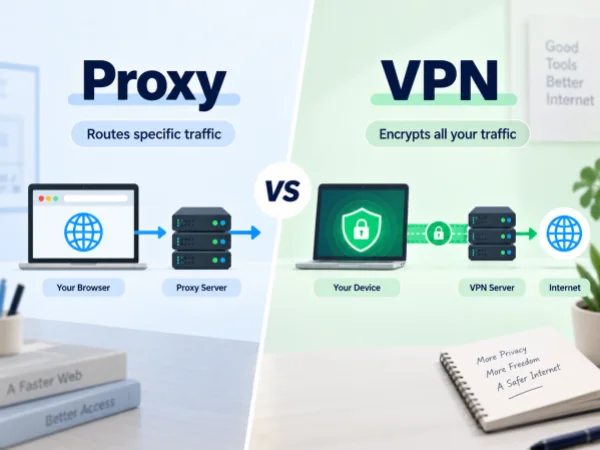
A standard device-level VPN normally routes supported internet traffic through the VPN connection. However, split tunneling can allow selected apps to bypass it, while browser extensions or proxies may protect only browser traffic.
Is a Free VPN Enough to Get These Advantages?
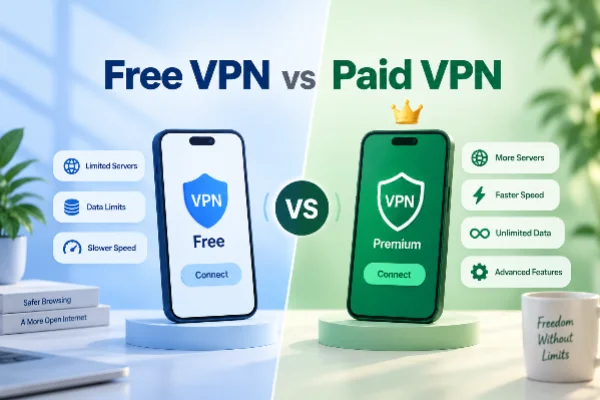
It depends on the provider. Free VPNs can still encrypt traffic and change your IP, but they may have fewer servers, slower speeds, usage limits, or different privacy practices. Check what data the provider collects and what limitations apply before choosing one.