Key Takeaways
💡 IXXX may use age verification to restrict access to adult content.
💡 Age checks can involve different methods depending on your location and the platform's requirements.
💡 A VPN can help protect your IP address and improve privacy when accessing websites.
💡 If IXXX is unavailable because of network or regional restrictions, checking your connection and using a reliable VPN may help.
💡 Avoid fake age information, suspicious verification services, and unofficial downloads.
💡 Always follow the laws and age requirements that apply to you.
Disclaimer: This article is for general informational purposes only. It does not encourage anyone to bypass legally required age restrictions or violate IXXX's terms of service. For better online privacy and security, consider activating a reliable tool such as UFO VPN when browsing.
What Is IXXX & Why Does It Require Age Verification?
IXXX is an adult-content website where users can find sexually explicit videos and other adult-oriented material. Because the platform hosts content intended for adults, access may be subject to age restrictions.
The exact verification process can vary depending on where you access IXXX and what requirements apply in your region:
→ Basic age confirmation: In some cases, IXXX may simply ask you to confirm that you are above the required age.
→ Stronger age checks: In other situations, local regulations may require additional age-assurance measures before you can access certain content.
The main purpose of age verification is pretty straightforward:
To prevent minors from accessing adult content and help platforms comply with applicable laws and regulations.
So, seeing an age-verification prompt does not necessarily mean that IXXX is down. The prompt may simply be triggered by your:
- Location → Different regions may have different requirements.
- Browser → Cookies, cache, or privacy settings can affect verification.
- Network → Your ISP or network configuration may influence how the site responds.
- Local regulations → Age-assurance requirements can change depending on where you are.
In short, if IXXX suddenly asks you to verify your age, check whether it is a legitimate verification request before assuming that the website is unavailable.
Why Is a VPN Necessary When Unblocking IXXX?
If you are legally allowed to access IXXX but the site is difficult to reach, a VPN can be useful for privacy, connection security, and troubleshooting access issues. It does not make someone eligible to access adult content or remove a legally required age check.
A VPN can help in several ways:
→ Protect your IP address: A VPN routes your connection through a VPN server, so websites see the server's IP address instead of your regular one.
→ Improve privacy: Your connection is encrypted between your device and the VPN server, which can provide an additional layer of protection when using public or untrusted networks.
→ Troubleshoot access problems: If IXXX works normally after connecting to a VPN, this may indicate that the original problem is related to your network or IP address.
A VPN is a privacy and connectivity tool, not a way to bypass mandatory age-verification requirements.
If you want a simple way to test your connection, UFO VPN can be a practical option. It lets you connect to an available VPN server in just a few clicks, making it easier to check whether a connection or IP-related issue is preventing IXXX from loading properly.
Here's how you can activate this efficient tool easily:


UFO VPN is an all-in-one VPN that offers unlimited access to 4K streaming like Netlfix, Disney Plus, no-ping gaming as PUBG, Roblox, CODM and social networking for YouTube, X, Facebook and more.




Unlock Pro Features
If you have upgraded to premium plan , feel free to enjoy premium servers for 4K streaming and advanced features like Kill Switch, Split Tunneling, and gaming acceleration. Your Mac is now fully optimized and protected. Inaddition to basic functions, we recommend you turn on

Verify Your IP Now
Use UFO VPN's " What is My IP " feature to see your new IP and location. This confirms your connection is secure, anonymous, and ready for safe browsing online anywhere at any time.







How Can You Bypass IXXX Age Verification?
If you are an adult who is legally permitted to access IXXX, the safest approach is not to circumvent a mandatory age check, but to identify why the verification process is appearing and complete the required process through legitimate channels.
1. Check Whether the Verification Is Actually Required
First, determine whether the prompt is coming from IXXX itself or from another page.
Look at the website address carefully and avoid entering personal information into unfamiliar pop-ups or third-party pages. If the verification page appears suspicious, close it and access IXXX again through its legitimate website.
2. Complete the Available Age Check
If IXXX requires age verification in your region, follow the verification instructions provided by the platform.
Do not enter a fake date of birth or use somebody else's information. Providing inaccurate information can create account, legal, or security problems and may also violate the platform's rules.
3. Clear Your Browser Cache and Site Data
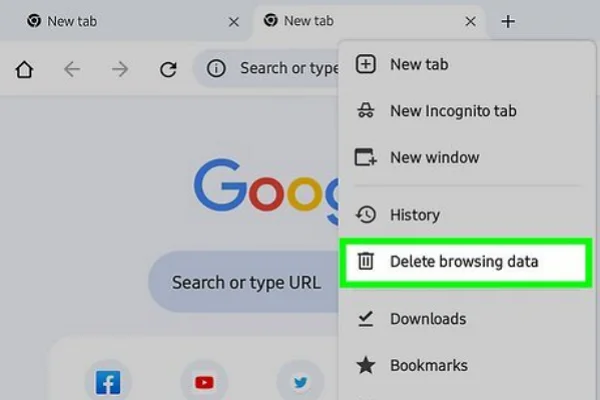
Old or corrupted cached files and cookies can sometimes interfere with age-verification pages or prevent the website from remembering your previous session.
To refresh the connection, clear the cache and site data for IXXX, then reopen the website. You don't necessarily need to delete all browsing data—removing data associated with the specific site is usually enough.
Quick tip: After clearing the data, close and reopen your browser before trying again.
4. Make Sure JavaScript Is Enabled
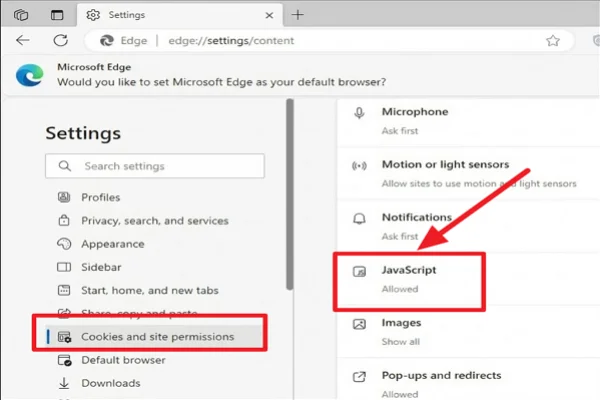
IXXX and its verification pages may rely on JavaScript to load interactive elements and process certain requests. If JavaScript is disabled, the page may not work as expected.
Check your browser's site settings and make sure JavaScript is allowed for the website. Then refresh the page and see whether the verification prompt loads correctly.
5. Try Incognito or Private Browsing
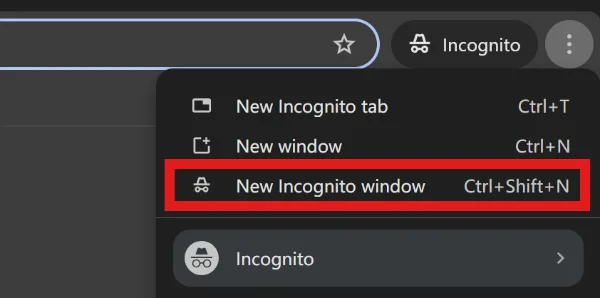
An incognito or private window gives you a clean browsing session without using your usual cookies and some stored site data. This makes it a quick way to determine whether your normal browser session is causing the problem.
Simply open a private window, visit IXXX, and check whether the same verification issue occurs. If the site works normally there, your regular browser's stored data or an extension may be contributing to the problem.
4. Test Your Network Connection
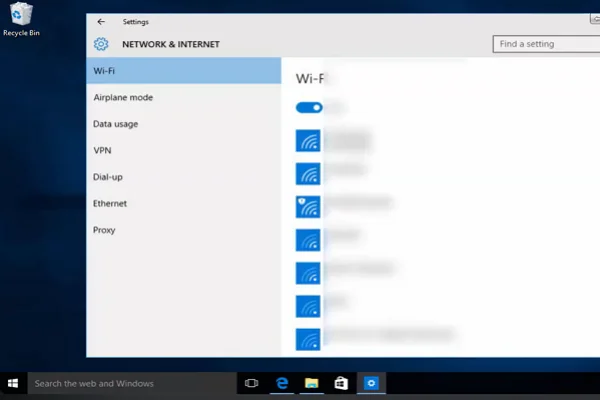
If the site refuses to load after verification, the problem may have nothing to do with your age.
Try switching between Wi-Fi and mobile data. You can also restart your router or temporarily disable browser extensions that may interfere with website requests.
If IXXX works on one connection but not another, the issue may be related to your network or ISP rather than the website itself.
5. Use a VPN for Privacy and Access Troubleshooting
If you are legally allowed to access the site but suspect that your network or IP address is causing the problem, connect to a reputable VPN such as UFO VPN and try loading the website again.
The basic process is simple:
- Download and install UFO VPN.
- Open the app and sign in if required.
- Choose a suitable server.
- Connect to the VPN.
- Reopen your browser and test IXXX.
A VPN may help with network-level access issues, but it does not replace legally required age verification.
Bonus Tips to Stay Safe & Private on IXXX
Getting access to IXXX is only part of the equation. If you want a safer browsing experience, you should also pay attention to what information you share, which websites you trust, and how your browser and device are configured. A few simple habits can help you avoid scams, unwanted tracking, and other common online risks.
Here are some practical tips worth keeping in mind:
1. Don't Upload Identification to Random Verification Pages

Be especially careful if a page suddenly asks for your ID, passport, credit-card details, or other sensitive information.
Before submitting anything, verify that the request comes from the legitimate platform or an authorized verification provider. If you are unsure, do not continue.
2. Use a Separate Browser Profile
If you want to keep adult-site browsing separate from your normal online activity, create a dedicated browser profile.
This can help separate cookies, browsing history, saved logins, and site permissions from your primary browser profile. It is a simple way to reduce accidental cross-site tracking.
3. Avoid Suspicious "Verification Tools"
You may encounter websites claiming to provide an instant solution for IXXX verification. Be cautious with these services.
Never install an unknown application simply because it promises to remove an age check. Malicious downloads can contain spyware, unwanted extensions, or other security threats.
4. Don't Reuse Important Passwords
If you create an account, use a unique password that you do not use for email, banking, social media, or other important services.
A password manager can make this easier. You only need to remember one master password while the manager generates and stores unique passwords for individual accounts.
5. Check Your Privacy Settings Regularly
Browser permissions can accumulate over time. Periodically review which websites can access notifications, location information, camera, microphone, and other browser features.
If a permission is unnecessary, revoke it. You can usually manage these settings from your browser's privacy or site-permission menu.
6. Keep Your Device and Browser Updated
Security updates often fix vulnerabilities that attackers can exploit. Keep your operating system, browser, VPN application, and security software updated.
This is especially important when visiting unfamiliar websites or downloading files.
Final Verdict
Access problems on adult websites are not always caused by the website itself. A verification prompt, browser issue, network restriction, or privacy setting can each produce a different experience, so it is worth identifying the actual problem before trying random solutions.
If you are legally old enough to use IXXX, focus on legitimate access methods and good privacy practices rather than questionable age-verification workarounds. Using UFO VPN can also add an extra layer of privacy and help you troubleshoot network-related access problems without relying on suspicious third-party tools.
FAQs
Does IXXX work on mobile phones?
IXXX may be accessible through a mobile browser, but the experience can vary depending on your device, browser, network, and local restrictions.
Why does IXXX keep asking me to verify my age?
Repeated prompts can result from deleted cookies, private browsing settings, blocked scripts, browser restrictions, or changes to the site's verification requirements.
Can my internet provider see that I visit IXXX?
Your ISP may be able to observe certain information about your internet connection. Using a reputable VPN can reduce the amount of browsing information visible to your network provider by encrypting your traffic between your device and the VPN server.
Is it safe to create an account on IXXX?
The answer depends on the information you provide and how you protect your account. Use a unique password, avoid unnecessary personal information, and carefully review any requests for sensitive data.
What should I do if IXXX suddenly stops loading?
First check whether other websites work normally. Then try another browser, clear the site's data, test another network, and check whether the platform is experiencing a wider outage. If the problem appears network-related, a reputable VPN can also be used as a troubleshooting option.