Is Discord Not Working in Egypt Just for You? (2026 Check)
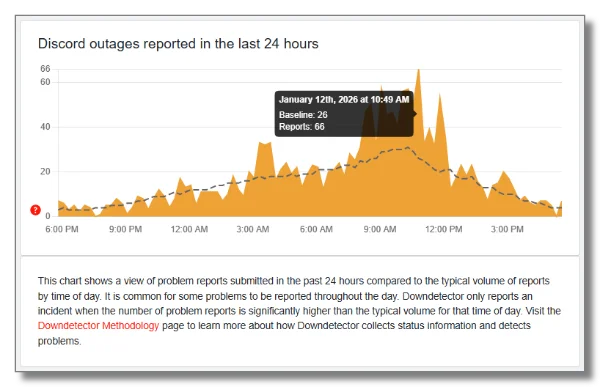
Is it just me facing Discord issues in Egypt? Chill down, and let's determine whether the disorder is local to your device or part of a broader regional problem.
Here’s how to check:
1. Use Downdetector Tools
Websites like Downdetector track live outages and show if others in Egypt are experiencing Discord issues.
2. Visit Discord Status Page
Discord has a live status page displaying server performance. If the servers are fully operational but you still can’t connect, the problem is likely local or network-related, potentially due to ISP restrictions. Then, using a free proxy VPN to bypass restrictions is one of the most effective ways to restore access.
3. Ask Around for More Information
Reach out to friends or local online communities like Reddit in Egypt to see if they’re experiencing similar problems.
Discord is not working in Egypt? Is discord not working only for me or what's going on

4. Try Different Devices or Networks
Switch between Wi-Fi and mobile data, or try logging in on another device to check if connectivity improves.
Doing these quick checks helps you figure out whether the issue is with your device, your network, or regional restrictions—so you know exactly what steps to take next.
Common Discord Issues You May Encounter in Egypt
In Egypt, you may come across these Discord problems:
-
App Not Opening or Freezing – Sometimes the app launches, but won’t load servers or chat messages.
-
Failed Connections – Discord may fail to connect to voice channels or direct messages.
-
Slow Loading Times – Even when Discord works, users may experience significant lag or delayed notifications.
-
Blocked Features – Certain media or voice functions may be restricted due to local network policies.
These issues often overlap, making it difficult to pinpoint the exact cause. Keep reading to get quick fixes.
Why Is Discord Not Working in Egypt (Mobile/Desktop)?
Discord may stop working in Egypt for a variety of reasons, and the cause isn’t always obvious at first. Below are the most common factors to consider:
1. Network Restrictions
In some cases, ISPs or national-level policies may throttle or block certain online platforms. Discord can be affected during periods of increased network monitoring, making voice calls, media sharing, or even basic chat features unstable or inaccessible. At this time, a VPN tool like UFO VPN can help change your IP address to a new one where Discord is fully available, such as the USA VPN free, the UK VPN free, France VPN free, etc.
2. Server-Side Problems
Although less frequent, Discord’s own servers can experience outages. When this happens, users worldwide may have trouble connecting, creating channels, or sending messages. Checking Discord’s official status page helps confirm if the issue is global rather than regional.
3. Device or App Issues
Local problems within your device or the Discord app can also cause disruptions. Outdated app versions, corrupted installation files, or overloaded cached data may prevent Discord from loading properly—especially after system updates.
4. Firewall or Antivirus Interference
On desktops, security tools like firewalls and antivirus software may block Discord’s connection if the app isn’t whitelisted. This can lead to login failures, voice connection errors, or the app being unable to fetch new messages.
5. Mobile Data Limitations
For mobile users, slow or unstable mobile data (especially 3G/4G in crowded areas) can cause voice channel timeouts or message delays. Some carriers also restrict certain types of VoIP traffic, affecting how Discord performs on cellular networks.
How to Fix Discord Issues in Egypt: 7 Practical Ways to Try
Here are some effective strategies to get Discord working again in Egypt:
Fix 1. Check Your Internet Connection
Ensure your connection is stable. Switch between Wi-Fi and mobile data, or restart your router. Sometimes, simple reconnections solve most loading and lag issues.
Fix 2. Use a VPN for Regional Restrictions (99% Fixing)
If Discord is blocked or throttled in your area, a VPN can help bypass these restrictions. Connecting through a secure VPN can restore access to all Discord features safely and privately. UFO VPN, for instance, offers 2000+ servers optimized for social platforms, advanced VPN encryption technologies, and a strict no-logs policy, keeping your Discord connection fast and safe.
Follow the steps below to set up UFO VPN for your devices:


UFO VPN is an all-in-one VPN that offers unlimited access to 4K streaming like Netlfix, Disney Plus, no-ping gaming as PUBG, Roblox, CODM and social networking for YouTube, X, Facebook and more.




Unlock Pro Features
If you have upgraded to premium plan , feel free to enjoy premium servers for 4K streaming and advanced features like Kill Switch, Split Tunneling, and gaming acceleration. Your Mac is now fully optimized and protected. Inaddition to basic functions, we recommend you turn on

Verify Your IP Now
Use UFO VPN's " What is My IP " feature to see your new IP and location. This confirms your connection is secure, anonymous, and ready for safe browsing online anywhere at any time.







Fix 3. Clear Cache and Update Discord
Old cache files or outdated app versions can cause crashes. Here's how to clear Discord cache:
✔ For Android:
-
Open Settings
-
Tap Apps or App Management
-
Find and select Discord
-
Tap Storage & Cache
-
Press Clear Cache (avoid “Clear Data” unless necessary)
-
Reopen the Discord app
This removes temporary files without deleting your account or chat data.
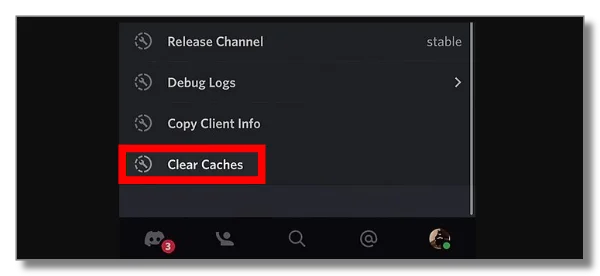
✔ For iPhone (iOS):
iOS doesn’t offer a direct “Clear Cache” option, so you can:
Method 1: Offload App
-
Go to Settings
-
Tap General
-
Tap iPhone Storage
-
Select Discord
-
Tap Offload App
-
Then tap Reinstall App
Method 2: Reinstall Discord
-
Long-press the Discord icon → Delete App
-
Reinstall from the App Store
✔ For Windows:
-
Close Discord completely (Right-click in the system tray → Quit Discord)
-
Press Win + R
-
Type:
-
Press Enter
-
Delete the folders: Cache, Code Cache, and GPUCache
-
Restart Discord
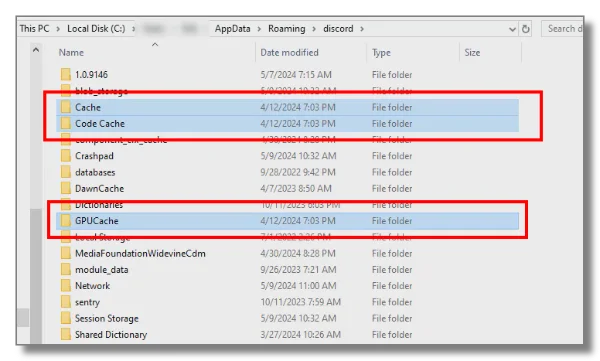
✔ For macOS:
-
Quit Discord completely
-
Open Finder
-
Click Go in the top menu → Go to Folder
-
Enter:
-
Delete Cache, GPUCache, and Code Cache
-
Relaunch Discord
Don’t Forget to Update Discord
After clearing cache, make sure you are using the latest version:
-
Mobile (Android/iOS): Check for updates in Google Play or App Store
-
Desktop: Discord usually auto-updates, but you can:
-
Click Update Now if prompted, or
-
Download the latest version from the official website
-
Fix 4. Adjust Firewall and Security Settings
Your firewall or antivirus might block Discord. Temporarily disable them or allow Discord through your firewall.
On Windows, navigate to Control Panel → System and Security → Windows Defender Firewall → Allow an app to ensure Discord is permitted.
Fix 5. Try Discord Web Version
Sometimes, the desktop or mobile app faces issues that the web version avoids. Visit discord.com using a browser to check if it works. If it does, the problem likely lies with the app itself.
Fix 6. Test Different DNS Settings
Changing your DNS to a reliable public server like Google DNS (8.8.8.8 / 8.8.4.4) or Cloudflare (1.1.1.1) can sometimes improve connectivity and reduce latency when Discord struggles to connect.

Fix 7. Contact Discord Support
If all else fails, Discord support can help troubleshoot account-specific issues. Be ready to provide details such as error messages, device type, and network settings for faster assistance.
Final Thoughts
Discord not working in Egypt can be annoying, but most issues have practical solutions. By checking your connection, clearing cache, adjusting security settings, trying the web version, or using a reliable VPN like UFO VPN, you can restore access and enjoy Discord without interruptions.
FAQs
Is it legal to access Discord Egypt with a VPN?
Yes. VPNs are widely used in Egypt for privacy, security, and accessing blocked communication tools like Discord. Just remember that legality depends on what you do online, not the VPN itself.
Why is Discord slow or lagging in Egypt?
This often happens due to network congestion, ISP restrictions, or outdated app versions. Try switching networks and VPN servers, updating the app, or restarting your device to see if it improves.
Is Discord blocked in Egypt permanently?
No. Discord isn’t permanently blocked, but certain ISPs or time periods may limit features like voice calls. A VPN can help maintain consistent access when this happens.
Will using a VPN slow my Discord connection?
With a reputable VPN, the speed impact is usually minimal. Choosing optimized or nearby servers often ensures smooth voice and video performance.