Iran IP Address: Significance
An IP address reflects your digital location. Websites, apps, and streaming services use your IP to decide what content you can or can’t access. You might want an Iran IP to:
-
Access Iran-only news sites or apps like Aparat, Filimo, or Namava
-
Log in to Iranian banking portals
-
Check geo-restricted business tools or e-commerce from inside Iran
-
Appear to be located in Iran for region-specific advertising, testing, or gaming
| Application | Iran IP Needed | Notes |
|---|---|---|
| Watching Iran-only content | ✅ Yes | Filimo, Namava, TV3.ir |
| Iranian online banking | ✅ Yes | Some logins are geo-restricted |
| Accessing Telegram/Instagram in Iran | ❌ No | Those platforms are blocked within Iran |
| Web testing or ad targeting | ✅ Yes | Useful for developers or marketers |
| Buying local Iranian goods | ✅ Yes | Prices may vary by IP |
But with government controls, geo-blocking, and strict surveillance, you need to be strategic and secure about how you get that IP.
Ways to Change Your IP Address to Iran (Free & Paid)
There are two primary methods to change your IP to an Iran-based one:
-
Using a free Iran VPN
-
Using an Iran Proxy Server
Let’s break them down.
Option 1: Use a VPN That Offers Iran IP Addresses
UFO VPN routes your internet traffic through a remote server in the country of your choice. It encrypts your data and gives you a new IP from that location—safely and privately. However, not all VPNs offer Iranian IPs due to political, legal, and infrastructure concerns. Some only offer “virtual Iran” locations—servers located elsewhere that simulate Iranian IPs.
🏆Top VPNs Offering Iran IP
| VPN Provider | Iran Server Type | Free Plan? | Key Benefits |
|---|---|---|---|
| UFO VPN | Virtual Iran | ✅ Yes | Fast, no logs, optimized for speed |
| HideMyAss (HMA) | Virtual Iran | ✅ Trial | Intuitive UI, multiple servers |
| StrongVPN | Virtual Iran | ❌ | High performance |
| TorGuard | Dedicated IP | ❌ | Great for developers & testing |
We recommend you use UFO VPN for free access to get free Iran IPs. It's fast, beginner-friendly, and doesn’t log your activity. Here's how:


UFO VPN is an all-in-one VPN that offers unlimited access to 4K streaming like Netlfix, Disney Plus, no-ping gaming as PUBG, Roblox, CODM and social networking for YouTube, X, Facebook and more.




Unlock Pro Features
If you have upgraded to premium plan , feel free to enjoy premium servers for 4K streaming and advanced features like Kill Switch, Split Tunneling, and gaming acceleration. Your Mac is now fully optimized and protected. Inaddition to basic functions, we recommend you turn on

Verify Your IP Now
Use UFO VPN's " What is My IP " feature to see your new IP and location. This confirms your connection is secure, anonymous, and ready for safe browsing online anywhere at any time.







Option 2: Use a Free Proxy Server Based in Iran
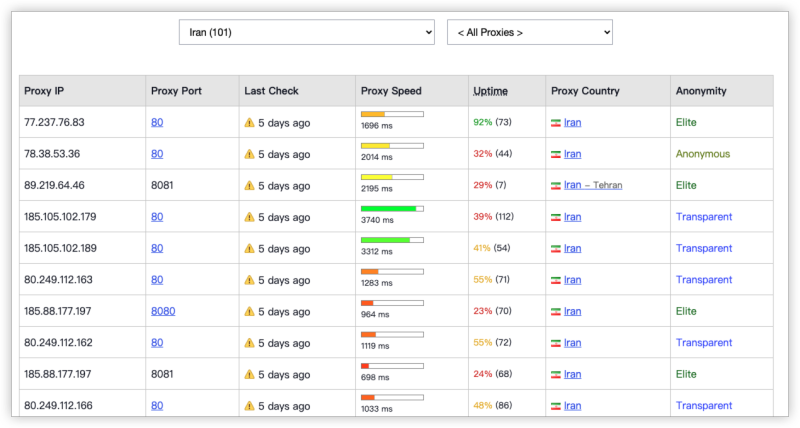
If you want a lightweight solution without installing software, a proxy server might do the trick. However, proxies do not encrypt your data, making them risky for login-based or sensitive activity.
| Proxy Tools | Iran Support | Encryption | Features |
|---|---|---|---|
| FreeProxyList.net | ✅ Sometimes | ❌ No | Ad-supported, rotating IPs |
| Iran SOCKS5 Tunnel | ✅ Manual | ✅ Yes | Requires setup knowledge |
| Hide.me Web Proxy | ❌ | ✅ Yes | No Iran IP currently |
Proxies are fine for quick browsing, but don’t use them for anything requiring login credentials, payments, or messaging.


Proxy vs. VPN: Which Is Better for Iran IP Access
| Features | Iran VPN | Iran Proxy Server |
|---|---|---|
| Encryption | ✅ Yes | ❌ No |
| Anonymity | ✅ Strong | ⚠️ Weak |
| Speeds | ✅ Stable | ⚠️ Inconsistent |
| Safe for Banking/Login | ✅ Yes | ❌ Never |
| Bypass Geo-blocks | ✅ Highly effective | ⚠️ Limited |
| Free Option Available | ✅ (UFO VPN) | ✅ |
| Recommended For Iran? | ✅ Strongly Recommended | ⚠️ Use with caution |
Bonus: Security Tips with an Iran IP
Even with the right tools, you still need to protect yourself online—especially when spoofing IP locations.
-
Use a VPN with no-logs policy and ad-blocker features like UFO VPN
-
Avoid proxy services that don’t support HTTPS
-
Check your IP location after connecting to confirm success
-
Never use Iran-based IPs to conduct illegal activities
-
Use private/incognito browsing mode during sessions
-
Always scan files you download via Iranian sites
Conclusion
Getting an Iran IP address is more accessible than ever—and you don’t need to risk your privacy to do it. Whether you're managing a business, watching Persian shows, or running ad tests, the right tools make it simple.
FAQs
Is it legal to use an Iran IP address?
Yes, in most countries it’s legal to use an Iran IP, especially for development, research, or testing. However, accessing copyrighted or restricted content may break local laws or terms of service.
Can I get a real (physical) Iran IP?
Very few services offer physical Iran IPs due to censorship and infrastructure issues. Most VPNs like UFO VPN use virtual Iran locations, which work fine for most tasks.
Are free Iran proxies safe?
Generally not. Free proxies often log your activity, inject ads, or even leak your data. Always use HTTPS proxies or better yet—VPNs with Iran support.
Does UFO VPN offer a free Iran IP?
Yes. UFO VPN’s free plan includes access to virtual Middle Eastern servers including Iran. Upgrade for higher speeds or additional features.