What Is a Telegram Proxy?
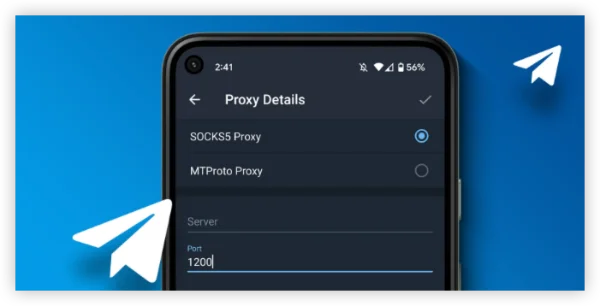
A Telegram proxy is a server that acts as an intermediary between your device and Telegram’s servers, allowing you to bypass regional restrictions in countries like Pakistan. Telegram supports MTProto proxies, a lightweight and secure protocol designed for fast messaging even under censorship.
Benefits of using a proxy for Telegram:
-
Unblock Telegram in Pakistan (or any restricted region)
-
Maintain chat privacy and security
-
No need for third-party apps — you can configure it inside Telegram
Proxy vs. VPN for Telegram: Which One Is Better:
-
✅ Use trusted proxies or reputable VPNs to avoid data theft
-
✅ Avoid random free proxies shared in public forums (risk of spying)
-
✅ Switch to VPN if proxy stops working during high censorship periods
| Feature | Telegram Proxy | VPN |
|---|---|---|
| Setup | Manual (inside Telegram) | Simple app install |
| Scope | Telegram only | Encrypts all apps & browsers |
| Speed | Lightweight, usually faster | Can be slower if server is far |
| Security | Limited to Telegram | Full device encryption |
| Bypass ISP Blocks | Yes | Yes, with stronger privacy |
If you just need Telegram in Pakistan, a proxy is quick and free. If you also want more add-ons like ad-blocker, split tunneling and more to browse securely, a free proxy VPN like UFO VPN is a better choice.
10 Best Telegram Proxy Services for Pakistan
1. Webshare
Why it’s good: Offers a massive pool of over 30M+ IPs across 195+ countries, supporting SOCKS5 and MTProto protocols for fast, secure Telegram access.
Features: High-speed residential proxies, GDPR/CCPA compliance, 99.97% uptime, automatic IP rotation.
Best for: Anonymous scraping and bypassing Telegram geo-blocks.
2. Decodo (formerly Smartproxy)
Why it’s good: Provides dedicated Telegram proxies with a pool of over 65M+ IPs across 195+ locations, ensuring reliable access in Pakistan.
Features: Residential, ISP, datacenter, and mobile proxies; GDPR/CCPA compliance; Telegram automation support.
Best for: Users who need secure, dedicated proxies for communication and bot management.
3. Bright Data
Why it’s good: Premium proxy service with 72M+ IPs worldwide, offering robust performance for Telegram in restricted regions.
Features: Residential, datacenter, mobile, and ISP proxies; advanced proxy management tools.
Best for: Businesses and power users who need scalability and top-tier stability.
4. Proxy-Seller
Why it’s good: Affordable and reliable SOCKS5 proxies tailored for Telegram, ensuring secure and uninterrupted access.
Features: High-speed servers, 24/7 customer support, end-to-end encryption support.
Best for: Budget-conscious users looking for reliable Telegram connectivity.
5. Proxy-IPv4
Why it’s good: Specializes in stable Telegram proxies focused on bypassing geo-restrictions in Pakistan.
Features: IPv4 proxies, high anonymity, MTProto protocol compatibility.
Best for: Users who require consistent access with minimal downtime.
6. HydraProxy
Why it’s good: Offers 5M+ residential and mobile IPs, perfect for bypassing Telegram blocks with minimal latency.
Features: Global coverage, high-speed connections, Telegram automation support.
Best for: Users seeking residential proxies with good privacy protection.
7. YiLu Proxy
Why it’s good: Provides SOCKS5 proxies with 90M+ residential and 50M+ mobile IPs from 200+ countries.
Features: Local port forwarding, easy setup on Windows and Android, bypasses network restrictions.
Best for: Tech-savvy users who want flexibility and granular control.
8. ProxyNova
Why it’s good: Offers a regularly updated list of free proxies, including options suitable for Pakistan.
Features: Free proxies, global coverage, quick availability.
Best for: Casual users looking for no-cost Telegram access (may require frequent updates).
9. HideMyAss (HMA)
Why it’s good: Provides free and premium proxy lists with filtering options for reliable Telegram access.
Features: Easy-to-use interface, broad proxy selection, bypasses basic restrictions.
Best for: Beginners exploring free or low-cost solutions.
10. CroxyProxy
Why it’s good: Web-based proxy that works instantly, no installation required, perfect for quick Telegram access.
Features: IPv4/IPv6 support, simple UI, supports basic data extraction tasks.
Best for: Users who want a hassle-free, browser-based solution.
How to Set Up a Telegram Proxy in Pakistan
Follow these simple steps to connect:
Step 1. Get a working MTProto proxy address
Look for reliable Telegram proxy providers or communities that share free/paid proxy links.
Step 2. Open Telegram Settings
Go to Settings → Data & Storage → Proxy Settings.
Step 3. Add the Proxy Manually
-
Enter the server address, port, and secret key provided by the proxy source.
-
Enable the proxy and test the connection.
Pro Tip: For better stability, use a provider that refreshes proxy servers frequently to avoid downtime.
Is using a Telegram proxy legal in Pakistan?
Yes — using a Telegram proxy in Pakistan is generally legal. There are no specific laws that criminalize using proxies or MTProto connections to access Telegram. However, you are still subject to local internet regulations, meaning that:
-
You should avoid using Telegram for illegal activities (e.g., spreading hate speech, disinformation, or banned content).
-
ISPs or the PTA (Pakistan Telecommunication Authority) may still throttle or block proxy servers during major shutdowns.
For maximum privacy and security, consider using a Pakistan VPN instead of a free proxy, as VPNs encrypt all your traffic and hide your IP address more effectively.
Bonus: What If Telegram Proxy for Pakistan Not Working?
If your Telegram proxy suddenly stops working, don’t panic — it’s a common issue when ISPs block proxy servers. Here’s what you can do:
1. Switch to a VPN
This is the ultimate way to access Telegram again while hiding your real location. If proxies are frequently blocked, a VPN with servers outside Pakistan (e.g., Singapore, UAE, Europe) will give you more stable and encrypted access.


UFO VPN is an all-in-one VPN that offers unlimited access to 4K streaming like Netlfix, Disney Plus, no-ping gaming as PUBG, Roblox, CODM and social networking for YouTube, X, Facebook and more.




Unlock Pro Features
If you have upgraded to premium plan , feel free to enjoy premium servers for 4K streaming and advanced features like Kill Switch, Split Tunneling, and gaming acceleration. Your Mac is now fully optimized and protected. Inaddition to basic functions, we recommend you turn on

Verify Your IP Now
Use UFO VPN's " What is My IP " feature to see your new IP and location. This confirms your connection is secure, anonymous, and ready for safe browsing online anywhere at any time.







2. Refresh Your Proxy Settings
Go to Telegram’s Settings → Data & Storage → Proxy Settings and disable/re-enable the proxy.
3. Try a Different Proxy
Proxy servers can be blocked quickly. Get a new MTProto proxy link from a trusted source or proxy provider.
4. Clear Telegram Cache
On mobile, go to Settings → Data & Storage → Storage Usage and clear cache to reset the connection.
Conclusion
If you’re in Pakistan and cannot access Telegram, setting up a Telegram proxy is the fastest solution. For users who want more privacy and access to other blocked platforms, a VPN is the most secure option.
FAQs
Can I use free proxies safely?
Free proxies can work, but they may log your activity. Prefer providers with a privacy policy or use a secure VPN.
Why does my proxy disconnect often?
ISPs may block proxy IPs over time. Refresh your proxy list or switch to a VPN for more reliable access.
Does a proxy hide my identity?
Some administrators enforce lock screen security, so you may not be able to disable it.