Is Blocking Someone on OnlyFans Permanent?
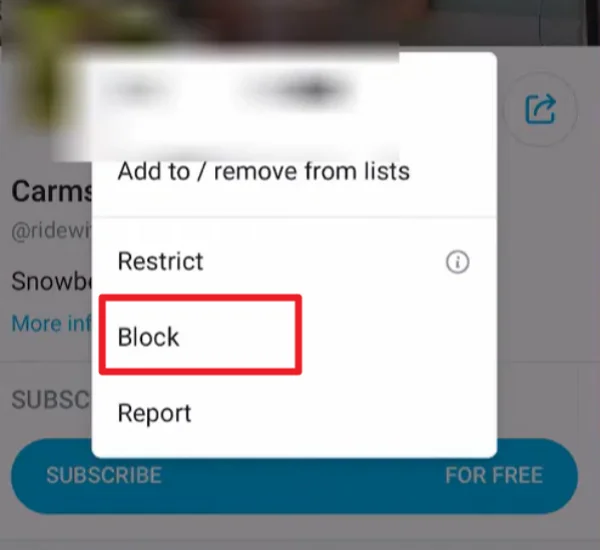
Blocking someone on OnlyFans is not permanent. You can reverse the action at any time from your account settings. Once a user is blocked, they cannot view your profile, send messages, or interact with your content. However, this restriction stays in place only until you decide to remove it.
The platform does not delete the blocked user from your system. Instead, it stores them in a blocked list. This means you can go back, find the user, and unblock them whenever you want. You do not need to send a request or wait for approval.
Steps to Unblock Someone on OnlyFans Safely
Before you start, make sure your account is working normally, and your internet connection is stable. If the platform is not loading or certain pages are blocked in your region, you may not be able to access your settings page.
In some countries, OnlyFans may be restricted or slow to load. In this case, connecting to a specialized OnlyFans VPN free can help you open the site and keep your connection stable while making changes to your account.
Step 1: Make Sure You Have the Right Access
You need full access to your OnlyFans account before doing anything. Log in with your correct email and password. If you cannot open the website, check your internet connection first. If the issue continues, try switching networks or using a reliable tool like UFO VPN to reach the platform.
With proper access, you will be able to open your settings or see your blocked list.


UFO VPN is an all-in-one VPN that offers unlimited access to 4K streaming like Netlfix, Disney Plus, no-ping gaming as PUBG, Roblox, CODM and social networking for YouTube, X, Facebook and more.




Unlock Pro Features
If you have upgraded to premium plan , feel free to enjoy premium servers for 4K streaming and advanced features like Kill Switch, Split Tunneling, and gaming acceleration. Your Mac is now fully optimized and protected. Inaddition to basic functions, we recommend you turn on

Verify Your IP Now
Use UFO VPN's " What is My IP " feature to see your new IP and location. This confirms your connection is secure, anonymous, and ready for safe browsing online anywhere at any time.







Step 2: Log in to OnlyFans
Open your browser and go to the official website. Log in with your account and password. Confirm that the page shows a secure HTTPS connection. Avoid using public Wi-Fi to protect your privacy and account security.
Step 3: Go to the Subscriptions page
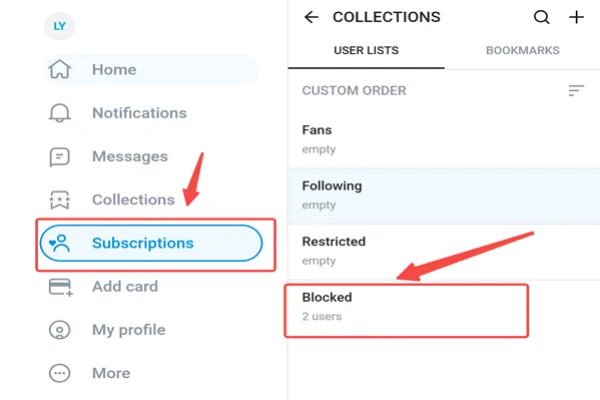
After logging in, find and click the Subscriptions (or Collections) tab in the top menu or sidebar on the homepage. This is the key section for managing fans, subscriptions, and user lists—you will see all the relevant categories here.
Step 4: Enter the Blocked list
Once on the Subscriptions page, scroll through the user list section. You will see options like Fans, Following, Restricted, and Blocked. Click Blocked to view the full list of users you have previously blocked.
Step 5: Select and unblock the target user
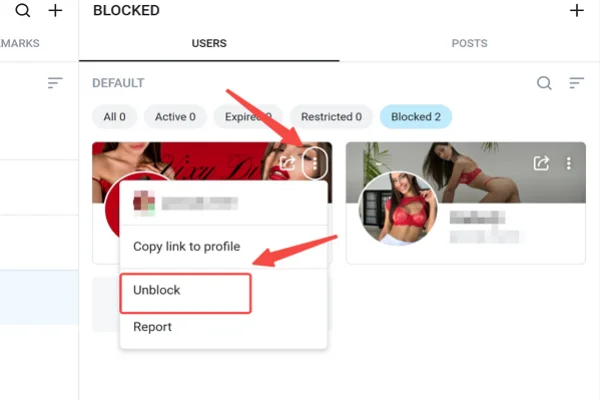
In the Blocked list, find the user you want to unblock, then click their username to go to their profile page (or perform the action directly in the list). Click the three-dot icon (⋯) in the top right corner, select Unblock User, and confirm the action to complete it.
Step 6: Confirm the unblock and note what happens next
After successful unblocking, the user will not receive any notification. However, they will be able to view your content again, send messages, or manually resubscribe (subscriptions do not restore automatically).
Old chat history is usually kept, but it is recommended to check your privacy settings to make sure everything is normal.
🎯 Safety reminder: Only perform these steps on the official OnlyFans website. Never click any “unblock tools” or suspicious links (they are often scams). Solve any previous issues (e.g., harassment) before unblocking and always follow OnlyFans terms of service.
What Happens After Unblocking Someone on OnlyFans?
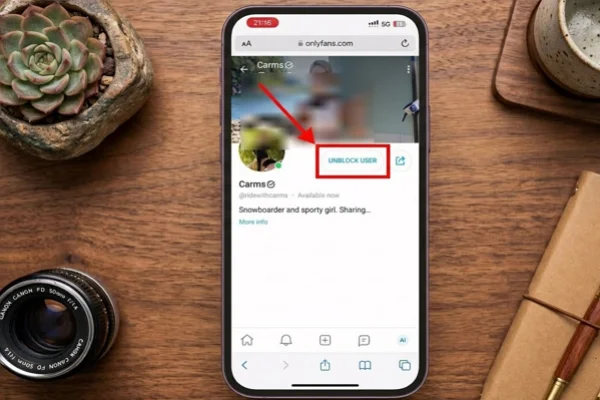
When you unblock someone, the digital "wall" disappears instantly. However, it doesn’t necessarily mean everything goes back to exactly how it was before the block happened. There are specific changes to your interaction that you should be aware of so you aren't surprised by what you see (or don't see).
✅ Restored Visibility
The most immediate change is that you can now see each other’s profiles again. If you unblock a creator, you can search for their name, and their page will appear in the search results.
They will also be able to find your profile if they search for you. You are no longer "invisible" to one another. You can see their bio, their profile picture, and their header image.
✅ Subscription Status
This is the part that confuses most people. If you were subscribed to a creator and then blocked them, your subscription was likely cancelled or paused. Unblocking them does not automatically restart a paid subscription. If their content is behind a paywall, you will usually have to click the "Subscribe" button again.
If they have a free page, you will need to "Follow" them again to get their posts back in your main feed. Your previous payment history remains in your "Statements" section, but the active link is broken until you manually renew it.
✅ Messaging and DMs
Unblocking restores the ability to send Direct Messages (DMs). If you had a conversation history with this person before the block, those messages usually reappear in your inbox. You can send them a new message immediately.
However, keep in mind that any messages they tried to send you while they were blocked were never delivered and will not appear now. The "blackout period" remains a blank space in your chat history.
✅ Feed Updates
Once you have re-followed or re-subscribed to the person, their new posts will start showing up in your home feed alongside everyone else you follow. You can once again like their photos, comment on their videos, and tip them. It’s as if the account has been "reborn" into your digital life.
How Do I Know If I Get Blocked on OnlyFans by Others?
Sometimes it is not clear right away if someone has blocked you on OnlyFans. The platform does not send a notification or warning. However, there are several clear signs you can check to confirm what happened.
💡 You can't open their profile: One of the most direct signs is that their profile page no longer loads. When you search for their username or click on their link, the page may show an error or appear empty. If the account still exists but you cannot access it, you may have been blocked.
💡 Your messages are not delivered: If you had a chat history with the person, try sending a message. If the message fails to send or shows no delivery status, this is another strong sign. In normal situations, messages should go through without issues.
💡 You lose access to their content: If you were previously subscribed, you may suddenly lose access to their posts. Even if your subscription has not expired, blocked users cannot view any content. This includes photos, videos, and paid posts.
💡 Their profile disappears from your following list: Check your following or subscription list. If the account is no longer there, and you did not unsubscribe yourself, it may indicate that you were blocked.
💡 You cannot interact with their account: Likes, comments, and tips will no longer work. If you try to interact and nothing happens, or the options are missing, this is another sign of a block.
These signs can also happen if the user deletes their account or restricts access in other ways. To confirm, you can try searching for the profile from another account. If it appears there but not on your account, it is likely that you have been blocked.
Conclusion
Unblocking on OnlyFans is a direct action that you control from your account settings. As long as your account is accessible and your connection is stable, you can manage your blocked list without delay. This gives you full control over who can interact with your profile and content at any time.
FAQs
Can I unblock multiple users at the same time on OnlyFans?
No, OnlyFans requires you to unblock users one by one. You need to select each account manually from your blocked list.
Will my subscription settings change after unblocking someone?
No, your subscription rules stay the same. The user must still pay if your content is behind a paywall.
Can I block the same person again after unblocking them?
Yes, you can block and unblock the same user as many times as you want from your settings.
Does unblocking restore deleted messages?
No, if messages were deleted before, they cannot be recovered after unblocking.
Can I see how long someone has been blocked?
No, OnlyFans does not show the duration of a block. It only displays the list of blocked users.